





 Audio Capture


Bandcamp remains one of the most creator-friendly platforms for discovering independent music, but its listening experience is still mostly tied to streaming or purchased downloads. That's why many users search for a Bandcamp downloader, not necessarily to bypass ownership rules, but to make offline listening, format conversion, and music library management more flexible.
This guide breaks down the best Bandcamp music downloaders in 2026, how they work, and how to choose the right option depending on your needs. Instead of simply listing tools, we'll group them by real-world usage so you can quickly find what actually fits your situation.
Part 1. Online Free Bandcamp Downloaders for Casual Listening
Bandcamp online downloaders are browser-based tools where you paste a Bandcamp link and download the converted file directly. They require no installation, work across almost any operating system, offer quick Bandcamp MP3 conversion, and feature simple interfaces. If you are just looking to grab a quick track for offline background listening and don't mind the 128kbps limitation, you can use the following web-based tools.
Note:
Online Bandcamp music downloaders's reliability varies widely. Many rely on scraping or temporary parsing systems, which can break when Bandcamp updates its site structure. They often struggle with consistent album detection, can be ad-heavy, and lack robust FLAC support. They are best for quick, occasional downloads.
#1. SSBandcampDownloader
- Site Link: https://ssbandcampdownloader.com/ or https://bandchampalbumdownloadermp3.com/
- Output Format: MP3, FLAC, WAV, OGG
- Support Bandcamp Link: Tracks, Albums, Playlists
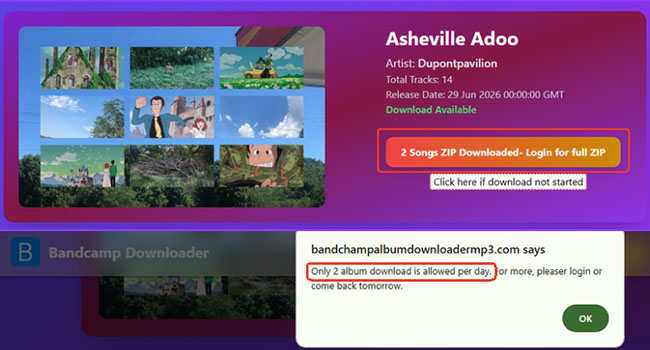
- Download Limit: 2 songs per day
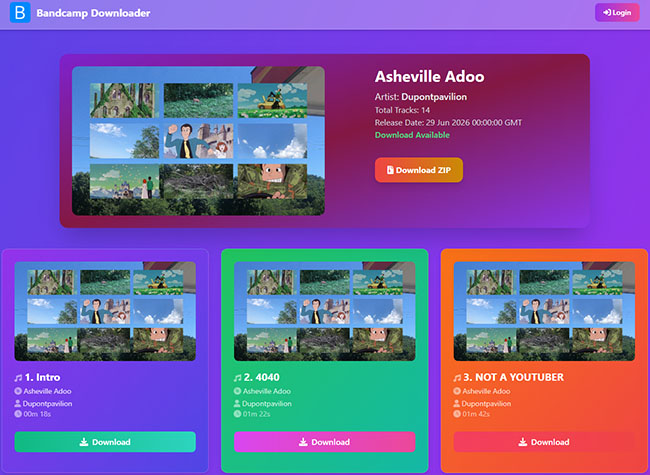
SSBandcampDownloader is designed for simple Bandcamp link downloader. Users paste a Bandcamp single track or album URL and receive downloadable audio files. It supports multiple output formats, including MP3 (up to 320 kbps), WAV, FLAC, and OGG, providing a ZIP file for entire albums or playlists. It is perfect for quick single-track downloads and no-install workflows, though reliability fluctuates with Bandcamp site updates.
Editor's Real User Experience:
When you click "Downloader", the site redirects to BandcampAlbumDownloaderMP3 website and offers the relevant download. The process is free of ad interruptions, but the download is limited to the two songs per day. Simply creating an account doesn't help; you need to upgrade to the paid version to remove these limits.
#2. BandcampToMP3
- Site Link: https://bandcamptomp3.com/
- Output Format: MP3
- Support Bandcamp Link: Tracks, Albums, Playlists
- Download Limit: Unlimited download numbers, but need to click the download one by one
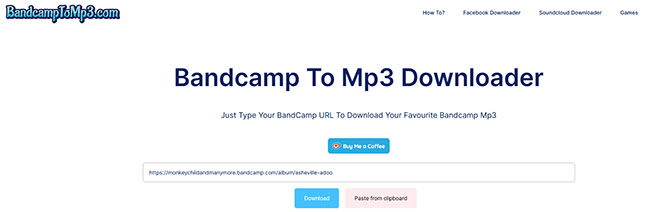
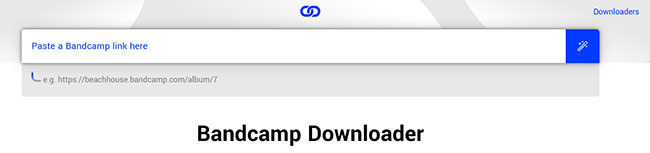
BandcampToMP3 is a streamlined, browser-based Bandcamp song downloader focused exclusively on audio extraction. Visitors just need to copy the target media URL from Bandcamp's platform and insert it into the search box to generate a downloadable file. It operates completely in the cloud, meaning there is no software to install or account to register. This makes it a highly convenient option for casual listeners who occasionally need to save Bandcamp music for offline playback without dealing with complex configurations or format menus.
Editor's Real User Experience:
The website features a minimalist interface and a very simple workflow: copy and download. There are no ads during use. However, although it supports recognizing albums or playlists, you must click on individual options to download the songs. Additionally, the extracted files are limited to Bandcamp's default 128 kbps preview bitrate, and there is no indication near the download options showing which song is currently being downloaded.
#3. Locoloader Bandcamp Downloader
- Site Link: https://www.locoloader.com/bandcamp-downloader/
- Output Format: MP3
- Support Bandcamp Link: Tracks, Albums, Playlists
- Download Limit: Unlimited downloads, but requires manual, one-by-one clicking.
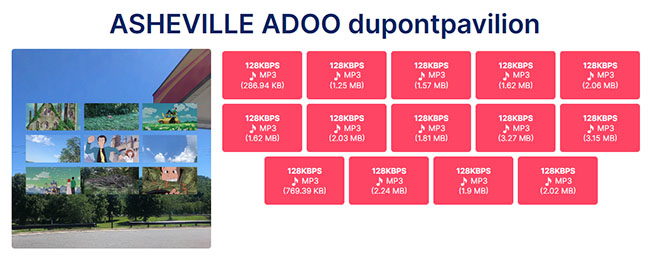
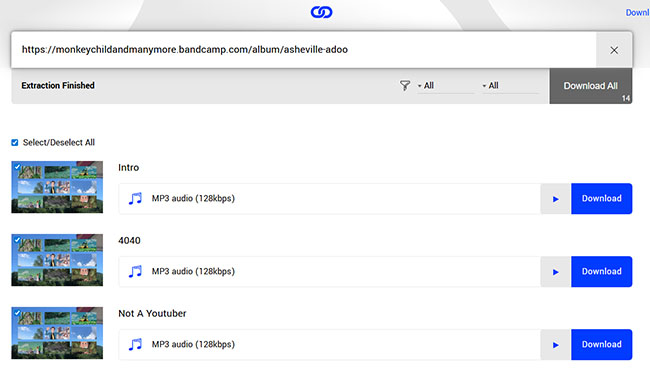
Locoloader is a versatile web downloader that extracts media from a wide variety of platforms, featuring a dedicated module specifically for Bandcamp. By pasting a song, full album, or playlist URL into the main search field, the system quickly parses the web page and generates direct MP3 audio links. This Bandcamp free downloader offers a much cleaner, ad-free interface and works smoothly across both mobile and desktop browsers.
Editor's Real User Experience:
This site offers unlimited downloads without requiring an account or a premium subscription upgrade. However, a major drawback for users looking to save entire albums or playlists is the lack of a batch processing or ZIP archive feature. An improvement over BandcampToMP3 is that each song comes with its corresponding title.
Bandcamp Online Downloaders Flooded With Ads — Avoid at All Costs
While web-based tools offer a quick fix, some platforms cross the line into aggressive monetization. The following two downloaders are heavily cluttered with intrusive advertisements, resulting in a highly frustrating and unfriendly user experience. Furthermore, both downloaders are strictly limited to the MP3 format and only support saving songs one by one.
-
BandcampDownloader.app: The platform is severely bogged down by pop-ups and redirection links, which ruin the layout and slow down navigation.
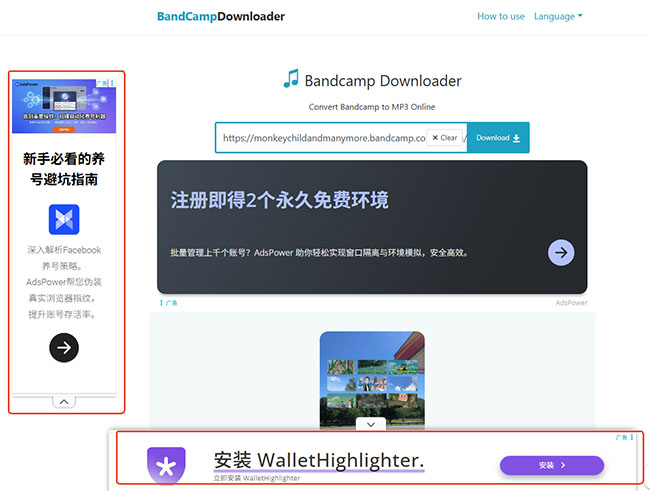
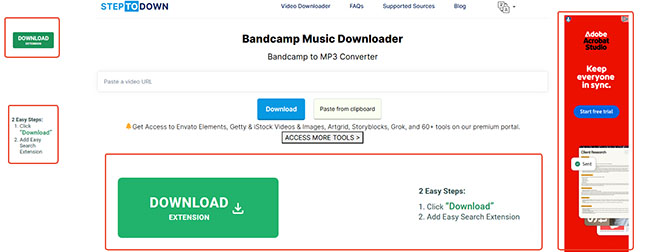
- StepToDown Bandcamp Music Downloader: StepToDown's download interface is an exact, identical carbon copy of BandcampToMP3. But it has excessive ad placements.
Tips:
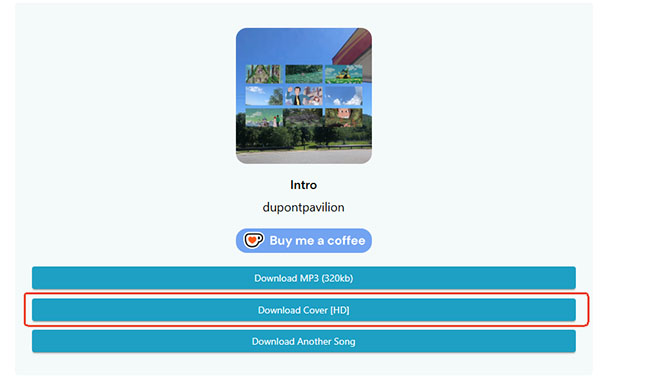
BandcampDownloader can extract and download the official Bandcamp album cover art. If you specifically need the high-quality artwork file and cannot find it elsewhere, this site can be utilized. Just make sure you have a robust ad blocker enabled before you click anything.
Part 2. Desktop Bandcamp Downloader and Capture for Mac and Windows
For users who need to process massive batches of links, maintain meticulous metadata, or simply prefer to avoid browser-based tools altogether, dedicated software is the way to go.
#4. DRmare Audio Capture
- Site Link: https://www.drmare.com/
- Output Format: MP3, FLAC, WAV, M4A, M4B, AIFF
- Support Bandcamp Link: Tracks, Albums, Playlists
- Download Limit: Download the first minute of each song
Unlike browser-based link downloader, DRmare Audio Capture is a desktop-based solution that scrapes the raw data and recodes them. It captures streaming music and converts it to MP3, FLAC, WAV, M4A, AIFF, and M4B while keeping lossless audio quality.
It supports a wide range of platforms beyond Bandcamp, including Spotify, Apple Music, Amazon Music, and more. Because it captures audio directly, it works securely even when web structure changes break other downloaders, and it is highly effective for editing ID3 tags and organizing extensive libraries. Additionally, it supports opening multiple windows and downloading multiple Bandcamp files simultaneously.
Editor's Real User Experience:
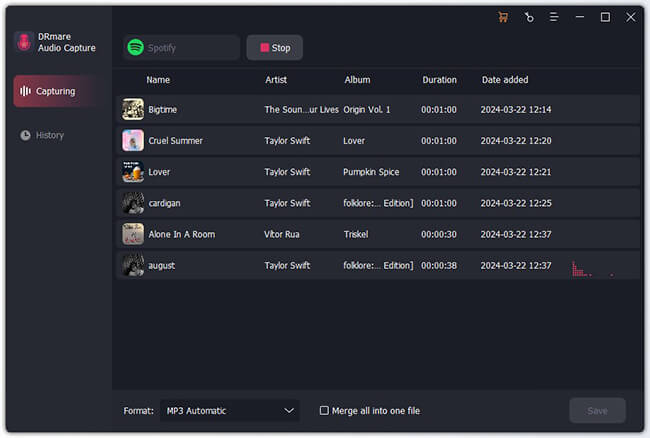
When I put the software through its paces, the first thing I ran into was a hard cutoff: the free trial version stopped recording exactly at the 1-minute mark for every track. If you want full-length songs, you'll have to opt for the paid upgrade.
On the functional side, I tested the multi-window feature by spinning up multiple Bandcamp streams at the same time. The software successfully isolated the audio from each tab, split the individual tracks, and stamped the ID3 tags automatically.
Part 3. Open-Source Free Bandcamp Downloaders on GitHub
For technical users, open-source Bandcamp downloaders on GitHub provide the most flexibility. These rely on frameworks and scripts to automate large-scale downloads, extract audio from multiple sources, and preserve metadata with high accuracy.
#5. easlice/bandcamp-downloader (GitHub)
- Site Link: https://github.com/easlice/bandcamp-downloader
- Output Format: MP3 (320kbps & V0), FLAC, WAV, ALAC, AIFF, AAC, Vorbis
- Support Bandcamp Link: Full Personal Collection / Account Backups
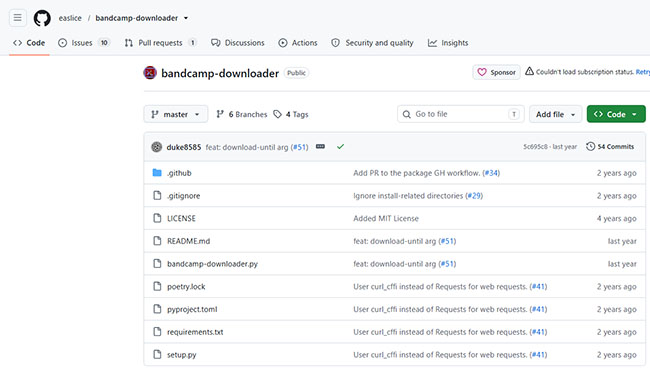
The easlice/bandcamp-downloader repository is an open-source, Python-driven command-line script engineered specifically for archiving entire personal Bandcamp music libraries. Rather than parsing single random links from around the web, this automated utility interfaces directly with your actual Bandcamp account.
It hooks into your active web browser session (supporting Firefox, Chrome, Brave, Edge, and others) to pull session cookies for seamless background authentication. Once set up, it automatically organizes your tracks locally into clean directory structures broken down neatly by artist and album name.
Editor's Real User Experience:
When I tested this script on a collection of over 50 albums, it completely bypassed the tedious process of manual extraction. I logged into Bandcamp on Firefox, fired up my terminal, ran the Python command with my username, and watched it download everything in parallel using 5 simultaneous threads.
The massive catch for non-technical users, however, is the lack of a graphical interface. If you aren't familiar with installing dependencies via pip, managing Python runtime environments, or troubleshooting browser cookie decryption errors in the command prompt, the initial setup can feel like a steep roadblock.
#6. otiel/bandcampdownloader (GitHub):
- Site Link: https://github.com/otiel/bandcampdownloader
- Output Format: MP3 (128 kbps)
- Support Bandcamp Link: Tracks, Albums, Artist Pages
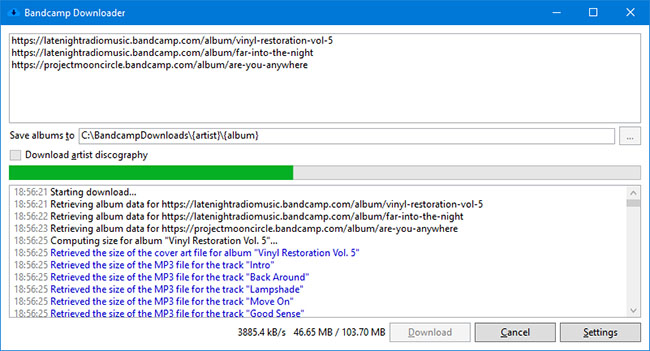
Unlike complex command-line scripts that require technical environments, otiel/bandcampdownloader is a standalone Windows desktop application featuring a basic Graphical User Interface (GUI). The program operates by extracting the pre-streamed 128 kbps MP3 files that Bandcamp provides for public browser listening.
It allows users to queue up individual tracks, complete albums, or a creator's entire public discography. Once retrieved, the utility automatically packages the files with comprehensive ID3 metadata tags (including track numbers, release years, embedded lyrics, and cover art) and can generate structured .m3u or .pls playlist files automatically.
Editor's Real User Experience:
Running this app on Windows was highly accessible because it uses a clean, visual window where you just copy-paste links, avoiding the terminal entirely. I fed it an artist's main page URL, and it mapped out the complete release list with proper file-naming structures instantly.
However, my testing highlighted a few technical limits you need to keep in mind. Because this tool pulls directly from the web browser's preview player, the output quality is strictly capped at a compressed 128 kbps bitrate.
Additionally, when I attempted a large batch download, the application initially threw an "HTTPS Error 429" (Too Many Requests) and halted. To fix this, I had to open the settings panel and drop the maximum concurrent album and track downloads down to 1 to stop triggering Bandcamp's automated anti-scraping blocks.
Part 5. Best Bandcamp Downloader Browser Extensions for Chrome/Firefox
Browser extensions sit right in your browser and trigger when you visit a Bandcamp page. They allow one-click downloading and can automatically detect album tracks directly from the page layout. While highly convenient, they depend heavily on browser updates, store policies, and are occasionally less stable than standalone desktop software.
#7. Batchcamp (Firefox):
A top-tier utility for users with massive purchased libraries (such as music bought on Bandcamp Fridays). Available directly from the Firefox Add-ons store, Batchcamp allows you to bulk-download your entire collection in any format Bandcamp offers (lossless or compressed). It tracks what you have already downloaded, saves cover art, names files via custom templates, and runs multiple downloads concurrently in a dedicated tab.
#8. Keeptune (jaymoulin/keeptune on GitHub):
An open-source Chrome extension designed to download streaming albums directly from Bandcamp and SoundCloud. When you visit an album page, Keeptune sends a pop-up notification allowing you to download the listenable tracks neatly packaged in a ZIP file.
Note:
Because it was removed from the official Chrome Web Store for policy compliance, it must be installed manually via GitHub, making it better suited for users comfortable with sideloading extensions.
Part 6. Feature Comparison of Bandcamp Music Downloaders
To help you cut through the noise and choose the exact tool for your workflow, the table below provides a side-by-side comparison of all the Bandcamp song downloaders analyzed in this guide.
| Downloader Name | Tool Type | Supported Formats | Target Link Types | Download Limits & Editor's Catch |
|---|---|---|---|---|
| SSBandcampDownloader | Online Web Tool | MP3 (up to 320kbps), FLAC, WAV, OGG | Tracks, Albums, Playlists | Strictly capped at 2 songs per day on the free tier; redirects to an external site layout to process files. |
| BandcampToMP3 | Online Web Tool | MP3 (128 kbps only) | Tracks, Albums, Playlists | Unlimited files, but lacks ZIP packaging (must download tracks one-by-one); doesn't show track titles in the download menu. |
| Locoloader Bandcamp Downloader | Online Web Tool | MP3 | Tracks, Albums, Playlists | Completely free and unlimited, but requires manual, one-by-one clicking for albums; clearly displays corresponding song titles. |
| DRmare Audio Capture | Desktop Software (Win/Mac) | MP3, FLAC, WAV, M4A, M4B, AIFF | Tracks, Albums, Playlists | Free version caps recordings at the first 1 minute per song. Paid upgrade offers lossless quality and multi-window simultaneous recording. |
| easlice/bandcamp-downloader | Open-Source CLI Script | MP3 (320kbps/V0), FLAC, WAV, ALAC, AIFF, AAC, Vorbis | Full Personal Purchases / Collections | Entirely free and parallel-threaded, but has no graphical user interface (GUI); requires comfort with Python and command lines. |
| otiel/bandcampdownloader | Open-Source Desktop App | MP3 (128 kbps only) | Tracks, Albums, Artist Pages | Beginner-friendly Windows GUI, but audio quality is capped at 128 kbps streaming player previews; fast downloads trigger HTTP 429 blocks. |
| Batchcamp | Browser Extension (Firefox) | All native Bandcamp formats (Lossless & Compressed) | Personal Collection / Purchase Pages | Seamless one-click browser automation, but designed only for officially purchased accounts; performance relies on browser stability. |
| Keeptune | Browser Extension (Chrome Sideload) | ZIP Archive (Streaming audio tracks) | Public Streaming Albums | Automatically packages browser-streamed songs into clean folders, but must be manually sideloaded via GitHub due to Web Store removal. |
Part 7. FAQ About Bandcamp Album Downloaders
Can I download Bandcamp music for free?
Some tracks are listed as free or name your price, but the vast majority of music requires a purchase before downloading through official channels.
What is the best format for Bandcamp downloads?
MP3 is the most universally compatible format for mobile devices and basic media players, while FLAC is preferred by audiophiles for its lossless audio quality.
Do Bandcamp downloaders work for full albums?
Yes. SSBandcampDownloader, Chrome extensions, desktop tools, and open-source scripts excel at full-album and batch downloading.
Is it legal to use Bandcamp downloaders?
Legality depends on your usage and content ownership. Using tools to download content you have legally purchased is completely fine. Unauthorized redistribution is not.
Part 8. In Conclusion
Bandcamp downloaders serve different needs rather than offering a single universal solution. The right choice depends on how you listen, store, and manage your music. Online tools are the quickest option for occasional downloads, especially when you just need a single track or small album. They require no setup but are less stable and not ideal for building a long-term library.
Desktop tools like DRmare Audio Capture offer a more reliable and structured experience. They work better for users who want consistent quality, format flexibility, and multi-track handling, even if they require installation or upgrades.
Open-source tools provide the most control and automation, making them suitable for advanced users who manage large collections or prefer custom workflows. Browser extensions sit in the middle, offering convenience directly inside Bandcamp pages but with some stability trade-offs.
In practice, most users benefit from combining tools based on their needs, quick web downloads for convenience, desktop software for stability, and open-source solutions for scale.

 Home
Home





User Comments
Leave a Comment