





You've likely heard about the magic of Deezer bots on Telegram—a seemingly endless library of high-quality FLAC music, available for free at your fingertips. For any music aficionado, the promise is almost too good to be true. But what's the real story behind these convenient tools? Are they the perfect hack for building your offline collection, or do they hide risks that could compromise your security and peace of mind?
This article is an investigation into the world of Deezer Telegram bots. We'll uncover how they work, expose the common issues users face, and explore whether they are truly safe to use. More importantly, we'll introduce a more reliable and secure method for getting the high-quality Deezer music you love.
Part 1. How to Download Deezer Music with a Telegram Bot
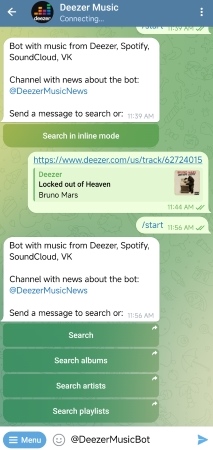
Telegram bot act as automated scripts that communicate with music streaming servers to grab files. If you happen to find an active, working bot, the downloading process is relatively straightforward across both desktop and mobile versions of Telegram. However, keep in mind that the steps can vary slightly depending on the bot's current server stability. Here we'll take @DeezerMusicBot as an example.
Step 1. Initialize the Bot Connection. Open your Telegram application, type @DeezerMusicBot into the global search bar, and select the official bot from the results. Tap the "/Start" button at the bottom of the screen to wake up the bot and initialize its command script.
Step 2. Fetch the Target Deezer URL. Minimize Telegram and open your official Deezer app or web player. Navigate to the specific song, album, or playlist you want to grab. Click the "Share" icon and copy the music link directly to your device's clipboard.
Step 3. Submit and Process the Stream. Return to the Telegram chat window, paste the copied Deezer link into the text box, and hit send. The bot's server will attempt to parse the URL. If the server is functional, the bot will return a downloadable audio file directly within the chat window within a few moments.
Step 4. Save to Your Local Storage. Tap the three dots or the downward arrow next to the generated audio file inside Telegram, and select "Save to Music" or "Save to Downloads."
Pros
 100% Free: No subscriptions or fees required.
- Zero Installation: Works entirely inside the Telegram app.
- Cross-Platform: Seamless operation on iOS, Android, and PC.
Cons
 No Batch Downloads: Cannot process large playlists at once.
- Compressed Audio: Server limits often cap music quality.
- Frequent Downtime: Servers crash or go offline regularly.
Part 2. The Instability of Deezer Telegram Bots
While using a chat bot sounds incredibly convenient on paper, the entire ecosystem relies on a highly unstable foundation. Over the past several months, Deezer has heavily upgraded its security tokens, effectively locking out public access codes that these bots used to strip high-fidelity music.
2026 Status Update: Are Deezer Telegram Bots Still Working?
To save you the headache of testing broken links, we monitor the status of the most commonly recommended Deezer bots across the web. Here is the current landscape:
- @deezload2bot: 🟡 VULNERABLE. Although currently active and very popular, its massive user base severely overloads its servers. During peak hours, users often experience significant delays in generating download links, and its high profile makes it a prime target for sudden DMCA shutdowns.
- @DeezloaderAn0n_bot: 🟡 INTERMITTENT. While this bot occasionally comes back online, it is highly unstable. During our latest test, audio parsing took over 5 minutes per track, and album downloads frequently failed at 50%.
- @SoundscapeBot: 🔴 OFFLINE. Previously a go-to tool for downloading high-quality tracks from Deezer and Apple Music. It was permanently shut down and removed from Telegram.
Hidden Paywalls for High Quality
Even if you find a working bot, many top-tier options have quietly changed their business models. Downloading a single 128kbps MP3 might be free, but essential features are now locked behind a paywall.
Note:
Many currently active bots such as @MusicsHuntersbot or the open-source DezAlty-Bot have now locked premium features—like lossless FLAC formatting and "one-click full album ZIP downloads" behind a paywall. You are often required to pay a monthly subscription (typically around $5) or make a mandatory donation just to access these features.
Audio Compression
Server bandwidth is expensive. To keep costs low, many free bots secretly compress the audio before sending it to you. The file title might claim it is high quality, but you are not actually getting Deezer's authentic lossless sound.
Part 3. The Permanent Solution for Uninterrupted Deezer Music
Even if you find a working bot today, there is a high probability it will be banned by next week. Furthermore, many surviving bots secretly compress audio to save server bandwidth, meaning you aren't actually getting Deezer's Hi-Fi FLAC quality.
If you are tired of disappearing Telegram handles, it is time to upgrade to a stable setup. By shifting the downloading power directly onto your computer, you can cut out the unreliable middleman. The DRmare Deezer Music Converter serves as the ultimate local alternative to failing Telegram networks. Rather than relying on fragile web in your computer's storage, ready to transfer to any device or cloud drive you own.
- Step 1Launch the Integrated Deezer Web Player
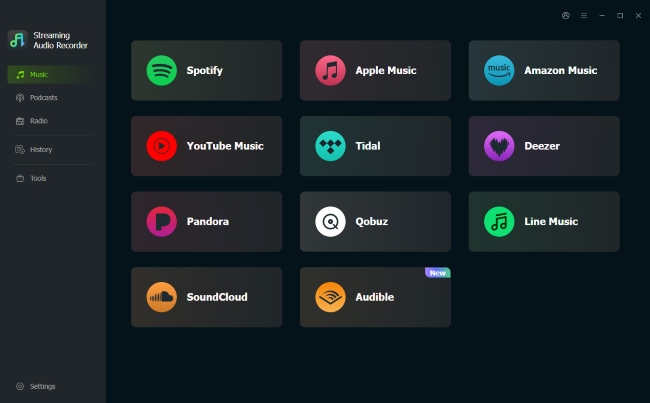
Open the DRmare software on your computer to access the main interface. Click on the prominent Deezer icon to boot up the secure, built-in browser engine. From here, log into your personal Deezer account to ensure the software can directly access your customized Flow, favorite albums, and private playlists.
- Step 2Configure High-Fidelity Audio Settings for Deezer
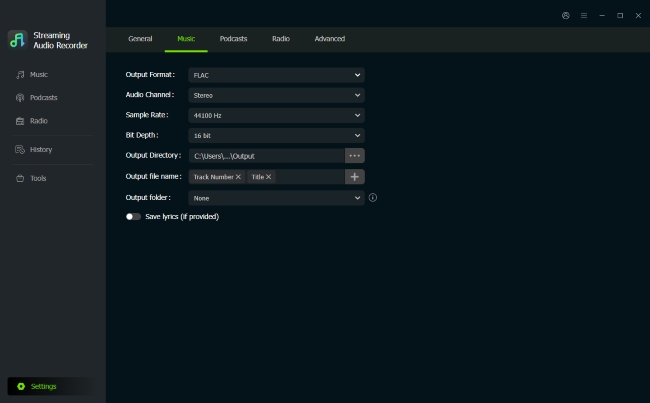
Before initializing any downloads, you need to customize your output container to preserve pristine audio quality. Click the "Settings" menu and head straight to the "Music" tab. Unlike bots that compress your files, this control panel allows you to manually select lossless formats like FLAC or WAV, and adjust advanced variables like sample rates and bit depths.
- Step 3Load Your Desired Playlists and Albums
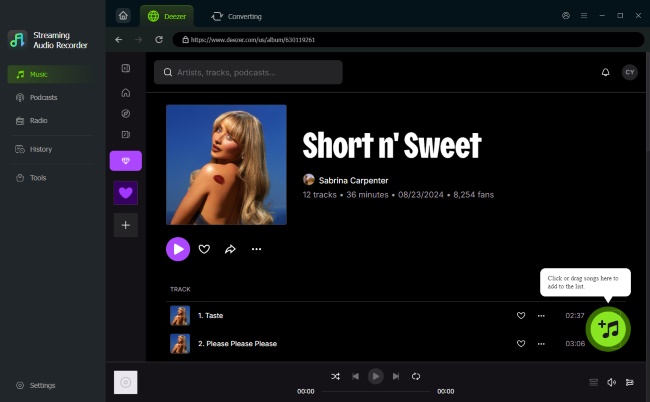
Use the built-in browser to browse through your curated music library or search for specific artists. When you locate the target playlist or album you want to keep permanently offline, click the floating "Add> Add to List" button. The software will instantly scan the link metadata, open a selection window, and let you choose which songs to import into the unified processing queue.
- Step 4Extract Deezer Tracks for Permanent Local Playback
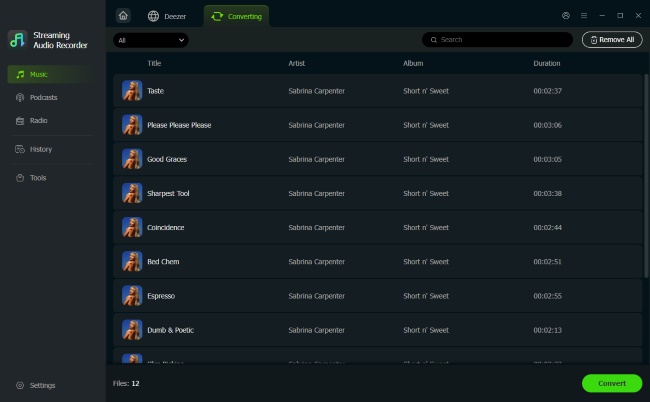
With your target music successfully queued up, press the "Convert" button to initiate the batch local export. The program will automatically isolate and process each track at high speed. Once the progress bars finish, simply head over to the "History" tab on the left-side toolbar to find your high-fidelity audio files from Deezer.
Part 4. Conclusion
While the allure of a free Deezer bot on Telegram is strong, our investigation shows that it's a risky gamble. Between the unreliable service, the serious security threat of exposing your ARL token, and the potential for scams, these bots are not a viable long-term solution for any serious music lover.
For those who value their security and want a permanent, high-quality offline music library, the choice is clear. By shifting to a stable, high-speed downloading tool like DRmare Streaming Audio Recorder, you can achieve your goal without compromising your data or dealing with constant frustration. It's the smartest, fastest, and most reliable way to build the Deezer music collection you've always wanted.

 Home
Home





User Comments
Leave a Comment