





If you're an Android user looking to enjoy Deezer music offline, you've likely encountered the Freezer APK, now updated to ReFreezer. This app allows you to stream and download Deezer songs directly to your Android device. In this guide, we'll cover everything you need to know about ReFreezer—how to use it to download Deezer music on Android, and a more reliable alternative for offline Deezer music.
Part 1. What Is ReFreezer for Deezer
ReFreezer is a free, open-source Android application developed by DJDoubleD that serves as an updated version of the Freezer APK. Functioning as a lightweight alternative to Deezer, it utilizes Deezer's public APIs to allow you to stream and download music directly to your device's internal storage. It also enables seamless offline listening without visual clutter. The latest ReFreezer version 0.7.15 has now fixed the limitations on writing permissions to external SD cards in Android 11+ systems.
Features of ReFreezer
- Direct Downloading: Saves songs directly to your phone's internal storage or SD card for true offline access.
- Ad-Free Experience: Removes audio and visual advertisements during playback.
- Lyrics Integration: Supports both synchronized and unsynchronized lyrics for karaoke-style listening.
- Smart Playlists: Includes features like "Flow" and "Mood" playlists found in the original app.
- Android Auto Support: Fully compatible with car entertainment systems.
Note:
Safety Reminder: As this is a modified APK not available on the Google Play Store, always ensure you download the official ReFreezer release to avoid malware.
Pros and cons of this method
Pros
 Download Free: Downloads Deezer MP3s for offline playback at no cost.
- No Root Needed: Works on standard Android devices without system modifications.
- Flexible Storage: Supports saving downloads to external SD cards (Android 11+).
Cons
 Quality Limits: Free accounts are restricted to lower quality (128kbps).
- Android Only: Not available for iOS users; requires manual APK installation.
- Security & Risk: Unofficial app not on Play Store; carries potential account bans or malware risks if not sourced carefully.
Part 2. How to Use ReFreezer to Download Deezer Music on Android
To get started with ReFreezer on Android, you need to download the ReFreezer APK files to your Android. As long as APK installation from unknown sources is enabled, the entire setup and download process can be completed in just a few minutes. Below is a step-by-step guide to help you download Deezer music with the ReFreezer APK smoothly and efficiently.
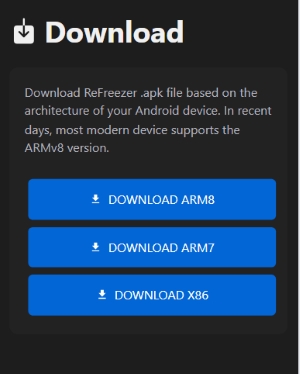
Step 1. Head over to the ReFreezer official website and download the APK file to your Android.
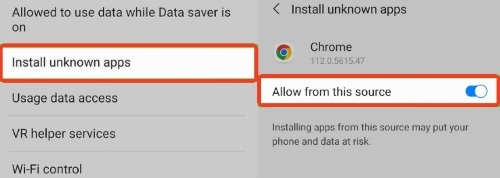
Step 2. Since ReFreezer is a modified application, Google Play Protect usually flags and blocks it. You'll need to give your phone permission to install it. Just go to your settings, enable "Install unknown apps> Allow from this source".
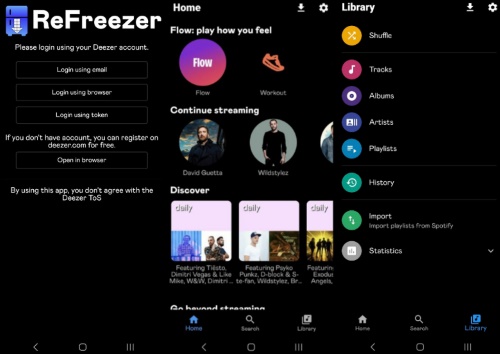
Step 3. Launch ReFreezer on your device. You'll be prompted to log in to your Deezer account. The interface looks and feels almost exactly like the official app.
Note:
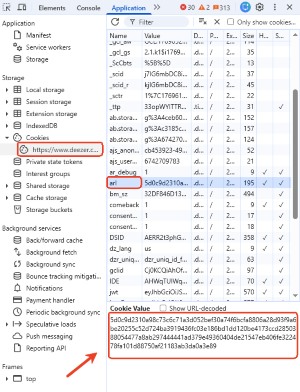
ReFreezer relies on ARL (Deezer login token), so it is recommended to log in with the ARL code or an alternative account to reduce the risk of the account being banned by Deezer. To get the ARL token, you need to log in to Deezer on your computer browser, press F12 to open the developer tools, go to "Storage> Cookies", then find the value of ARL and copy it.
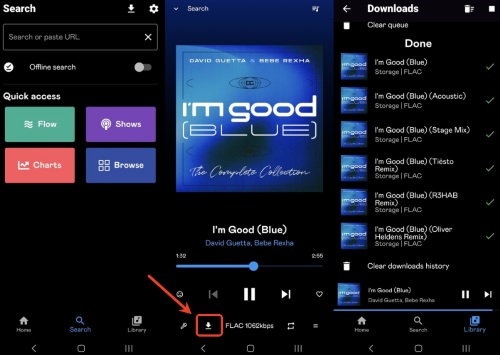
Step 4. Search for the Deezer playlist and find the track or album you want to save. Simply tap the download button next to the song or playlist, and the files are directly saved to your phone.
Part 3. Best ReFreezer Deezer APK Alternative
While ReFreezer is a convenient tool for quick access to Deezer music on Android, it comes with inherent instability and security risks. For example, ReFreezer may stop working, crash, or fail to fetch lyrics when Deezer's API updates. For a more secure and stable solution, DRmare Streaming Audio Recorder is the preferred alternative. It eliminates these risks, allowing you to build a permanent library on your computer without worrying about account bans or sudden app failures.
- Stability: Unlike mod APKs that break whenever Deezer updates its API, DRmare works independently by saving high-quality audio.
- Format Flexibility: Convert your Deezer tracks to MP3, AAC, FLAC, WAV, M4A, or M4B.
- Automatic ID3 Tagging: The software intelligently identifies the song title, artist, album, and genre, automatically tagging the files for you.
- Lossless Quality: DRmare blocks ads from Deezer and preserves the original audio quality without requiring a Deezer subscription.
- Step 1Configure Output Quality for Deezer
Launch the DRmare software on your desktop and navigate to the "Settings" menu. Under the "Music" tab, you can define your target audio format, such as MP3 or lossless FLAC, and adjust the bit rate to ensure your downloaded tracks match the high fidelity you expect.

- Step 2Access the Deezer Web Player
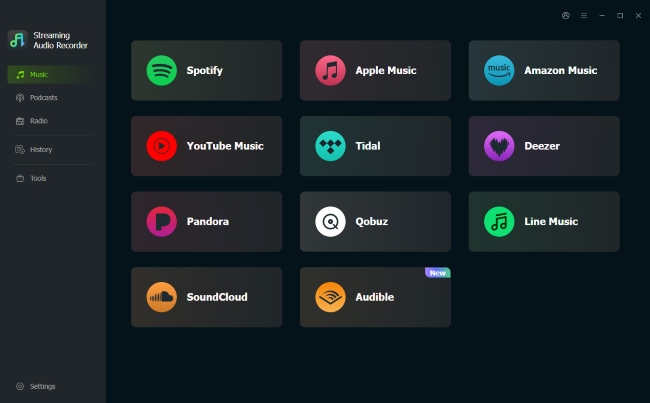
From the main interface, click the Deezer icon to launch the built-in browser. Log in to your account securely within this window. This allows you to access your Deezer playlists just as you would on the official web player.
- Step 3Import Deezer Tracks for Conversion
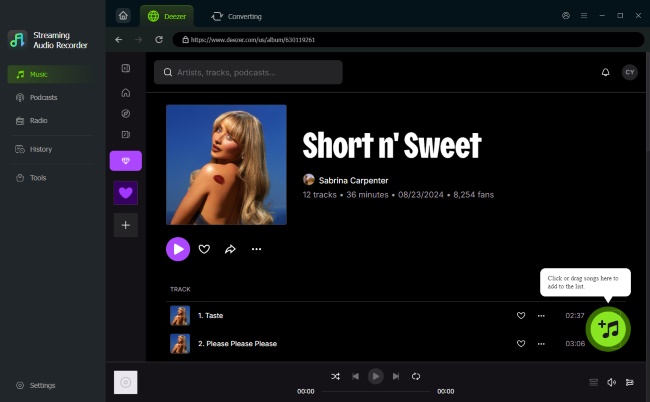
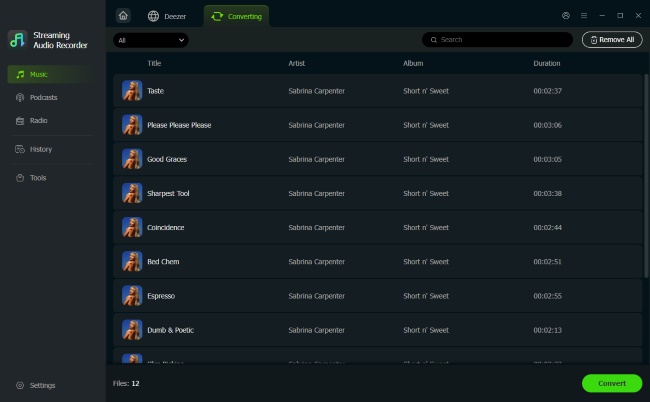
Browse for the songs, albums, or playlists you wish to keep offline. Once you have made your selection, click the "Add" button with a plus icon and "Add to List" to load the tracks into the conversion queue. You can review the list and uncheck any songs you don't need before proceeding.
Simply hit the "Convert" button to begin the download process. The software will rapidly save the selected tracks to your computer's local storage with original audio quality preserved. Once finished, navigate to the "History" tab to access your offline Deezer music library.
Part 4. Comparison of Deezer Music Downloader: ReFreezer vs DRmare
| Feature | ReFreezer APK | DRmare Streaming Audio Recorder |
|---|---|---|
| Platform | Android Only | Windows/Mac |
| Price | Free (with limitations) | Paid (with free trial) |
| Batch Download Support | ✅ | ✅ |
| Ad-Free | ✅ | ✅ |
| Lyrics Integration | ✅ | ✅ |
| Audio Quality | 128kbps--Free, 320kbps--Premium | Lossless audio |
| Format Support | MP3s only (Free), FLAC (Premium) | MP3, FLAC, WAV, M4A, AIFF, and M4B |
| Security & Stability | Unstable, may break with Deezer API updates | Stable, no risk of account bans |
| Additional Features | Smart Playlists, Android Auto support | Flexible quality settings, High-speed conversion |
If you are comfortable with technical steps and need a free solution for your Android phone, the Deezer ReFreezer APK is your best bet in 2026. However, if you want a reliable, long-term way to save your music collection without worrying about tokens expiring or apps crashing, DRmare Streaming Audio Recorder offers the most professional and secure experience.

 Home
Home





User Comments
Leave a Comment