





Pandora refuses to play? Whether the app is endlessly buffering, abruptly crashing, or simply failing to connect to your smart speakers, dealing with a broken music stream can quickly ruin your vibe. In my experience testing various streaming ecosystems, I've found that the reason why Pandora not working often comes down to a stubborn network hiccup or a forgotten VPN running in the background on your device. Let's walk through how to get your Pandora music flowing again.
Part 1. Why is Pandora Not Working?
Before you start haphazardly deleting apps or resetting your home Wi-Fi router, it helps to pinpoint exactly what part of the streaming chain is breaking down. If you are wondering why Pandora is not working today, the diagnosis almost always boils down to one of these five core issues:
- Network & Security Blocks: Fluctuating Wi-Fi, weak cellular transitions, or active VPNs intercepting the app's connection.
- Corrupted App Data: Outdated app versions or a bloated cache file causing the software to freeze or crash.
- Account Conflicts: Hitting your plan's concurrent streaming limit or dealing with an expired login token.
- Device Interference: Aggressive battery-saving modes on smartphones, or outdated firmware on smart TVs and car stereos.
- Server Outages: Temporary downtime on Pandora's own servers.
Part 2. Universal Checks Before You Troubleshoot
Whenever I troubleshoot a broken streaming setup, I always follow a strict order of operations. It saves a massive amount of time to rule out the big-picture, cloud-level issues first. If the problem is on Pandora's end, no amount of tweaking your phone settings will bring the music back.
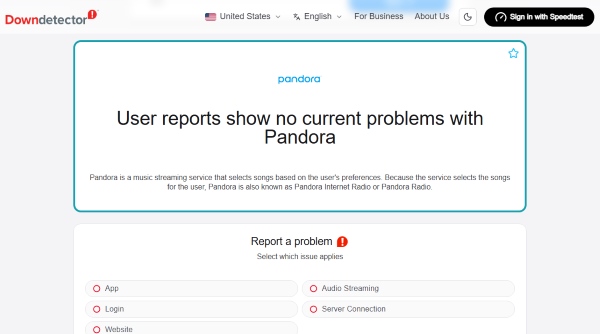
Is Pandora Radio Down?
Sometimes, the problem genuinely isn't on your end. Server outages can cause the platform to go entirely dark or result in random station loading errors. A quick glance at community reporting sites like Downdetector can usually confirm if others are experiencing similar issues. If there is a massive spike in reports, your best bet is simply to wait it out until the engineering team resolves the server lag.
The "Device Limit Reached" Error
If the servers are fine but your account is suddenly pausing or skipping, you might be bumping into the platform's device limit. Unless you are subscribed to a Premium Family plan, the service typically only allows one stream at a time per account.
During my own troubleshooting sessions, I've noticed that an active session left open on a home computer or an iPad can easily hijack your car stream. If you suspect this is happening, head to your account settings via a web browser, look for the device management section, and select the option to log out of all other devices. This clears out any phantom sessions causing conflicts.
Part 3. How to Fix Pandora Not Working on Mobile Devices
If the servers are humming along and your account is clear of ghost sessions, the issue is almost certainly localized to your hardware. Since most of us rely on our smartphones as our primary digital jukebox, let's look at the specific software quirks that routinely interrupt iOS and Android devices.
Pandora Not Working on iPhone & iPad
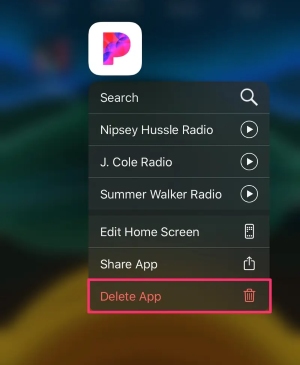
When the iOS app starts misbehaving, standard advice usually suggests deleting the app entirely. However, I often find that simply "offloading" the app works wonders without destroying your customized local data. You can do this in your iPhone's Storage settings. It removes the core app files but keeps your data intact, often clearing out whatever corrupted cache was causing the freeze.
Additionally, double-check that Background App Refresh is enabled for Pandora. If iOS restricts the app from pulling data in the background, your music might abruptly stop the moment your screen goes dark.
Pandora App Crashing on Android
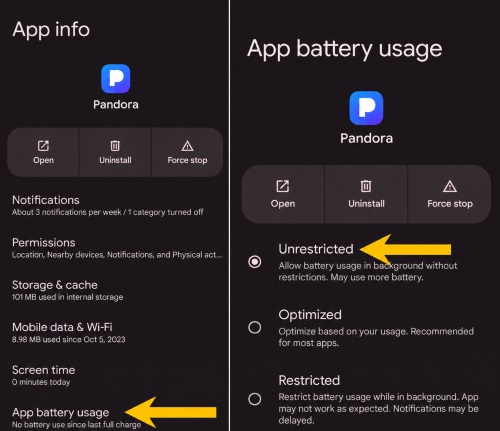
Android devices are notorious for aggressively managing background applications to save battery life. If your music routinely stops playing after a few songs, your phone's operating system might be putting the app to sleep.
To fix this, you will typically need to dive into your device's settings. Navigate to the battery optimization menu, find the Pandora app, and switch it to "Unrestricted" or disable battery optimization for it entirely. Giving the app permission to run freely in the background usually prevents those annoying mid-song dropouts.
Part 4. Fix Pandora Crashing on Web Browsers and Car Systems
Of course, our phones aren't the only places we stream. When you transition from walking with headphones to sitting at your office desk or driving your daily commute, a whole new set of external hardware and software variables comes into play. Strict browser security and spotty dashboard integrations are frequent culprits here.
Adblockers and HTML5 Autoplay Conflicts
If the Pandora website loads but the music refuses to start, a browser extension is likely to blame. In my testing, aggressive adblockers or extensions designed to disable HTML5 autoplay frequently break the web player's background scripts.
Try opening the site in an Incognito or Private Browsing window. If the music plays perfectly there, you will know an extension is at fault. Whitelisting the Pandora domain in your adblocker settings is generally a quick and permanent fix for this.
Apple CarPlay & Android Auto Issues
Similarly, when users search for why Pandora is not working in their car, the issue usually stems from the digital handshake between the phone and the dashboard. A trick I frequently use when testing spotty automotive connections is to start playback on the phone before plugging it in or waiting for the Bluetooth to connect.
If that doesn't help, inspect your physical cable—data transfer requires a much higher quality cord than simply charging a battery. Furthermore, ensuring both your phone's operating system and your car's firmware are fully updated can often resolve lingering compatibility bugs that prevent the app from communicating with your stereo.
Part 5. The Ultimate Workaround When Pandora App Keeps Failing
Sometimes, despite jumping through every troubleshooting hoop, the app just refuses to cooperate, especially if you frequent areas with spotty cell service or restrictive network firewalls. When my Pandora app is not working on a remote road trip, I've found that the most reliable solution is to bypass the platform's live streaming requirements entirely.
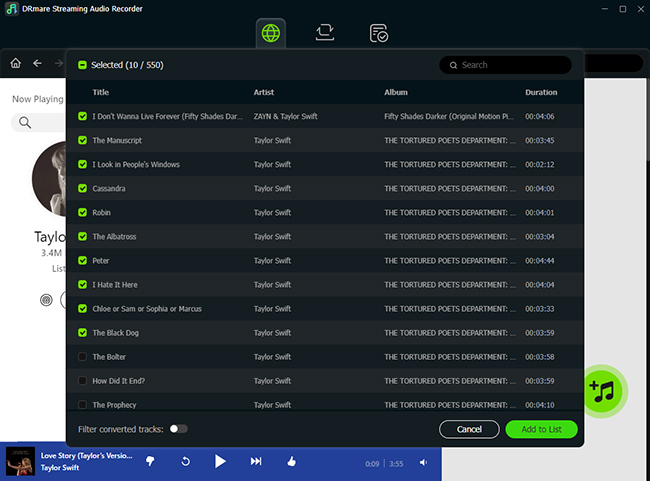
This is where third-party utility tools like DRmare Streaming Audio Recorder come into the picture. Instead of relying on a flawless internet connection and a perfectly functioning app, DRmare allows users to download their favorite Pandora playlists and stations directly to their local drive. It serves as an excellent fallback strategy, ensuring your music keeps playing even when the Pandora ecosystem is down.
- Lightning-Fast Batch Downloads: During my tests, the 100X recording speed was a game-changer. You can batch-download entire Pandora stations in minutes, completely sidestepping those frustrating buffering screens on your commute.
- Universal, DRM-Free Formats: Choose from versatile outputs like MP3, FLAC, WAV, or M4A, allowing you bypass spotty Apple CarPlay or Android Auto connections.
- Preserved ID3 Tags & High-Fidelity: DRmare automatically retains the original metadata—including album art, artist names, and lyrics—keeping your offline library as neatly organized as the Pandora app itself.
Part 6. Final Thoughts: Getting Your Music Flowing Again
Troubleshooting streaming audio shouldn't feel like a second job. In most of my testing scenarios, restoring your music is usually as straightforward as adjusting a background data permission, clearing out old logged-in devices, or forcing a digital handshake refresh. While network drops and software glitches are an inevitable part of modern streaming, you don't have to let them ruin your listening experience. Whether you choose to dive into your device settings to fix the live stream or opt for a reliable offline workaround like DRmare to bypass the servers entirely, you now have the tools to keep your favorite stations playing without interruption.

 Home



User Comments
Leave a Comment