





Finding a reliable way to build a free, high-quality offline music library can be frustrating. Enter Fildo, a powerful Android audio downloader that connects you directly to MP3 and FLAC files. Whether you want to save your favorite albums or podcasts, this tool has gained massive popularity. In this complete guide, we will explore its core features, walk you through how to use Fildo APK, and reveal the best alternatives to Fildo available.
Part 1. What is the Fildo App
Fildo is a versatile music and podcast player and downloader designed for Android devices. Instead of hosting its own content library like traditional streaming platforms, it functions as an advanced audio search engine that aggregates tracks from multiple online sources. Connecting users directly to third-party MP3 hosting sites, it allows them to search, stream, and download music and podcasts from across the web through a single, centralized interface.
| Website | Availability | Download Output |
|---|---|---|
| https://fildo.net/android | Android 7.1 or higher | MP3, FLAC |
Part 2. Key Features and Capabilities of Fildo APK
Before you decide to download the software, it is helpful to understand what sets this Fildo music downloader APK apart from other media players. Recent updates, particularly the jump to version 6.4.5, have completely redesigned the application to prioritize high-quality audio fetching and user convenience. And the Fildo app is free to use that supported by banner and pop-up advertisements.
Core Features of Fildo APP for Android:
- Offline Downloading: Users can save tracks directly to their local device storage for offline listening. The app supports standard MP3 formats as well as high-quality, lossless FLAC files.
- Built-in Media Player: Fildo includes a fully functional player with an equalizer, a sleep timer, and the ability to read embedded lyrics and album artwork.
- Playlist Syncing: The app features a tool that allows users to import text data from Spotify playlists, using its search engine to locate matching audio files to recreate those playlists offline.
- Local Library Management: It doubles as a local music explorer, letting users easily browse their existing, manually downloaded audio files by artist, album, or specific SD card folders.
Part 3. How to Download and Use Fildo for Android
Because Fildo scrapes audio from third-party sources and bypasses traditional copyright licensing, it is not available on the official Google Play Store. To install it, users need to download the APK file either from Fildo's official website or from a trusted APK platform such as Uptodown.
How to Download Music Using Fildo
Once you have successfully installed the Fildo app on your device, you are ready to start building your personal offline library. The interface is designed to be intuitive. Whether you are hunting for a specific podcast or a full album, saving your favorite tracks via the Fildo platform is incredibly easy.
Step 1. To prepare your device for the Fildo app download, navigate to your Android "Settings > Security" menu. Toggle on the "Install Unknown Apps" or "Unknown Sources" option to permit third-party software installations.
Step 2. Open your preferred browser and visit the official Fildo website. Securely download the Fildo APK latest version to ensure you receive the newest interface updates and bug fixes.
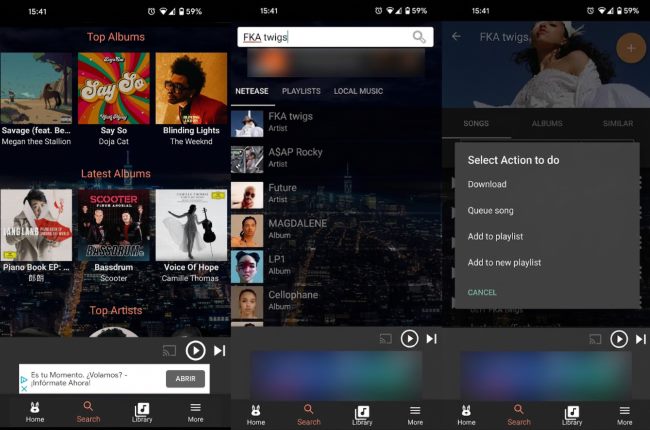
Step 3. Launch the Fildo music downloader. Use the search bar to explore the massive web catalog for your favorite podcasts or albums. When you find the right track, tap the menu icon right next to it. Select the "Download" action to instantly save the MP3 files directly to your local storage for seamless offline listening.
How to Import from Spotify to Fildo
Transitioning to a new audio player does not mean you have to leave your carefully curated music behind. The Fildo app includes a highly convenient tool designed to transfer your existing Spotify libraries for offline listening. Instead of manually searching for every single track, the application automates the matching process.
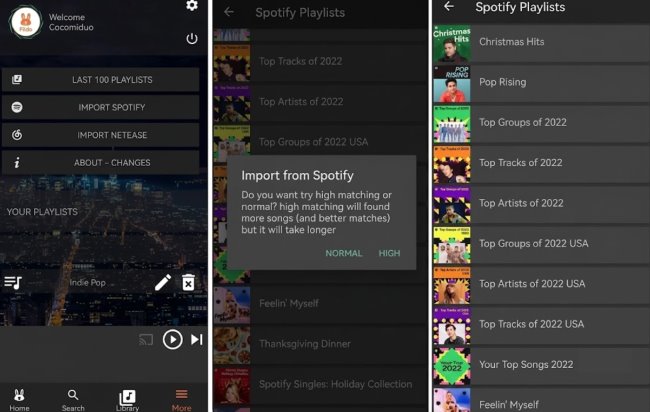
Step 1. Launch the Fildo app on your Android device to access the main home screen. Navigate to the "More" tab located in the bottom navigation menu. Scroll through the options and tap on the "Import Spotify" feature.
Step 2. Enter your Spotify login credentials when the prompt appears. You will need to safely grant the application permission to read your profile data so it can accurately identify your saved tracks.
Step 3. Once the synchronization is finished, your complete tracklists will conveniently populate under the "Your Playlists" heading within that same "More" section, ready for you to explore and download.
Tip for Lossless Spotify Downloads:
Fildo does not pull audio from Spotify's servers; it merely uses your playlist text data to search for matching MP3s across third-party websites. This can sometimes result in incorrect track versions or lower audio quality. If you want to download the high-fidelity tracks from Spotify, using DRmare Spotify Music Converter is the perfect solution. It securely converts your Spotify playlists into permanent offline formats, bypassing the unpredictable nature of web scraping.
Part 4. Is the Fildo APK Safe to Download?
Device Security and Malware Risks
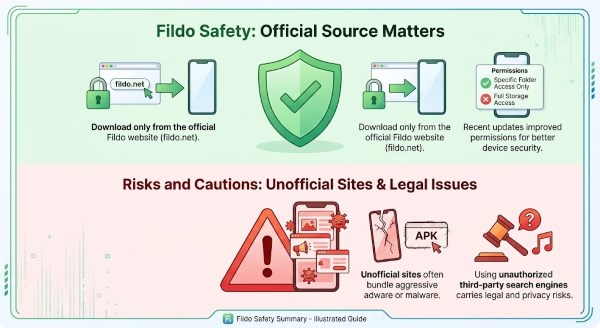
Protecting your device should be your top priority during a Fildo app download. The application is generally safe if sourced exclusively from the official website. Recent updates have even improved security by restricting permissions to specific audio folders rather than requiring full storage access. However, the real danger lies in unofficial third-party platforms, which frequently bundle the APK with aggressive adware or malicious tracking scripts.
Legality and Privacy Concerns
Beyond technical safety, users must weigh the legal and privacy implications. Because Fildo scrapes audio from external third-party servers, it bypasses traditional copyright and licensing agreements. Downloading copyrighted music without authorization remains a legal gray area that carries risks depending on your local laws. Additionally, as an unofficial downloader, the app carries inherent data privacy concerns that require you to navigate it responsibly.
Part 5. Pros and Cons of the Fildo App for Android
Before making Fildo your primary music downloading tool, it is important to objectively weigh its overall value against its limitations. While the application offers incredible freedom for building a massive offline library, it also comes with a few compromises. The presence of in-app ads and the reliance on third-party scraping mean it might not be the perfect solution for everyone.
Pros
 Massive Catalog: Free access to global songs and podcasts.
- High-Quality Audio: Supports 320kbps MP3 and lossless FLAC formats.
- Spotify Integration: Easily imports and recreates playlists offline.
- Feature-Rich Player: Built-in EQ, sleep timer, and embedded lyrics.
Cons
 Intrusive Ads: Heavy pop-ups unless you buy a premium subscription.
- No Play Store: Requires manual APK sideloading to install.
- Unstable Search: Relies on third-party servers that can go down.
- Legal Gray Area: Bypasses traditional copyright and licensing.
Part 6. Top Alternatives to Fildo Music APK
While the Fildo Android app provides a convenient way for getting free music, its reliance on unstable third-party servers and intrusive ads can sometimes disrupt your listening experience. If you are tired of broken search results, exploring other options is highly recommended. Upgrading to a dedicated tool can provide a much safer and more reliable way to build your permanent offline music library.
DRmare Streaming Audio Recorder
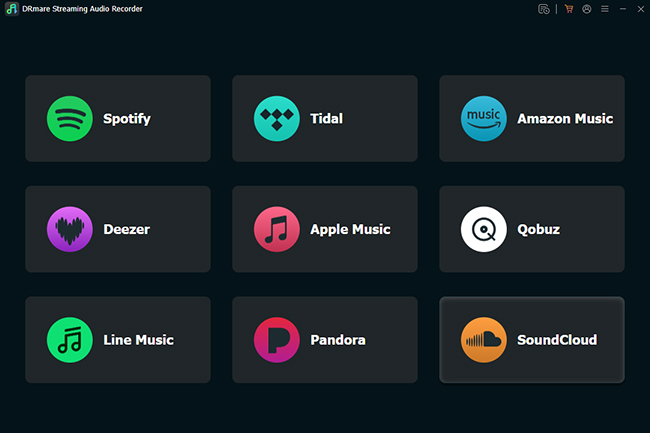
For users seeking a professional downloader, DRmare Streaming Audio Recorder is the logical upgrade from unpredictable mobile apps. Instead of scraping third-party web engines, this powerful desktop software bypasses the streaming limitations to save your favorite music. It effectively transforms your daily streaming habits into a permanent, high-end collection without sacrificing audio quality or metadata.
DRmare acts as a comprehensive hub, allowing you to download music from ten major platforms, including Spotify, Apple Music, Tidal, Qobuz, YouTube Music, etc. Furthermore, you have complete control over the output parameters, allowing you to easily adjust the bit depths, sample rate, and audio channels to tailor your exact listening experience.
- Perfect Fidelity: Guarantees high-bitrate streams, preserving Hi-Res Lossless and 24bit/44.1Khz audio tracks.
- Versatile Formats: Fast and efficient batch processing converts entire playlists into MP3, FLAC, WAV, AIFF, M4B, or M4A formats.
- Offline Accessibility: Preserves high-quality audio alongside complete ID3 metadata for easy organization on any device.
SoundBound
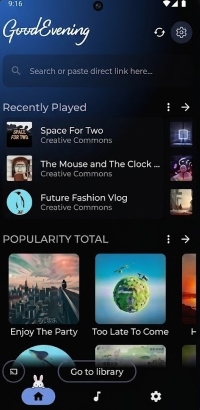
If you prefer a free interface that mirrors your usual downloading routine, SoundBound is a fantastic Fildo app alternative. Instead of relying on fixed servers, it utilizes a highly customizable plugin system. By installing community-built extensions, you can seamlessly pull music from multiple external sources. This aggregates audio from across the web into one unified hub, bypassing strict platform restrictions to easily organize your entire digital library in one place.
Once your preferred plugins are active, the app acts as a powerful downloader, letting you save high-quality MP3, FLAC, and WAV tracks directly to your local storage. It syncs seamlessly across Android, Windows, macOS, and Linux, ensuring your offline music is always accessible. To further elevate your listening experience, SoundBound includes robust playback tools, featuring a built-in equalizer to manually adjust audio profiles, smooth crossfade, and adjustable listening speeds.
Part 7. FAQs on Fildo APK Download
Why is Fildo suddenly showing "No Results" for my searches?
Because the app relies on scraping external third-party servers to fetch audio files, those connections can occasionally break or experience heavy traffic. If a specific host goes down or your local internet service provider(ISP) blocks access to certain audio servers, Fildo's search engine will temporarily fail. You can use a reliable VPN to bypass these network blocks and restore your results.
Is there a premium version of Fildo to remove ads?
Yes, while the core features of the app are completely free to use, the developers now offer an official, optional premium subscription. Purchasing this subscription completely removes all advertisements from the interface and supports the ongoing maintenance of the project.
Does the app have a built-in lyrics feature?
No, Fildo does not provide a built-in, synchronized lyrics display interface. However, when downloading audio, the app typically embeds the full lyrics directly into the MP3 or FLAC file as metadata (ID3 tags). To view the lyrics while listening, simply play your downloaded Fildo tracks through a third-party offline music player that supports local metadata, such as Poweramp.
Final Thought
Ultimately, the Fildo app is a capable tool for users wanting an extensive offline music library for free. However, its intrusive ads and third-party scraping risks mean it is not for everyone. For a more reliable solution, upgrade to the high-fidelity alternative DRmare, which you can use to safely enhance your offline audio experience.

 Home
Home





User Comments
Leave a Comment