





For audiophiles who refuse to compromise on sound quality, building a local library of high-resolution tracks often leads to some unofficial web scrapers. SQUID.WTF is one such platform, a web-based tool designed to let users extract and download lossless music from major streaming services. However, with the growing debates around its long-term reliability, many users wonder whether SQUID.WTF is safe. In this comprehensive guide, we will explore everything from its features and potential security risks to the best alternatives available to keep your music collection growing safely.
Part 1. What is SQUID.WTF
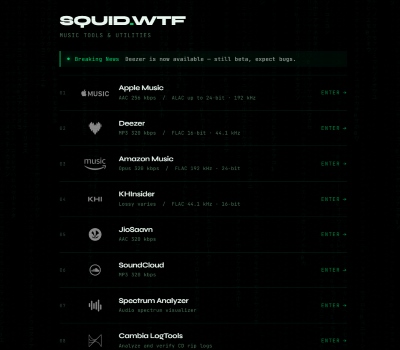
SQUID.WTF is a powerful tool that has evolved from a basic lossless music scraper into a high-resolution audio management platform. It empowers audiophiles to build personal libraries with authentic tracks up to 192 kHz / 24-bit Hi-Res FLAC. To seamlessly bridge these audio needs, the tool operates through dedicated subdomains tailored to specific streaming services.
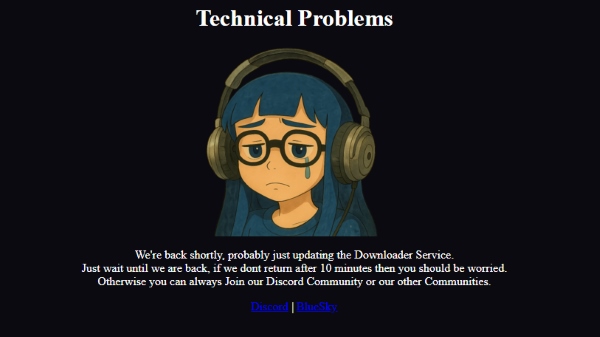
Update: SQUID.WTF Is Currently Unavailable:
SQUID.WTF is currently experiencing a major service outage and its core features are no longer accessible. Previous updates had already removed support for Tidal and Qobuz due to increasing anti-scraping measures from streaming platforms. Consequently, any previous workarounds like the popular "qobuz squid wtf" or "tidal squid.wtf" modules are officially dead.
At the moment, many remaining download channels appear to be under maintenance or unavailable, with no clear timeline for a full recovery. To continue downloading high-quality FLAC audio without interruption, you may want to consider other actively maintained SQUID.WTF alternative tools reviewed in Part 4.
Pros
 No Login Required: Instant access without installation or account registration.
- Efficient Batching: One-click downloads for entire albums and playlists.
- Flexible Exporting: Tailored quality settings with individual or ZIP file options.
Cons
 Frequent Downtime: Services often break due to security updates and API blocks.
- Occasional Download Failures: Some tracks may fail to download completely or return errors.
- Security Risks: Unofficial nature poses potential privacy and tracking concerns.
Part 2. Is SQUID.WTF Safe to Use
When evaluating unauthorized web tools, security and privacy are the primary concerns. To understand if SQUID.WTF is safe, we can evaluate it across three critical dimensions: technical integrity, data privacy, and platform compliance.
-
Technical safety appears reliable. The tool is generally viewed as relatively safe within open-source and audiophile communities. Unlike many similar sites filled with intrusive ads or malicious redirects, SQUID.WTF features a clean, minimalist interface.
-
Privacy and transparency lack clear disclosure. The platform does not publish a detailed privacy policy or explain how user data is handled. Each time a link is pasted or a download is initiated, there is no assurance that the activity is not being logged. For users who value strict anonymity, this lack of transparency is a concern.
-
Account safety remains a concern. Using third-party ripping tools violates the Terms of Service of platforms such as SoundCloud. Even if SQUID.WTF relies on its own internal tokens to retrieve content, any detection of abnormal behavior associated with an account could potentially result in suspension.
Recommendation:
To ensure your data security and download experience, dedicated software like DRmare Streaming Audio Recorder provides a far superior and safer solution. It operates locally on your Mac or Windows PC with full user privacy controls. By choosing the actively updated desktop app, you eliminate the threat of sudden server outages while enjoying guaranteed Hi-Res FLAC downloads without putting your streaming accounts at risk.
Part 3. How to Use SQUID.WTF to Download FLAC Music
If you are wondering how squid wtf works, the process is designed to be as intuitive as online downloader tools. It allows you to bypass complex decryption and save high-fidelity files with just a few clicks. Follow these steps to extract high-quality music files directly to your devices:
Step 1. Copy the URL of your favorite album or track from Amazon Music, SoundCloud, etc. Navigate to the current active SQUID.WTF domain. On the homepage, select the corresponding streaming platform icon that matches the link you just copied.
Step 2. Before pasting your link, look for the "Settings" icon in the upper-right corner. Here, you can select your desired output quality, ranging from AAC to 24-bit/192kHz FLAC. You can also toggle options like "Download covers separately" or "Convert AAC to MP3" to suit your library's needs.
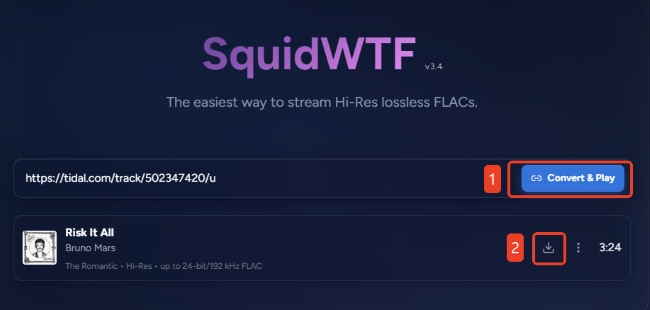
Step 3. Paste your copied URL into the central search bar. Then press "Convert & Play" to parse the link. Once the track appears, click the "Download" icon to begin the process. Downloading full Hi-Res albums may take a few minutes, depending on the current server load and the stability of the streaming service's API. Also, it occasionally fails to parse valid track links or abruptly halts during the extraction process.
Test Result of Audio Quality:
In terms of audio quality, SQUID.WTF does not simply record or resample streams to create fake files. Instead, it accesses the original audio streams directly through an API. It shows that the downloaded FLAC files exhibit genuine lossless characteristics. Although the final quality depends on the source platform itself, the technical suggests that SQUID.WTF can deliver authentic lossless audio with correct bit depth and sampling rates.
Part 4. SQUID.WTF Not Working? The Best Alternatives
While SQUID.WTF has been a powerful platform for many users looking to download or convert their music, it suffers from unexpected downtimes, server overloads, or sudden closures. Fortunately, you can easily swap out SQUID.WTF for a more stable solution. To help you quickly find the perfect replacement and get back to downloading, we have categorized the best available alternatives into three distinct approaches.
Reliable Desktop Converter
Due to continuous updates and stricter security measures from streaming platforms, encountering SQUID.WTF not working issues has become increasingly common. With support for major audio sources like Qobuz and Tidal removed, and many remaining online downloader modules becoming unstable, relying on web-based scraping methods is no longer a reliable long-term solution.
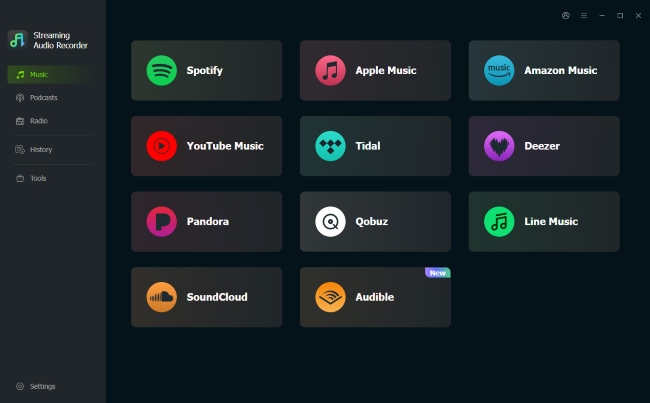
When these online tools stop working, a more stable alternative is DRmare Streaming Audio Recorder. Instead of depending on constantly changing online APIs, DRmare captures high-quality audio through the streaming service’s native playback process. It supports downloading lossless music from 11 popular streaming platforms, including Tidal, Qobuz, SoundCloud, Deezer, Amazon Music, etc, making it a practical option for users who want more control over their audio collection.
- Universal Compatibility: Seamlessly supports over 10 major music streaming platforms including Spotify and Tidal.
- Lossless Quality & Multi-Format: Exports 100% lossless audio into versatile formats like FLAC and MP3 to fit any device.
- Zero Downtime: Bypasses platform security blocks via a built-in web player to ensure uninterrupted stability.
- Smart Metadata &: Automatically embeds complete ID3 tags and cover art to intelligently organize your library.
User-Friendly Online Converters
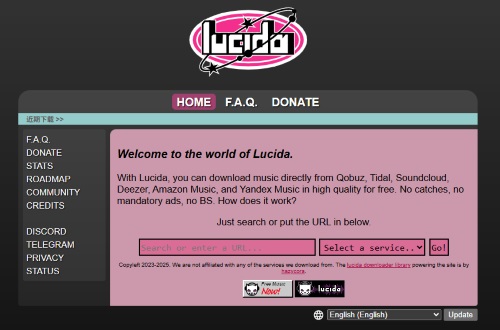
If you prefer the same browser-based convenience that SQUID.WTF offers, online extractors like Lucida are excellent fallback options. These web tools function almost the same, allowing you to rip tracks from platforms like Deezer, Qobuz, or Tidal simply by pasting a URL. They are perfect for listeners who just need to grab a few songs quickly.
Step 1. Open your target streaming app or web player, find the specific song or album you wish to keep, and copy its unique shareable link to your clipboard.
Step 2. Navigate to the Lucida platform. Paste your copied URL directly into the main search field and click the "Go" button to let the site parse the track data.
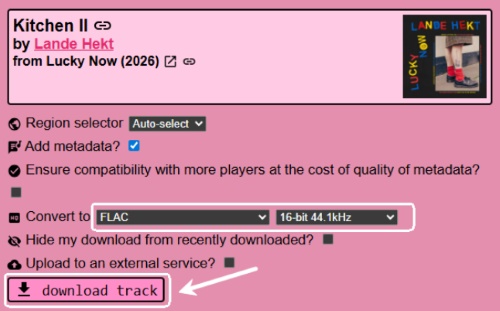
Step 3. Once the system analyzes the link, select your preferred audio format and bitrate from the available options. Finally, click the "download track" button to save the file.
Note:
Lucida often suffers from the same vulnerabilities as SQUID.WTF. They are prone to slow download speeds, unexpected server crashes, and sudden domain takedowns. Furthermore, it is unable to process massive playlists or batch downloads.
Advanced Command-Line Tools
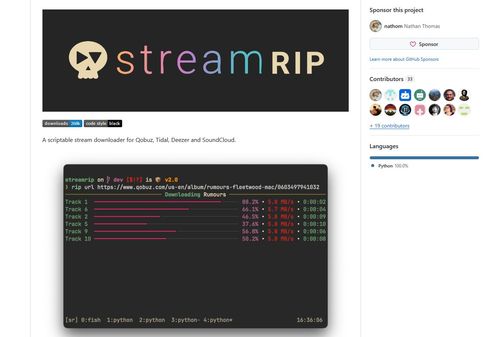
For tech-savvy audiophiles, scriptable tools like Streamrip offer a vastly superior, highly customizable ripping experience. Operating entirely through your computer's terminal, this powerful Python-based script facilitates fast, concurrent downloads from Qobuz, Tidal, SoundCloud, and Deezer. It can automatically manage metadata, prevent duplicate downloads via a built-in database, and reliably fetch audio up to master-quality 24-bit/192kHz.
Step 1. Ensure your system has Python 3.10 or a newer version installed. While optional, installing FFmpeg alongside it is highly recommended to unlock the script's full media conversion capabilities.
Step 2. Open your terminal or command prompt and type the command "pip3 install streamrip --upgrade" to seamlessly install the tool and its dependencies.
Step 3. To download a high-resolution album, simply type "rip url" followed by the link (e.g., rip url {Qobuz album URL}). If you want to force the tool to output a specific format, you can adjust the command to something like rip --codec mp3 url {Qobuz song URL}.
Note:
Unlike web scrapers that use shared server tokens, Streamrip requires you to have an active premium subscription to the corresponding service (like a valid Qobuz account) configured in its backend to successfully fetch the high-resolution files.
Part 5. SQUID.WTF vs. Alternatives
| Feature | SQUID.WTF | DRmare | Lucida | Streamrip |
|---|---|---|---|---|
| Tool Type | Online Stream Ripper | Desktop Downloader | Web Converter | Command-Line Script |
| Supported Platforms | SoundCloud, Amazon Music, Deezer, KHInsider, Spectrum Analyzer | Apple Music, Spotify, Tidal, Qobuz, Deezer, Pandora, SoundCloud, YouTube Music, Amazon Music, LINE Music, Audible | Qobuz, Tidal, SoundCloud, Deezer, Amazon Music, Yandex Music | Qobuz, Tidal, Deezer, SoundCloud |
| Audio Fidelity | Up to 24-bit/192kHz | Up to 24-bit/192kHz | Varies based on source | Up to 24-bit/192kHz |
| Output Formats | FLAC, MP3, AAC | FLAC, WAV, MP3, M4A, AIFF, M4B | FLAC, MP3, M4A AAC, WAV, OGG | FLAC, MP3 |
| Batch Processing | Yes | Yes | No | Yes |
| Metadata & ID3 Tags | Basic (Cover art) | Fully preserved (Artist, Title, Cover Art) | Basic | Fully preserved |
| Stability & Uptime | Low | High | Low | High |
| Cost | Free | Paid (With free trial) | Free | Free (Requires premium accounts) |
If you want the quickest, no-install method for grabbing a FLAC file and don't mind occasional server errors, sticking with squid.wtf or web alternatives like Lucida is perfectly fine. They are fast, free, and generally safe. However, if you want a reliable and effective way to build your offline library, shifting to a local desktop software like DRmare Streaming Audio Recorder is the smartest long-term investment.

 Home
Home





Download high quality music from Tidal, Spotify, Apple Music, Amazon Music, and more. Save audio in MP3, FLAC, WAV, M4A, AIFF, and M4B formats with full metadata.