





For music enthusiasts looking to build a local library, Lucida.to has emerged as a highly popular browser-based tool for extracting high-fidelity audio directly from major streaming platforms. While the platform's frequent server timeouts have left many users searching for more stable solutions. We will take an in-depth look at how Lucida.to actually performs and evaluate its risks in the article. Also, we will explore the top three reliable alternatives to help you find the safest and most efficient way to keep your favorite tracks.
Part 1. What is Lucida.to
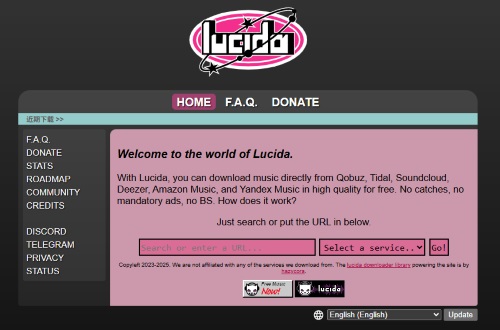
Lucida.to is a popular online music downloading tool that allows users to extract high-bitrate audio from major streaming platforms. It operates entirely in the browser, meaning you do not need to install any software or register for an account to begin building your local music libraries. The platform interfaces with services such as Tidal, Qobuz, SoundCloud, Deezer, and Amazon Music, fetching audio tracks directly from their servers.
Key Features of Lucida.to:
- Multi-Platform Support: Seamlessly extracts audio links from major services like Qobuz, Tidal, SoundCloud, Deezer, and Amazon Music.
- Versatile Audio Formats: Delivers true lossless FLAC and WAV formats, alongside standard MP3, M4A, and OGG files.
- Batch Downloads & Metadata: Supports bulk downloading while perfectly preserving original ID3 tags and audio metadata.
Pros
 Cost-Free & Accessible: Completely free with no registration or subscription required.
- High-Quality Output: Delivers lossless FLAC files with metadata.
- Batch Processing: Efficiently handles full playlists and album links for bulk downloads.
Cons
 Unstable Infrastructure: Frequent server timeouts, connection drops, and domain changes.
- Zero Official Support: Lacks an official app or customer service; relies on community forums.
- Hardware Playback Glitches: Audio can exhibit static or distortion on older devices (e.g., iPods).
Note:
Lucida.to is currently experiencing significant backend issues that affect its core functionality. Now it fails to download music from Tidal, Qobuz, and Deezer, because it doesn't have enough active sources to grab the necessary ARLs to bypass the platform's security. If you primarily use these specific streaming services, you will likely encounter repeated errors and should consider using the alternative tools mentioned in Part 3 as a workaround.

Part 2. How to Download Music Using Lucida.to
Since the web-based tool functions entirely within your browser, you don't need to install any software or create an account to start building your offline library. The entire extraction process takes just a few clicks once you have located the audio you want to save.
Step 1. Open the app or web player of the supported streaming platform to locate the song, album, or playlist. Click the share icon next to the track and copy its unique URL to your clipboard.
Step 2. Navigate to the Lucida website. Paste the copied link directly into the search bar on the Lucida homepage, then hit the "Go" button to start analyzing the track data.
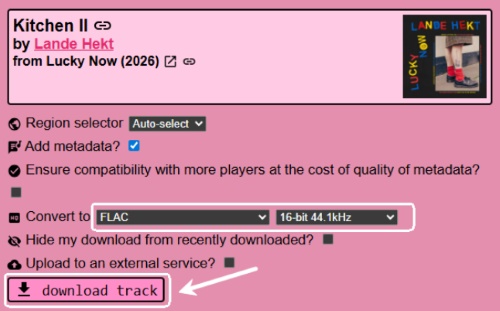
Step 3. Select your desired audio format (such as FLAC, MP3, WAV, or M4A) and bitrate from the provided options. Finally, click the "download track" button to save the audio file directly to your device.
Part 3. Lucida.to Performance and Safety Analysis
To truly determine if Lucida.to is the right option for your music downloading, we must examine how it performs under the hood. Below, we break down the platform's actual reliability, evaluating both the true fidelity of its audio downloads and the security implications.
How Good is the Audio Quality on Lucida.to?
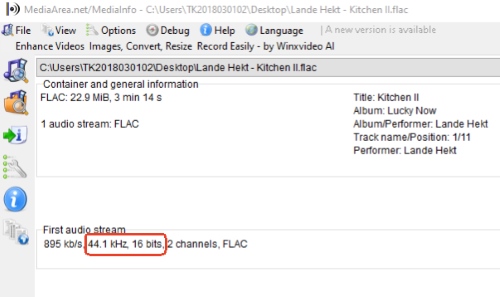
When the site is fully functional, Lucida.to generally delivers on its promise of high-quality audio. However, users have reported occasional discrepancies where the actual bitrate of downloaded MP3s falls short of what the metadata claims. Adding to the frustration, there are also rare reports of high-frequency distortion when transferring these files to certain playback devices.
Is Lucida.to Safe and Private to Use?
According to a recent security analysis by Gridinsoft, Lucida.to currently holds a low trust score of just 35/100 and is officially classified as a "Suspicious Website." There is no verified contact information or customer support page, and the underlying server locations are hidden behind CDN proxy networks, as well as its legally gray operation and unpredictable infrastructure.
Ultimately, it is not entirely safe to use Lucida.to. While the platform does not force you to install software or create an account to download audio files, interacting with unregulated proxy sites always carries inherent risks. If you choose to visit the site, you should proceed with strict caution and never download anything other than standard audio files. For users who want a secure and private archiving experience, transitioning to a verified offline tool is the smartest choice.
Note:
The other online music downloader DoubleDouble is actually maintained by the same development team behind Lucida.to. DoubleDouble is typically used as a secondary "mirror" or backup site to ensure continuity in case Lucida is down. While DoubleDouble.top is currently inaccessible. This unpredictable downtime strongly reinforces the need for other independent and stable solutions.
Part 3. Top 3 Reliable Alternatives to Lucida.to
If you are tired of dealing with Lucida.to's frequent issues, exploring other options is a smart move. Fortunately, there are several excellent alternatives that provide superior stability and safety. The following three tools are currently the most reliable ways to bypass Lucida's limitations on your computer or mobile.
DRmare Streaming Audio Recorder
Lucida.to are often plagued by constant server breakdowns and an inability to fetch files from heavily secured platforms. When these online tools inevitably fail or shut down, transitioning to a stable desktop solution is the most reliable choice. The best overall alternative is DRmare Streaming Audio Recorder. Instead of relying on fragile backend APIs that constantly get blocked by streaming services, DRmare extracts high-fidelity audio directly from streaming web players, ensuring a near-perfect success rate regardless of platform updates.
- Universal Compatibility: Supports 10 platforms, including Tidal, Deezer, SoundCloud, Spotify, YouTube Music, etc., ensuring your tracks are accessible regardless of the service.
- Immunity to Downtime: Provide a level of stability, and avoid the server timeouts, domain bans, and security blocks that frequently take Lucida offline.
- Verified Lossless Quality: Download audio in MP3, FLAC, WAV, M4A, AIFF, and M4B, which eliminates the "fake bitrate" metadata issues and hardware distortion reported by Lucida users.
- Metadata & Lyrics Support: Identifies and embeds ID3 tags and lyrics along with your downloaded tracks, providing a complete media experience that browser-based rips often lack.
- Step 1Configure Your Fidelity Preferences
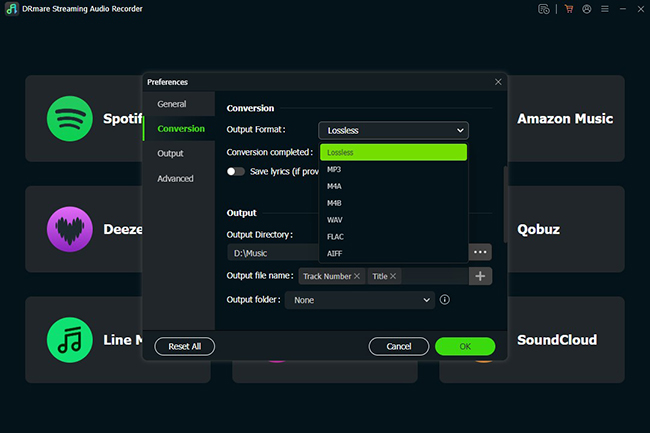
Launch the software and click the "Menu" icon to open the "Preferences" panel. Within the "Conversion" tab, you can define your output parameters. Here, you can explicitly lock in a lossless format to ensure bit-perfect audio for your collection.
- Step 2Launch the Integrated Streaming Player
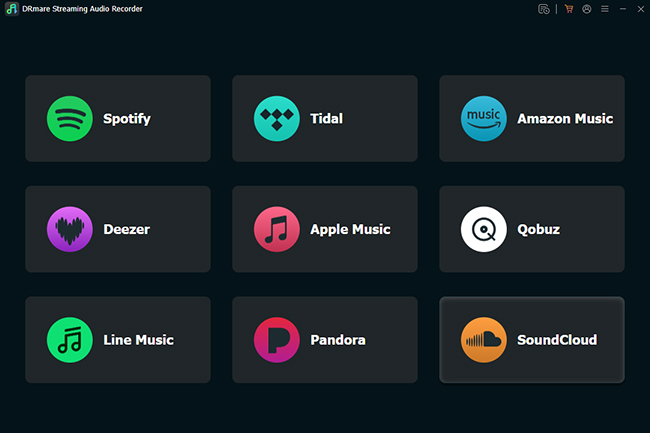
From the main interface, select the streaming service you wish to use (such as Tidal, Qobuz, or Spotify). This opens a built-in browser window that allows you to access the platform directly, bypassing the errors and API crashes that frequently plague online tools.
- Step 3Populate Your Downloading Queue
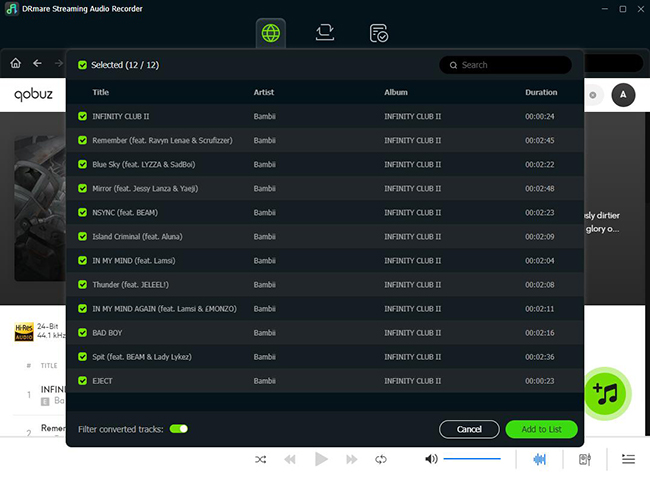
When you locate the desired music to save, simply click the prominent "Add" button. A list of all tracks will appear; you can then refine your selection and confirm by clicking "Add to list" to prepare them for batch processing.
- Step 4Execute the High-Speed Conversion
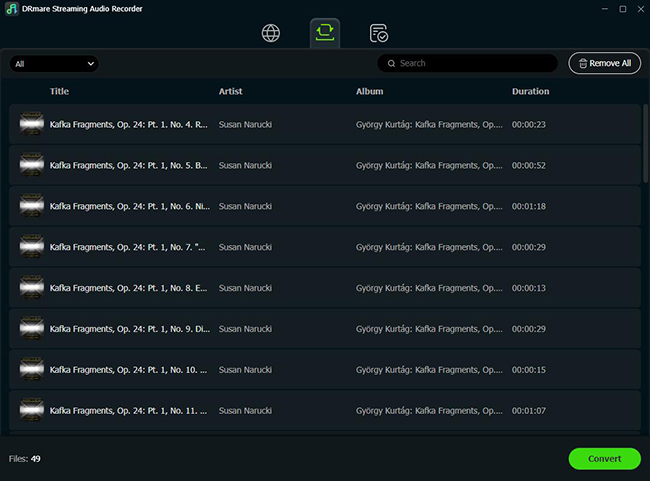
Click the "Convert" button to start the high-speed conversion process. DRmare will strip away encryption and save the audio locally with all ID3 tags and lyrics intact. Then you can find your perfectly organized files in the "Converted" tab, ready for playback on any device without the compatibility issues common in web-based rips.
SQUID.WTF
SQUID.WTF has evolved into a robust, high-resolution audio extraction platform tailored for audiophiles seeking files up to 192kHz/24-bit FLAC. Beyond basic track ripping, it offers automatic AAC-to-MP3 conversion, advanced metadata, and flexible queue management that allows you to optimize download performance or bundle multiple tracks into convenient ZIP archives.
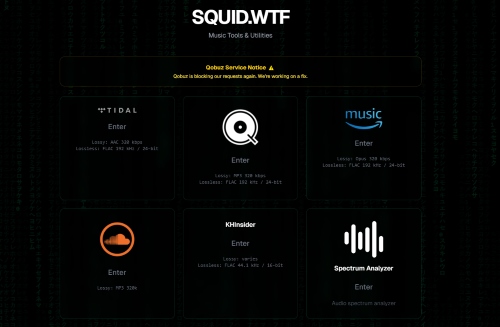
Step 1. Copy the shareable URL of the specific track or album directly from your preferred streaming app. Navigate to the SQUID.WTF website and select the streaming service icon that corresponds to your copied link.
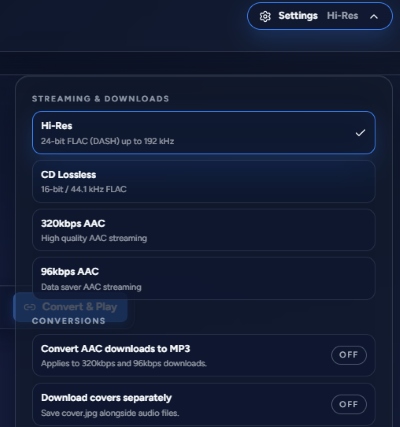
Step 2. Click the "Settings" icon in the upper-right corner to set your desired output fidelity as Hi-Res and toggle options like "Download covers separately" for a better listening experience.
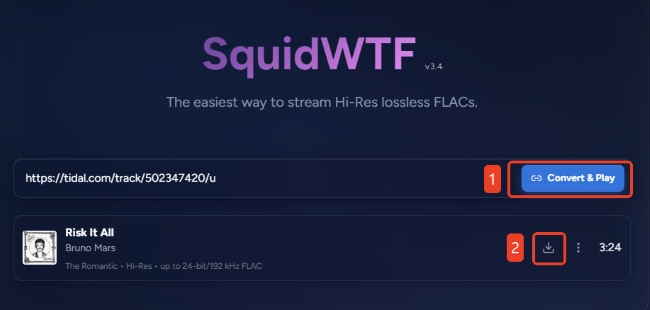
Step 3. Paste your link into the central search bar and click "Convert & Play". Once the platform parses the track data, click the "Download" icon beside the track to save the file, and full hi-res albums may take a few minutes to process.
MusicsHuntersbot
For users who prefer managing their media directly from a mobile device without navigating ad-heavy websites, MusicsHuntersbot is a highly popular Telegram alternative. This free, intelligent chat bot is capable of scraping audio from a wide range of platforms, including Qobuz, YouTube, Spotify, and SoundCloud. One of its standout features is its ability to automatically capture and embed essential ID3 metadata and album artwork directly into the final downloaded file. However, the output audio quality can sometimes be inconsistent, and the bot is known to suffer from slow processing speeds or timeout errors during peak server traffic.
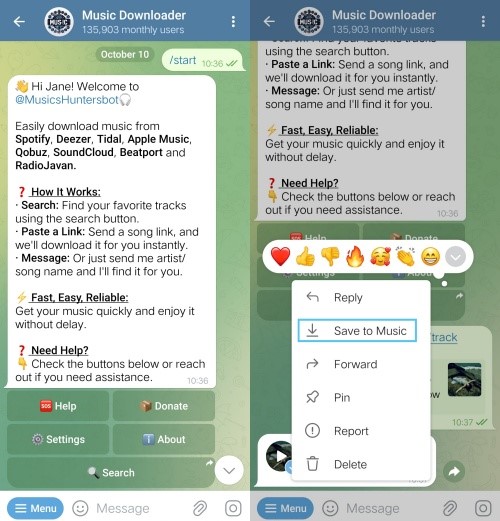
Step 1. Open the Telegram app on your mobile device or desktop, search for the @MusicsHuntersbot handle in the global search directory, and tap the "/Start" button at the bottom of the chat window to activate the service.
Step 2. Send the bot your music request by either typing out the specific artist and track name, or by pasting a direct shareable link from a supported platform like Qobuz right into the messaging interface.
Step 3. Choose your desired output format and quality from the bot's interactive inline menu. Allow a few moments for the remote servers to process the extraction, and then tap the download arrow on the returned audio file to save it directly to your device's local storage.
Lucida.to vs. Its Alternatives
| Feature | Lucida.to | DRmare Recorder | SQUID.WTF | MusicsHuntersbot |
|---|---|---|---|---|
| Tool Type | Web-based | Desktop Software | Web-based | Telegram Bot |
| Stability | Low | High | Moderate | Low |
| Security & Privacy | Low | High | Moderate | Moderate |
| Platform Support | Amazon, SoundCloud (Tidal/Qobuz/Deezer fail) | Qobuz, Deezer, Tidal, Spotify, SoundCloud, Amazon Music, Deezer, etc | Tidal, O̧obuz, Amazon Music, SoundCloud, KHInsider | Qobuz, YouTube, Spotify, SoundCloud |
| Audio Format | FLAC, MP3, WAV, M4A, AAC, OGG | FLAC, WAV, MP3, M4A, AIFF, M4B | FLAC, MP3, AAC | MP3, M4A, FLAC |
| Metadata Handling | ✅ | ✅ | ✅ | ✅ |
| Batch Processing | ✅ | ✅ | ✅ (ZIP available) | ❌ |
| Cost | Free | Paid with free trail | Free | Free |
Part 4. Conclusion
Tools like Lucida.to and SQUID.WTF are highly convenient and are perfect for grabbing a quick song here and there. However, they are fundamentally vulnerable to API changes and server overloads, making them unreliable for bulk music archiving. Telegram bots offer similar convenience for mobile users but often lack granular control over bitrates and metadata.
If you are a serious collector, dedicated software easily outshines the competition. DRmare Streaming Audio Recorder offers a level of consistency that other music rippers simply cannot match. It ensures a near-perfect success rate without the risk of sudden site takedowns, making it the most reliable long-term solution for high-fidelity music downloading.

 Home
Home





User Comments
Leave a Comment