





Choosing between Spotify and Pandora used to be easy. If you wanted a radio station that "just knew" what you liked, you picked Pandora. If you wanted to play specific songs on demand, you picked Spotify.
But in 2025, the lines have blurred. Spotify now has "AI DJs" that mimic radio hosts, and Pandora has a Premium tier that offers full on-demand listening. With Spotify's massive September 2025 update shaking up the free tier, the decision is harder than ever.
In this technical review, we will break down Spotify vs Pandora round-by-round—analyzing their algorithms, audio quality, pricing, and offline capabilities—to help you decide which monthly subscription is actually worth your money.
Round 1: Music Discovery & AI Technology
This is the philosophical heart of the battle. Both Spotify and Pandora want to help you find new music, but they do it in fundamentally different ways.
Pandora: The Music Genome Project
Pandora doesn't care what is popular; it cares about what a song sounds like. Its "Music Genome Project" analyzes every track based on over 400 musical attributes (or "genes"), such as syncopated rhythms, vocal growls, or major key tonality.
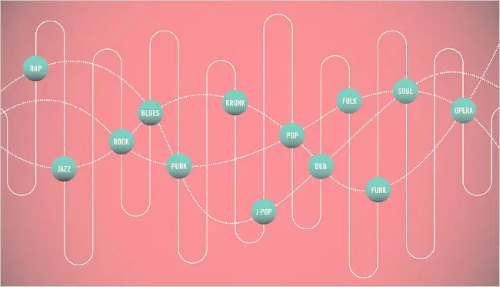
It is the master of consistency. If you create a station based on a specific jazz track, Pandora will find other tracks with that exact sonic signature, even if they are by unknown artists.
Best For: Passive listeners who want a "set it and forget it" experience for work or focus.
Spotify: The Power of Social AI
Spotify relies on Collaborative Filtering. It looks at what millions of other users are doing. If people who listen to The Weeknd also listen to Daft Punk, Spotify recommends that connection to you.
It feels incredibly human and trendy. Features like Daylist (which changes genres based on the time of day) and AI DJ (which adds commentary between tracks) make it feel like a personalized radio station that knows your lifestyle, not just your music taste.
Best For: Active listeners who want to discover what is trending or find music that fits a specific "mood" or activity.
Round 2: Audio Quality and Bitrates
For the casual listener, both sound fine. But if you have invested in quality noise-canceling headphones or a good car stereo, the difference is noticeable.
Spotify Premium streams at approximately 320 kbps using the Ogg Vorbis (and increasingly AAC) format. This provides crisp highs, deep bass, and clear separation between instruments. It is widely considered the industry standard for "high quality" compressed audio.
Pandora Premium, on the other hand, tops out at 192 kbps (AAC). While AAC is efficient, 192 kbps simply captures less data than 320 kbps. In complex tracks with many instruments, Pandora can sometimes sound slightly "muddier" or less dynamic than Spotify.
Winner: Spotify. The numbers don't lie, and neither do your ears.
Round 3: Offline Listening & The "Rental" Problem
Both Spotify Premium and Pandora Premium offer "Offline Listening". However, there is a major catch that most users overlook: You are only renting these files.
When you download a playlist on either app, it saves as a cryptic, encrypted cache file. You cannot move these files to an MP3 player, burn them to a CD, or use them in DJ software. Worst of all, if you ever cancel your subscription or if the service raises its price again, you lose your entire collection instantly.
This restriction is frustrating for music lovers who want true ownership of their curated playlists.
The Solution: DRmare Spotify Music Converter
If you prefer Spotify's superior discovery and audio quality but hate the "rental" restrictions, DRmare Spotify Music Converter offers the perfect middle ground.
It is a specialized tool that bridges the gap between streaming and ownership. It allows you to download Spotify tracks, playlists, and albums as genuine local files (MP3, FLAC, WAV, etc.) completely bypassing the restrictive encryption.
How to Convert Spotify Music to MP3 with DRmare
If you want to backup your library, the process is straightforward:
- Step 1Log In and Customize Settings
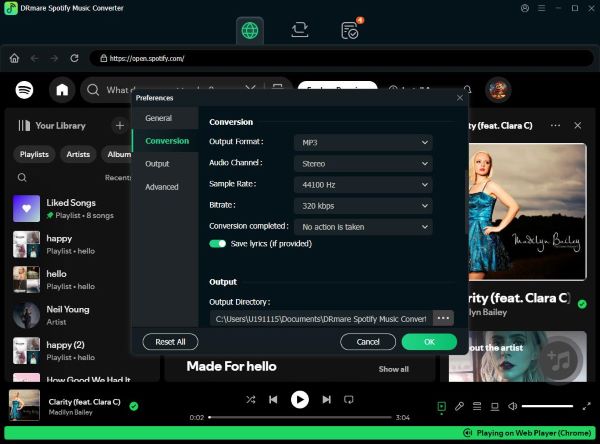
Launch DRmare Spotify Music Converter and log into your Spotify account using the built-in web player. Before choosing music, click the Menu icon (top-right) > Preferences > Conversion. Here, you can set your preferred output format (like MP3) and bitrate to 320 kbps to ensure the highest quality.
- Step 2Select and Add Music
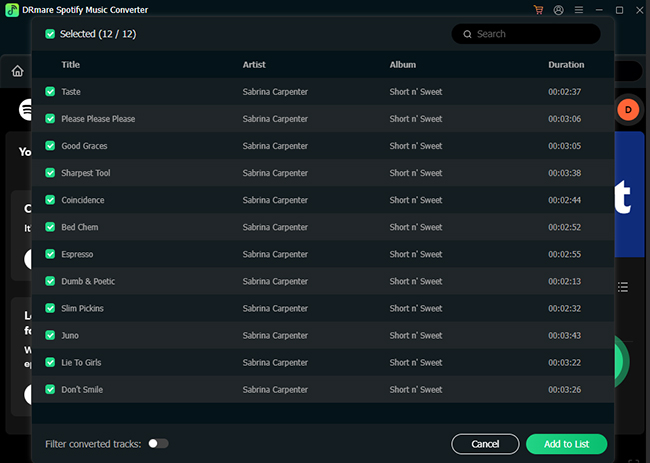
Browse through the built-in Spotify web player to find the tracks or playlists you want to keep. Simply drag and drop the content directly onto the Green Music icon floating in the bottom-right corner. A list will pop up—click Add to list to confirm your selection.
- Step 3Convert and Access Local Files
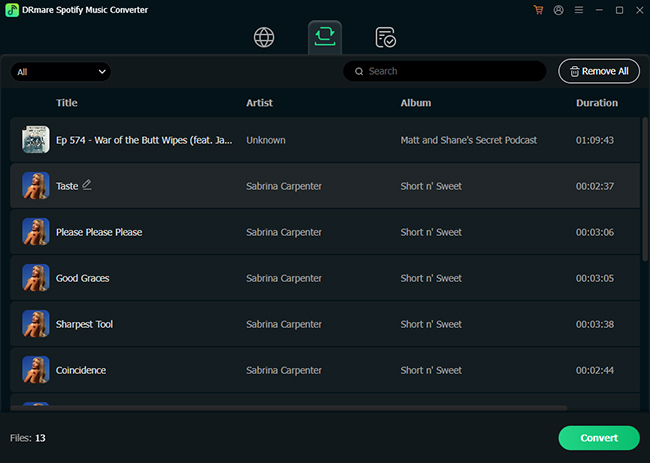
Click the Convert button under the "Converting" tab. The software will automatically download and convert your selected songs in batch. Once finished, navigate to the Converted tab to find your fully offline, unencrypted audio files, ready to be transferred to any device.
Round 4: Pricing and Plans
Price is often the deciding factor. While the individual plans are similar, the "perks" are where the value shifts.
| Plan | Spotify Price | Pandora Price | The Verdict |
|---|---|---|---|
| Free Tier | Free (Ad-supported) | Free (Ad-supported) | Spotify Wins. Its new update allows limited on-demand play ("Pick & Play"), whereas Pandora is strictly radio-only. |
| Individual | $11.99/mo | $10.99/mo | Spotify Wins. For $1 more, you get Audiobooks (15 hrs) and higher bitrate audio. |
| Radio Plan | N/A | $4.99/mo (Plus) | Pandora Wins. If you just want ad-free radio without on-demand hassles, this is the cheapest option. |
| Family | $19.99/mo (6 accts) | $17.99/mo (6 accts) | Tie. Both offer good value, but Spotify includes a dedicated "Spotify Kids" app. |
| Student | $5.99/mo | $5.99/mo | Spotify Wins. It includes Hulu (with ads), making it arguably the best deal in the entire streaming industry. |
Round 5: The Content Ecosystem
In 2025, a music app is rarely just about music.
Spotify has aggressively evolved into an all-in-one audio platform.
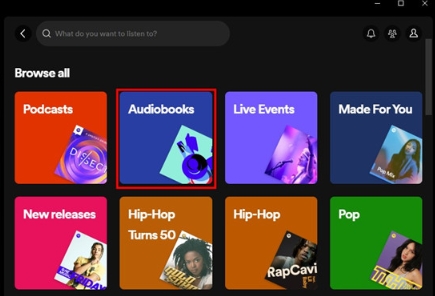
- Podcasts: It hosts over 5 million podcasts, including massive exclusives you can't find elsewhere.
- Audiobooks: Premium users get 15 hours of audiobook listening per month included. This is a huge value add if you casually listen to books.
Pandora remains focused on music. While it has podcasts, the library is smaller, and the discovery interface for them is clunky. It has zero audiobook integration.
Final Verdict: Which One Should You Choose?
After analyzing the keywords, specs, and user experiences for 2025, here is the final breakdown.
Stick with Pandora if:
- You want a traditional "Radio" experience where you don't have to work to find good music.
- You are on a tight budget and the $4.99 Pandora Plus plan fits your needs for ad-free background music.
- You prefer the "Music Genome" style of finding songs that sound similar, rather than what is trending.
Switch to Spotify if:
- You want the best overall value for your money (especially with Audiobooks and Hulu for students).
- You care about audio quality (320 kbps vs 192 kbps).
- You want total control to create playlists and share them socially.
Choose Spotify + DRmare if:
You are a music collector at heart. You want the powerful discovery tools of Spotify to find new tracks, but you refuse to be locked into a "rental" subscription forever. Using them together gives you the best of modern streaming with the permanent ownership of the MP3 era.

 Home
Home





User Comments
Leave a Comment