





Did you just receive an alarming email stating that your Spotify access has been suspended? Whether you are using a Free or Premium plan, losing access to your carefully curated playlists and saved podcasts is incredibly frustrating.
Don't panic! Getting your account restored is usually a straightforward process. Follow this quick guide to appeal your suspension and get your music back online today.
How to Recover a Suspended Spotify Account
- Step 1Initiate a Support Chat
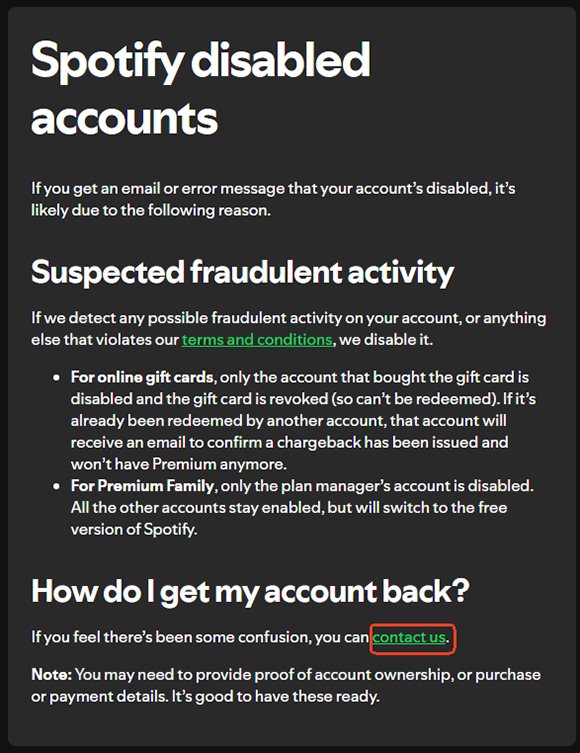
Head over to the official Spotify Disabled Account page. Look for the "Contact Us" section and click it. This will redirect you to a new page where you can begin your appeal.
- Step 2Speak with the AI Assistant
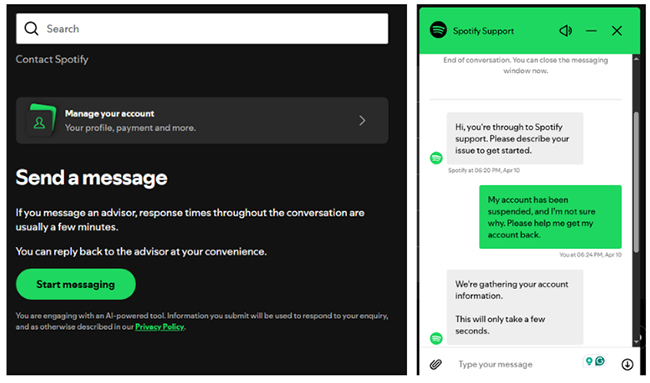
Tap the "Start messaging" button, the chat window will pop up in the bottom right corner of your screen. Send a direct, clear message regarding your issue. You can copy and paste this exact prompt:

After that, the AI chatbot will auto-reply and guide you through a few prompts to successfully locate your account in their system.
- Step 3Agree to the Terms of Service
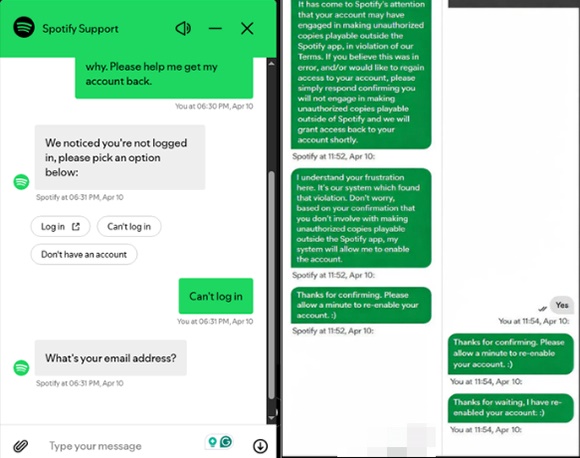
Once your account is located, the bot will send a message asking you to confirm that you will remain in compliance with Spotify's terms and conditions. Simply reply with "Yes".
What Happens Next?
That's it! Shortly after confirming your compliance, Spotify should lift the ban and grant you access to your account once again.
Tips:
- You can try logging in right away, but please note that for security purposes, you will likely be prompted to reset your password before you can return to your normal streaming service. Welcome back to your Spotify music!
- If your account was suspended for high-speed recording due to using the DRmare Spotify Music Converter, it is highly recommended to use a secondary or backup account for this tool in the future. This will help prevent any further issues or bans on your main account.
- If you fail to recover your account, you can use DRmare Spotify Music Converter's new Music Library Backup & Restore feature to easily create secure backups of your Spotify library and restore your playlists to your new account.


 Home
Home





User Comments
Leave a Comment