





When you're trying to watch a video or take a quick break on YouTube, finding that YouTube is blocked on your school or office network can be frustrating, especially on managed school Wi-Fi or Chromebook devices. Although modern firewalls have become increasingly advanced, there are still reliable ways to regain access. In this guide, we'll explore 6 proven methods to get YouTube unblocked at school or elsewhere efficiently and safely.
For managed school Chromebooks, Mobile Hotspots and Web Proxies offer the fastest setup without admin rights. For complete privacy and unthrottled streaming on personal devices, a VPN remains the most reliable solution. Legacy methods like direct IP access or URL shorteners are no longer effective against modern school firewalls.
Part 1. Quick Comparison: 6 Proven Methods to Unblock YouTube at School
How We Tested These Methods:
To ensure our recommendations actually work in real-world scenarios, we tested every method across three controlled, restricted network environments. These environments included a managed school Chromebook, an enterprise Windows laptop behind a Fortinet corporate firewall, and an iPhone connected to public Wi-Fi. We evaluated each approach based on speed, connection stability, setup difficulty, and safety risks. Here are the updated results based on our hands-on testing.
Review the table below to find the best solution for your current device and network restrictions:
| Method | Setup Difficulty | Best For |
|---|---|---|
| Mobile Hotspot | Low | School Chromebooks & personal devices with restricted Wi-Fi |
| Proxy Service | Very Low | Quick browser access without installing heavy applications |
| Reliable VPN | Low | Complete privacy and unthrottled streaming on personal devices |
| Custom DNS Settings | Medium | Bypassing basic network-level domain filters |
| Adjust Local Restrictions | Low | Fixing device-level blocks and Restricted Mode |
| Offline Download | Low | Environments with aggressive, unbeatable firewalls |
Part 2. Network Redirection to Get YouTube Unblocked
If the block is applied to the entire network, you need a way to change how your traffic is routed. These are the solutions for a total unblock on YouTube.
1. Switch to a Mobile Hotspot
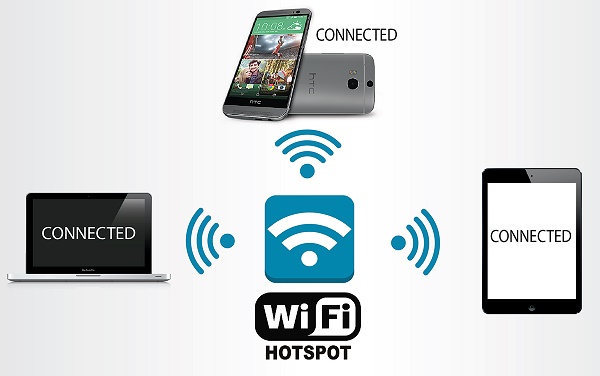
If you're using a Chromebook or a restricted device, switching to a mobile hotspot can help you avoid network-level blocks entirely, making it easy to unblock YouTube at school or on other managed networks.
Step 1. Open "Settings" on your phone and turn on "Mobile Hotspot/Personal Hotspot".
Step 2. Connect to the hotspot network on your Chromebook or tablet. Once connected, you can get YouTube unblocked without restrictions.
2. Route Traffic Through a Proxy (Web & Extension)
A proxy acts as a middleman between your device and YouTube, hiding your actual destination from the network firewall. Depending on your device's administrative restrictions, you can use either a web-based proxy or a browser extension to achieve this.Option A: Use an Online Web Proxy (Best for strict school Chromebooks)
Web proxies require absolutely no installation, making them perfect if your school administrator has blocked access to the Chrome Web Store. You simply visit the proxy site and browse YouTube within its interface.
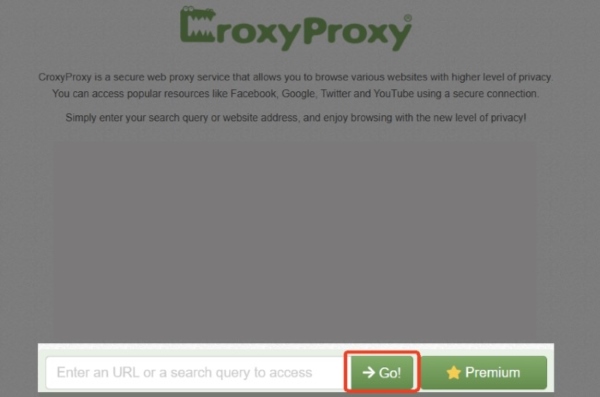
Step 1. Navigate to a reliable web proxy service, such as CroxyProxy or ProxySite. Type youtube.com into the provided search or URL bar. You can also paste a video link if you want to watch any YouTube video unblocked link.
Step 2. Then click the "Go" button. The unblocked YouTube proxy will bypass local restrictions, enabling you to watch YouTube directly within the proxy interface.
Option B: Add a Browser Proxy Extension (Best for personal devices on school Wi-Fi)
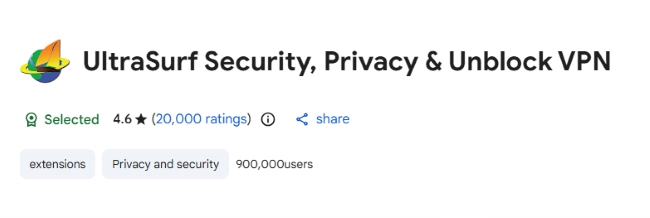
If you are using your own laptop but are connected to a restrictive network, dedicated browser extensions offer a much more seamless and integrated experience. Tools like UltraSurf or Hoxx automatically reroute your entire browser's traffic.
Step 1. Navigate to the Chrome Web Store or your browser's add-on marketplace and search for the VPN extension.
Step 2. Install and toggle it. Most extensions allow you to select a specific country to bypass regional geo-blocks. Refresh your tab to access YouTube with a single click.
3. Use a Reliable VPN
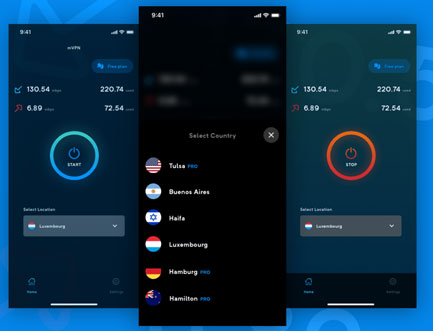
The VPN is a standard method to get YouTube unblocked. It encrypts your entire connection and tunnels it through a server in a different location. This hides the word "YouTube" from your network administrator, making it impossible for the firewall to block your activity.
Step 1. Select and install a reputable privacy tool like NordVPN or Surfshark, which provides the necessary bandwidth for smooth video and music streaming.
Step 2. Launch the app and connect to an unrestricted server. With the connection active, refresh your browser or open the YouTube app, and then you can stream content with YouTube unblocked.
4. Configure DNS Settings
Many network filters rely on "DNS filtering" to misdirect requests for YouTube. If YouTube is blocked by your network's default DNS, switching to a public provider can help you resolve the domain and restore access. It's worth noting that this doesn't encrypt your traffic or bypass all restrictions, especially IP-based blocks.
On Windows & Mac
Step 1. Access your device's network settings, select your active connection, and locate the DNS Server or IPv4 properties.
Step 2. Switch the setting from "Automatic" to "Manual" and input the following addresses:
Google Public DNS: 8.8.8.8 / 8.8.4.4
Cloudflare DNS: 1.1.1.1 / 1.0.0.1
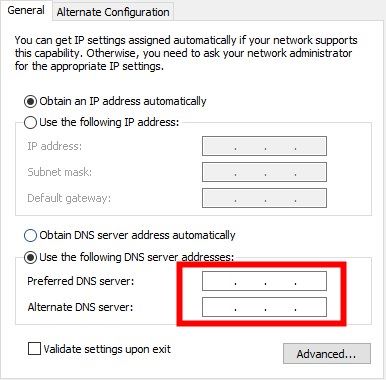
Step 3. Apply the changes and restart your browser, then your computer can correctly resolve YouTube's address and establish a connection.
On Android & iOS
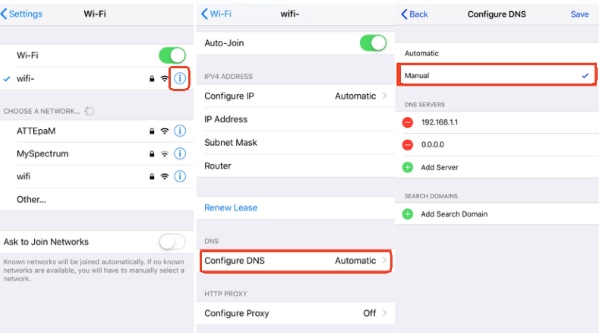
Step 1. Navigate to your Wi-Fi settings and tap the "i" or gear icon next to your current network. Look for "Configure DNS" or "Private DNS".
Step 2. Enter the manual addresses or the hostname.
iOS: 1.1.1.1
Androiddns.google/one.one.one.one
Part 3. Browser and URL Settings to Unblock YouTube Access
In some cases, you don't need to change your entire network to access unblocked YouTube sites. Making small adjustments to your browser settings or the way you access a URL can be enough to unblock YouTube. These browser-level tweaks are often the quickest solution, especially when YouTube is restricted by basic filters.
5. Check Restricted Sites and Mode
YouTube access can be limited by local browser settings or built-in platform filters. In some cases, adjusting these settings on your device is enough to restore a YouTube unblocked experience without changing networks.
Manage Browser-Based Restricted Sites
Browsers like Chrome or Edge have their own internal "blocklists". Even if the network is open, a site listed here will remain inaccessible.
Step 1. Navigate to your browser's "Privacy and Security" settings and find the "Site Settings" menu.
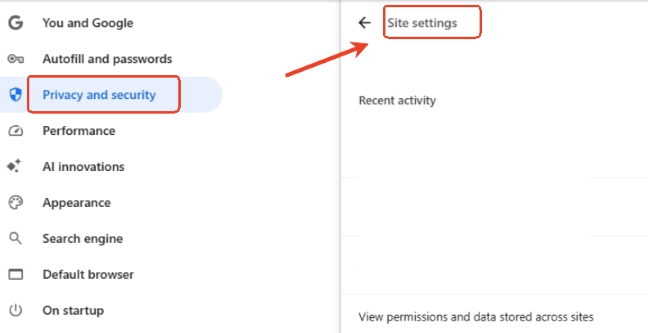
Step 2. Review the list of blocked URLs. If "youtube.com" is present, remove it from the list and restart the browser to restore access and unblock YouTube on Chrome.
Toggle Off YouTube Restricted Mode
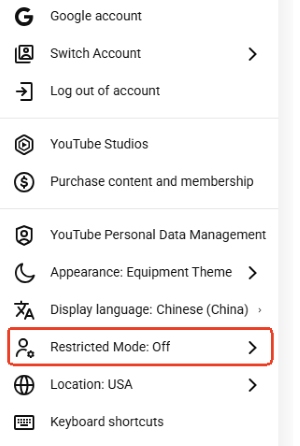
YouTube's Restricted Mode automatically filters content based on video metadata. If search results are missing or certain videos won't play, disabling this option can often help.
Step 1. Select your profile icon on the YouTube homepage and scroll to the bottom of the menu.
Step 2. Click on "Restricted Mode" and toggle the switch to "Off". If the setting is "Locked by Administrator," you may need to use a VPN or the DNS methods mentioned earlier.
Note:
Modifying administrative lists at school or work usually requires elevated permissions. Always ensure you are following local network policies before attempting to alter these settings.
6. Access YouTube Through its IP Address (⚠️Outdated)
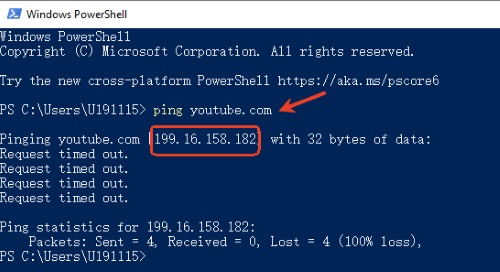
Every web server operates on an IP address, and early web filters only blocked the domain name "youtube.com". By pinging YouTube to get its direct IP address, users historically bypassed basic DNS-level filters.
Modern firewalls easily detect the target IP ranges and inspect HTTPS handshakes using SNI (Server Name Indication). Because Google routes YouTube traffic across dynamic, content-delivery networks rather than a single static IP, entering a raw IP address rarely loads the site today.
Step 1. Open your "Command Prompt" or "Terminal" on your device. Type "ping youtube.com" and press "Enter". The system will display a numerical address.
Step 2. Copy this string of numbers and paste it directly into your browser's address bar in the restricted environment, then hit "Enter".
Note:
Modern firewalls are increasingly capable of blocking IP ranges, and as YouTube uses a vast and rotating network of addresses for different services, a single IP may not load the entire site correctly. Additionally, this offers no encryption or privacy.
7. Change YouTube URL (⚠️Rarely Works)
Altering the URL structure is a traditional trick used to bypass simplistic string-based keyword blocks. In previous years, filters often forgot to restrict secondary domains or altered playback paths.
- Mobile/Regional Domains: Trying `m.youtube.com` or international subdomains like `youtube.ca` can sometimes bypass local blacklists.
- The "Embed" Hack: If a specific video is blocked, change the URL from /watch?v=[ID] to /embed/[ID]. This loads the video in a full-screen player that often lacks the tracking elements firewalls use to trigger a block.
- URL Shorteners: Use a service like Bitly or TinyURL to create a new and disguised link for a YouTube video or music. The network filter may not recognize the shortened link as a YouTube destination.
Note:
Contemporary firewalls analyze traffic at the packet level rather than simply checking URL text strings. While these tricks might still work on very old hardware, they offer no encryption and will fail against any modern network gateway.
Part 4. App-Based Method to Watch YouTube Unblocked
When web-based filters become too aggressive, switching to the app or offline tools can provide a more stable experience. These methods move beyond the traditional browser environment, where most network restrictions are concentrated.
Tips:
If you find that the YouTube website is blocked on your browser, the YouTube app might still be functional. This is because many institutional firewalls are configured to block standard web traffic but may overlook the specific data protocols used by the standalone app. But it is less effective against network-wide IP bans.
8. Download YouTube Video/Music for Offline Playback
The most reliable way to bypass a block is to remove the need for a live connection entirely. By saving your favorite YouTube videos or music in advance, you can watch them unblocked at school or any restricted place.
Save and Watch Unblocked YouTube Videos
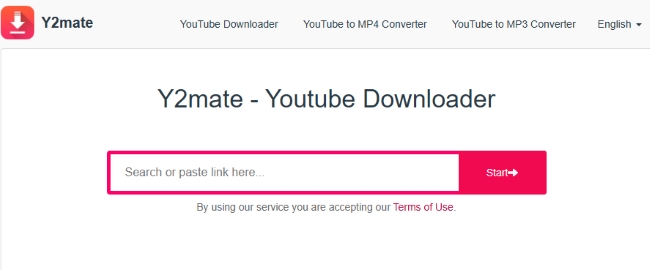
If your primary goal is to watch specific videos rather than browse the entire platform, downloading them for offline viewing is a viable option. Online tools like y2mate allow you to download YouTube videos and watch unblocked YouTube videos anytime, anywhere.
Convert and Download YouTube Music to Play Offline
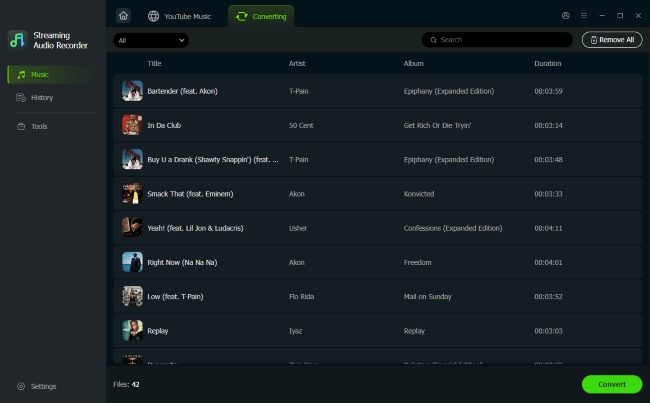
To avoid the lag of proxies or unstable connections, the best way to get YouTube Music unblocked is to remove the network restriction entirely through offline playback. DRmare Streaming Audio Recorder is a powerful solution that allows you to save YouTube audio directly to your device. Because the files are stored locally, they bypass all firewalls and filters, ensuring you can enjoy your favorite unblocked YouTube content at school or the office.
Part 5. FAQs about How to Unblock YouTube
Why is YouTube blocked at school or workplace?
YouTube access is typically restricted for four primary reasons. Schools and workplaces often block YouTube sites to minimize distractions and conserve network bandwidth, while certain governments impose nationwide restrictions to maintain social stability. Additionally, content creators frequently "geo-fence" videos to comply with regional copyright and licensing agreements, and YouTube itself utilizes age-gating or "Restricted Mode" to filter out sensitive content for younger or unverified users.
How to unblock YouTube on a school Chromebook?
Since Chromebooks are often heavily managed by school administrators, your best options are web-based solutions that don't require software installation. Try using a reputable web proxy or a Mobile Hotspot to bypass the school's managed Wi-Fi entirely.
How to unblock YouTube on family link?
Restrictions on Family Link are controlled by the parent account. To change these:
- Open the Family Link app on the parent's device and select the child's profile.
- Navigate to "Controls > Content Restrictions > YouTube".
- Adjust the "Content Setting" or toggle off Restricted Mode.
Is it safe and legal to unblock YouTube?
In most regions, using an unblocker is not illegal, but it may violate the "Acceptable Use Policy" of your school or workplace, potentially leading to disciplinary action. Regarding safety, paid VPNs are generally very secure. However, be extremely careful with "free" proxy sites or unknown browser extensions, which often contain malicious ads or track your data.

 Home
Home




Get YouTube Music unblocked for offline listening by saving songs as local MP3, FLAC, WAV, M4A, AIFF, or M4B files with full metadata.