





Is there anything more frustrating? You're trying to focus on studying or get through the workday, you pull up SoundCloud for the perfect playlist, and you're hit with that dreaded "Access Denied" message. This happens all the time on school, work, and even public Wi-Fi networks. But why does it happen? And more importantly, what can you do about it?
This guide will show you how to get SoundCloud unblocked. We'll expose the hidden dangers of those so-called "quick fixes" you see online and show you safe, reliable ways to keep your Soundcloud playing. Let's dive in and find the best solution for you.
Part 1. Why Is SoundCloud Blocked? 7 Ways to Unblock It
The dreaded "Access Denied" message usually happens because schools and workplaces use IP blocking, DNS filtering, or device restrictions to save bandwidth and minimize distractions. In other cases, regional music licensing is the real culprit behind the block.
Understanding how these restrictions work makes it easier to bypass them. Before diving into the step-by-step tutorials, we've summarized 7 proven methods in the quick comparison table below so you can instantly find the most effective workaround for your specific situation.
| Unblocking Method | Difficulty | Streaming Speed | Recommendation & Notes |
|---|---|---|---|
| VPN | Easy | ⚡ Fast | ⭐⭐⭐⭐ Secure & fast. However, reliable ones require a paid subscription. |
| Web Proxy | Easy | 🐢 Buffers | ⭐⭐ High privacy risks and loaded with spam ads. |
| Browser Extensions | Easy | Normal | ⭐⭐⭐ Convenient, but often unstable and prone to data leaks. |
| Change Custom DNS | Medium | Normal | ⭐⭐⭐ Free & safe, but often fails against strict school/work firewalls. |
| Tor Browser | Easy | 🐢 Slow | ⭐⭐ Top anonymity, but painfully slow. Unsuitable for music streaming. |
| Alternative Websites | Easy | ⚡ Fast | ⭐⭐ Good for music discovery, but doesn't actually unblock your SoundCloud account. |
| DRmare Streaming Audio Recorder | Easy | ⚡ Fast | ⭐⭐⭐⭐⭐Download tracks in advance for unrestricted offline playback anywhere. |
Part 2. How to Use VPN to Unblock Soundcloud at School or Work
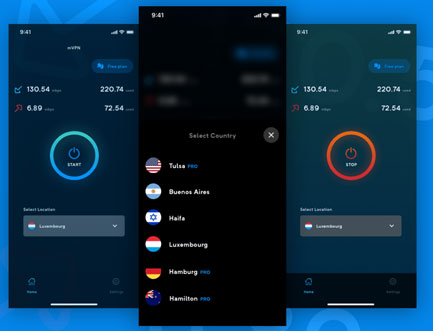
If you're looking for a more robust and secure method than a web proxy, using a Virtual Private Network (VPN) is the gold standard for how to unblock SoundCloud. A VPN creates a private, encrypted "tunnel" for your internet connection. Think of it as a secure pipeline that hides all your online activity from your local network's firewall. This makes it a highly effective tool to get SoundCloud unblocked at school or work, as the network administrators can't see what websites you are visiting.
Using a VPN is a straightforward process that provides a stable and private connection.
Step 1. Choose a Reputable VPN Service. First, select a well-reviewed, trustworthy VPN provider. While free VPNs exist, reputable paid services offer much better speed, reliability, and security, ensuring they won't log or sell your data.
Step 2. Install the VPN App on Your Device. Next, create an account and install the provider's application on the desired device (PC, Mac, Chromebook, smartphone, etc.)
Step 3. Connect to a Server.This is the crucial step. Launch the app and connect to a server in a country where SoundCloud is fully accessible.
Step 4. Enjoy Unrestricted Access With the VPN connected, simply open your web browser or the SoundCloud app. You will find you have full access, with SoundCloud unblocked and ready for you to stream your favorite music securely and without interruption.
Part 3. How to Use Web Proxy Sites to Get Soundcloud Unblocked
Searching for "SoundCloud unblocked" will quickly lead you to web proxies—sites often named "Unblocked 66" or similar. They are a popular quick-fix that works by acting as a middleman. You connect to the proxy site, and it fetches the SoundCloud page for you, hiding your activity from your school or work's network filter.
Using one of these sites is straightforward, and it's why they are so popular.
Step 1. Find a proxy website. The terms like "web proxy sites," will lead you to them.
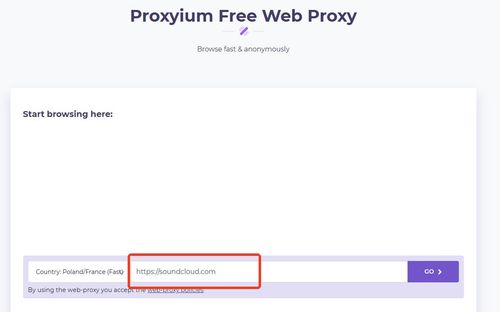
Step 2. Look for the URL bar. On the proxy's homepage, there will be a text box where you can enter a web address.
Step 3. Enter the SoundCloud URL. Type "https://soundcloud.com" into the box and click the 'Go' or 'Enter' button next to it.
Step 4. Browse SoundCloud. The proxy site will load SoundCloud within its own page, allowing you to browse and listen.
Note:
There are significant downsides to using free proxies. They are often incredibly slow, making music a frustrating, buffer-filled experience. More importantly, they are not secure. These sites frequently track your Browse activity, are loaded with aggressive ads, and you should never enter sensitive login information while using one, as your data could be exposed.
Part 4. Unblock Soundcloud with Mobile Hotspot
Perhaps the simplest way to get SoundCloud unblocked doesn't involve any special software at all—just the phone in your pocket. The restriction is tied to the school or work Wi-Fi network, not your personal mobile data plan. By using your smartphone as a mobile hotspot, you create your own private Wi-Fi network that completely bypasses their firewall.
To do this, simply enable the "Personal Hotspot" or "Tethering" feature in your phone's settings, then connect your laptop or Chromebook to this new network. You'll immediately unblock SoundCloud and any other restricted sites. The major downside, however, is data consumption. Streaming music uses a lot of mobile data, which can get expensive if you don't have an unlimited plan. While this method is perfect for getting SoundCloud unblocked at school for a short study session, it's not ideal for hours of continuous listening.
Part 5. Soundcloud Unblocked By Changing DNS Server
If your school or workplace uses basic network filtering, changing your device's DNS settings can be an effective workaround. Think of DNS as the internet's phone book. When a local network removes SoundCloud from its default directory, you can manually switch to free public DNS services to find the website's address again. Choose a public DNS server to use. The most popular and trusted options are:
- Cloudflare: 1.1.1.1 and 1.0.0.1 (hostname for Android: one.one.one.one)
- Google: 8.8.8.8 and 8.8.4.4 (hostname for Android: dns.google)
Setup for Computers (Windows & macOS)
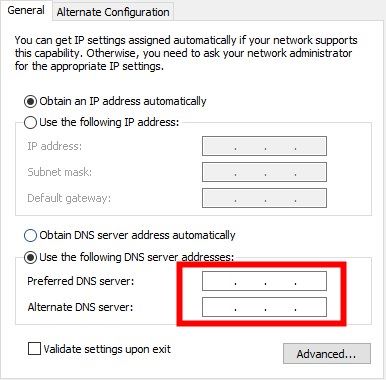
Step 1. Open your computer's Network or Wi-Fi settings and view the properties (or "Details") of your current connection.
Step 2. Locate the DNS configuration (usually found under IPv4 settings or the "DNS" tab) and change the setup from "Automatic" to "Manual".
Step 3. Type the public DNS addresses provided above into the DNS fields, save your settings, and refresh your browser.
Setup for Mobile Devices (iOS/Android)
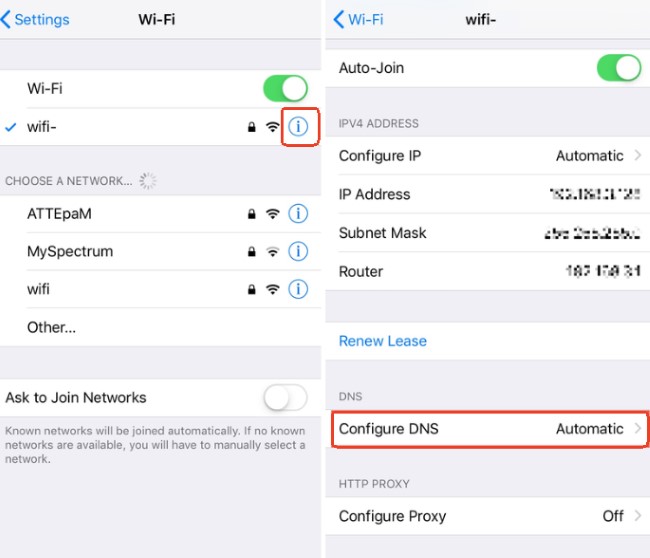
Step 1. Open your phone's Wi-Fi settings and tap the details icon (like the "i" or gear icon) next to your connected network.
Step 2. Scroll down to find "Configure DNS" (on iOS) or "Private DNS" (on Android) and switch it to "Manual" mode.
Step 3. Clear any default addresses, enter your new public DNS or hostname, and save the changes.
Note:
Many school-issued tablets or company computers have strict administrative locks on advanced network permissions. If you find these settings are grayed out or unclickable, it means your device restricts this action, and you will need to try other unblocking methods.
Part 6. Unblock Soundcloud Com with Tor Browser
For those who prioritize privacy above all else, the Tor Browser is another powerful tool that can unblock SoundCloud. Tor is famous for its ability to provide a high degree of anonymity by routing your internet traffic through multiple layers of encryption, run by a global network of volunteers. This process makes it virtually impossible for your local network administrator to monitor your online activity. Bypassing firewalls with this method guarantees a secure and entirely unblocked SoundCloud experience.
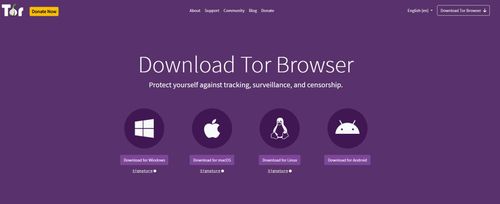
Step 1. Download the Tor Browser from the official Tor Project website. It's free and available for Windows, macOS, Linux, and Android.
Step 2. Launch the Tor Browser and click "Connect." It will automatically establish a secure, anonymous connection to the Tor network.
Step 3. Once connected, simply type soundcloud.com into the address bar and browse as you normally would.
Tips:
The major trade-off when using the Tor Browser is its speed. Because your connection is bounced between multiple computers around the world for maximum privacy, it becomes very slow. This makes it less than ideal for streaming on SoundCloud, as you will likely experience constant buffering, long loading times for songs, and potentially lower audio quality.
Part 7. Explore School-Friendly SoundCloud Alternative Sites
When you are struggling to figure out how to get SoundCloud unblocked at school, exploring alternative audio platforms is often the safest and easiest route. Many educational and royalty-free music libraries are viewed as low-risk by network administrators, meaning they usually bypass strict campus firewalls completely. Finding a reliable alternative to a SoundCloud website unblocked workaround is a fantastic way to keep your audio flowing smoothly without violating any school network policies.
Below is a quick overview of some excellent platforms you can try for music streaming:
| Platform | Sites | Best For | Key Features |
|---|---|---|---|
| Free Music Archive (FMA) | freemusicarchive.org | Broad genre exploration | Massive library of original, royalty-free tracks. |
| Jamendo Music | jamendo.com | Discovering independent artists | Free streaming of independent music for personal use. |
| Soundzabound | soundzabound.com | K-12 education and study time | Royalty-free music licensed specifically for schools. |
| Musopen | musopen.org | Classical music lovers | Public domain classical music and educational sheet music. |
| Lofi.co | lofi.co | Focus and background noise | Continuous, relaxing lo-fi hip hop beats for studying. |
Tips:
For a deeper dive into campus-friendly entertainment, check out our comprehensive guide to unblocked music sites. If you need a break between classes, you can also explore the free unblocked movie sites for school to safely upgrade your digital downtime.
Part 8. The Ultimate Solution to Unblock Soundcloud
While proxies, VPNs, and DNS tricks can be effective, they often feel like you are fighting a constant, exhausting battle against ever-changing network blocks. What if you could sidestep the school firewall or workplace filter entirely? The ultimate solution to keep your audio playing is by using a high-fidelity tool like the DRmare Streaming Audio Recorder. Instead of relying on an unstable connection or a risky proxy site, this professional-grade software acts as a secure downloader. It uses a built-in web player to save your favorite tracks as multiple audio files. This ensures you always have access to unblocked SoundCloud music, letting you enjoy a seamless SoundCloud unblocked experience without internet restrictions.
- Lossless Audio Quality: Captures high-fidelity sound that remains 100% faithful to the original recording.
- Smart Auto-Organization: Automatically preserves essential song details, including titles, artists, and high-quality album art.
- Effortless Batch Recording: Downloads full playlists or albums in a single click with automatic, precision track splitting.
- Local & Secure Operation: Runs locally on your computer to eliminate the security and privacy risks of online tools.
Building Your Offline SoundCloud Library with DRmare
- Step 1Set Your Output Preferences

Before you begin, it's a good idea to choose your preferred audio format. Click the "Settings" icon in the lower-left corner, select "Music" tab. Here you can choose your desired output format, like MP3 for universal compatibility or FLAC for true lossless quality.
- Step 2Select SoundCloud and Log In
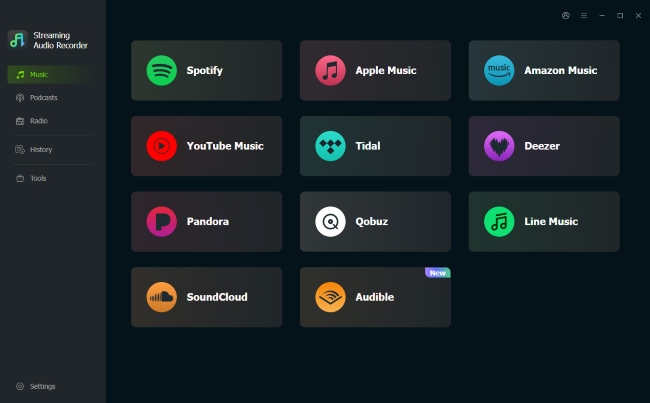
From the main screen of the software, click on the SoundCloud icon. This will open the SoundCloud web player directly within the DRmare application. Log into your SoundCloud account as you normally would.
- Step 3Add SoundCloud Tracks for Conversion
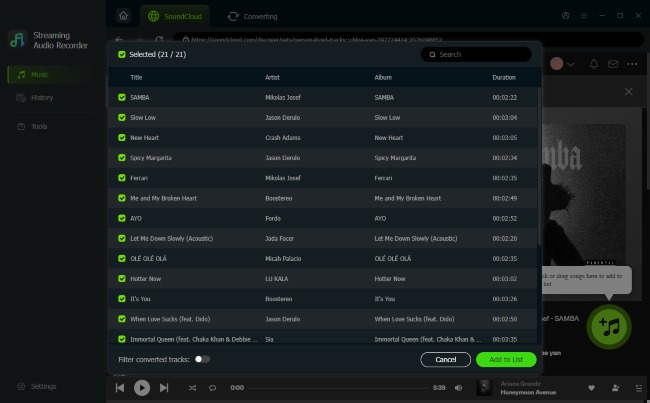
Navigate to the playlist, album, or track that you want to save. Once you have the page open, click the "Add" button (it looks like a plus sign) on the side of the interface. The software will analyze the page and load all the available tracks into a conversion list.
- Step 4Download Your SoundCloud Music
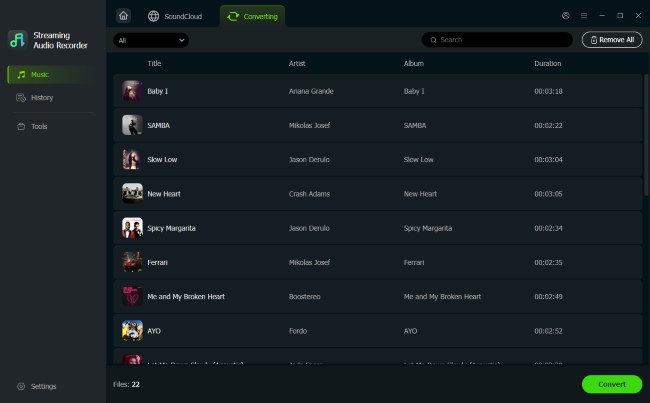
After the tracks are added to the list, simply click the "Convert" button to save all the selected tracks in the format you chose earlier. Once the process is complete, click on the "History" tab to see all your newly saved music. These files are now ready to be transferred to any device for a truly SoundCloud unblocked experience, permanently.
Part 9. Conclusion
In the end, you have several ways to get SoundCloud unblocked. Quick fixes like web proxies work but are slow and insecure, while a good VPN offers the safest way to get live access. Other tricks like using a mobile hotspot or changing your DNS can also help in a pinch.
However, the only way to permanently defeat any block is to download your music for offline listening. Using a tool like DRmare Streaming Audio Recorder to build your own personal library is the ultimate solution, giving you guaranteed, interruption-free access to your favorite tracks anywhere, anytime.

 Home
Home





User Comments
Leave a Comment