





 Audio Capture


If you were browsing the mobile web back in the early 2010s on a feature phone, chances are Waptrick was your go-to hub. It was lightweight, remarkably fast on slow networks, and packed with free MP3s, games, and wallpapers. But times have changed. With the rise of modern streaming services, I wanted to see if this old-school site is still usable today? Here is what I found during my recent testing in Waptrick music downloads, along with a far more reliable way to build your offline music collection.

What Exactly Was Waptrick?
In its glory days, Waptrick gained massive popularity because it made downloading content completely painless, no account setup, no lengthy registration forms, just instant access. It offered free downloads of music (MP3s), videos, wallpapers, and games. When I revisited the site recently, I noticed the layout still retains that classic, minimalistic feel. The music section is organized into straightforward categories:
- New Music
- Most Downloaded Music
- Popular Music
- Genre-specific sections (e.g., Rock/Metal, Electronic, Classical, TV/Movie Soundtracks)
However, behind the simple interface lies a major catch: almost everything hosted on Waptrick comes from unverified, user-uploaded sources. That brings up big questions about both file quality and overall safety.
What Happened to www.waptrick.com?
To put it plainly, the site has seen better days. As most listeners shifted to platforms like Spotify or Apple Music, sites like waptrick.com quietly faded into the background. During my test run, the music library felt severely outdated. Worse still, the site's basic functionality seems broken. When I tried clicking around to preview or fetch songs, many files simply wouldn't play or load at all.
How to Download Waptrick MP3 Music for Free (Tested)
Out of curiosity, I attempted to go through the classic download process step-by-step to see if it was still doable. Here is what I did:
Detailed Steps to Waptrick Music MP3 Download
Step 1. I opened my Chrome browser and go to the official WapTrick.com site: https://waptrick.com/en/mp3_music/.

Step 2. On the website, I used the search tool to look for a few popular tracks, and also tried browsing through the "Popular Music" section.

Step 3. Once I selected a track, I landed on the song page and clicked the primary Download button.

The Result:
Unfortunately, the download function failed every single time. Instead of saving an MP3 file to my device, I was greeted with a blank page displaying a blunt error message: "Gone, An error has occurred."
Is Waptrick Safe to Use Today?
Even if you manage to find a working link, I'd suggest proceeding with extreme caution. In my testing, clicking around the site frequently triggered intrusive redirects and sketchy pop-up windows. Downloading unverified files from unencrypted servers like this poses real security risks, including potential malware or aggressive adware infections.
Best WapTrick Alternative to Download MP3 Music
Since Waptrick is practically unusable now, you need a safer alternative if you want actual audio files stored on your drive. While streaming apps are great for daily listening, they keep you locked within their ecosystem—you don't actually own the files, and you can't export them to use in custom mixes, personal projects, or older media players.
During my search for a practical solution, I tested DRmare Audio Capture, and it turned out to be a solid workaround. Rather than relying on risky direct-download sites, it works by recording audio directly from whatever app or browser playing sound on your computer. It can also save your music in lossless formats like FLAC and WAV, or high-bitrate MP3 and M4A for playing them on any device as you want.
How to Download MP3 Music via WapTrick Alternative
Step 1. Download and install DRmare Audio Capture on your computer. Open the program, and click the 'Select/Add an App' button to add the desired source application.
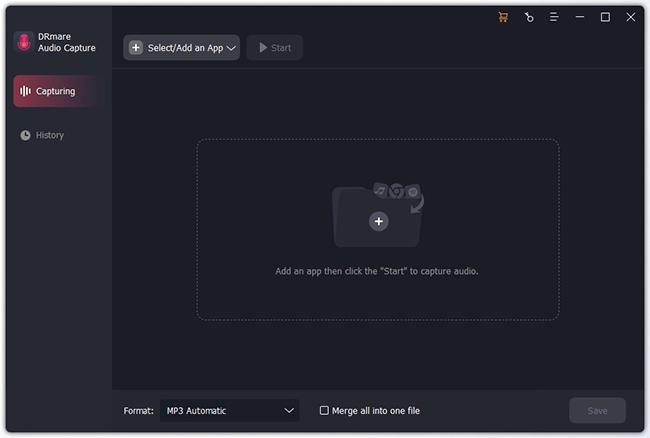
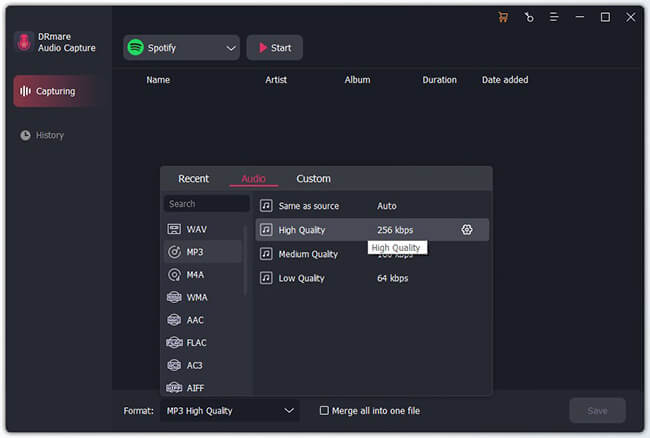
Step 2. Before downloading, click the 'Format' icon at the bottom left to open the settings window. Here, you can choose your output format (MP3, FLAC, WAV, M4A, etc.). You can also customize the codec, sample rate, and bit rate to ensure you get the exact audio quality you want. For most users, MP3 at 320 kbps is an excellent balance of quality and file size.
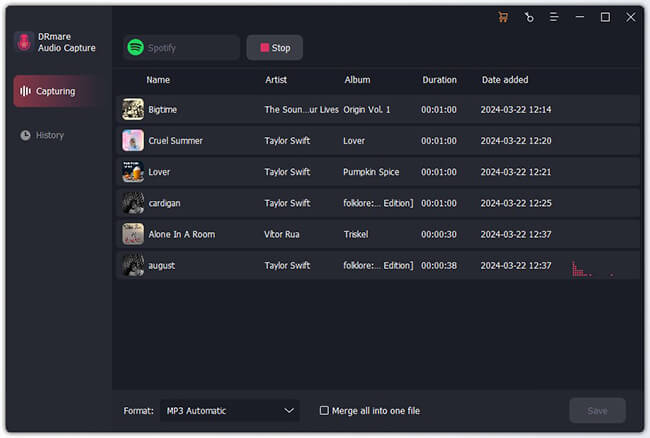
Step 3. Tap the 'Start' icon, and DRmare Audio Capture will open the target application. Simply navigate to the song, album, or playlist you want and begin playing it. It will automatically detect the audio and begin the recording process, intelligently splitting tracks and capturing metadata like the artist and song title.
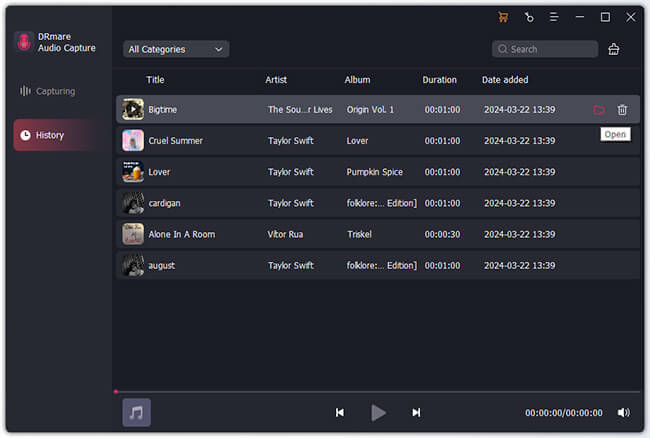
Step 4. Once the music has finished playing, stop the recording. You can now see the captured tracks in the DRmare window. If needed, you can click the 'Edit' icon on each track to trim any unwanted sections. When you are satisfied, click the 'Save' button. Your high-quality music files will be saved to your computer, ready for offline listening on any device.
Conclusion
Waptrick certainly holds a nostalgic spot for anyone who frequented the mobile web a decade ago, but as a functional free MP3 music downloader today, it's pretty much a dead end. Between dead links, download errors, and questionable security, it's simply not worth the hassle.
If you like having full control over your offline music library, using a reliable tool like DRmare Audio Capture gives you a clean, safe, and flexible way to save audio from almost any source without risking your device.

 Home



User Comments
Leave a Comment