





Deezer allows subscribers to download music for offline listening, but you can only find it completely locked to the Deezer app. This is caused by Digital Rights Management (DRM), designed to prevent audio files from being copied or transferred. If you want the freedom to listen anywhere, you will need a reliable way to bypass the DRM restriction. This guide explores the most effective tools and methods for Deezer DRM removal, helping you unlock your music for personal offline listening safely.
Part 1. Does Deezer Have DRM
Yes. Like most major streaming services, this platform utilizes DRM technology to protect its massive audio catalog from unauthorized distribution. When you purchase a premium subscription and download tracks to your smartphone or computer, you are not actually receiving standard audio files like MP3s or FLACs. Instead, the app downloads encrypted cache files that are completely unreadable by standard media players, car stereos, or DJ software.
Part 2. The Best Deezer DRM Removal Tool
The encryption ensures that the music can only be played within Deezer while your subscription remains active. Once your plan ends, you immediately lose access to all your saved offline Deezer tracks. So you'll need a reliable DRM removal tool for Deezer to secure a permanent backup of your favorite songs.
DRmare Streaming Audio Recorder is an effective solution for removing DRM from Deezer music by bypassing encryption without accessing protected cache files directly. It allows you to download Deezer songs and albums as permanent local files while preserving original audio quality and full ID3 metadata. With support for batch conversion and stable performance, it provides faster and more reliable results than most tools, making it ideal for building a complete DRM-free Deezer library.
How to Remove Deezer DRM by Desktop Deezer Music Downloader
- Step 1Change Output Settings to Strip DRM from Deezer
Launch DRmare Streaming Audio Recorder and access the menu to configure your desired audio parameters. Navigate to "Settings" and select the "Music" tab to choose your output format, ensuring lossless quality before you strip DRM from Deezer tracks. Once your preferences are saved, click the built-in platform icon and log in to your streaming account.

- Step 2Select the Deezer Music You Want to Unlock
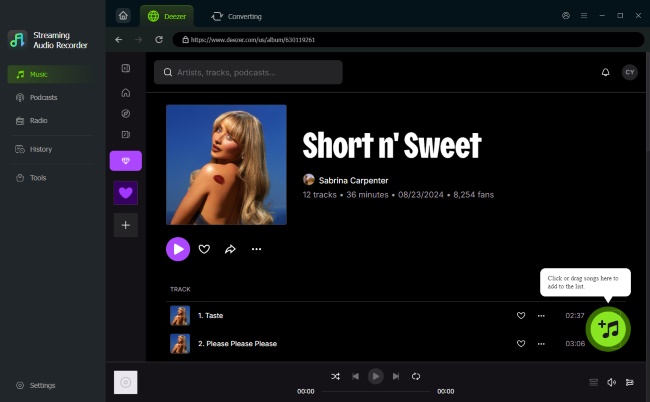
Back to the main interface and choose Deezer from the platforms, then utilize the integrated Deezer Music web player to explore your library. Locate and open the playlists you want to save and click the "Add" button on the right-lower. This allows you to preview your selected tracks to your queue and then hit "Add to List" to load them for the downloading.
- Step 3Bypass Deezer DRM and Decrypt Files Losslessly
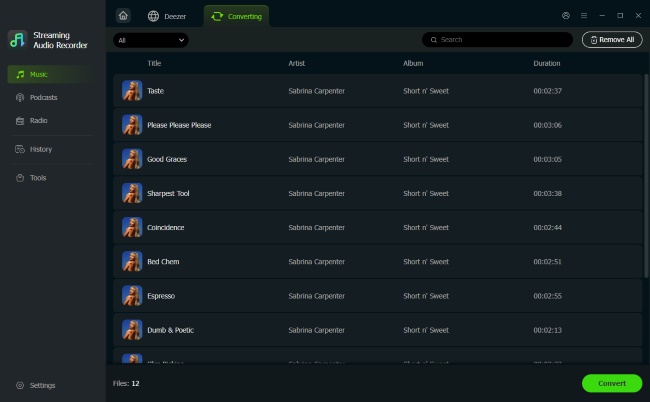
Move over to the "Converting" tab within the interface and hit the "Convert" button to officially bypass Deezer DRM. The app will immediately begin to decrypt Deezer music, saving the files directly to your local drive without any quality loss. As soon as the conversion process wraps up, you can locate all your unlocked and playable Deezer files in the "History" history tab.
Part 3. Other Tools to Remove DRM from Deezer
While dedicated desktop software offers the most reliable way to remove Deezer DRM, it is not the only option available. You may also consider several alternative approaches, including online tools, open-source solutions, and audio recording software. Each of these alternatives provides a unique way to unlock Deezer DRM based on your preferences.
Bypass Deezer DRM via Online Tools
Using a dedicated Deezer downloader online is a convenient approach to removing DRM from Deezer for casual listeners. It allows you to grab a few tracks quickly from your browser, eliminating the need to install third-party apps on your hard drive.
How to Strip DRM from Deezer without Installing Software
Step 1. Open the Deezer app or the web player to locate the specific songs you want to keep. Click the share icon next to your selected audio and copy its unique URL to your clipboard.
Step 2. Navigate to a reliable web extractor like the Lucida site. Paste the copied link straight into the prominent search bar, then hit the "Go" button to let the platform analyze the track data.
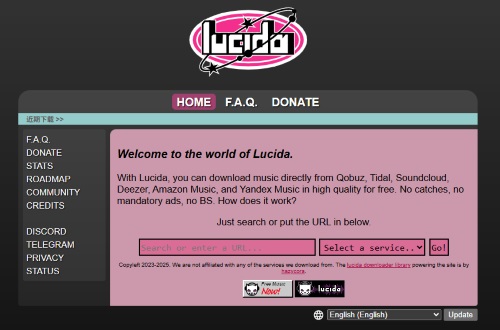
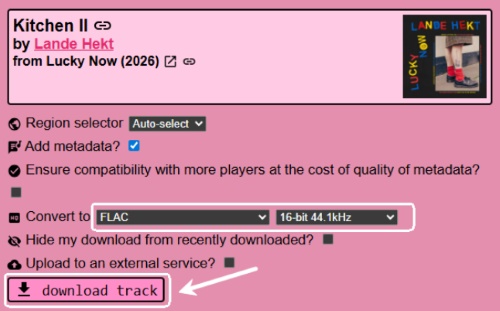
Step 3. Once the website successfully parses the link, you will be prompted to choose your preferred audio format and bitrate. Then click the final "download track" button to strip DRM from Deezer and save the decrypted file directly to your device.
Note:
Free online downloaders frequently suffer from slow download speeds, server crashes, or sudden domain takedowns. If you need to process massive playlists or simply want a consistently reliable experience, turning to a desktop solution like DRmare Streaming Audio Recorder remains the superior choice.
Unlock Deezer DRM Using Open-Source Tools
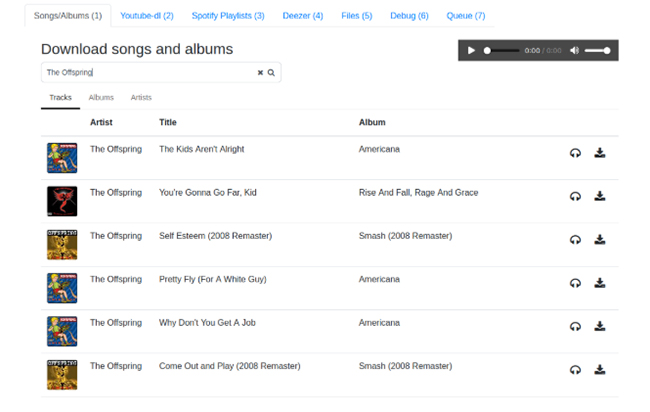
For more technically inclined users, open-source projects hosted on platforms like GitHub offer a powerful way to decrypt Deezer music. Projects such as Kmille's Deezer Downloader utilize specific user login tokens to authenticate your premium account and directly download unencrypted files.
How to Decrypt Deezer Music with Deezer Downloader on GitHub
Step 1. To kick off this open-source method, ensure you have Python correctly installed on your operating system. Open your command prompt or terminal window and execute the command "pip install --user deezer-downloader" to install the required package and its dependencies.
Step 2. Launch a web browser, such as Chrome or Firefox, and log in to your premium streaming account. Press the F12 key to bring up the Developer Tools panel, then navigate directly to the "Application" or "Storage" tab. Search through your active cookies until you find the arl token and copy it to your clipboard.
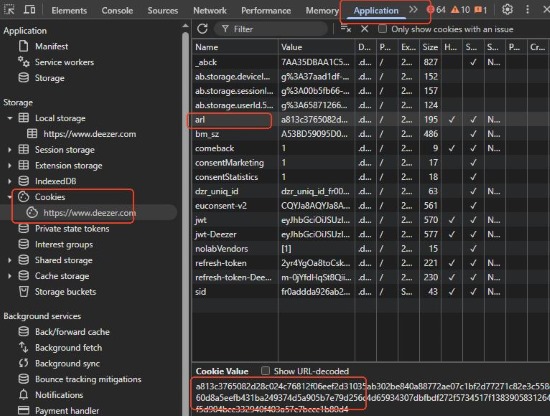
Step 3. This extracted token acts as your digital key to unlock Deezer DRM. You must generate a configuration file by running "deezer-downloader --show-config-template > config.ini" in your terminal. Open the newly created config.ini file in a text editor, paste your ARL cookie where prompted, and customize your download folder paths.
Step 4. Start the background service through your terminal, which will launch a local web server on your machine. Open a new tab in your regular web browser and type in the local address provided in the terminal to access the downloader's front-end interface.
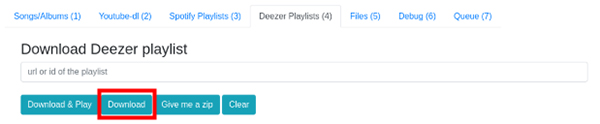
Step 5. Within this local dashboard, you can paste complete playlist URLs into the designated field. Initiate the transfer to successfully decrypt Deezer music and save the DRM-free tracks directly to your designated local folder.
Note:
Relying on a user-provided ARL token means you are extracting and handing over your personal login credentials to a third-party application. This poses a significant account security risk. If you are uncomfortable exposing your authentication tokens or dealing with complex setups, the desktop solution is a much safer alternative.
Remove Deezer DRM with Audio Recording Software
Another effective way to remove Deezer DRM is by using a versatile recording tool--DRmare Audio Capture. Instead of dealing with encrypted Deezer files directly, this software captures the audio during playback and saves it as standard formats such as MP3, FLAC, or M4A. With its stable recording process and customizable output settings, it enables you to create Deezer music files without DRM restrictions.
How to Remove DRM from Deezer with DRmare Audio Capture
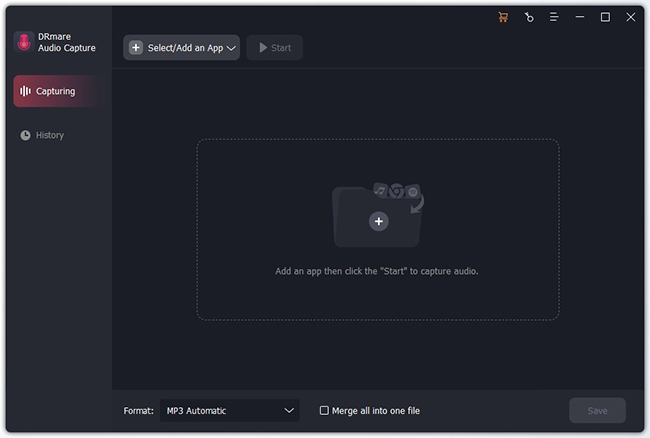
- Step 1Launch the Program and Select Your Source.
Begin by opening DRmare Audio Capture on your desktop. You will be greeted by a list of application icons. If the list is missing, simply click the "Select/Add an app" button to manually include the target application in the recording list.
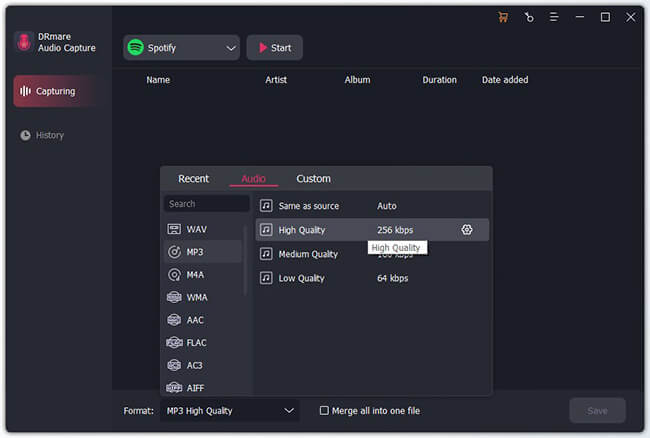
- Step 2Define Your Output Parameters
Click on the "Format" icon to open the configuration window. Here, you can select the specific file type you want for your decrypted library. You can also adjust the codec or channel to ensure your saved files meet your specific audio quality standards.
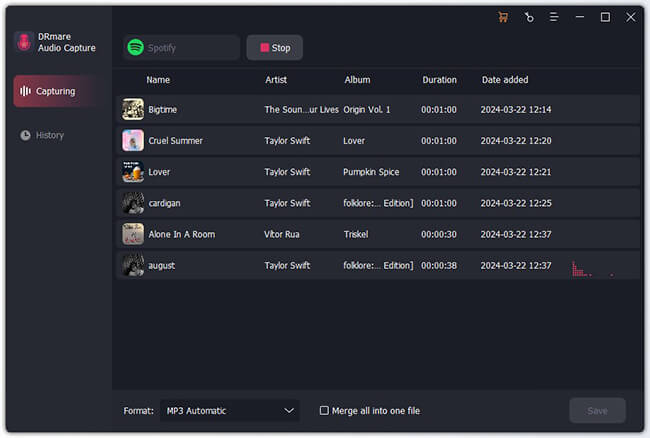
- Step 3Record and Decrypt Deezer Music
Once your settings are finalized, click the "Start" button to initiate the capture mode, which will launch your chosen app or browser. Simply play the music as you normally would; the software will automatically detect the audio signal and begin the recording process in a dedicated window.
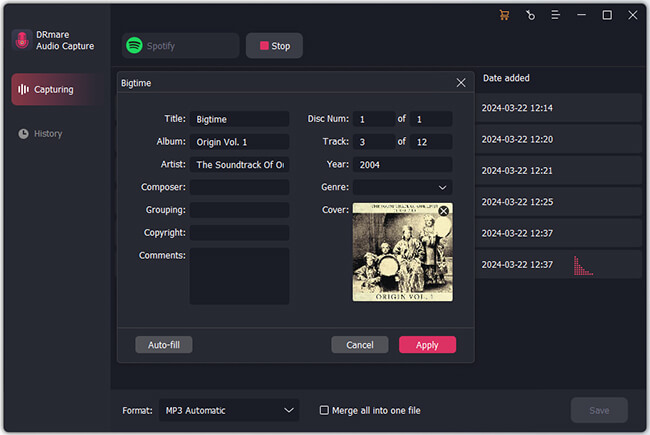
- Step 4Refine Your Recorded Tracks
Once the music stops, you can trim unwanted silence, cut specific segments, and manually edit the ID3 tags to keep your library perfectly organized before saving.
- Step 5Finalize Your Offline Library
After editing, click the "Save" button to store the DRM-free tracks on your computer. You can now locate these files in your local folder and transfer them to any device for unrestricted offline playback.
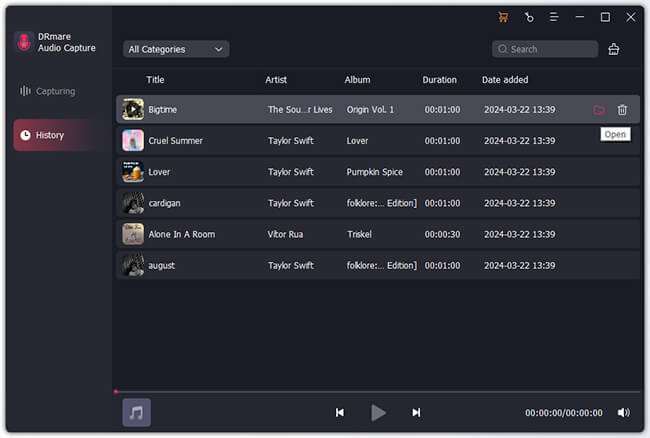
Note:
Compared with high-speed converters that can process tracks in just a few seconds, audio recording tools must play each song in real time to capture it. As a result, recording large playlists can take considerably longer and may require the software to run for several hours.
Part 4. Methods Comparison for Deezer DRM Removal
The following table provides a quick overview of how the top solutions perform across key categories:
| Method | Best For | Speed | Quality | Difficulty |
|---|---|---|---|---|
| DRmare Streaming Audio Recorder | High-quality, fast batch downloads | Very Fast | Lossless | Easy |
| Online Downloader Lucida | One-off tracks without installation | Slow | Compressed | Easy |
| GitHub Open-Source Tool | Tech-savvy users wanting a free route | Fast | Lossless | Advanced |
| DRmare Audio Capture | Universal recording & precision editing | Slow | High | Moderate |
For the fastest and most reliable results, a professional desktop tool like DRmare Streaming Audio Recorder offers the best balance of efficiency and original audio quality, making it ideal for building a permanent library. Online tools can be useful for occasional use despite possible instability, while open-source solutions provide a free but more technical option. If you need a flexible recorder, DRmare Audio Capture is a practical alternative. Ultimately, any of these methods can help you bypass Deezer DRM and enjoy your music from Deezer.

 Home
Home





User Comments
Leave a Comment