





YouTube Music allows you to discover new music and entertainment with a free account. However, relying on an internet connection isn't always practical, and official offline listening is restricted to Premium subscribers. Love YouTube for music but hate the ads and buffering?
Fortunately, you don't need a premium account to take your YouTube Music library with you. There are numerous YouTube Music downloaders available that allow you to download and convert YouTube Music to high-quality local files for offline playback on any device. In this article, we cover the top 11 best YouTube Music downloaders online free, for Mac, Windows PC, Android, and iPhone, helping you enjoy a buffer-free and ad-free experience anywhere.

No.1 DRmare Streaming Audio Recorder (Built-in YouTube Music Downloader for Mac and PC)
Compatibility: Windows, macOS
If you are looking for the ultimate all-in-one solution, DRmare Streaming Audio Recorder takes the top spot. It's an all-in-one music downloader for Spotify, Deezer, Apple Music, Amazon Music, Tidal, SoundCloud, Line Music, Pandora, and Qobuz. With the new major update, it can also serve as a dedicated YouTube Music downloader for PC and Mac. It now has a direct YouTube Music option, allowing users to access its built-in YouTube Music web player.
This allows you to browse, search, and download songs, playlists, and albums directly from your YouTube Music library within the software interface, no extra browser or app required. It automatically detects the audio stream and converts it to your preferred format (MP3, FLAC, WAV, M4A, etc.) without losing quality.
You simply browse YouTube Music directly inside the DRmare interface, log in to your free or premium account, and click to download entire playlists or albums at up to 30X speed. It automatically detects ID3 tags (Artist, Title, Album Art), making your offline library look professional instantly. During the download process, it automatically identifies and keeps YouTube Music metadata, including title, artist, album, and cover art, and filters out ads for a smooth offline library.
How to Download YouTube Music with a Free Account
Let's see how to use DRmare Streaming Audio Recorder to batch download YouTube Music songs directly without needing to record them in real-time or install the YouTube Music app. It works perfectly with a YouTube Music Free account.
Step 1. Open the DRmare Streaming Audio Recorder on your Windows PC or macOS computer. On the main interface, you will see a list of icons for various streaming services. You can scroll down to click the "YouTube Music" icon, and it will show the built-in YouTube Music web player.
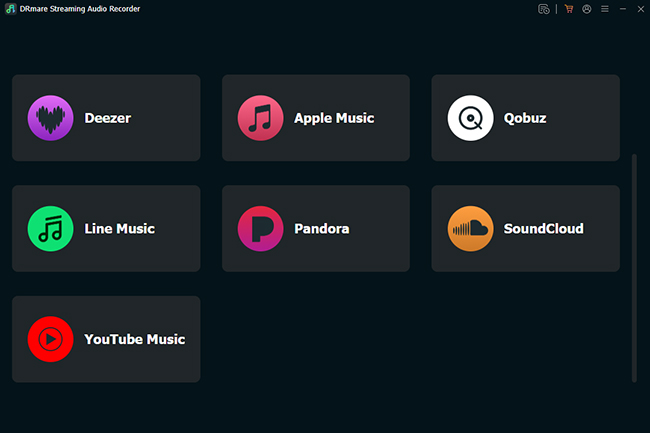
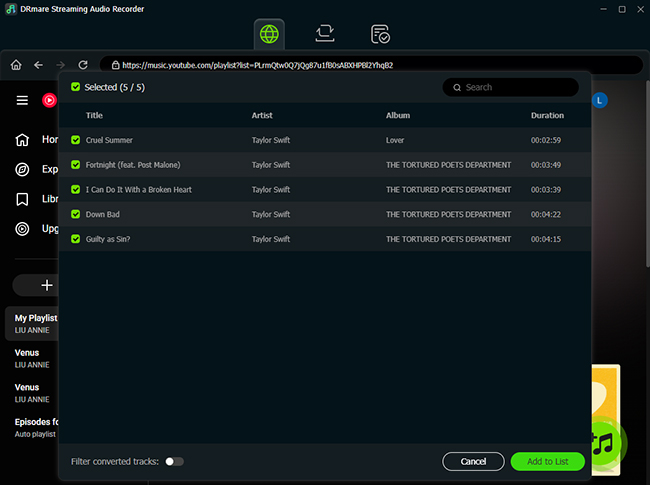
Step 2. Log in to your YouTube Music free or premium account and browse the YouTube Music interface to find a playlist, album, or specific song you want to download. Once you open a playlist or album, you will see a green "+" icon floating on the right side of the screen. Click it and "Add to List" button to load YouTube Music songs to the conversion list.
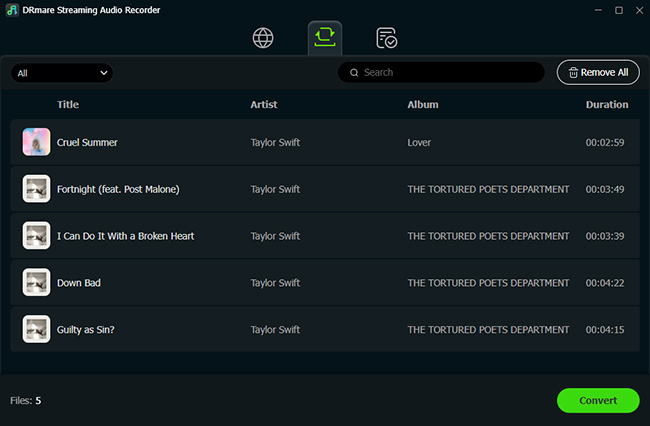
Step 3. You can click the "Convert" button in the bottom-right corner of the Converting section. It will download added YouTube songs as ad-free local files at high speed (up to 30X faster than recording). Once the process is complete, you can click the "Converted" > "Folder" icon to locate YouTube Music downloads for offline listening wherever you go.
Verdict: High-quality, direct music downloading from YouTube Music, Spotify, Amazon Music, and more with a built-in web player.
No.2 DRmare Audio Capture
Compatibility: Windows, macOS
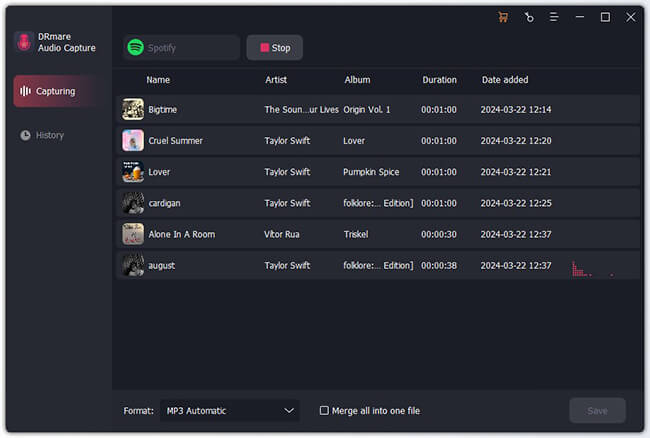
While many tools specialize in either YouTube videos or the YouTube Music app, few handle both with equal precision. DRmare Audio Capture provides a highly flexible solution for users who want to extract high-quality audio from any source playing on their computer. Whether it's a trending music video on YouTube or a curated playlist on YouTube Music, this tool captures it and saves it in a wide variety of formats, including MP3, FLAC, WAV, M4A, AIFF, and M4B.
Unlike basic recorders that might pick up background noise or system alerts, DRmare Audio Capture uses advanced independent audio sensing technology. This allows it to "hook" into specific applications, like Chrome, Firefox, or the YouTube Music desktop app and record only the intended audio.
Its standout feature is the ability to record multiple songs from different browser tabs at the same time without any audio mixing or interference. Beyond YouTube, it captures music from Spotify, Amazon Music, Tidal, SoundCloud, and even non-music sources like Facebook videos or online meetings. It also includes a built-in editor to trim unwanted silence, cut segments, or merge multiple clips into one.
Verdict: It is perfect for users who want a single tool that can grab audio from any website or software on their PC or Mac while maintaining professional-grade sound quality.
No.3 SnapDownloader
Compatibility: Windows, macOS
SnapDownloader is a powerhouse often preferred by power users. It supports downloading videos from over 900 websites, including YouTube, Facebook, Twitter, Vimeo, and more. It stands out because it allows you to download videos from YouTube in resolutions up to 8K.
This music downloader from YouTube offers a user-friendly interface and supports downloading videos to various media formats such as MP3, MP4, WMA, AVI, and more. With it, you can batch-download YouTube audio or videos and enjoy them on any device. Even better, SnapDownloader includes features like a built-in audio trimmer. It enables you to trim the YouTube audio before you even start the download, saving you time and storage space. It offers a generous trial period that lets you test its capabilities.
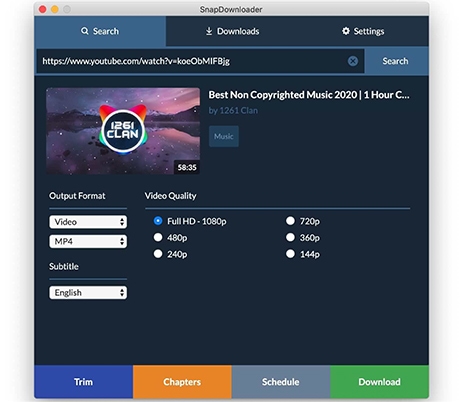
Verdict: Perfect if you need specific segments of audio rather than full YouTube tracks.
No.4. 4K Video Downloader
Compatibility: Windows, macOS, Linux
If you prefer a classic "Copy & Paste" workflow, 4K Video Downloader+ remains the industry standard. As its name suggests, it allows users to download videos and music from YouTube and other sites, like Facebook, in high quality. Its user interface is also easy to navigate through.
This software excels at grabbing entire playlists or even whole channels with a single click. It also features a "Smart Mode" that lets you set your preferred format (like MP3, 320kbps) once, and apply it to all future downloads automatically. The only kicker on this app is that you can download a maximum of 24 tracks from a playlist. Exceeding 24 video downloads will require a license key that you need to buy.

Verdict: The safest choice if you prefer the traditional URL copy-paste method.
No.5 Vidmate
Compatibility: Android (APK), Windows (via Emulator or Extension), iOS (Limited versions)
VidMate has long been established as a tool for mobile users, extending its utility far beyond a simple YouTube music downloader for Android and iOS. It functions as a comprehensive media hub, categorized into music, movies, and TV shows, while providing a powerful built-in search engine to find almost any file on the web. For Android users, especially, it remains a top-tier choice for building an offline library without a premium subscription.
It allows users to view and select from all available video and audio resolutions, including high-bitrate MP3 conversions. Notably, VidMate's internal browser is designed to filter out ads, even those embedded in the YouTube video itself, ensuring a clean download every time. Beyond YouTube, its "Multi-Utility" nature allows it to fetch content from over 1,000 sites, including Instagram, TikTok, and Facebook.
Using VidMate is exceptionally intuitive. The default search bar is optimized for YouTube results; simply enter a song title or paste a URL to locate your music. As soon as the track begins streaming, a signature red pop-up button appears on the screen. With one tap, you can select your preferred format and quality, and the download begins instantly in the background.
Verdict: The ultimate "all-in-one" media hub for Android and iOS users who want to download music and videos from thousands of sites for free.
No.6 TubeMate
Compatibility: Android (APK), Windows (via Emulator)
TubeMate is one of the longest-running and most trusted names in the world of mobile video downloading. While it is no longer hosted on the official Google Play Store due to policy restrictions, it remains a staple for millions of Android users who download the APK directly.
Known for its efficiency and "no-frills" approach, TubeMate excels at extracting high-quality audio and video from YouTube, Facebook, Vimeo, and DailyMotion. It allows you to download up to 10 files simultaneously, significantly reducing the time spent building an offline library. Whether you are converting a trending music video to a 320kbps MP3 or saving a 1080p documentary for a long flight, TubeMate free YouTube Music downloader handles the task with impressive speed and stability.
Verdict: Perfect for users who want a lightweight and fast downloader that "just works."
No.7 ClipGrab YouTube Music Downloader Free
Compatibility: Windows, macOS, Linux
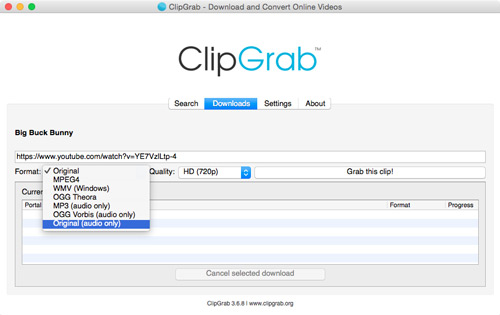
If you find professional recording software too complex and mobile APKs too risky, ClipGrab is the perfect middle ground. It is a friendly, open-source, free YouTube Music downloader app that specializes in making the "YouTube-to-MP3" process as simple as possible. It is widely praised for its clean, "donation-ware" model and its ability to work across all major desktop operating systems.
ClipGrab's standout feature is its "clipboard monitoring" system. You don't even need to paste links manually; once the program is running in the background, it automatically detects when you copy a YouTube URL to your clipboard and asks if you'd like to download it. It can convert YouTube videos into high-quality MP3s or other formats like MPEG4 and WMV in just a few clicks.
Note:
The installer for ClipGrab sometimes includes "bundled offers" (like antivirus software you don't need). You must pay attention during installation and decline these offers.
Verdict: Great for budget-conscious users who can navigate an installer carefully.
No.8 EzMP3 YouTube Music Downloader Online Free
Compatibility: Online Free (Windows, Mac, Android, iOS)
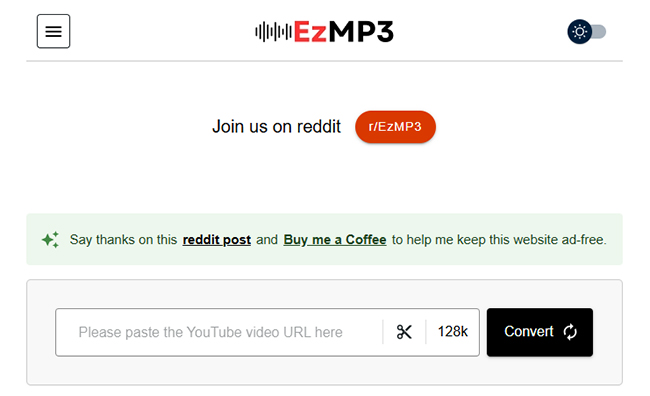
In an online landscape where many web-based YouTube free music downloaders are cluttered with intrusive ads and security risks, EzMP3 stands out as a streamlined and safer alternative. It is specifically designed for users who need a quick YouTube Music download without the hassle of installing software or registering for an account.
While most free online downloaders cap audio quality at a lower bitrate to save on server costs, EzMP3 is highly regarded for supporting 320kbps MP3 conversions. This ensures that the high-fidelity sound of your favorite YouTube Music tracks is preserved. The interface is remarkably clean, focusing on a "search or paste" functionality that gets the job done in seconds.
Verdict: A solid bookmark for quick, high-quality web conversions with high bitrate support.
No.9 YTMP3 Free Online YouTube Music Downloader
Compatibility: Online Free (Windows, Mac, Android, iOS)
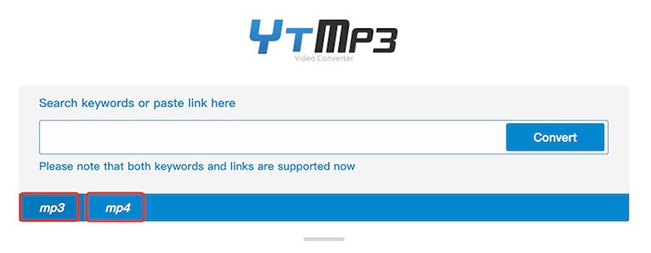
YTMP3 is a fast, minimalist web tool that has evolved beyond simple link pasting. While traditional converters often struggle with audio clarity, the newer AI-powered iterations of YTMP3 use smart processing to ensure that the audio ripped from YouTube videos remains crisp and clear. It is one of the most accessible music downloaders from YouTube for users who want a "one-click" experience without navigating through complex settings.
What makes this version stand out is its support for both keyword searches and direct links. You don't even need to have YouTube open in another tab; you can simply type the name of a song or artist into the YTMP3 search bar, and it will fetch the relevant results for you to convert instantly. It's a perfect solution for building a quick mobile music library on the fly.
Verdict: Best for casual listeners who value speed and simplicity above all else. It is the ultimate YouTube Music downloader for when you need a song quickly and don't have access to your primary desktop software.
No.10 Y2Mate YouTube Song Downloader Free Online
Compatibility: Online Free (Windows, Mac, Android, iOS)
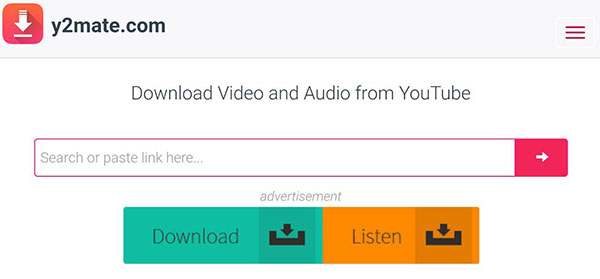
Y2Mate is a "no-registration" platform that allows users to turn YouTube links into downloadable audio or video files quickly. It is a versatile tool that works on any device with a browser, providing a quick, software-free way to grab a single track.
The process is as straightforward as it gets: you simply paste a YouTube URL into the search bar, and Y2Mate generates a list of all available resolutions and bitrates. You can choose to save the file as a high-quality 320kbps MP3 or an MP4 video up to 1080p. The problem with this tool is that the site displays ads, which isn't the case with the other free YouTube music downloaders online.
Verdict: For users who need a fast, free download. However, it requires a higher level of user caution than the other tools on this list.
No.11 OnlyMP3
Compatibility: Online Free (Windows, Mac, Android, iOS)
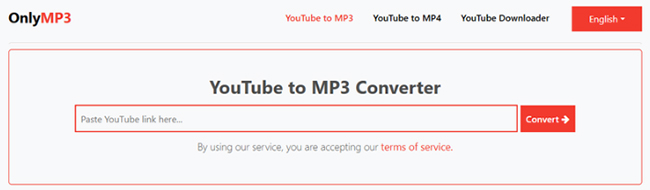
In a sea of complicated tools, OnlyMP3 stands out by focusing on a single, specific mission: converting YouTube videos to high-quality audio with zero friction. It is a "specialist" tool designed strictly for MP3 conversion, stripped of unnecessary video formats to ensure the fastest processing speeds possible.
What truly differentiates OnlyMP3 is its seamless cloud integration. Once your conversion is complete, the site provides a dedicated button to save the file directly to your Dropbox account. This is a game-changer for mobile users or professionals who want to build an organized music library across multiple devices without wasting local storage or manually uploading files later.
Verdict: Ideal for mobile users who want to save storage space on their device.
Quick Comparison: Top 11 YouTube Song Downloaders
Here is the comprehensive comparison table for the 11 Best YouTube Music Downloaders. This table is designed to help you quickly identify the right tool based on your device, quality needs, and preferred workflow.
| Tool | Compatibility | Type | Key Feature | Best For |
|---|---|---|---|---|
| DRmare Streaming Audio Recorder | Win, Mac | Desktop | Built-in YT Music Player & 30X Speed | High-fidelity, bulk library building |
| DRmare Audio Capture | Win, Mac | Desktop | Multi-track simultaneous recording | Capturing audio from any browser/app |
| SnapDownloader | Win, Mac | Desktop | 8K Video support & built-in trimmer | Power users needing specific segments |
| 4K Video Downloader+ | Win, Mac, Linux | Desktop | Smart Mode for automated settings | Traditional "Copy & Paste" workflow |
| VidMate | Android, iOS | Mobile App | Ad-free internal browser & media hub | Android users seeking a free mobile hub |
| TubeMate | Android | Mobile App | Parallel download acceleration (10 files) | Fast, no-frills mobile downloads |
| ClipGrab | Win, Mac, Linux | Desktop | Clipboard monitoring (auto-detect) | Casual desktop users on a budget |
| EzMP3 | Web Browser | Online | 320kbps MP3 support (no install) | Fast, high-quality one-off downloads |
| YtMP3 | Web Browser | Online | AI-powered conversion & Search | Casual listeners valuing speed |
| Y2Mate | Web Browser | Online | Unlimited downloads / High variety | Quick conversions on public computers |
| OnlyMP3 | Web Browser | Online | Direct save to Dropbox | Saving phone storage / Cloud users |
FAQs about the Best YouTube Music Downloader
What makes the best YouTube Music downloader?
The best YouTube music downloader should possess four key elements, including security (no malware), audio quality (able to maintain a high bitrate), ease of use, and conversion speed.
What is the difference between "YouTube Premium" downloads and these downloaders?
The main difference is ownership.
- YouTube Premium: You are "renting" the music. You can listen offline, but the files are encrypted (DRM-protected) and hidden on your phone. If you cancel your subscription, you lose all your music immediately.
- YouTube Music Downloaders: You own the file. It is a standard MP3 that you can move to a USB drive, burn to a CD, or play on an old iPod, and you keep it forever.
Is it safe to use a free YouTube Music downloader online?
The short answer is: Generally, NO. Most free online YouTube Music downloaders are unsafe and carry significant security risks. If you care about the health of your computer, avoid the "quick and easy" websites.
Why do online YouTube song downloader have so many pop-up ads?
Running a video conversion server is expensive. Since these websites offer the service for free, they rely on aggressive advertising networks to pay the bills.
In Conclusion
Selecting the right YouTube music downloader depends on your workflow. If you want a modern, all-in-one solution that feels like a premium app, DRmare Streaming Audio Recorder is the clear winner. It simplifies the process by letting you browse and download directly inside the app.
For those who prefer the traditional "copy URL and paste" method, 4K Video Downloader+ remains the most reliable desktop alternative. And if you are in a rush and need a quick freebie, OnlyMP3 is the safest bet for a YouTube to MP3 download site.

 Home
Home





User Comments
Leave a Comment