





The demand for high-fidelity audio is peaking as listeners and creators move past the limitations of compressed MP3s. WAV (Waveform Audio File Format) remains the gold standard for uncompressed, lossless sound, preserving every nuance of a recording. Whether you are an audiophile building a library or a producer handling raw stems, finding a reliable WAV music download site or WAV downloader is essential.
Many platforms prioritize storage-saving compression over raw fidelity. In 2026, understanding the difference between lossless and high-resolution is vital for quality media consumption. This guide highlights reputable sources and tools to help you download studio-quality WAV files while avoiding malware or fake upscaled files.
Part 1. Top WAV Music Download Sites for Audiophiles
For the dedicated listener, purchasing music in WAV format ensures that you own the closest possible copy to the original studio master. Unlike streaming services that may fluctuate in quality based on your internet connection, a downloaded WAV file provides consistent, bit-perfect playback. Several platforms have established themselves as leaders in the high-resolution market by working directly with labels to provide verified files.
1. Beatport
Beatport is the undisputed global leader for electronic dance music (EDM) and DJ culture. It serves as a critical resource for professional performers who require uncompressed WAV files to ensure their tracks sound powerful on massive club sound systems. When purchasing from Beatport, users can opt for a "WAV Pro" upgrade, which provides metadata-rich files that integrate seamlessly with professional DJ software and hardware.

2. Qobuz
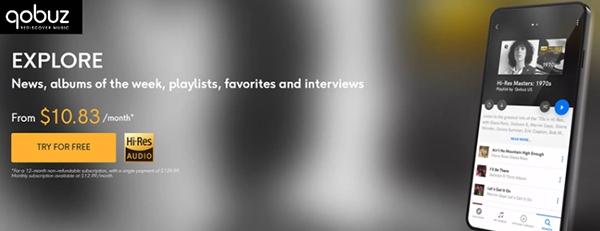
Qobuz has distinguished itself as the premier choice for audiophiles who demand both a vast library and uncompromising quality. Unlike many competitors, Qobuz offers a dedicated "Download Store" where you can purchase albums in full CD-quality (16-bit) or High-Res (24-bit/up to 192Khz) WAV formats. Their commitment to "The Studio Experience" means they provide extensive digital booklets and liner notes, recreating the premium feel of owning a physical record.
3. HDtracks
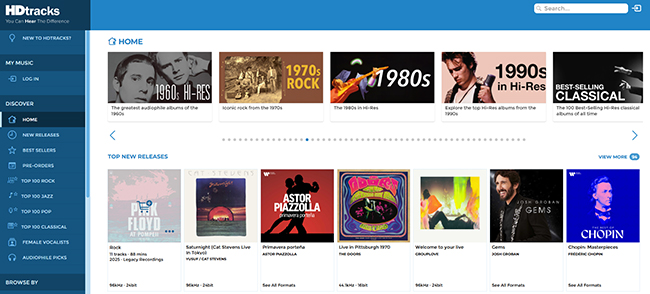
HDtracks was a pioneer in the high-resolution audio movement and continues to offer one of the most extensive catalogs of legendary remastered albums. They work directly with record labels to ensure that the WAV files provided are sourced from the original master tapes whenever possible. This platform is particularly valued by jazz and rock enthusiasts who want to hear every detail of a classic recording as if they were in the booth during the session.
4. Bandcamp
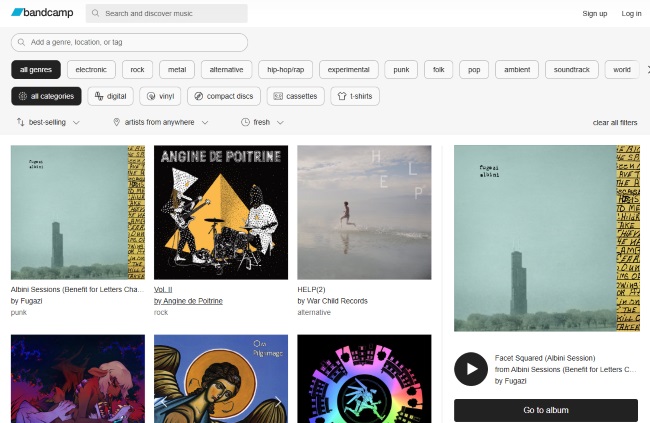
Bandcamp offers a unique, artist-first ecosystem that has become a staple for independent music discovery. When you buy music here, the platform allows you to download your purchase in any format indefinitely, including uncompressed WAV and AIFF. It is widely considered the most transparent site for creators, as a significant portion of the sale goes directly to the artist, making it a favorite for socially conscious listeners.
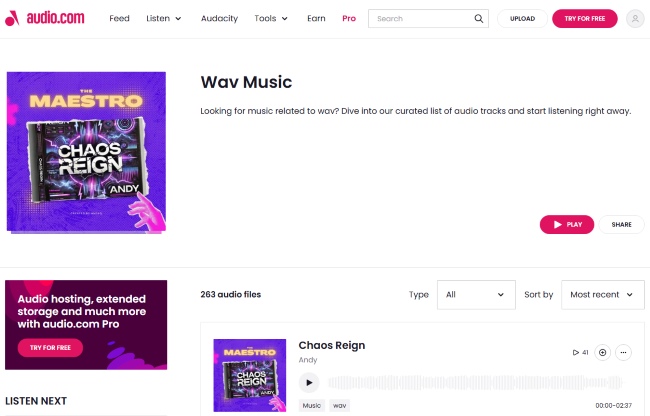
5. audio.com
Audio.com is a rapidly growing platform powered by the creators of Audacity, designed specifically for sharing and discovering high-quality audio. It serves as a modern bridge between social sharing and professional hosting, allowing creators to upload and distribute their work in uncompressed formats. For users looking for unique samples, independent podcasts, or experimental tracks in WAV format, this site offers a clean and ad-free experience.
How to Purchase and Download WAV Files from These WAV Sites
Step 1. Navigate to your chosen platform and use the search bar to find a specific artist or track. Ensure you are looking at the "Store" or "Download" section rather than a streaming-only preview.
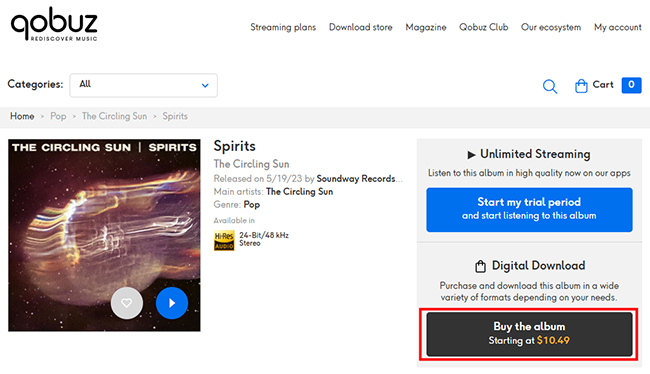
Step 2. Add the desired items to your cart and proceed to the format selection screen. Complete the checkout process using a secure payment method. Once the transaction is verified, you will receive a download link; it is often best to use a "Download Manager" for large WAV albums to ensure the file integrity remains intact during the transfer.
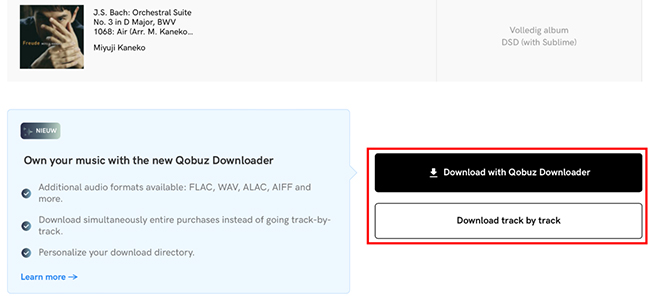
Step 3. On sites like Beatport or Qobuz, you may need to explicitly toggle the "WAV" option, as FLAC or MP3 is often the default setting to save bandwidth.
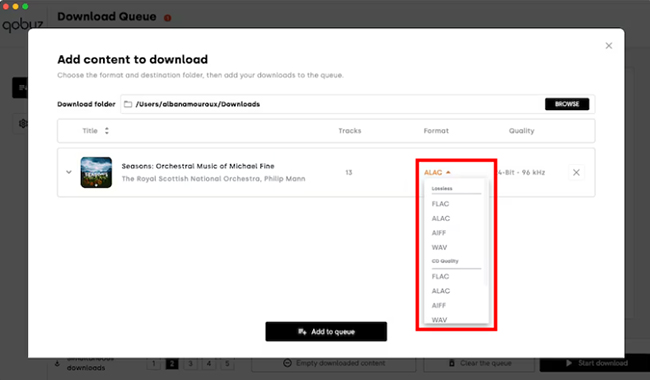
Step 4. After the download is finished, move the files to your dedicated music library or external drive. Because WAV files are significantly larger than MP3s, maintaining an organized folder structure by "Artist > Album" is highly recommended for long-term management.
Part 2. Most Reliable WAV Downloaders [Free Tools Covered]
Is there a way to acquire WAV files without direct individual purchases? The answer is yes. For users who want to save their favorite tracks from popular streaming services as WAV files, a high-quality WAV downloader is the most effective solution.
While online tools offer convenience, long-term collectors and professionals prefer specialized software for its stability and verified quality. This section focuses on tools that prioritize "bit-perfect" extraction, ensuring that your WAV downloads aren't just empty containers, but true lossless copies. The following three options represent the most reliable paths for acquiring and managing WAV files today, ranging from automated recording to community-driven archives.
6. DRmare Streaming Audio Recorder (Professional WAV Downloader)
DRmare Streaming Audio Recorder has become a favorite because it bypasses common "API blocks" that prevent most web-based WAV downloaders from working. It functions by downloading and encoding WAV audio directly from a platform's web player within its software, ensuring a 99% success rate across services like Spotify, Tidal, Qobuz, YouTube Music, and SoundCloud.
Apart from WAV, it can download music in FLAC, AIFF, MP3, M4A, and M4B at a fast conversion speed. It is particularly effective for those who want to build a permanent, offline WAV library with all metadata (artist, album, year) and lyrics automatically preserved.
How to Download WAV Music from Popular Streaming Platforms
Step 1. Launch the DRmare Streaming Audio Recorder on your computer and click the "Menu" > "Preferences" > "Conversion" option to select WAV as your target output. You can further customize the sample rate (e.g., 48,000 Hz) and bit depth (24-bit) in the settings menu to match professional standards.
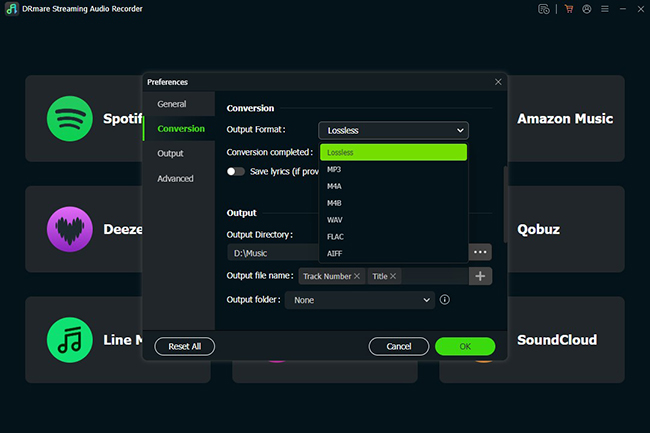
Step 2. Select your desired streaming service (like Tidal, Qobuz, or SoundCloud) from the built-in browser and log in to your account.
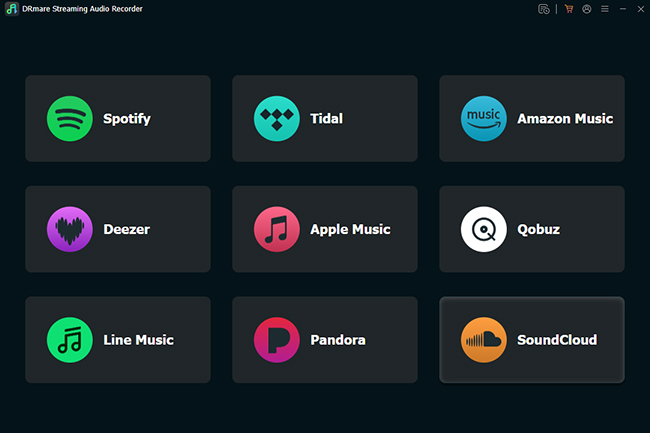
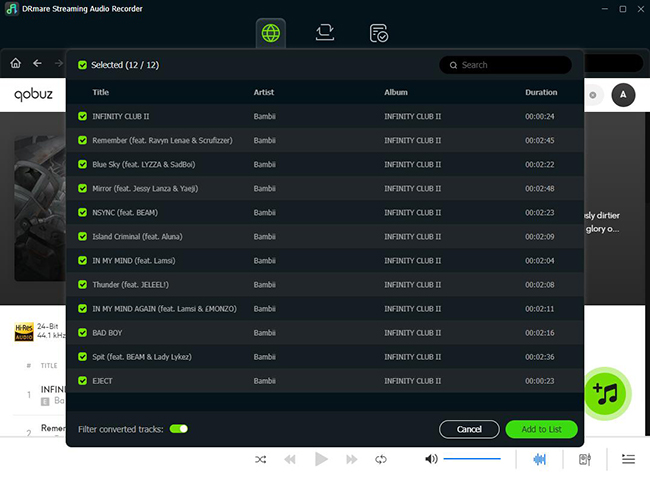
Step 3. Search for the track or playlist you wish to save and tap the "Add" > "Add to List" button to load them into the conversion queue.
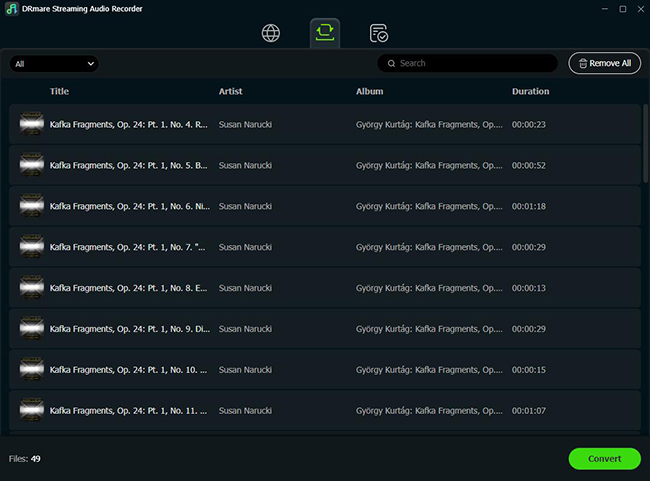
Step 4. Tap the "Convert" button under the Converting section, it will automatically download each song as a separate, high-quality WAV file. Once finished, click "Converted" > "Folder" to locate them in the output folder, where you can then export them to any external drive or media player.
7. Internet Archive (Free WAV Downloader)
The Internet Archive is a non-profit library offering millions of free, legal, and high-quality audio files, including live concerts, old-time radio, and public domain music. It is a goldmine for those seeking "The Great 78 Project" (digitized 78rpm records) or live sets from bands like the Grateful Dead. Because these are historical archives, they often provide the raw, uncompressed WAV transfers alongside modern compressed versions.
How to Download WAV Files for Free
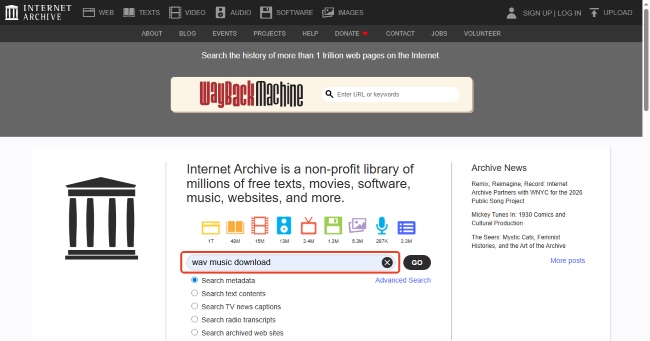
Step 1. Visit the Internet Archive website and type the "WAV Music Download" or similar words in the search bar and tap the "Go" button to find available WAV files.
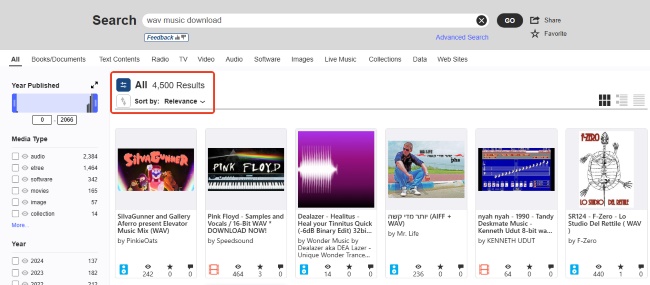
Step 2. Click on a specific item that you'd like to download to open its dedicated page, then scroll down to the "Download Options" box located on the right side of the screen.
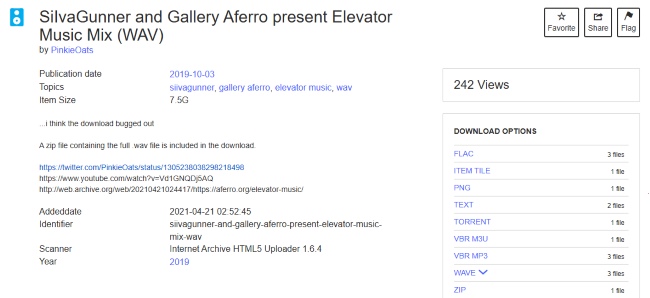
Step 3. Tap the "WAVE" button to find the wanted WAV version; if it isn't visible, click "Show All" to see the full list of available file formats for that specific upload.
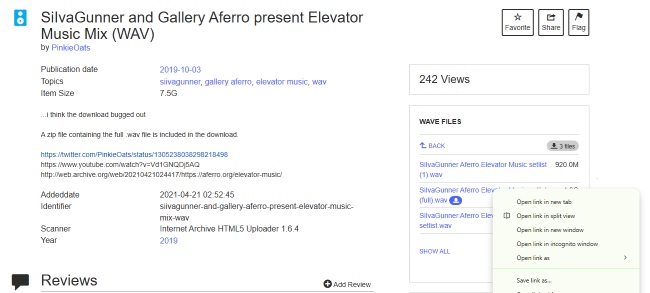
Step 4. Right-click the WAV file link and select "Save Link As..." to begin the download directly to your computer.
8. Audacity (Free WAV Music Recorder and Downloader)
Audacity remains the most important open-source tool in any audio enthusiast's arsenal. While it isn't a "downloader" in the traditional sense, it is the best tool for "ripping" audio from your computer's sound card or converting existing files into pristine WAVs. It is also the best way to verify if a file you downloaded elsewhere is a fake by using its built-in spectral analysis.
How to Record or Convert WAV Files for Free
Step 1. Open Audacity and go to the "File" menu, then select "Import" > "Audio" to load any existing music file you want to convert.
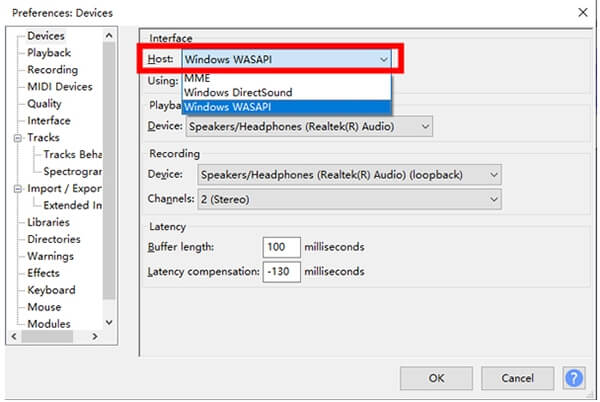
Step 2. If you are recording live audio, ensure your "Host" is set to Windows WASAPI (on PC) or Core Audio (on Mac) and select "Loopback" as your input device to record what you hear through your speakers.
Tips:
For recording WAV files, click the red "Record" button in Audacity and then immediately start playing the song from your source. You should see the blue waveforms appearing in the track window, indicating that the audio is being captured in real-time.
Step 3. Once your audio is ready, go to "File" > "Export" and choose "Export as WAV."
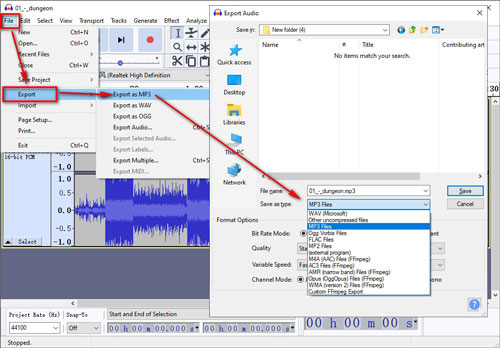
Step 4. In the "Encoding" dropdown, select "Signed 16-bit PCM" for standard CD quality or "Signed 24-bit PCM" for studio quality, then click "Save."
Part 3. In Conclusion
The perfect WAV music download method depends entirely on your end goal. For the absolute best fidelity and legal ownership, commercial sites like Qobuz or HDtracks are the industry standards. If you are a creator on a budget, the DRmare Streaming Audio Recorder and Internet Archive provide safe, high-quality alternatives that won't compromise your project's integrity.
Regardless of the tool you choose, always remember the "Size Test": if a WAV file is only a few megabytes, it's likely a low-quality conversion. By using the professional-grade WAV downloader and verification steps outlined in this guide, you can ensure your audio library sounds exactly as the artist intended.

 Home
Home





User Comments
Leave a Comment