





Can I download SoundCloud WAV officially for high-fidelity offline listening? Despite supporting lossless WAV uploads, SoundCloud streams and downloads music as a compressed file from 128kbps to 256kbps. But no worries! You are not out of options. There are many SoundCloud downloaders WAV to achieve this goal. In this guide, we'll explore the top 5 best SoundCloud to WAV downloaders and converters, from free online tools to premium desktop apps. You can choose the most suitable one to convert SoundCloud to WAV format with simple, step-by-step instructions.
Quick Picks: Best SoundCloud to WAV Converters:
- DRmare Streaming Audio Recorder — Best for creating a local music library with lossless WAV files and organized metadata.
- MusicVerter — Best for offline collections with fast multi-format conversion and convenient audio file organization.
- yt-dlp — Best for online downloading with a free open-source tool supporting powerful command-line customization.
Part 1. Best SoundCloud to WAV Converter and Downloader for Mac and PC
For the most reliable, high-quality solution to download WAV from SoundCloud, DRmare Streaming Audio Recorder stands out as the top-tier choice. It's designed specifically for this purpose and focuses on delivering the best possible output from the SoundCloud stream. It can download SoundCloud songs to not only lossless WAV format but also FLAC without quality degradation. It doesn't require a SoundCloud Go or Go+ premium subscription for WAV downloads.
Besides, it allows you to batch download multiple SoundCloud songs or playlists at once to WAV at up to 65X conversion speed and keep or edit ID3 tags based on your special requirements. Furthermore, it supports up to ten major streaming music services to download WAV tracks. In short, DRmare is purpose-built for streaming music, offering consistent performance, studio-quality output, and an intuitive user interface.
Editor's Hands-on Take on DRmare:
During our test, DRmare extracted a 10-track SoundCloud playlist in less than 5 minutes. The output WAV files from SoundCloud correctly retained the 16-bit / 44.1kHz standard, and metadata like artist names and album art were automatically mapped to the local WAV tags.
How to Download from SoundCloud to WAV via DRmare
- Step 1Customize SoundCloud Output Format as WAV
Install and open DRmare Streaming Audio Recorder on your Mac or Windows computer. Click the "Settings" icon at the low left corner and choose "Music" option. Now, you can customize the output format of SoundCloud songs to WAV and other audio parameters, such as sample rate, bit rate, and audio channels.

- Step 2Launch SoundCloud Downloader to WAV
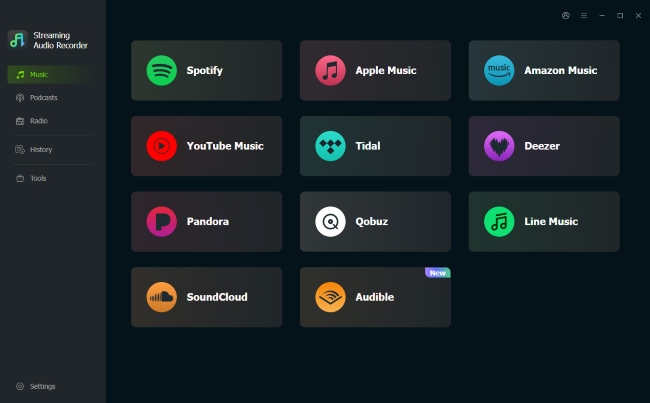
In DRmare Streaming Audio Recorder's main window, you can tap the "SoundCloud" icon from the list of supported platforms. It will open the SoundCloud song downloader WAV. Log in to your SoundCloud account within DRmare's built-in browser.
- Step 3Select SoundCloud Songs to Download as WAV
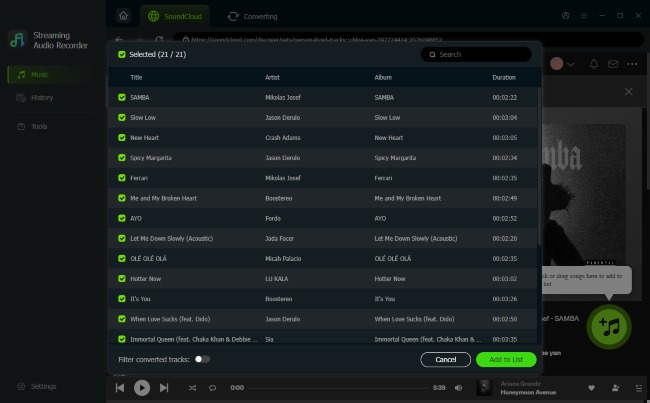
Go back to the SoundCloud Web Player, discover favorite songs, playlists, or albums you wish to download to WAV, and click the "Add" > "Add to List" button to load them to the Converting window.
- Step 4Download WAV from SoundCloud Losslessly at 65X Speed
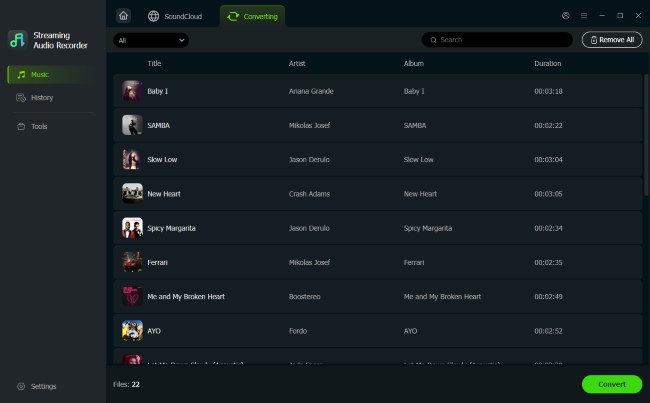
Press the big green "Convert" button at the bottom-right corner of the main interface, DRmare SoundCloud WAV Downloader will run at 65X conversion speed to download and save added SoundCloud tracks as WAV files, applying any metadata. After conversion, you can locate SoundCloud WAV downloads by click the "History" tab.
Pros
 65X faster batch conversion speed
- Support nine popular streaming music platforms
- Download SoundCloud songs, playlists, albums to WAV, FLAC, MP3, AIFF, M4A, and M4B
- Retain full metadata (artist, album, etc.) and ID3 tags
Cons
 Upgrade to the full version to unblock length limitations
Part 2. Free SoundCloud WAV Downloaders and Converters Online
For those seeking a quick solution for downloading SoundCloud WAV files without installing any software and spending a cent, online tools are the most convenient option. These web-based SoundCloud to WAV converters and downloaders work by taking the URL of a SoundCloud track and converting the audio stream into a downloadable file.
Note on Popular Online SoundCloud WAV Converters:
We tested several popular web-based SoundCloud to WAV converters. 3 served aggressive pop-under ads, 1 failed with a "Server Timeout" on tracks longer than 10 minutes, and 1 renamed a low-bitrate MP3 extension to `.wav` without actual audio re-encoding. Platforms like MusicFetcher and SoundCloudMate are widely used, but they also come with intrusive pop-ups and misleading download buttons.
MusicVerter
🔗Website: https://www.musicverter.com/soundcloudtowav
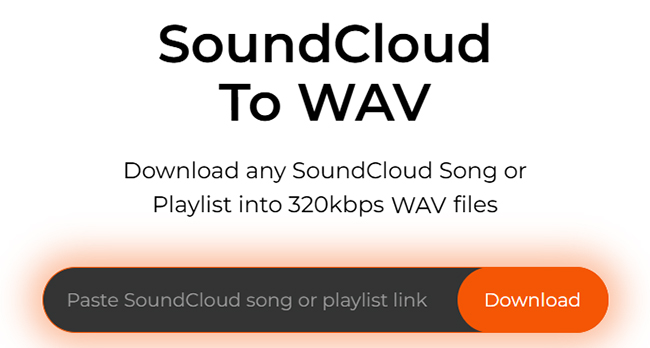
MusicVerter is another online SoundCloud music downloader. However, this free option is only available for exporting individual SoundCloud songs to MP3 one by one. If you'd like to download SoundCloud playlists and Go+ songs to FLAC, WAV, and AAC file formats, you must subscribe to its Premium plan, which costs $13 per month. The paid MusicVerter can automatically include artist, track, and album details and convert SoundCloud to WAV online free at once.
Pros
- Quick in-browser conversion
- No need to install extra software
- Don't require SoundCloud account
Cons
- WAV format behind paid tier
- Free only for MP3; WAV costs ~$13/month
- No desktop app; depends on browser
CutYt
🔗Website: https://www.cutyt.com/soundcloud
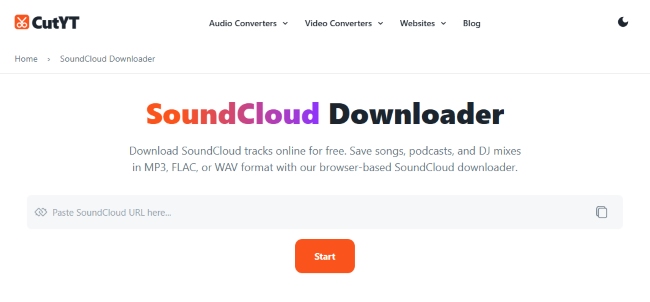
CutYT is a user-friendly online SoundCloud to WAV converter that allows users to save public SoundCloud tracks, podcasts, and DJ mixes as WAV files directly from the browser. With a simple URL-based conversion process, it is suitable for users who need quick WAV downloads for SoundCloud music offline listening, audio editing, or personal backups.
Pros
- Quick SoundCloud to WAV conversion via URL
- No software installation required
Cons
- Only supports public SoundCloud tracks
- Lacks batch download and advanced settings
Soundcloudrips (Not Available)
🔗Website: https://soundcloudrips.com/enkj/soundcloud-to-wav
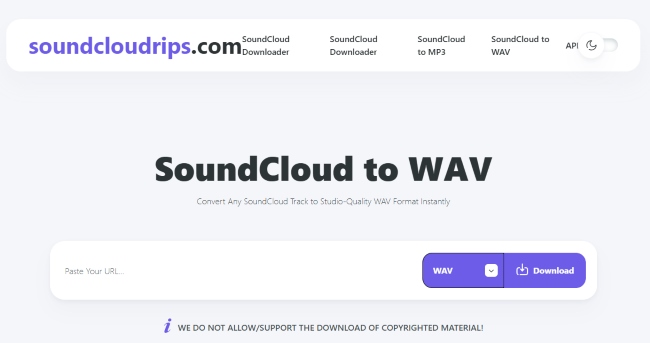
The free online SoundCloud Music downloader to WAV we can meet is Soundcloudrips. It offers unlimited SoundCloud downloads, supports WAV output with 16-bit depth and 48 kHz sample rate, and works directly in your browser, no installation or account required. Apart from WAV, it's also able to download SoundCloud tracks to MP3, M4A, WEBM, AAC, FLAC, and OGG on all devices (Android, iOS, Windows, macOS, Linux, ChromeOS). By the way, this online software can download videos to MP4 from YouTube, Facebook, Vimeo, TikTok, IMBb, X, and Twitch.
Pros
- Fully free with no download limits
- Instant browser-based conversion (no signup)
- Broad format options including WAV, FLAC
Cons
- Interface includes ads and pop-up redirects
- Single-track processing; no batch playlist handling
- Quality depends on source; some tracks are only 256 kbps
Warning: The Redirect Loop Issue on SoundCloudRip:
Based on our testing, SoundCloudRip currently suffers from severe usability issues caused by aggressive advertising networks. Whenever you click the final download button, the interface is completely hijacked. Instead of initiating the file transfer, the site intentionally triggers an endless loop of redirects to spam or sponsor pages. This persistent ad-loop makes it completely impossible to actually download any SoundCloud music to WAV.
Part 3. Free SoundCloud to WAV Converter and Ripper
For users who prefer a free solution that offers maximum control, the professional audio editor Audacity is an excellent choice. This method involves ripping the SoundCloud audio directly as it plays on your computer. To capture the best source audio, this technique is most effective when used with a SoundCloud Go+ account streaming in "High Quality."
Editor's Real Test on Audacity:
Audacity is 100% free and reliable, but it requires manual operation. It’s ideal for grabbing quick 2-minute clips, but tedious if you want to save entire SoundCloud albums as WAV files.
How to Rip SoundCloud to WAV for Free via Audacity
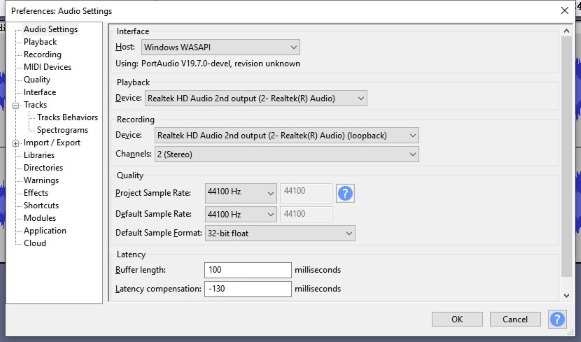
Step 1. Open Audacity SoundCloud ripper WAV and in the dropdown menu for the audio host, select "Windows WASAPI". In the recording device menu, choose the loopback option for your speakers or headphones (e.g., "Speakers (Realtek Audio) (loopback)").
Step 2. Cue up your SoundCloud track in your browser, but do not press play yet. In Audacity, press the red "Record" button. You will see a flat line, indicating it is recording silence.
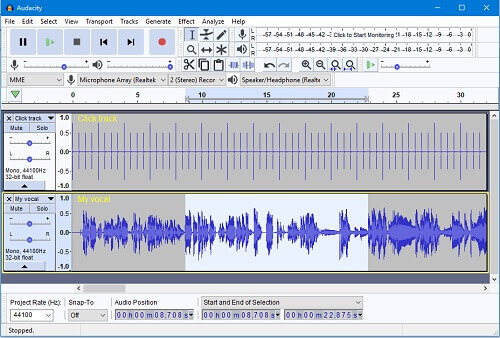
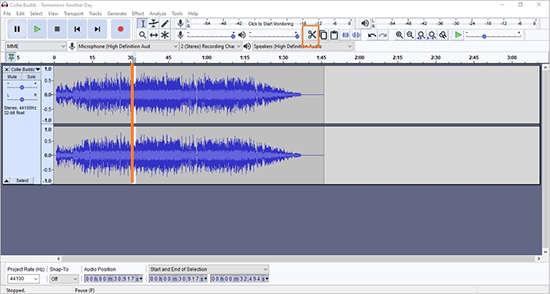
Step 3. Immediately switch to your browser and play the SoundCloud track from the beginning. Once the song is finished, stop the recording in Audacity. You can then trim any leading or trailing silence.
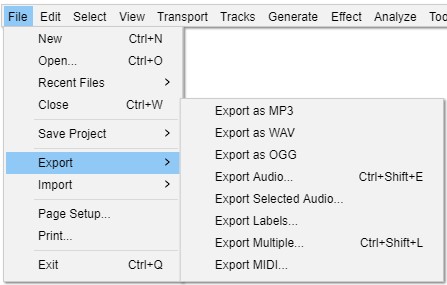
Step 4. Go to "File" > "Export" > "Export as WAV". Here you can name your file and save it to your computer as a standard WAV audio file.
Pros
- Completely free and open-source
- Cross-platform compatibility
- Powerful editing and recording features
Cons
- Dated user interface, it's hard to use
- No multitrack recording from a single interface
- Low output audio quality
Part 4. Command-Line Tools to Save SoundCloud to WAV
For users comfortable with a more technical approach, command-line downloaders offer a powerful, ad-free alternative. The most robust tool for this task is yt-dlp. It supports hundreds of websites and provides extensive options for downloading SoundCloud audio, from single tracks to entire playlists, in high-quality formats like WAV. While this method is fast, clean, and highly customizable, it does require some initial setup and familiarity with terminal interfaces.
Hand-on Test on yt-dlp:
yt-dlp is lightning-fast for tech-savvy users. Grabbing a 120-minute DJ set takes just 16 seconds. However, during our testing, SoundCloud updated its anti-bot security once, causing yt-dlp to throw a HTTP 403 error until we manually updated to the latest build via terminal commands.
How to Use yt-dlp for SoundCloud WAV Downloads
Step 1. Install the necessary tools on your system. For macOS, using Homebrew is the easiest method (run brew install yt-dlp). For Windows or Linux, the Python package manager is recommended (run pip install yt-dlp). Alternatively, Windows users can download the yt-dlp.exe directly from the official GitHub page. Ensure you also follow the documentation to install FFmpeg.
Step 2. Open your Terminal (macOS/Linux) or Command Prompt (Windows).
Step 3. Copy the URL of the SoundCloud track or playlist you wish to download.
Step 4. Execute the desired command. Type yt-dlp followed by the necessary flags and your URL enclosed in quotes. Here are the most common commands for extracting audio:

Pros
- Completely free and open-source
- Cross-platform compatibility
- Powerful editing and recording features
Cons
- Dated user interface, it's hard to use
- No multitrack recording from a single interface
- Low output audio quality
Part 5. Comparison Among Methods to Download SoundCloud WAV
Choosing the best method to convert SoundCloud to WAV depends on your specific needs, whether it's convenience, audio fidelity, batch downloads, or free access. Here's a comprehensive comparison to help you decide which tool suits you best.
| Tool | Devices | Formats | Batch Support | Price | Best For | Ratings |
|---|---|---|---|---|---|---|
| DRmare Streaming Audio Recorder | Desktop | WAV, FLAC, AIFF, MP3, M4A, M4B | ✅(65X) | Paid(Trial) | Professional users & high-speed batching | 4.8 |
| MusicVerter | Online | MP3, WAV, FLAC, AAC | ✅ | Paid | Browser users willing to pay for convenience | 4.4 |
| SoundCloudRip | Online | WAV, MP3, FLAC | ❌ | Free | Quick, casual downloads | 4.3 |
| Cutyt | Online | WAV, MP3, MP4 | ❌ | Free | Fast, single-track browser conversions | 4.4 |
| Audacity | Desktop | WAV, MP3, AIFF | ❌ | Free | Users who want to record and edit audio manually | 4.5 |
| yt-dlp | Desktop | WAV, MP3, AAC | ✅ | Free | Technical users seeking ad-free, high-quality files | 4.6 |
Part 6. FAQ about Converting SoundCloud to WAV
Is it legal to download SoundCloud music to WAV?
Downloading copyrighted music without the creator's permission is against SoundCloud's Terms of Service and may infringe on copyright laws. It is your responsibility to ensure you have the right to download and use the content. And all SoundCloud WAV downloads are available for personal use only.
Will I lose audio quality while getting WAV files?
You cannot create quality that was not there to begin with. The quality of your downloaded WAV is limited by the quality of the SoundCloud stream you are capturing. For best results, ensure your SoundCloud account is set to "High Quality" streaming if you are a Go+ subscriber.
Can I download private SoundCloud songs to WAV?
Generally, no. Most downloaders and converters can only access publicly available tracks. Private tracks are not accessible via their standard URL, so these tools cannot process them.
Part 7. In Conclusion
Downloading SoundCloud to WAV is no longer a complicated task, whether you want to preserve high-fidelity audio, edit music professionally, or simply enjoy offline listening in the best possible quality, there's a method to suit your needs.
If you prioritize lossless sound quality, batch downloads, and ID3 tag retention, then DRmare Streaming Audio Recorder is your best SoundCloud to WAV downloader. It delivers professional-grade results and supports more than just SoundCloud, making it a worthwhile investment for serious users.

 Home
Home




User Comments
Leave a Comment