





 I'm looking for a safe way to download or convert YouTube videos to WAV format. However, many sites and apps seem sketchy with some unsafe things. Does anyone have recommendations for a safe, clean, and reliable YouTube to WAV converter?
Converting YouTube to WAV (Waveform Audio File Format) is a common need for creators, audio editors, musicians, voice engineers, and anyone who prefers lossless audio quality. While many free online YouTube to WAV converters claim to be the best, the reality often involves server instability, misleading audio quality, and serious privacy risks.
This guide focuses on safety and functionality. We have categorized the top tools into professional desktop YouTube to WAV downloaders (for bulk/safety) and free online tools (for speed/convenience), prioritizing those that respect your data and your device.
Quick Comparison: Top Best YouTube to WAV Converters at a Glance
How We Test:
In our tests, the most important checks were not simply whether a tool displayed a WAV button, but whether the downloaded file was actually WAV, whether unexpected redirects appeared, and whether playlists completed successfully.
| Best For... | Tool Name | Why We Picked It | Safety Rating |
|---|---|---|---|
| Overall Best (Safe) | DRmare All-in-One Music Downloader for YouTube | Ad-free, handles full playlists, supports high-quality WAV extraction. | ⭐⭐⭐⭐⭐ |
| Best Online (No Ads) | CutYT | The cleanest web tool available. No trackers, pop-ups, or nonsense. | ⭐⭐⭐⭐ |
The "Gold Standard" – Best Desktop YouTube to WAV Downloader Software
Recommended For: Frequent users, audiophiles, and anyone who wants to download YouTube videos and playlists to WAV without risk of malware.
Desktop software is generally superior to web tools because it processes files locally on your machine. This means faster conversion speeds, support for 8K video or high-bitrate audio, and zero invasive advertisements.
1. DRmare All-in-One Music Downloader for YouTube
Basic Info:
- Website Link: https://www.drmare.com/
- Compatible OS: Windows, macOS
- Supported Output Formats: WAV, FLAC, MP3, AIFF, M4A, M4B, Lossless
- Price: Free trial; $24.95/month
- Rating: ⭐⭐⭐⭐⭐
| Metric | Ease of Use | Safety | Speed | Audio Quality |
|---|---|---|---|---|
| Score | 9/10 | 10/10 | 9/10 | 10/10 |
DRmare All-in-One Music Downloader for YouTube is a professional audio downloader tool designed specifically for streaming services, and it now fully supports YouTube Music. Since it's a local program, you never deal with the sketchy pop-ups found on free sites. It utilizes GPU hardware acceleration to convert entire YouTube playlists or albums at once significantly faster than competitors. It also enables you to download YouTube audio to multiple audio formats, such as WAV, FLAC, M4A, MP3, and more.
For WAV conversion, it's particularly strong because it downloads and encodes it with high fidelity, ensuring you get the uncompressed quality you need for production or high-end listening. It acts as an all-in-one downloader that supports not just YouTube, but also major platforms like Spotify, Apple Music, and Amazon Music.
YouTube Video: How to Convert YouTube Music tracks to WAV Converter
Pros
 Support many streaming music sites
- Batch downloads and lossless audio quality
- Automatically detects and keeps title, artist, and album art (rare for WAV).
- 100% clean; no ads, redirects, or phishing risks
- Support multiple audio formats
Cons
 Requires a license for full features (free trial available).
2. ByClick Downloader
Basic Info:
- Website Link: https://www.byclickdownloader.com/
- Compatible OS: Windows
- Supported Output Formats: WAV, MP3, M4A, AAC, MP4, FLV, AVI, WMV, MKV, 3GP, Webm
- Price: Free trial; $40/lifetime
- Rating: ⭐⭐⭐
| Metric | Ease of Use | Safety | Speed | Audio Quality |
|---|---|---|---|---|
| Score | 7/10 | 10/10 | 6/10 | 7/10 |
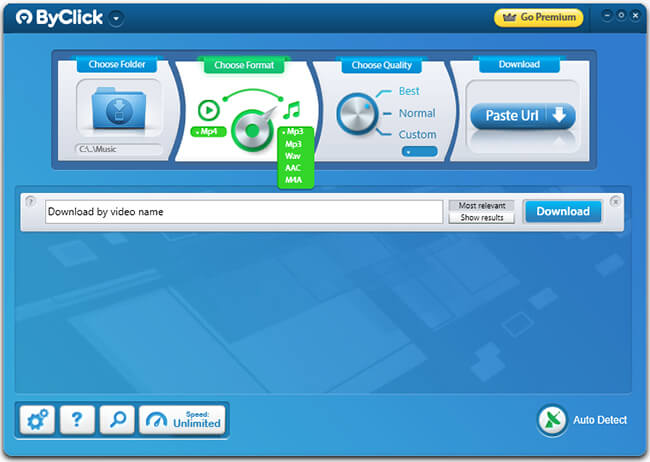
ByClick Downloader is also the premium standard for desktop YouTube to WAV downloading on Windows computers. Unlike web tools that rely on unstable servers, this software runs locally on your machine, ensuring privacy and stability. It is particularly famous for its ability to parse entire YouTube playlists and channels, allowing users to download hundreds of audio files in a single click.
Its standout feature is the "Auto-Detect" system: when you copy a URL from YouTube (or Facebook/Instagram), the software instantly detects it and offers a small pop-up to download the audio or video immediately. It can save videos from YouTube and other websites in HD 720, HD 1080p, 4K, and 8K resolution.
Step 1. Open the software on your Windows computer, you can customize the output settings under the "Choose Format" and Choose Quality" section.
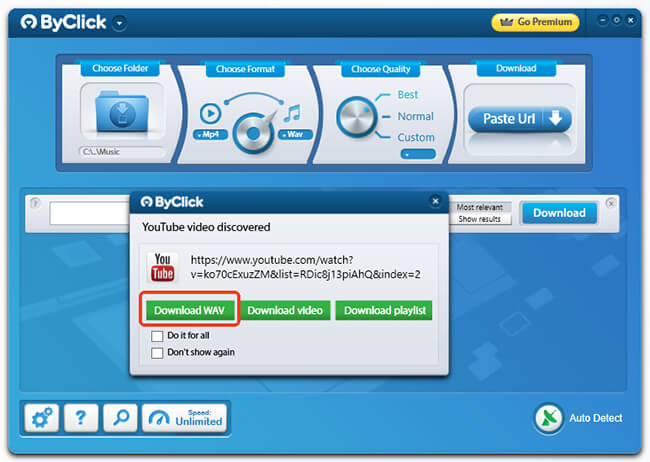
Step 2. Visit the YouTube website and copy the link of the video or playlist from your browser. Go back to ByClick Downloader to choose the "Download WAV" button. It will automatically download YouTube video to WAV format.
Note:
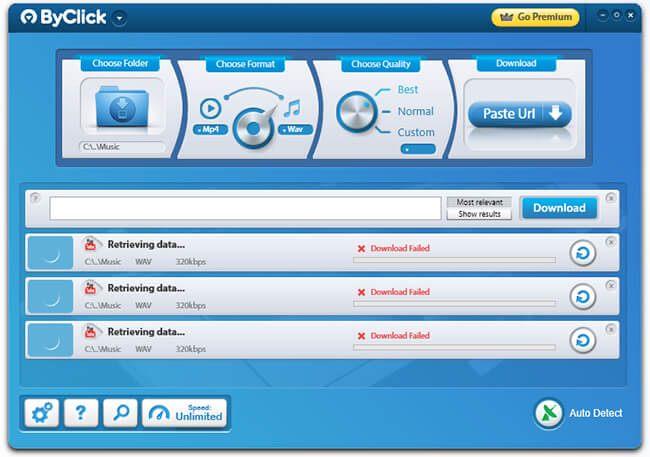
While ByClick Downloader is popular, it suffers from significant reliability issues; downloads frequently fail or stall mid-process without providing a clear error reason.
Pros
- Support downloading YouTube videos to kinds of video formats
- Works well with sites beyond YouTube (Facebook, Vimeo, etc.).
Cons
- Not available for Mac or Linux users.
- The interface looks like Windows 7 software.
- Playlist downloading is limited in the free version.
- Low success rate.
The "Quick Fix" – Best Free Online YouTube to WAV Converters
Recommended for: One-off downloads and mobile users. Note: Use an AdBlocker for safety.
Online free YouTube to WAV audio converters are convenient, no installation required, but they often come with aggressive advertising. We have filtered this list to find the safest options.
3. CutYT
Basic Info:
- Website Link: https://www.cutyt.com/yt-wav
- Compatible OS: Web (Browser-based)
- Supported Output Formats: WAV, MP3, FLAC, M4A, AAC, ALAC, OPUS, VORBIS, MP4, MKV, etc.
- Price: Free
- Rating: ⭐⭐⭐⭐
| Metric | Ease of Use | Safety | Speed | Audio Quality |
|---|---|---|---|---|
| Score | 9/10 | 9/10 | 8/10 | 9/10 |
If you need a WAV file immediately and don't want to deal with software installations or account sign-ups, CutYT is one of the most streamlined online options available. It is specifically designed for speed and supports everything from 4K video to high-fidelity audio formats like WAV and FLAC.
CutYT maintains a relatively clean interface. You can use the slider or type timestamps to trim the clip you want to keep and preview your YouTube WAV files. This makes it the perfect online tool for users who want to grab a specific sound effect, a meme clip, or a chorus from a longer video directly in WAV files.
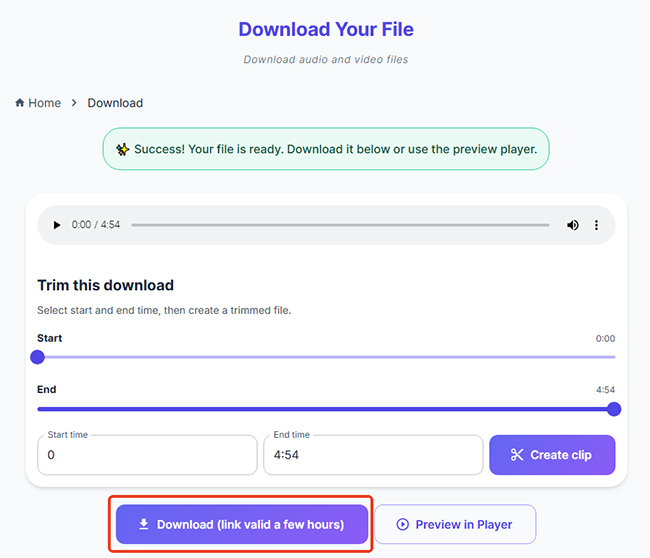
Our Test for CutYT:
We tested CutYT with a public YouTube video in Chrome. The site recognized the URL successfully. Its trimming controls worked during our test, and the downloaded file opened normally as a WAV file. We did not need to create an account, although the tool only handled one video at a time and did not process a complete playlist.
Pros
- No daily download limits or hidden "premium" tiers for longer videos.
- Everything happens in your browser, making it ideal for mobile users or public computers.
- Users frequently report a lack of the "annoying pop-ups" that plague other free sites.
Cons
- The conversion speed depends entirely on your current connection.
- You have to convert and download each video individually, which can be tedious for large playlists.
- It lacks the advanced ID3 tag editing.
4. Y2WAV
Basic Info:
- Website Link: https://y2wav.com/
- Compatible OS: Web (Browser-based)
- Supported Output Formats: WAV, MP3, FLAC, M4A, AAC, ALAC, MP4, OGG
- Price: Free
- Rating: ⭐⭐⭐
| Metric | Ease of Use | Safety | Speed | Audio Quality |
|---|---|---|---|---|
| Score | 10/10 | 6/10 | 8/10 | 7/10 |
Y2WAV is a versatile web-based converter that positions itself as a simple, no-registration solution. It differentiates itself by offering support for FLAC and M4A alongside standard WAV conversion, which is rare for basic free tools. It is a "no-nonsense" site with a minimalist interface. And it supports videos up to 2 hours long. However, it lacks advanced features, such as built-in trimming tools found in desktop alternatives.
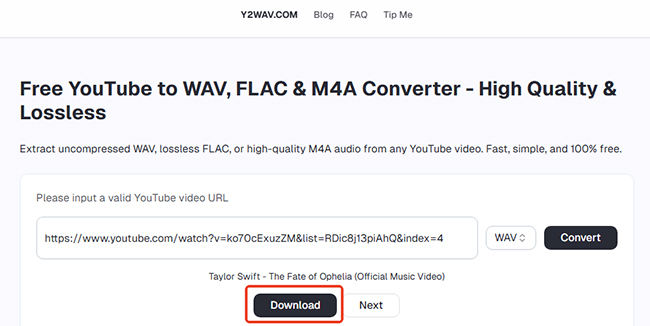
Use Experience:
While the interface is clean, clicking the 'Download' button constantly triggers redirects to ad-heavy sites. Using an ad blocker is highly recommended to bypass this.
Pros
- One of the few free sites that offers ALAC (Apple Lossless), which is perfect for Apple Music/iTunes users.
- It allows for videos up to 120 minutes, making it great for DJ sets or podcasts.
- The site is fully responsive, meaning it works just as well on an iPhone or Android browser as it does on a desktop.
Cons
- Due to server locations, some videos may be blocked based on your geographic region.
- There is no "batch" or "playlist" download feature; you must process links one at a time.
- Redirects to ads websites.
5. TubeRipper
Basic Info:
- Website Link: https://tuberipper.cc/67/
- Compatible OS: Web (Browser-based)
- Supported Output Formats: WAV, MP3, FLAC, M4A, Webm, OPUS, MP4, OGG
- Price: Free
- Rating: ⭐⭐
| Metric | Ease of Use | Safety | Speed | Audio Quality |
|---|---|---|---|---|
| Score | 8/10 | 5/10 | 8/10 | 7/10 |
For those who want a simple, browser-based tool that can handle almost any platform, TubeRipper is a highly effective free option. While many converters only focus on YouTube, TubeRipper is built to extract audio and video from a massive range of sites including Facebook, Instagram, TikTok, and SoundCloud.
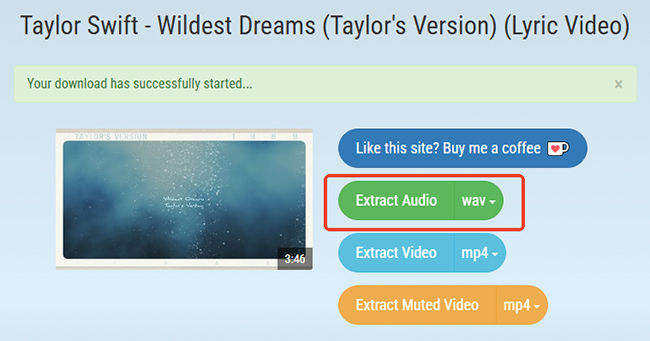
Tips for Using TubeRipper:
It's particularly popular for its quick download trick (adding "777" to a YouTube URL), making it one of the fastest ways to jump from watching a video to downloading its WAV file without even visiting the homepage first.

Pros
- Supports many video sites.
- Offers a wide array of audio-only formats beyond WAV.
- Start converting immediately with zero personal information required.
Cons
- Like many free web tools, you may encounter redirect ads or pop-ups during the conversion process.
- There is no batch-download feature; you must handle one link at a time.
- Depending on the source site, conversion times can occasionally lag during peak traffic hours.
6. Yout
Basic Info:
- Website Link: https://yout.com/
- Compatible OS: Web (Browser-based)
- Supported Output Formats: WAV, MP3, MP4
- Price: Free; $11.99/month
- Rating: ⭐⭐⭐
| Metric | Ease of Use | Safety | Speed | Audio Quality |
|---|---|---|---|---|
| Score | 7/10 | 8/10 | 8/10 | 7/10 |
If you need more than just a single song, Yout is widely considered the most intuitive converter on the web. It gained fame for its signature "URL hack"—you don't even need to visit the site first to use it. By simply deleting the letters "ube" from any YouTube URL (changing youtube.com/... to yout.com/...) and hitting Enter, you are instantly redirected to a download page for that specific video.
However, the free version for downloading YouTube to WAV will download source from the download.org. What sets Yout apart from the competition is its remarkably clean, professional interface. It feels more like a modern web app than a traditional ripper site, and it is largely free of the aggressive pop-ups and sketchy redirects that plague other services.
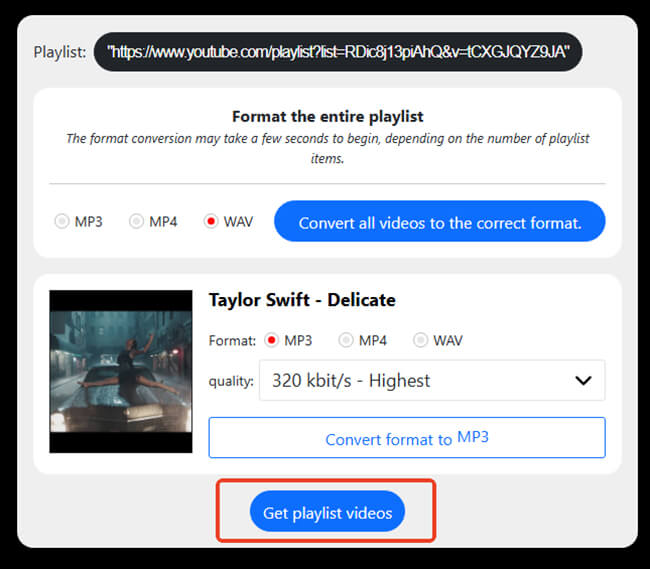
Our Test Experience:
We tested Yout using both the URL shortcut and the website’s input box. In both cases, the tool recognized the public YouTube video and opened the corresponding conversion page successfully. Its URL shortcut saves time, but the additional pages in the free playlist workflow make it less efficient for bulk use.
The free playlist workflow was less direct. After selecting "Get playlist videos", Yout opened a separate page where you had to choose an individual video and select WAV again, and start the conversion. And you still need to process playlist videos individually, while more advanced playlist and batch features require a PRO subscription.
Pros
- The URL shortcut makes it the fastest way to start a conversion without copying and pasting links.
- It's a "clean" site with no mandatory registration for basic use.
Cons
- While it supports WAV, the highest quality/bitrate settings are often locked behind a "PRO" subscription.
- You can only process multiple video at a time with Premium account.
- It doesn't always preserve the artist or album tags.
7. AceThinker Free Online Video Downloader
Basic Info:
- Website Link: https://www.acethinker.ai/online-downloader
- Compatible OS: Web (Browser-based)
- Supported Output Formats: WAV, MP3, MP4, FLAC, OGG, M4A, AAC, WEBA
- Price: Free; $11.99/month
- Rating: ⭐⭐⭐
| Metric | Ease of Use | Safety | Speed | Audio Quality |
|---|---|---|---|---|
| Score | 8/10 | 8/10 | 7/10 | 8/10 |
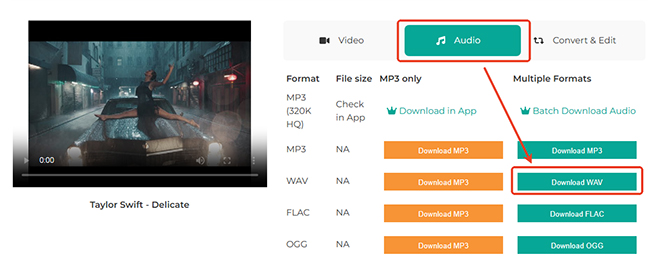
For users who need to grab content from more than just YouTube, AceThinker Free Online Video Downloader is a versatile and highly reliable online tool. It is widely praised for its broad support across 100+ video-sharing platforms, including YouTube, Facebook, Vimeo, Twitter, and TikTok.
Unlike many other free web tools that feel cluttered, AceThinker provides a very clean, professional-looking interface. It is a "no-install" solution, meaning all the processing happens in the cloud, making it a perfect choice for users who want to save space on their hard drives while still getting high-quality WAV files.
Editor's Note:
The basic workflow was easy to follow, although the online version could only process one link at a time during our test. The free service also applies a 100MB file-size limit. Longer videos or large WAV files may exceed this cap. We therefore recommend checking the source duration and estimated output size before starting the conversion.
Pros
- The interface is straightforward.
- No hidden fees for basic use, and the site uses encryption to ensure your browsing stays private.
Cons
- The free online version is capped at 100MB.
- Like most web tools, you can only convert one file at a time, which isn't ideal for large playlists.
Don't Use These Online YouTube to WAV Converters Free
We also tested several free online converters that appeared promising but failed to deliver a reliable WAV download. Since online converters can change or stop working without notice, their current behavior may differ when you visit them. Last tested on July 31, 2026.
| Online Free Tools | Reasons Not to Use |
|---|---|
| Downloaderto.com | Every time I click 'Download', the site triggers a pop-up redirecting to suspicious domains. Furthermore, despite selecting WAV as the output format, the file exports as an M4A. |
| Loader.to | This tool has two major issues: the download button leads to suspicious popups, and the 'WAV' setting incorrectly exports files as M4A. |
| Cobalt.tools | YouTube downloads are unavailable due to platform-side changes. |
| HireQuotient YouTube to WAV | It always failed to convert WAV, saying 'Please try again'. |
| Clipto.AI Free YouTube to WAV Converter | Although it can start analyzing YouTube URLs, nothing happens when you click Download, making it unusable. |
| SubEasy.ai YouTube to WAV Converter | The converter is inaccurate: it exports files in MP3 format even when WAV is selected. |
| Y2Download YouTube Downloader | Clicking the download button only redirects to a third-party platform and produces no other response. |
Comparison Table of Best YouTube to WAV Audio Converters
| Tool Name | Type | Best For | Safety Rating | Batch Support | Max Length |
|---|---|---|---|---|---|
| DRmare All-in-One | Desktop | Professional/Audiophile | ⭐⭐⭐⭐⭐ | Yes | Unlimited |
| ByClick Downloader | Desktop | Windows Power Users | ⭐⭐⭐ | Yes | Unlimited |
| CutYT | Online | Fast Trimming/Mobile | ⭐⭐⭐⭐ | No | Unlimited |
| Y2WAV | Online | Lossless (ALAC/FLAC) | ⭐⭐⭐ | No | 2 Hours |
| TubeRipper.cc | Online | Social Media Extractions | ⭐⭐ | No | Unlimited |
| Yout | Online | No-Copy URL Shortcut | ⭐⭐⭐ | No | Unlimited |
| AceThinker | Online | Clean, Multi-site Use | ⭐⭐⭐ | No | 100MB Limit |
FAQs about Converting YouTube to WAV
Is downloading YouTube to WAV legal?
No, downloading YouTube videos without permission typically violates YouTube's Terms of Service. YouTube's terms explicitly prohibit downloading content unless a download button is provided or the content is explicitly available for free reuse (e.g., Creative Commons). To avoid legal issues, ensure that you only download content you are authorized to access or distribute.
Does converting YouTube to WAV improve audio quality?
No. WAV is a lossless format, meaning it preserves the original audio without compression. However, if the YouTube video has a lower audio quality to begin with (e.g., a 128kbps MP3 file), converting it to WAV will not enhance the quality, it will simply preserve the poor quality.
Can I download WAV files from YouTube for free?
Yes, there are many free tools that allow you to convert YouTube videos to WAV. Several online converters, such as CutYT and AchThinker, let you download WAV files without cost.
Is it safe to use online YouTube to WAV converters?
It can be risky to use online YouTube to WAV converters. While some are trustworthy, many have:
- Ads that could lead to malicious websites or malware.
- Hidden fees or misleading claims.
- Privacy issues, such as tracking your data.
For added security, use desktop apps or choose well-known, reputable sites with no ads.
Can I download entire YouTube playlists to WAV?
Yes, you can use DRmare Streaming Audio Recorder to download entire YouTube playlists to WAV. It can extract multiple YouTube videos or tracks without downloading each one individually. Many online converters might not support batch downloading or playlist conversion, so check the tool's specifications before using it.
Can I convert YouTube to WAV on my phone?
Yes, you can use the 100% working online tools to finish this process. All of them are compatible with iOS and Android devices.
In Conclusion
Choosing the right YouTube to WAV converter comes down to your specific needs. For professionals and audiophiles who require lossless quality, batch downloading, and 100% security, a desktop solution like DRmare All-in-One Music Downloader is the superior choice. If you are a casual user looking for a quick, one-off download without installing software, CutYT offers the cleanest and fastest web-based experience. Regardless of the tool you pick, always prioritize safety by avoiding sites with aggressive pop-ups and ensuring you have the right to download the content.
Note:
This article is for informational and educational purposes only. We encourage users to only download content that is in the public domain, labeled with a Creative Commons license, or for which they have explicit permission from the copyright holder.

 Home
Home




User Comments
Leave a Comment