





While Tidal offers an extensive catalog of lossless and Hi-Res music, its built-in offline feature does not provide subscribers with standard local audio files. Open-source tools like Tiddl offer another approach, using command-line tools to access and save supported Tidal streams.
However, Tiddl faced compatibility issues in 2026 after changes to Tidal's authentication system. Is Tiddl still working today? This review examines its current status, key features, usage, and what alternatives are available.
Part 1. What Is Tiddl?
Tiddl is an open-source, command-line interface (CLI) music downloader. The tool enables Tidal subscribers to retrieve tracks, full albums, music videos, artist discographies, and curated playlists directly to their local drives. It interacts with Tidal's backend endpoints, extracting the original streams without unnecessary transcoding when configured for lossless output.
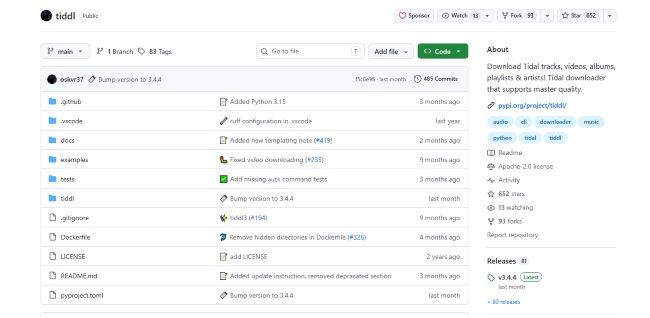
Core Features of Tiddl:
- Comprehensive Quality Selection: Supports four distinct streaming tiers from Low(96kbps) to Max(192 kHz).
- Customizable Directory Formatting: Users can define dynamic directory templates to structure downloads automatically.
- Automated Tagging: It embeds complete ID3/FLAC metadata tags, track numbers, and high-resolution album artwork into the output files.
Part 2. Is Tiddl Still Working?
What Happened to Tiddl?
Tidal rolled out sweeping updates to its OAuth 2.0 authentication endpoints and API security keys. This server-side change invalidated legacy developer tokens, causing almost every third-party downloader to fail abruptly.
Users attempting to fetch lossless files experienced errors where .flac tracks were forcibly downgraded to 320 kbps .m4a streams or thrown as corrupted, unplayable files. Fortunately, the developer pushed tiddl v3.4.0+ (alpha) to patch the authentication flow, though unlocking the highest 24-bit tier now requires an extra manual step.
Tiddl Current Status
| Audio Tier | Working Status | Notes & Workarounds |
|---|---|---|
| Standard FLAC (HIGH) | Working Out of the Box | Restored in v3.4.0+. Standard tiddl auth login works directly for 16-bit / 44.1 kHz. |
| Hi-Res Master (MAX) | Working via Workaround | Requires manually extracting a web session token (JWT) from a desktop browser. |
| Compressed (AAC/M4A) | Working | Functions normally across both LOW and NORMAL presets. |
| Legacy Builds (< v3.4.0) | Broken | Fails with authentication errors or produces corrupted 0-byte files. |
Part 3. How to Use Tiddl to Download Music
Using Tiddl is relatively straightforward once the initial setup is complete. You will need a working Python environment and a globally accessible ffmpeg installation, which Tiddl uses for media processing, container extraction, and tagging.
Note:
Because Tiddl's authentication and download behavior has changed alongside Tidal's service updates, it is also worth using the latest available version before following the steps below. This can help you avoid problems caused by outdated commands or authentication methods.
Step 1. Install ffmpeg on your operating system and verify that Python (version 3.10 or newer) is added to your system PATH.
Step 2. Install the latest build of tiddl through your preferred Python package manager by executing:

Or use uv tool install tiddl==3.4.3 for the exact version.
Step 3. Initialize authentication by executing the login command in your terminal:
If you previously had an older session that expired or threw errors, run [tiddl auth logout --force] first to wipe corrupted cache files.
Step 4. If you want true 24-bit Hi-Res audio, open Tidal in your desktop browser, press F12 to open Developer Tools, head to the Network (Fetch/XHR) tab, log into your account, and locate your Authorization: Bearer
Step 5. Download your chosen album, track, or playlist by passing the URL to the download command:
Part 4. Best Alternatives to Tiddl
Tiddl is a useful option for users who are comfortable with command-line tools, but its setup requirements may not suit everyone. If you prefer a graphical interface or want a simpler way to download Tidal music, there are several alternatives worth considering. The three options below take different approaches, making it easier to choose based on your preferred workflow and download needs.
Disclaimer:
These tools are intended solely for personal archival, offline listening, and educational research. Always respect artists and streaming service agreements and avoid unauthorized public redistribution of copyrighted media.
1. DRmare Streaming Audio Recorder
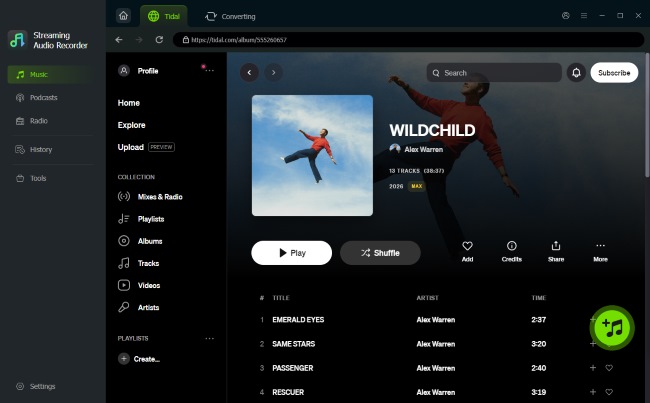
For users who prefer a desktop solution over Tiddl's command-line workflow, DRmare Streaming Audio Recorder provides a simpler way to download Tidal music. It supports batch processing and high-speed downloads, while allowing users to save Tidal tracks in formats such as FLAC, MP3, WAV, AAC, and M4A. The graphical interface also removes the need to set up Python or terminal commands manually.
-

Best for: Non-technical users who want a reliable Tidal downloader with fast batch downloads and flexible output options.
Pros
 Up to 37× faster download speed
- Batch download of multiple tracks
- Supports FLAC, MP3, WAV, AAC, and M4A
- Easy-to-use graphical interface
Cons
 Trial version has limitations
- Designed primarily for desktop use
2. Tidal-DL-NG (Tidal Downloader Next Generation)
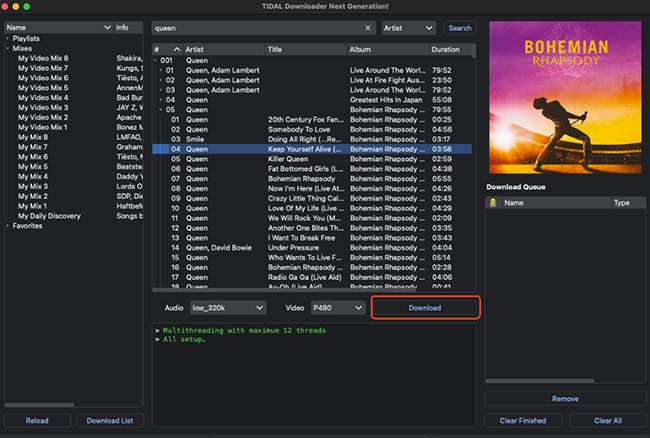
After the original tidal-dl project became inactive, Tidal-DL-NG emerged as a community-developed successor focused specifically on Tidal downloads. It offers a more modern workflow with CLI and GUI options, multithreaded downloading, and support for tracks, albums, playlists, videos, and favorites. It can also handle metadata, lyrics, cover art, and FLAC extraction, making it a strong choice for users who want more control than a typical desktop downloader while avoiding some of the limitations of older Tidal download tools.
-
Best for: Terminal power users and audiophiles exclusively focused on downloading high-resolution tracks from the Tidal.
Pros
- Native 24-bit MAX & Dolby Atmos support
- No manual browser token scraping required
- Multithreaded engine for faster downloads
Cons
- Relies primarily on a command-line interface
- Strictly limited to the Tidal ecosystem
- Requires a dedicated Python 3.12 environment
3. OrpheusDL GUI
OrpheusDL is a robust, multi-source media ripping framework, and OrpheusDL GUI wraps its powerful backend into a sleek desktop window. It allows digital hoarders to seamlessly fetch lossless tracks across different streaming services using modular integrations without touching any code. You can download the precompiled .exe or .dmg package from the official OrpheusDL GUI GitHub releases page.
-
Best for: Music collectors who manage subscriptions across multiple platforms and dislike working in command-line terminals.
Pros
- Supports Tidal, Qobuz, Apple Music, Deezer
- Fully visual desktop interface
- High resilience (API breaks don't ruin all modules)
Cons
- Initial module and token setup takes extra time
- Subject to rate-limiting on public search APIs
- Slightly slower batch processing than CLI tools
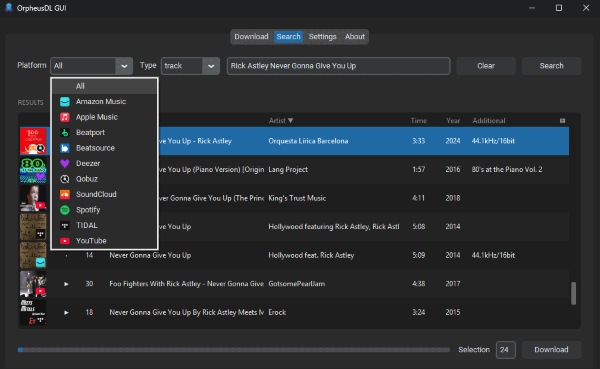
Comparison of The Tiddl Alternatives
| Feature / Metric | Tiddl | DRmare Streaming Audio Recorder | Tidal-DL-NG | OrpheusDL GUI |
|---|---|---|---|---|
| Interface / Workflow | CLI | Desktop GUI | CLI + GUI | Desktop GUI |
| Maximum Audio Quality | Up to 24-bit/192 kHz | Lossless FLAC | Up to 24-bit/192 kHz | Up to 24-bit/192 kHz |
| Authentication | Web / Token-based | Built-in account login | Device Code | Module-based |
| Music Service Support | Tidal | Tidal + other supported services | Tidal | Multiple services |
| Batch Downloads | ✓ | ✓ | ✓ | ✓ |
| Open Source | ✓ | x | ✓ | ✓ |
| Ease of Use | Advanced | Easy | Moderate | Moderate |
Note:
Available audio quality, authentication methods, and certain advanced features may vary depending on the Tidal account, content, authentication method, and current version of each tool.
Part 5. Summary
Tiddl remains an actively developed Tidal downloader, but recent authentication and download issues can make the experience less predictable. If you are comfortable with CLI tools, it is still worth considering. For an easier workflow, alternatives such as DRmare, Tidal-DL-NG, and OrpheusDL GUI offer different approaches.
- Choose DRmare if you prefer a commercial desktop converter that requires minimal technical setup.
- Choose Tidal-DL-NG if you want automated high-resolution downloads without extracting tokens manually.
- Choose OrpheusDL GUI if you prefer a visual interface and manage music across multiple platforms like Qobuz and Tidal.

 Home
Home





Download Tidal music to MP3, FLAC, WAV, M4A, AIFF, or M4B at up to 37X speed, with batch downloads, full metadata, and an easy-to-use GUI.