





Apple Music makes offline listening easy, but those downloads are locked to Apple ecosystem. That is where ViWizard Apple Music Converter comes in. It claims to save Apple Music content as standard audio files such as MP3, FLAC, WAV, M4A, M4B, and AIFF.
However, does it actually work as advertised in real use? For this ViWizard Apple Music Converter review, I tested version 5.0.1 with a 20-song Apple Music playlist, checked its Lossless output mode, conversion time, supported content, metadata handling, filename controls, and current limitations. Instead of judging the program only by its feature list, I focused on what actually happened during use.
Part 1. ViWizard Apple Music Converter Test Results at a Glance
ViWizard Apple Music Converter for Mac and Windows worked reliably in my playlist test. I converted 20 Apple Music tracks in Lossless mode in around four minutes, and all 20 files were generated without missing tracks in that batch.
| Test Item | My Result |
|---|---|
| Version tested | ViWizard Apple Music Converter 5.0.1 |
| macOS requirement | macOS 11 or later |
| Windows requirement | Windows 10 or 11 |
| Test playlist | 20 songs |
| Output mode | Lossless |
| Conversion time | About 4 minutes |
| Successful outputs | 20/20 |
| Missing or failed tracks | 0 in this test |
| Songs, Albums & Playlists | Supported |
| Music Videos & Live Radio | Not Supported |
| ID3 tags | Retained |
| Batch ID3 editing | Supported |
| Custom filenames | Supported |
| Main output formats | MP3, M4A, M4B, WAV, FLAC, AIFF |
Note:
This table reflects my test of version 5.0.1 rather than every possible Apple Music track or system configuration. Results can still vary depending on the source content, computer, software updates, and Apple Music playback availability.
Part 2. ViWizard Apple Music Converter Real-World Performance
While test results give a helpful snapshot of overall reliability, real-world performance reveals how it performs during daily use. To put ViWizard Apple Music Converter (v5.0.1) to the test, I took a closer look beyond simple pass/fail rates, evaluating everything from audio fidelity and encoding speed to metadata precision and file management.
A Brand-New Conversion Workflow: The Built-In Web Player
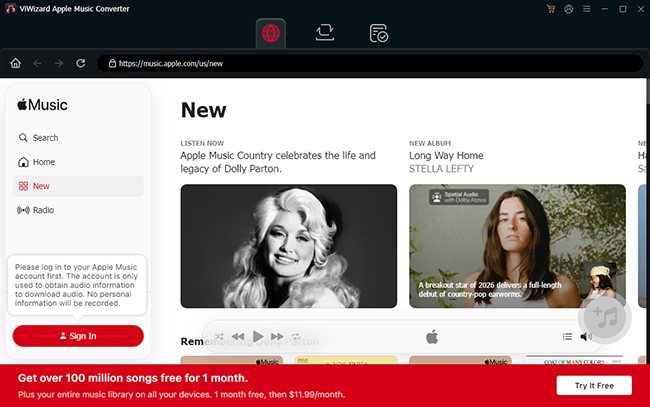
ViWizard Apple Music Converter is a desktop tool for Windows and macOS. The current workflow is noticeably different from older versions of Apple Music converters that depended heavily on iTunes or the native Music app. It uses a built-in Apple Music web interface, so you can sign in, browse Apple Music, open albums or playlists, and add music to the conversion queue from inside the program.
Content Compatibility and Limitations
| Apple Music Content | Result |
|---|---|
| Individual songs | Supported |
| Playlists | Supported |
| Albums | Supported |
| Artists | Supported |
| Music video links | Not supported |
| Live Radio | Not supported |
The two unsupported categories are important because some broad product descriptions can make Apple Music support sound more comprehensive than it really is. If your goal is downloading regular catalog songs and playlists, this limitation may not matter much. If you specifically want Apple Music videos or a live radio stream, ViWizard is not the right tool for that task based on my test.
Conversion Speed and Batch Efficiency
ViWizard promotes conversion speeds of up to 20X, but advertised maximum speed and real-world conversion time are not the same thing. In my test, a 20-song playlist took around four minutes from conversion start to completed output. That result was fast enough that I did not have to process the playlist in real time. It also shows that batch conversion is practical for more than one or two tracks.
Note:
The paid version is designed to run faster than the free trial mode, but actual performance will also depend on the number of tracks, output option, connection, and computer.
Audio Quality and Lossless Output
This is arguably the most critical technical question when evaluating a music converter. ViWizard features a dedicated Lossless output mode designed to capture the available audio stream directly, bypassing any secondary lossy encoding (such as converting to MP3).
Operationally, the mode performed flawlessly in my test: all 20 songs in the playlist were successfully downloaded with the Lossless setting enabled. However, a successful extraction does not guarantee that every track was delivered from Apple Music at the absolute highest possible resolution.
Note:
Setting an output format to 24-bit / 192 kHz FLAC does not up-sample or create missing detail from a lower-resolution stream. It simply places the original stream into a higher-capacity file container. ViWizard Apple Music Converter preserves the source quality supplied to the interface, but output settings cannot exceed the fidelity of the original audio feed.
Batch Metadata, ID3 Tags & File Organization
During my testing, metadata retention proved to be one of ViWizard's most distinct advantages over bare-bones audio downloaders. The software successfully preserved essential ID3 information right out of the gate. More importantly, it supports batch ID3 editing, meaning you are not forced to accept whatever default metadata comes through the stream.
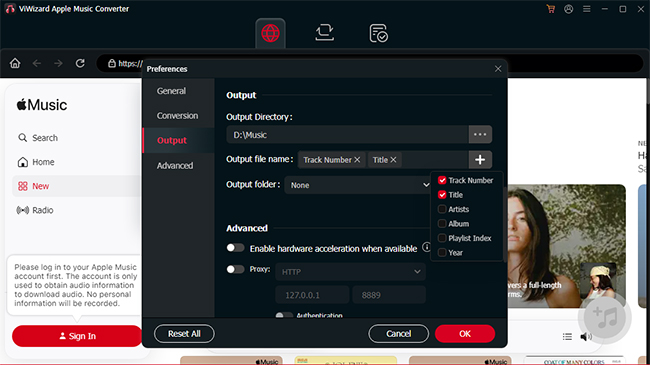
Beyond embedded ID3 tags, ViWizard Audio Converter allows you to define exactly how your output files are named. You can build custom naming templates by combining dynamic metadata variables, your own fixed text, and custom separators. Here is how it worked in practice:
- Basic Variables: Using the template {TrackNumber}_{Title} accurately produced files like 01_Love song.
- Custom Separators: Swapping the underscore for a hyphen ({TrackNumber}-{Title}) neatly adjusted the output to 01-Love song.
- Adding Fixed Text: Any ordinary text or numbers typed into the pattern are treated as fixed additions. For example, {TrackNumber}_{Title}12 successfully generated 01_Love song12.
You can construct these naming templates using any combination of the following available variables:
- Track Number
- Title
- Artist
- Album
- Playlist Order
- Year
Note:
File names still need to follow normal operating-system restrictions, so characters such as \ / : * ? < > cannot be used as ordinary filename characters.
Part 3. How to Use ViWizard Apple Music Converter for Mac and Windows
Now let's talk about the actual user experience of ViWizard Apple Music Converter to MP3. Because it no longer relies on external app synchronization, the current workflow is fairly straightforward. Here is the exact step-by-step process I used to queue and convert my test playlist.
Step 1. Go to the official website to download Viwizard Apple Music Converter for free. Launch it and enter the integrated Apple Music interface. Sign in with the Apple account you normally use for Apple Music access.
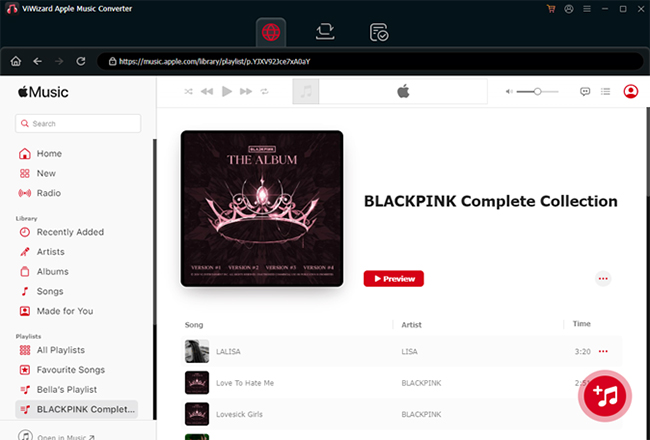
Step 2. Browse Apple Music inside the program or open the content you want to convert. You can add the selected Apple Music content to the queue. Check the list before starting so you can confirm the tracks you expect are present.
Tips:
For larger jobs, opening the full Apple Music album or playlist is much faster than adding tracks one at a time.
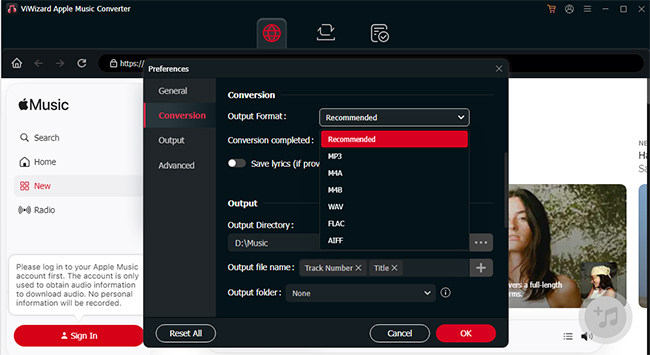
Step 3. Select Recommend if your priority is preserving the available source, or choose MP3, M4A, FLAC, WAV, AIFF, or M4B for a specific compatibility requirement. You can also adjust available audio settings and filename organization here.
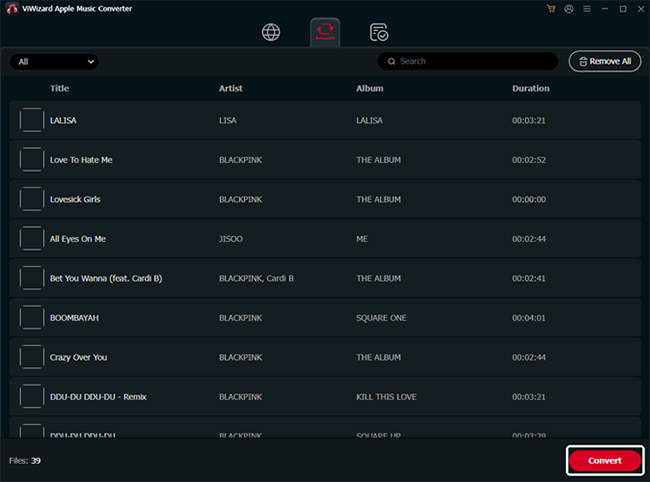
Step 4. Click the Convert button to run the conversion and let ViWizard process the queue. After conversion, review the local folder and confirm that track count, filenames, and metadata look correct before deleting or reorganizing the original playlist reference.
Part 4. Viwizard Apple Music Converter Pricing, Free Trial & Limitations
Pricing & Refund Policies
As of August 2026, ViWizard offers three primary subscription and perpetual tiers:
| Plan | Price | License | Refund Policy |
|---|---|---|---|
| Monthly | $19.95 | 1 PC or 1 Mac | 14-Day Money-Back |
| Yearly | $44.95 | 1 PC or 1 Mac | 30-Day Money-Back |
| Lifetime | $89.95 | 1 PC or 1 Mac | 30-Day Money-Back |
- Platform-Specific Licensing: Licenses are strictly single-OS. Purchasing a Mac license does not entitle you to use the Windows version, which is critical if you work across multiple operating systems.
- Conditional Refund Terms: Refund policies are conditional based on specific technical troubleshooting requirements rather than a universal "no-questions-asked" cancellation. Always double-check live terms before checkout.
Free Trial Limitations
The free version serves primarily as a system compatibility check. It enforces a strict 30-second conversion cap per track. While this limit is sufficient to test whether the software launches, recognizes your Apple account, and navigates the web player, it gives an incomplete picture of real-world performance. You cannot use the trial to evaluate:
- Full-length audio fidelity and end-to-end playback quality.
- Large-playlist batch stability and error handling over extended runs.
- Sustained batch conversion speeds across multi-gigabyte queues.
Part 5. Is ViWizard Apple Music Converter Safe and Legal?
Safety of using Viwizard Audio Converter comes down to three distinct factors: installer security, account privacy, and legal usage.
- Software & Installer Security: No bundled malware or unexpected system behavior was encountered during testing. To ensure file integrity, always download the installer directly from the official ViWizard website rather than third-party mirrors.
- Account Privacy & Login: Signing in through the integrated web player requires your Apple Account credentials. ViWizard explicitly states that it does not store or log account details. Note that this is the vendor's stated privacy position rather than an independently audited guarantee.
- Legal & Copyright Compliance: Converting streaming audio into local files does not override Apple's Terms of Service or copyright laws. Output files should strictly be used for personal offline playback on unsupported hardware, never for commercial projects, public distribution, or re-uploading.
Part 6. Viwizard Apple Music Converter Pros and Cons
To help you decide if ViWizard Apple Music Converter fits your specific audio workflow, I've summarized its core strengths and main drawbacks based on my test of version 5.0.1. Below is a quick-reference breakdown:
Pros
 Reliable batch results with a 100% success rate on the 20-track test playlist.
- Practical conversion speeds, completing 20 Lossless tracks in around four minutes.
- Excellent local-library controls with ID3 retention, batch metadata editing, and flexible filename templates.
- Wide and useful format range supporting MP3, FLAC, WAV, AIFF, M4A, M4B, and Lossless modes.
Cons
 Does not support or convert Apple Music video links and Live Radio streams.
- Restrictive free trial limited to 30-second samples prevents full-song performance testing.
- Outputting to 24-bit/192 kHz can be misleading, as it does not guarantee the Apple Music source was supplied at that high resolution.
- Single-platform licensing requires separate purchases for Windows and Mac.
Part 7. Alternatives to ViWizard Apple Music Converter
If ViWizard does not align with your workflow, whether due to licensing, trial limits, or broader media needs, here are three practical alternatives matching different user requirements and budgets:
1. DRmare Apple Music Converter (Direct Desktop Alternative)
If you want a dedicated desktop converter with faster conversion speed, DRmare Apple Music Converter is a direct equivalent. Built around an integrated Apple Music web player, it bypasses legacy app-sync steps and works at up to 30X.
2. DRmare Streaming Audio Recorder (All-in-One Multi-Platform Upgrade)
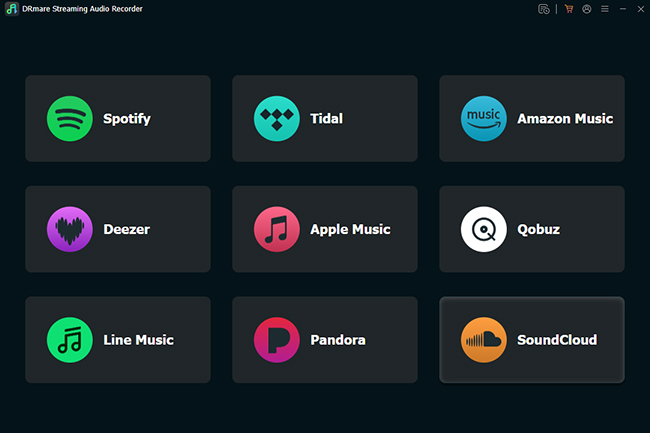
If a single-service utility feels too restrictive, DRmare Streaming Audio Recorder expands coverage across multiple platforms. Featuring built-in web players for Apple Music, Spotify, Tidal, Amazon Music, Deezer, SoundCloud, and more, it lets you manage multiple streaming subscriptions under one license.
3. AAPLmusicdownloader (Free Web-Based Alternative)
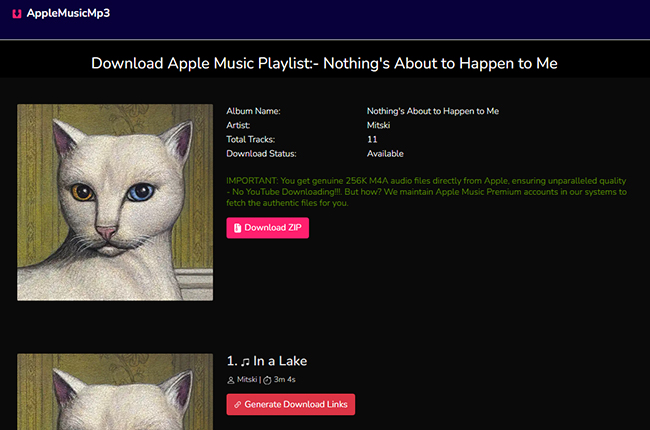
For occasional downloads without software installation, AAPLmusicDownloader provides a browser-based option. You paste an Apple Music track or album link directly into the site to extract standard MP3 files.
Part 8. Final Verdict
ViWizard Apple Music Converter (v5.0.1) is a reliable, standalone desktop tool that efficiently converts standard Apple Music tracks for offline playback. By utilizing a built-in web player, it bypasses external apps entirely while offering excellent batch processing and flexible ID3 metadata controls.
- Get it if: You need a stable tool to batch-convert standard songs and playlists while keeping your local audio library meticulously organized with custom filenames and tags.
- Skip it if: You want to download Music Videos or Live Radio, need cross-platform (Mac and Windows) licensing, or require full-track quality testing before purchasing (the free trial is strictly limited to 30 seconds per track).
Bottom Line: ViWizard is highly effective for dedicated Apple Music users building an offline library. However, if you require multi-platform recording or just need an occasional free download, all-in-one alternatives like DRmare or web-based downloaders are a better fit.

 Home
Home





User Comments
Leave a Comment