





Streaming Apple Music offline usually requires an active subscription, and downloaded tracks remain locked within Apple’s ecosystem. Because of this limitation, many users explore third-party online Apple Music downloader, likeAAPLMusicDownloader to understand whether they offer a practical alternative for personal offline access.
But you might wonder: is AAPLMusicDownloader safe and reliable? This review takes a technical, evidence-based look at how the tool performs in real-world use, including usability, stability, and audio quality analysis using Spek spectrum testing and suggests the best alternative available today.
Part 1. What Is AAPLMusicDownloader?
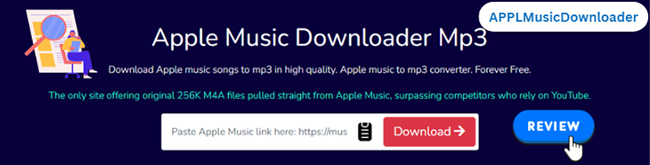
AAPLMusicDownloader is a user-friendly, innovative online service that allows you to easily process music links and export tracks in formats such as M4A and MP3. It does not require installation and works directly in modern browsers. Let's break down the key features of this software.
Highlight its key features:
- It doesn't require an Apple Music account or premium subscription to download Apple Music to MP3 or M4A format.
- Supports keeping the original 256K M4A files directly sourced from Apple, ensuring superior audio quality compared to services relying on YouTube downloads.
- Its internal system maintains active Apple Music Premium accounts (not your own account) to ensure authentic file retrieval.
- In addition to the original 256K M4A, you can also download Apple Music tracks in 320Kbps MP3 format, offering flexible options for offline listening.
- Compatible with all major platforms, including desktop, mobile devices, and web browsers (Chrome, Firefox, Safari, Opera, and Chromium-based browsers).
- Completely cloud-based, eliminating the need for downloading additional software or browser extensions.
- Allows for bulk playlist downloads in ZIP format for convenience.
- Prioritizes user privacy and incorporates robust security measures.
Disadvantages:
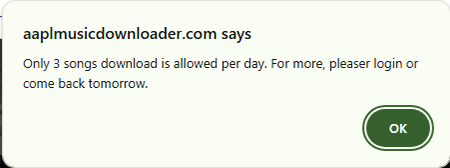
- Free-tier users are restricted to downloading only 3 songs per day or first two songs in a playlist or album.
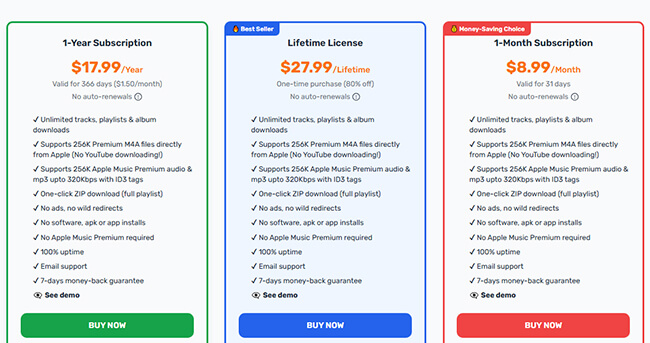
- Bulk playlist ZIP downloads require a premium account, available starting at $8.99.
Part 2. How to Use AAPLMusicDownloader to Download Apple Music to MP3 or M4A Online
Now that you're familiar with what AAPLMusicDownloader offers, it's time to walk through the straightforward process of downloading Apple Music songs without a subscription and account online in high quality. Whether you're looking to convert songs into MP3 for universal compatibility or prefer the original M4A quality, this step-by-step guide will clearly show you how to achieve both. Let's dive in!
- Step 1Copy Apple Music URL
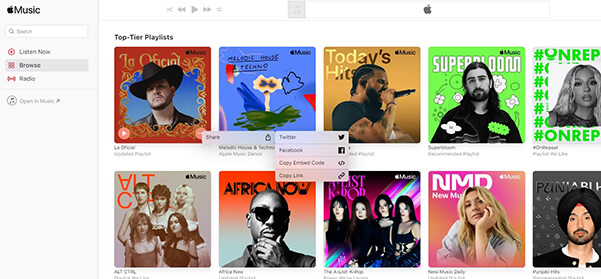
Head over to Apple Music Web Player and find the song or playlist you'd like to download. Once you've located your desired track or playlist, click on the three-dot icon next to its title, select "Share," and then choose "Copy Link".
- Step 2Paste Apple Music URL on AAPLMusicDownloader:
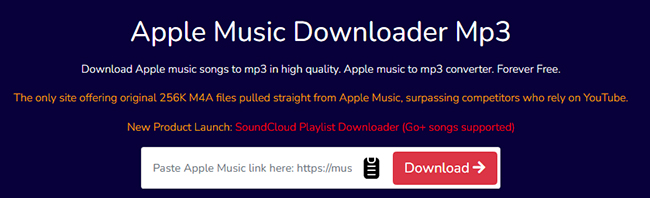
Navigate to the AAPLMusicDownloader website and find the input field clearly displayed on the homepage. Paste the copied Apple Music link directly into this box, and click the "Download" button to load them.
- Step 3Generate the Download Link
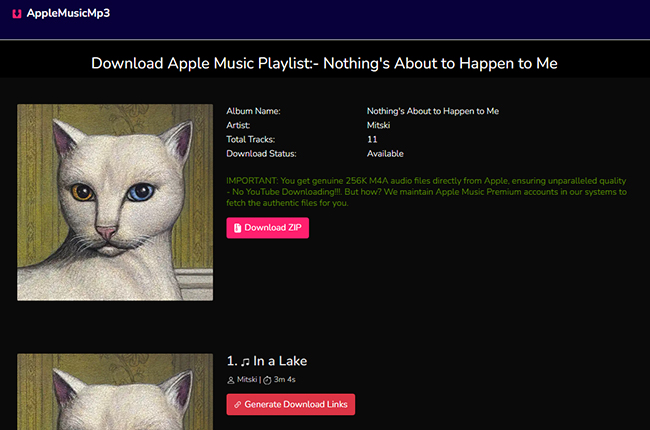
- To bulk download Apple Music playlist to M4A/MP3: Select the "Download ZIP" button.
- To download individual tracks: Click the "Generate Download Link" button next to each song.
Note:
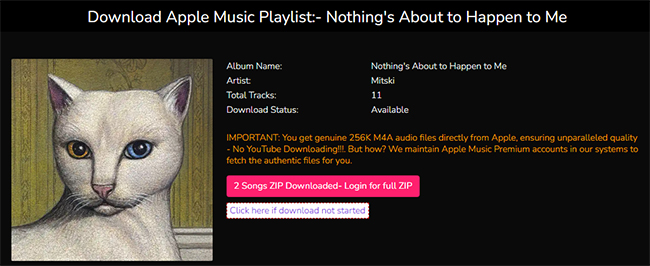
For free users, the 'Download ZIP' option will only process the first two tracks in your playlist or album.
- Step 4Download Apple Music for Free Online
Now, you can select the appropriate format and audio quality by clicking the "Select Audio Quality" option. It will automatically export Apple Music as original M4A or MP3 files.

Part 3. Performance & Audio Quality (Real-World Test)
The user interface is remarkably clean and ad-free. Unlike most web-based converters, the downloaded files are clean, meaning they do not contain intrusive promotional tags or website URLs in the metadata. To evaluate actual output quality, we tested multiple Apple Music tracks using Spek (frequency spectrum analysis).
AAPLMusicDownloader Test Setup
- Device: Windows 11
- Browser: Chrome
- Playlist: Nothing's About to Happen to Me
Test Results Summary
| Metric | Observation |
|---|---|
| Format | AAC (M4A) / MP3 |
| Bitrate | ~256kbps AAC / variable MP3 |
| Frequency Response | Up to ~20kHz |
| Stability | Moderate (occasional retries needed) |
| Metadata | Fully preserved |
Audio Quality Analysis by Spek:
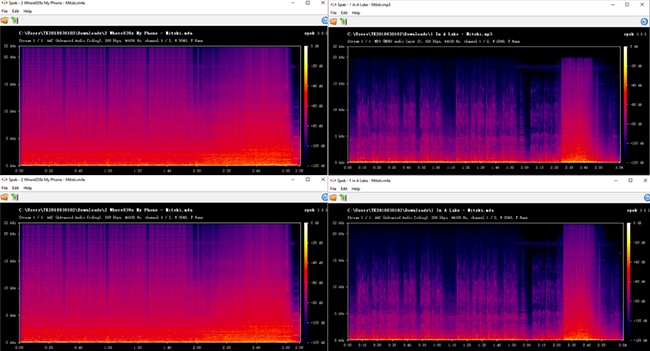
Spectral analysis shows that most M4A files maintain a clean frequency cutoff around 20kHz, which aligns with standard Apple Music streaming quality. This indicates that the output is not simply low-bitrate re-encoding, but remains within a high-quality AAC range typical of streaming services.
However, it is important to note:
- The tool does not produce true lossless ALAC output.
- MP3 outputs depend on conversion settings and may vary slightly in consistency.
- Quality is generally "stream-level," not archival-grade.
Practical Listening Result
For everyday listening (headphones, car audio, mobile devices), the difference from original streaming playback is minimal. For professional archiving or lossless libraries, limitations are still present.
Part 4. AAPLMusicDownloader's Limitations You Should Know
While AAPLMusicDownloader works reliably in simple scenarios, several limitations were observed:
1. Server Dependency
Performance depends heavily on server availability. During peak usage, delays or failures may occur.
2. Playlist Instability
Large playlists are not always processed consistently. Some tracks may require manual retry.
3. Output Variation
Audio quality remains generally high, but results can vary slightly depending on source availability and processing conditions.
Pros and cons of AAPLMusicDownloader
Pros
 No installation required
- Easy to use on all devices
- Preserves metadata effectively
- Supports both MP3 and M4A output
- Works for single tracks efficiently
Cons
 Playlist processing can be unstable
- No advanced library management features
- Output format consistency varies slightly
- Dependent on server performance
Part 5. Best Alternative to AAPLMusicDownloader
While AAPLMusicDownloader provides convenience and genuine Apple Music file downloads, it does come with several limitations. Free-tier users are limited to downloading just three songs per day, bulk playlist downloads require a premium subscription, and downloading multiple individual tracks can be tedious, as each track needs to be downloaded separately. Additionally, the online conversion process can be unstable, and available audio formats are quite limited.
To address these limitations effectively, DRmare Apple Music Converter emerges as the ideal alternative to APPL Music Downloader. DRmare Apple Music Converter is a desktop-based software that ensures lossless audio quality, rapid conversion speeds, and support for various formats, making it perfect for users who regularly manage large music libraries. It provides powerful, user-friendly features designed to overcome the shortcomings of web-based tools.
Key Features of DRmare Apple Music Converter:
- Supports a variety of output formats including MP3, M4A, AIFF, Lossless, FLAC, WAV, and M4B.
- Ensures preservation of original lossless audio quality and complete ID3 tags, like year, title, album cover art, etc.
- Delivers extremely fast download and conversion speeds up to 30X faster.
- Supports batch downloading single Apple Music tracks for significant time savings.
- Offers a secure, desktop-based solution for Apple Music conversion and downloading.
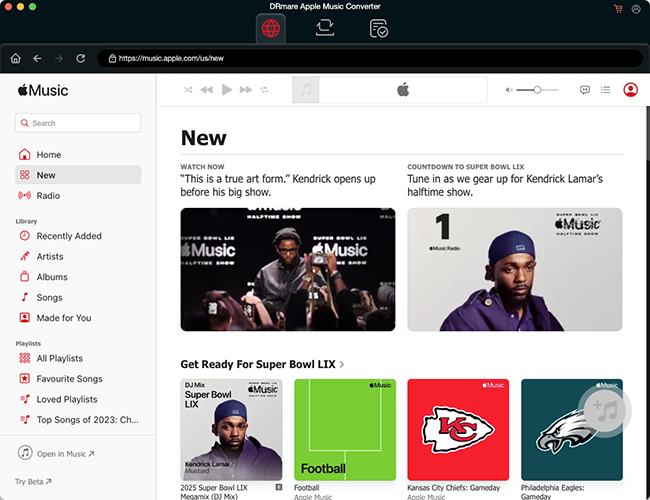
Step 1. Launch the DRmare Apple Music Converter application on your desktop. Click the "Log in" button to authorize your Apple Music account.
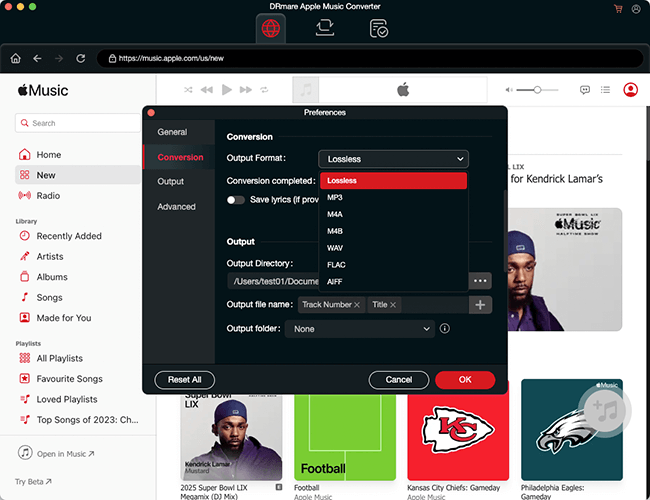
Step 2. Click the "Menu" icon > "Preferences" > "Conversion" option to select your preferred output format and adjust audio settings as needed for saving Apple Music.
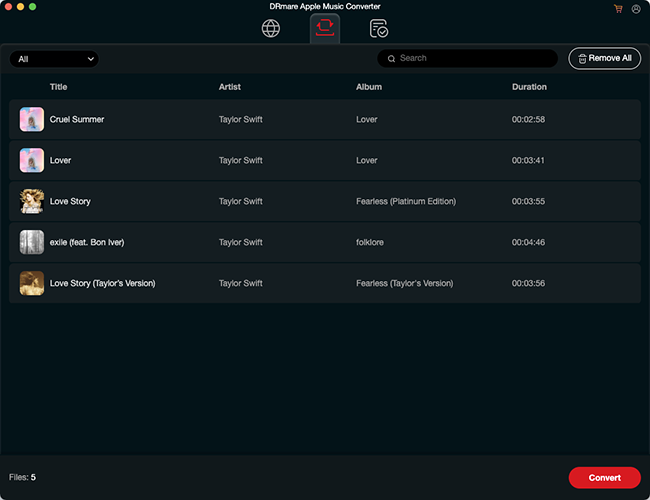
Step 3. Browse your Apple Music library and tap the "Add" > "Add to List" button to import desired songs or playlists directly into the application interface. Click the "Convert" button to convert your Apple Music quickly and reliably.
Comparison Table: AAPLMusicDownloader vs. DRmare Apple Music Converter
Here is a detailed comparison table between AAPLMusicDownloader and DRmare Apple Music Converter based on their features, performance, usability, and technical capabilities.
| Feature | AAPLMusicDownloader | DRmare Apple Music Converter |
|---|---|---|
| Software Type | Cloud-based / Online Web Tool | Desktop Application (Windows & Mac) |
| Installation Required | No (Runs directly in browser) | Yes |
| Apple Account Required | No (Uses internal premium server accounts) | Yes (Requires authorizing your Apple Music account) |
| Supported Output Formats | MP3, M4A | MP3, M4A, FLAC, WAV, AIFF, M4B, Lossless |
| Audio Quality (Max) | ~256kbps AAC / 320kbps MP3 (Stream-level) | Lossless Audio |
| Conversion Speed | Dependent on server queues (Standard speed) | Ultra-fast (Up to 30X speed acceleration) |
| Batch / Playlist Downloads | Limited (ZIP downloads unstable/restricted for free tier) | Stable Batch Processing (Download hundreds of tracks at once) |
| ID3 Tags & Metadata | Preserves basic metadata (No promo tags) | Preserves complete ID3 tags, album art, and exports lyrics |
| Library Management | None | Advanced (Auto-sorts files by Artist/Album; customizable filenames) |
| Stability & Reliability | Moderate | High |
| Free Tier Limitations | Max 3 songs per day; playlist ZIP limited to first 2 songs | Capped conversion length per track (Trial version) |
| Pricing | Free tier available; Premium starts at $8.99 | Premium starts at $19.95 (with 30-day money-back guarantee) |
| Rating | ⭐⭐⭐ | ⭐⭐⭐⭐ |
Part 6. FAQs about AAPL Music Downloader
Is AAPLMusicDownloader safe and legal to use?
Does it cost anything to download music from Apple Music?
What audio quality can I expect from AAPLMusicDownloader?
It offers high-quality audio files directly from Apple Music. Specifically, you can download songs in original 256K M4A format as provided by Apple, or choose the 320K MP3 option if you prefer higher compatibility across various devices.
Can I use AAPLMusicDownloader on Android and iPhone?
Yes, it is fully compatible with both Android and iPhone devices. Since it's a web-based service, you can easily access and use it directly from the browsers on your mobile devices without installing additional apps.
Do I need an Apple Music subscription to use AAPLMusicDownloader?
No, you don't need an Apple Music subscription or account. The tool internally manages Apple Music Premium accounts to provide you with high-quality music downloads without requiring your own subscription.
Part 7. In Conclusion
AAPLMusicDownloader offers a convenient solution to enjoy Apple Music offline on any device, without needing an Apple subscription or software installation. However, it has notable drawbacks like daily download limits, premium costs for bulk downloads, limited formats, and occasional stability issues.
For users who seek a more robust and reliable experience, DRmare Apple Music Converter is highly recommended. It provides lossless quality, rapid conversions, and broader format compatibility, making it ideal for extensive music management. Consider your personal needs carefully to select the best tool for your Apple Music enjoyment.

 Home
Home





User Comments
Leave a Comment