





Apple TV offers subscribers an array of thrilling dramas and live sports. Among them, MLS matches are one of the most popular content. Whether you're a longtime fan or new to MLS, knowing how to navigate Apple TV to access MLS matches ensures you won't miss any of the action. This guide explains everything about watching MLS on Apple TV in 2026, including step-by-step instructions for streaming MLS matches and how to keep enjoying your favorite games anytime, even after your Apple TV subscription ends.

Part 1. Watch MLS on Apple TV: What You Need to Know
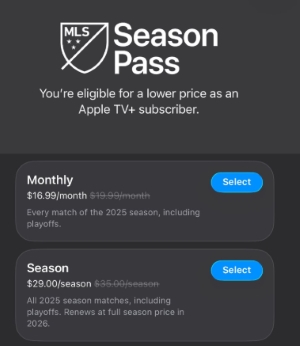
According to the MLS Apple TV deal, all league matches have been offered through a standalone subscription called MLS Season Pass since 2023. While some matches were free or available if you're an Apple TV subscriber, it still requires a separate MLS Season Pass for full access to MLS matches.
Can I Watch MLS on Apple TV for Free
No, you have to subscribe to the MLS Season Pass to watch your favorite games on Apple TV, and you can choose either a month or a season plan. But starting in 2026, all MLS matches will be included in the standard Apple TV subscription at no extra cost. If you have subscribed to MLS Season Pass, all the MLS subscriptions on Apple TV will conclude at the end of the 2025 season.
Can I Access MLS Season Pass without an Apple TV Subscription
Yes, MLS Season Pass can be purchased independently, while you can receive a discounted rate with an Apple TV subscription. You can pay for the Pass monthly or annually, and it works across all devices that support the Apple TV app. And a standard Apple TV subscription will be enough to access all MLS matches from 2026.
Part 2. How to Watch MLS on Apple TV (Step-by-step Guide)
Now that you know the basics about watching MLS on Apple TV, it's time to dive into the practical steps. We'll walk you through how to subscribe to MLS Season Pass and start streaming your favorite MLS matches, so you can enjoy MLS games on Apple TV with ease.
Step 1. Download and install the Apple TV app, then open the app and sign in with your account.
Step 2. In 2025, locate the "MLS" section in the top-middle toolbar on Apple TV and choose season plan for access to all MLS matches. While starting in 2026, all MLS games are included with a standard Apple TV subscription, so you just need to subscribe to Apple TV to watch your MLS matches.
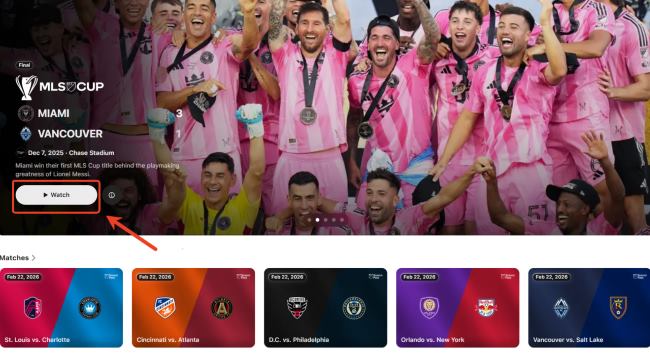
Step 3. Use the "Search" toolbar in the Apple TV app to look for MLS matches, and click on the match you want to watch.
Part 3. How to Watch MLS after Canceling Apple TV
Although all MLS matches will be included with an Apple TV subscription at no additional cost in 2026, the available MLS Season Pass content still follows a strict download policy. Season Pass or Multi-Pass videos can be downloaded only within 90 days after the final episode or match is released. This naturally raises a key concern: how can you continue watching your MLS games freely once your Apple TV subscription ends?
A professional tool like DRmare Apple TV Downloader offers an effective solution. This downloader lets you save MLS videos from Apple TV as standard MP4 or MKV files that work on any device. It preserves the original video quality, including 4K resolution along with all audio tracks and subtitles, and its high-speed conversion ensures a smooth and efficient downloading process. With Apple TV playback restrictions removed, you can use DRmare to keep your MLS games permanently and watch them offline on any device, even after your Apple TV subscription expires.
- Step 1Access Apple TV Account
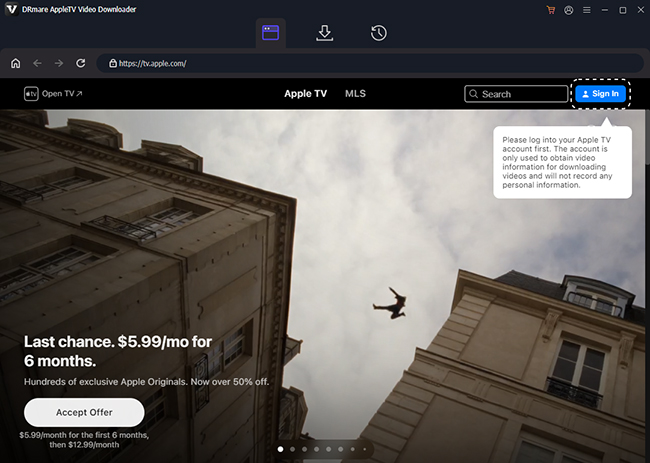
Install and open DRmare Apple TV Downloader on your computer. Tap "Sign In" and log in to your Apple TV account to continue, and your entire Apple TV library will be ready for download, and MLS Season Pass content will be included since 2026.
- Step 2Adjust Output Preferences for MLS Videos
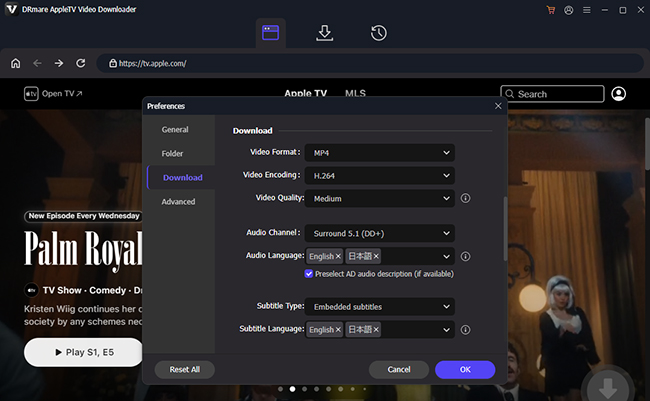
Before saving your videos, it's better to configure the output settings to suit your devices. Click the menu icon in the upper-right corner, then go to "Preferences" > "Download". If you don't know which formats to choose, MP4 will be the first option for the widest compatibility. You can also set resolution, video quality, audio tracks, and subtitles based on how you plan to watch MLS.
- Step 3Select Apple TV Movies, Shows, or MLS Matches
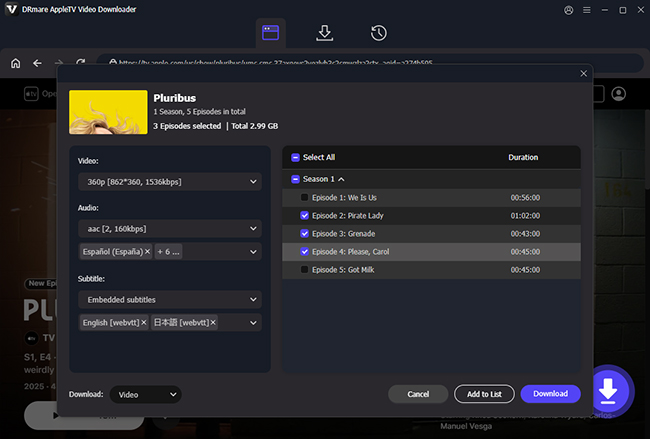
Open the MLS replay you want to keep offline, then click "Download". You can also add multiple videos to the task list for batch downloads, making it easy to save your entire MLS Season Pass videos at once.
- Step 4Download and Save Apple TV Videos Permanently
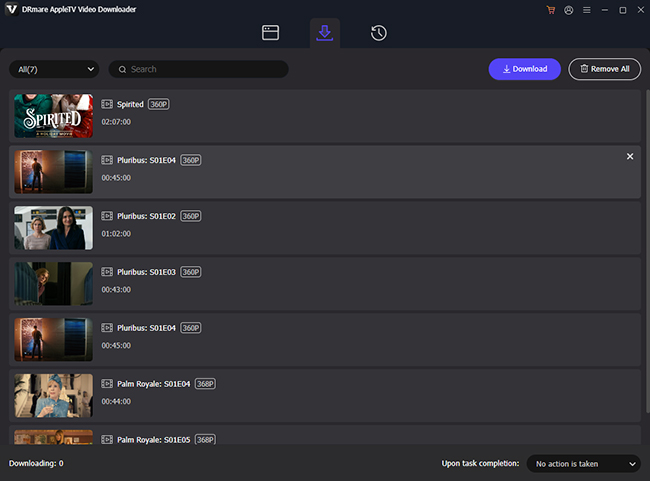
Once the download completes, your videos will appear in the "Download List" or your designated folder. From here, you can watch MLS offline on any device without subscription restrictions. This gives you complete freedom to watch MLS Season Pass content even after canceling Apple TV.
Part 4. More FAQs on Apple TV MLS
How much does it cost for an MLS Season Pass?
The MLS Season Pass is available for $14.99 per month or $99 for the full season, giving fans access to every MLS match. If you are an Apple TV+ subscriber, you can enjoy discounted rates of $12.99 per month or $79 for the season, making it more affordable to follow the league. Currently, there is no free trial, but the subscription provides comprehensive coverage and on-demand access to all matches, so you can watch live games, highlights, and replays at your convenience.
What devices support watching MLS on Apple TV?
MLS Season Pass is supported on a wide range of devices, ensuring you can watch matches wherever you are. It's available on all Apple devices, including Apple TV, Apple TV 4K, iPhone, iPad, and Vision Pro. In addition, fans can stream matches on Android devices, smart TVs from Samsung, LG, Vizio, and Sony, as well as on Roku, Amazon Fire TV, and Google TV. You can also watch on gaming consoles such as PlayStation and Xbox, or directly in a web browser on Apple TV. This broad device support makes it easy to catch every match live or on demand, no matter which platform you prefer.
Can I watch replays for MLS on Apple TV?
Yes, MLS Season Pass provides full on-demand replays of every match, allowing you to catch up on games you missed. After a match ends, simply open the Apple TV app, navigate to the MLS Season Pass section, and search for the match you want. You can choose to watch the full replay for the complete game or select Recap to view highlights.

 Home
Home




Download Apple TV MLS matches and replays to MP4 or MKV at 5X speed with original quality preserved, allowing offline MLS viewing on any device without an Apple TV subscription.