





If you want to save the best possible audio from your favorite videos, converting YouTube to M4A is the smartest choice for your offline library. Because YouTube natively streams its audio using the AAC codec, downloading it directly as an M4A file prevents quality loss. And at equivalent bitrates, M4A offers noticeably better audio fidelity than MP3. This guide breaks down 6 reliable methods available to help you safely convert YouTube to M4A, covering free online YouTube to M4A converters, stable desktop software, and other workarounds.
Part 1. Free Online YouTube to M4A Converters
If you only need to extract a handful of tracks, using an online YouTube to M4A converter is undoubtedly the fastest route. These convenient browser-based tools allow you to convert YouTube to M4A online without requiring any installation, working across almost any device. However, since the web is often filled with heavy ads and deceptive download buttons, finding a safe and reliable YouTube to M4A converter free online is essential to protect your digital security. Below, we introduce four tools to help you download YouTube videos to M4A online for free.
TubeRipper
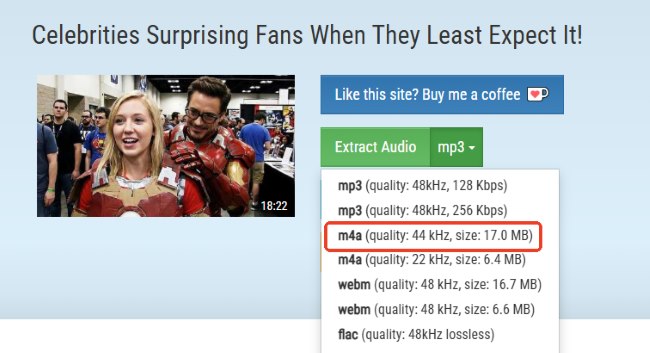
TubeRipper operates uniquely by exposing the technical backend of a video, allowing you to manually select the precise audio stream you want. When you paste a URL into this online YouTube to M4A converter, it parses all available media streams and displays exact details like sample rates and file sizes, ensuring you know exactly what you are downloading. While it excels as a free online YouTube converter, it also supports extraction from over 100 other popular websites, making it a highly versatile option for quick, transparent downloads directly from your browser.
Pros
 Exposes raw backend media streams for precise quality control
- Provides detailed metrics like sample rate and exact file size
- Supports instant extraction from over 100 popular media websites
- Fast conversion process directly from the web interface
Cons
 Displaying all individual audio and video streams can overwhelm beginners
- Does not preserve metadata in the downloaded files
- Restricts users to processing only one track at a time
- Triggers pop-up advertisements after clicking action buttons
AnyUkit
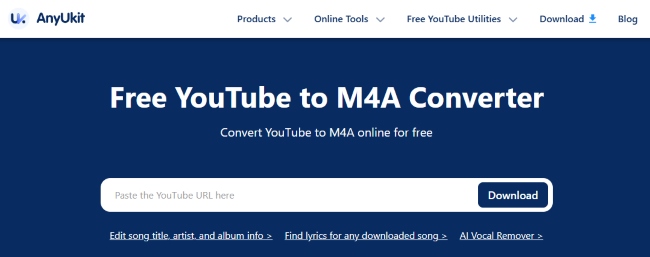
AnyUkit is a highly popular YouTube to M4A online solution that prioritizes a clean user interface and strict data privacy. Unlike many competitors that store your data indefinitely, AnyUkit automatically deletes your converted files from its servers within an hour to prevent tracking. Before you download YouTube music, it conveniently displays the estimated storage size, with M4A outputs generally hovering around 129 kbps. While it serves well to convert YouTube to M4A for free, it has strict daily download limits for the web version.
Pros
- Clean, ad-free user interface with a simple conversion workflow
- Strong privacy practices
- Displays output file size and audio quality before downloading
- Requires no account registration or intrusive data collection
Cons
- Strictly limited to only 3 free web downloads per day
- Occasionally triggers unwanted redirects during conversion
- Fails to process video links when website server overloaded
- Frequently prompts users to install the paid desktop application
CutYT
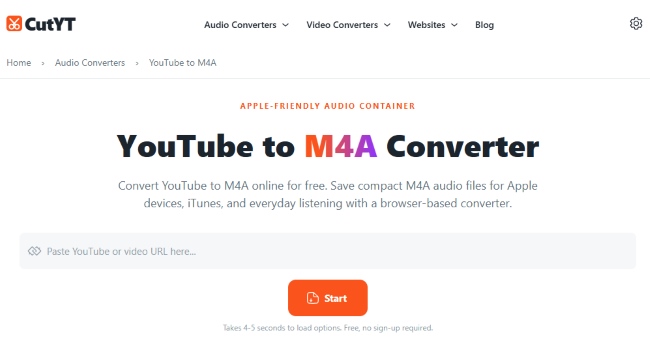
CutYT stands out as one of the most efficient ways to convert from YouTube to M4A distinguishes itself by offering a remarkably pristine interface. Beyond standard M4A extraction, it also caters to audiophiles by supporting uncompressed, high-fidelity formats like WAV and FLAC. Even more impressively, it comes equipped with convenient trim features that allow you to edit video clips online, ensuring you can extract and download only the specific audio segments you need.
Pros
- Exceptionally clean interface free from deceptive download buttons
- Requires no software installation or user registration to operate
- Supports lossless audio formats (WAV, FLAC) alongside M4A
- Allows you to easily cut and extract specific audio segments
Cons
- Lacks any batch conversion or playlist downloading capabilities
- Does not support advanced metadata editing or ID3 tags
- Overall processing speed is restricted by browser limitations
- Does not offer a dedicated desktop or mobile app counterpart
ClipConverter.CC
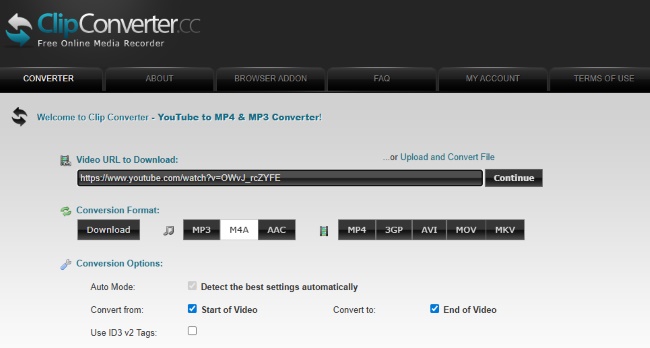
ClipConverter is a veteran YouTube converter online that has maintained a steady presence for years, offering broad compatibility across PCs and mobile devices. It grants users the flexibility to convert online links or local files into eight different media formats while providing the unique ability to trim audio start and end times directly on the webpage. However, relying on this online convert YouTube to M4A service comes with significant trade-offs: it actively blocks the conversion of official, copyrighted music videos and operates with strict file size and daily usage limits, making it better suited for casual, non-music audio extraction.
Pros
- Established platform that supports 8 distinct media file formats
- Works seamlessly across various devices (PCs, tablets, smartphones)
- No registration required to initiate the fast conversion process
- Allows users to select specific resolutions and audio quality tiers
Cons
- Strictly blocks the conversion of official, copyrighted music videos
- Plagued by misleading ads, fake virus warnings, and security risks
- Imposes daily limits (maximum 1GB file size and 25 conversion minutes)
- Noticeably slower compared to dedicated desktop software
Part 2. Best Desktop YouTube to M4A Converter for Mac/PC
While online platforms are incredibly convenient for occasional use, they frequently suffer from server overloads or suddenly stop working. If you are serious about archiving your favorite YouTube content, transitioning to professional desktop software provides unmatched stability and reliability.
DRmare Streaming Audio Recorder stands out as a premium alternative to standard ripping tools. Rather than scraping video URLs, it operates as an advanced, all-in-one downloading hub equipped with a built-in web player. This allows you to gain streaming media and bypass heavy encryption. It batch processes YouTube to M4A audio with original track information, alongside music from 9 other major platforms, including Spotify, Tidal, and Apple Music. This makes it a highly cost-effective, long-term solution for building an offline YouTube library.
How to Convert YouTube Music to M4A for Mac and PC
Step 1. Launch the DRmare application and navigate to the menu located in the top-right corner. Open the "Settings" >"Music" section to customize your audio profile. This gives you granular control to select M4A and adjust parameters to ensure you export true YouTube to M4A high quality files.
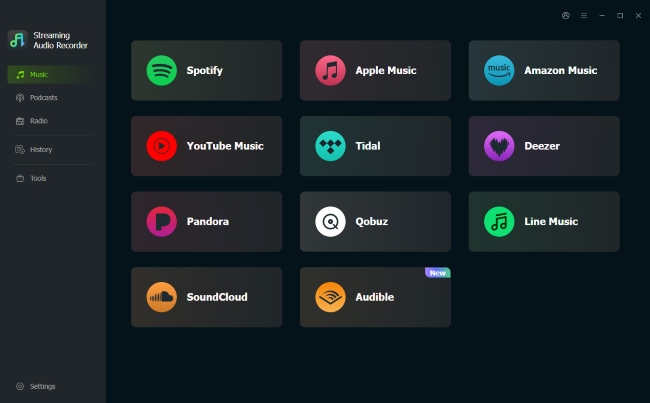
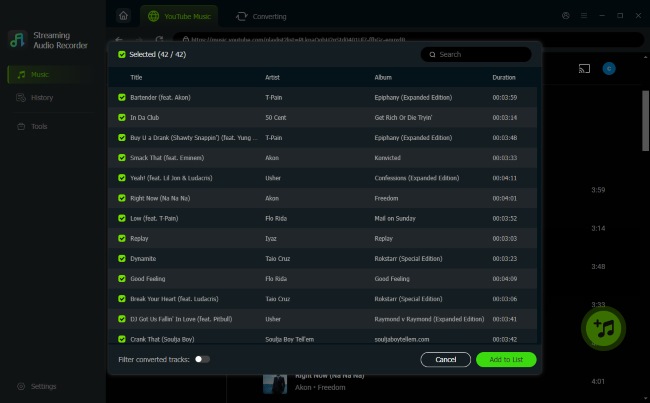
Step 2. Click on the built-in YouTube Music icon within the software to open the integrated web player. You can safely access your personal library with your account. Browse for the specific albums or playlists you need, then click the "Add" > "Add to List" button. This seamlessly queues your tracks for batch downloading, entirely avoiding the manual link-pasting required by free online tools.
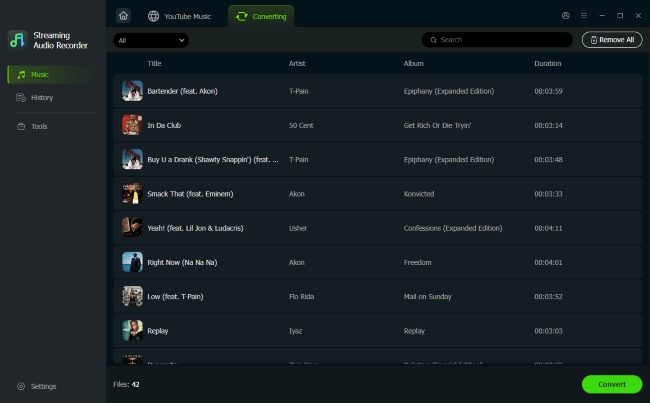
Step 3. Press the "Convert" button to start the lossless download process at up to 30X speed. The software automatically filters out intrusive advertisements, even if you are using a free YouTube account. Once finished, you can locate your perfectly organized YouTube M4A files with ID3 tags in the "History" tab.
Pros
- Supports fast batch downloading at up to 30X speed
- Preserves lossless audio quality alongside full ID3 tags and lyrics
- Automatically blocks all ads, even on free accounts
Cons
- Requires a paid software license to unlock full functionality
- Limited to desktop use with no mobile counterpart available
Part 3. Top GUI Tool to Convert YouTube to M4A Audio
If you frequently browse tech forums searching for a YouTube to M4A converter, you may have heard of a command-line utility called "yt-dlp". While it is an undeniably powerful extraction engine, the process can be incredibly intimidating for the average person. This is exactly where a Graphical User Interface (GUI) bridges the gap.
Stacher is the perfect solution for users who demand extreme backend performance but struggle with a command-line tool. Operating as a cross-platform audio converter that is available for Windows, macOS, and Linux, it is built directly on top of the yt-dp architecture. This program empowers you to pull native, high-fidelity streams directly from the source servers, ensuring you download YouTube to M4A without suffering any compression loss. Beyond raw extraction, Stacher handles batch downloading and is equipped with advanced search, filtering, and metadata-driven organization.
How to Use Stacher for YouTube to M4A Audio Extraction
Step 1. Since Stacher pulls raw streams directly from Google's servers, it requires the FFMPEG framework to properly merge and package your YouTube file. If it is not already installed on your system, you can follow the guide provided directly on the Stacher website.
Step 2. Launch the application on your computer. Copy your desired video or playlist link and paste it straight into the main URL input box at the top of the interface.
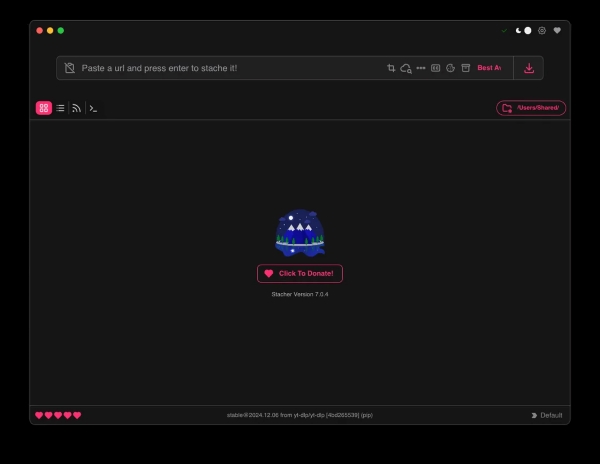
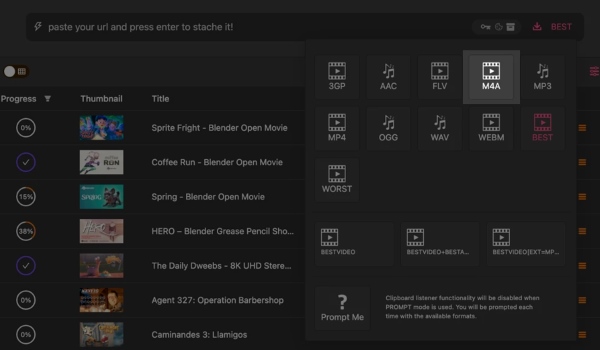
Step 3. Navigate to the download settings dropdown menu and choose M4A as your specific output format. Finally, click the "Download" button to save YouTube to M4A files directly to your local drive.
Pros
- Unleashes the full power of yt-dlp without requiring command-line knowledge
- Features a robust built-in library for seamless media playback and metadata management
- Fully cross-platform compatible, running smoothly on Windows, macOS, and Linux
- Effortlessly bypasses regional restrictions and handles massive playlist batches
Cons
- Requires a manual, one-time installation of FFMPEG to process audio correctly
- The advanced interface might feel overwhelming for users who only want one quick song
- Lacks a mobile application counterpart for on-the-go downloading
Part 5. Comparison of YouTube to M4A Converters
| Tool | Platform | Batch Download | Metadata | Key Highlight | Best For |
|---|---|---|---|---|---|
| TubeRipper | Web Browser | ❌️ | ❌️ | Exposes raw backend media streams | Precision quality control for single tracks |
| AnyUkit | Web Browser | ❌️ | ❌️ | Privacy-focused with file size previews | Safe, ad-free single file conversions |
| CutYT | Web Browser | ❌️ | ❌️ | Built-in trim features & lossless support | Extracting and editing specific audio segments |
| ClipConverter | Web Browser | ❌️ | ❌️ | Veteran tool with local file support | Basic, non-copyrighted audio extraction |
| DRmare Audio | Windows / Mac | ✅ | ✅ | Bypasses encryption for lossless capture | Building a perfectly organized music library |
| Stacher | Win / Mac / Linux | ✅ | ✅ | Powerful yt-dlp GUI wrapper | Tech enthusiasts seeking maximum performance |
While using an online YouTube to M4A converter offers unmatched convenience for downloading a single song, heavy users should undoubtedly lean toward desktop applications. Software like DRmare Streaming Audio Recorder or Stacher not only handles massive playlist batch downloads effortlessly, but they also ensure your metadata is beautifully preserved for a flawless listening experience on any media player.
Part 6. FAQs About YouTube to M4A Audio Conversion
Will an online YouTube to M4A converter save the original audio quality?
Yes, but it depends entirely on the tool you use. A high-quality online YouTube to M4A converter will directly extract this original stream, preserving the exact audio fidelity. However, many low-tier free sites force a secondary compression, which ruins the sound.
Is it safe to use online YouTube to M4A converters for free?
No. While some web tools are reliable, many free converter sites rely on aggressive pop-up ads that can harbor malware. To protect your device, you should enable a trusted ad-blocker. For a completely secure and stable experience, switching to a desktop program like DRmare Streaming Audio Recorder is a much safer long-term alternative.
Which devices and media players support M4A files?
M4A is an industry-standard audio container, meaning you will rarely face playback compatibility issues today. It is universally supported across all modern operating systems: Apple Ecosystem (iPhones, iPads, Macs), Android Devices, and Windows PCs.

 Home
Home





Convert YouTube Music tracks to WAV, FLAC, MP3, M4A, AIFF, or M4B for offline listening on any device without a YouTube Premium subscription.