





 Audio Capture


 "I often come across Reels that have amazing background music or motivational speeches that I'd like to save for offline listening. Does anyone know of a Instagram audio downloader free that doesn't bundle a bunch of malware or pop-ups?"
—community.techzeel.net
Are you trying to save a viral soundtrack or a funny voiceover from Instagram? Finding a reliable Instagram audio downloader is necessary, as the platform doesn't offer a native way to extract sound. Whether you need save Instagram audio for content creation or just want to listen offline, we have gathered the best free online tools and desktop apps to grab instagram reel audio instantly.
Part 1. Best Downloader Instagram Downloaders
Whether you're trying to save Instagram audio for offline listening, content creation, or personal archiving, there are plenty of tools available to get the job done. Some users prefer dedicated desktop apps that offer better output quality, while others simply want a free online solution that works instantly from a web browser. To help you choose the right option, we've rounded up the best Instagram audio downloaders available today, including both powerful desktop app and free online converters. Let's take a closer look how they extract audio from Instagram Reels and videos quick and effortless.
1. DRmare Audio Capture
If you demand lossless sound quality and zero interruptions, free web scrapers will not cut it. DRmare Audio Capture is a powerful and versatile desktop app for Mac and Windows. Instead of downloading a compressed web file, this robust instagram audio downloader app allow you to record the audio stream from your computer's soundcard.
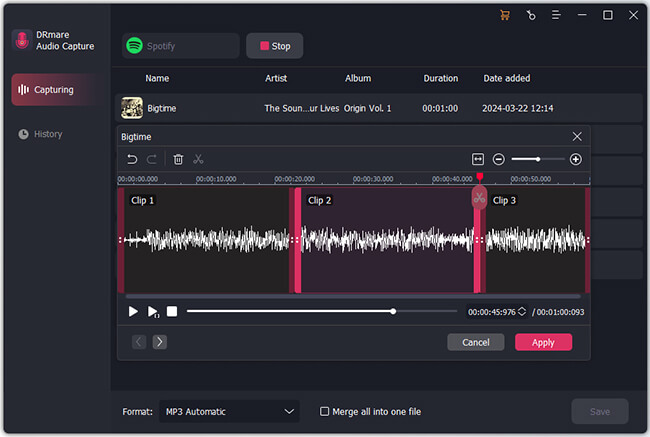
In addition, it supports a massive range of output formats—including MP3, M4A, M4B, AIFF, WAV, and FLAC, so you never have to use a secondary converter. Once you capture high-fidelity audio from Reels or Stories, you can use its built-in trimming tools to cut out dead air and isolate the exact soundbite you need before exporting the final track.
Step 1. Installing the Instagram audio downloader app and launch it. From the main dashboard, click the "Select/Add an App" button. You need to explicitly select the web browser like Chrome or Firefox that you plan to use to access Instagram.
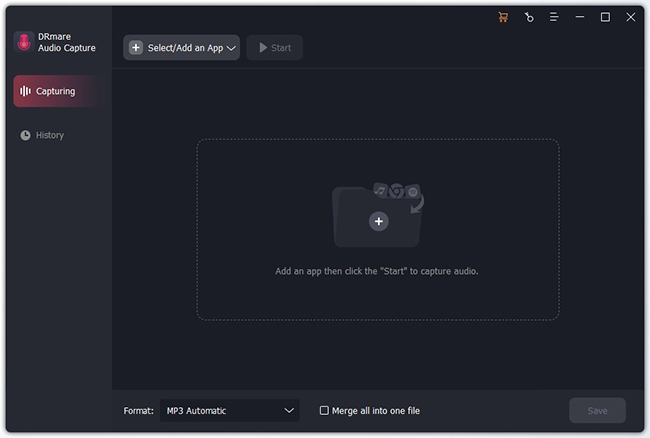
Step 2. Click the "Format" icon in the bottom right corner of the window. For a usual audio downloader for Instagram, just select MP3. If you require higher fidelity for a professional edit, you have full control to manipulate the codec and sample rate here.
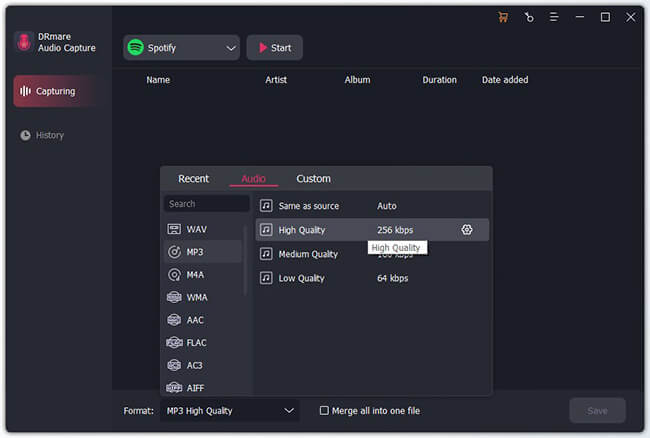
Step 3. Click the "Start" icon to launch the browser. Then navigate to the specific post and hit play. It will instantly detect the media stream and begin recording the playback in real-time, completely bypassing Instagram's download restrictions.
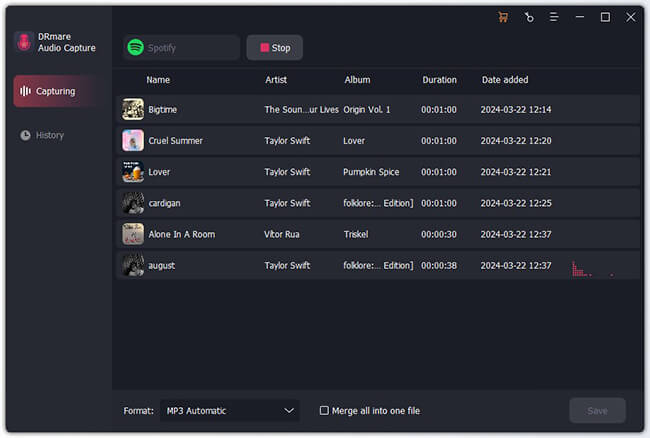
Step 4. When the video finishes playing, the recording stops automatically. Hover over your newly captured track to reveal the "Trim" and "Edit Tag" icons. You can use the trim tool to slice off unwanted intro noise so your Instagram audio downloaded file is tight and immediate.
Pros
 Completely ad-free environment with built-in audio trimming
- Supports a wide range of formats (MP3, FLAC, WAV, M4A)
Cons
 Requires a local desktop installation
- Premium software requires a paid license
2. Reelsvideo
Reelsvideo is a straightforward, no-frills Instagram audio link downloader. It specializes in pulling the audio stream or raw MP4 files from Instagram's servers without any unnecessary bloat. It is particularly popular among people who need to extract media quickly and do not mind navigating around a few banner ads.
Step 1. Copy the link to the Instagram Reel, video, or post that contains the audio you want to save.
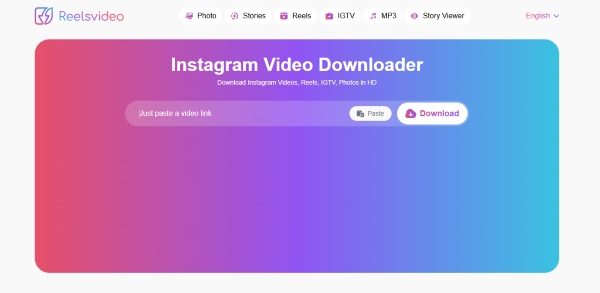
Step 2. Paste the URL into the search field on the ReelsVideo homepage and click the "Download" icon.
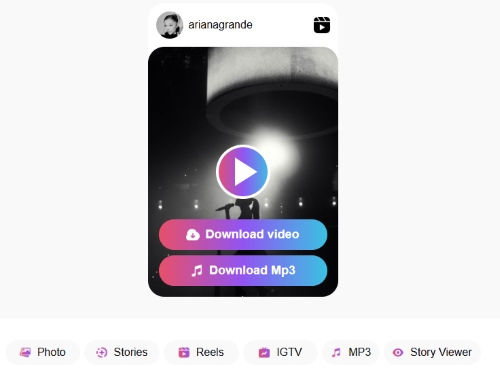
Step 3. Once the content is processed, a preview thumbnail will appear. Select "Download MP3" to extract the audio track from the Instagram as an MP3 file.
Pros
- Pulls the direct server audio stream
- Extremely fast processing times
Cons
- Interface features display ads
- Basic extraction features only
3. SpeakApp
SpeakApp stands out by offering utility that standard **audio downloader tools for instagram ignore. When you process a video through this platform, it extracts the MP3 and simultaneously generates a highly accurate AI text transcript of the spoken words. This makes it an absolute powerhouse for journalists, podcasters, and content managers who need to repurpose voiceovers.
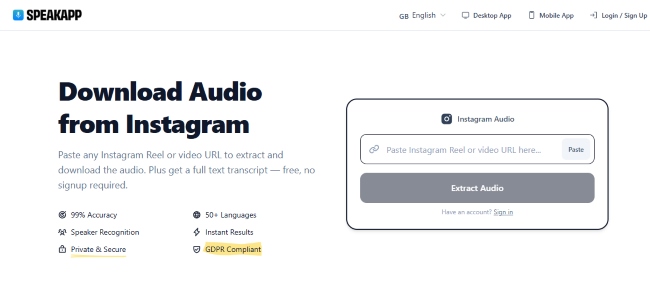
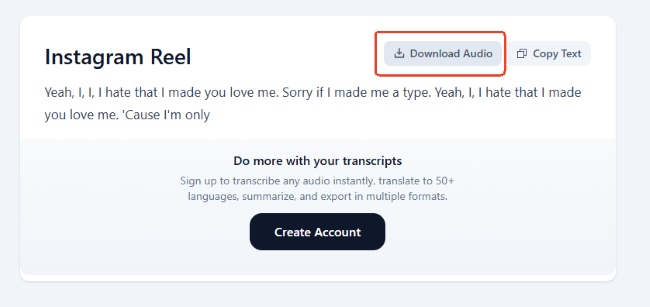
Step 1. Enter the Instagram Reel URL into the search box and select "Extract Audio" under it to analyze the video.
Step 2. After the audio track is detected, review the generated Reel text information and click "Download Audio" to save the sound file to your device.
Pros
- Auto-generates accurate text transcripts
- Supports over 50 different languages
Cons
- Transcript processing adds a slight delay
- Not suited for rapid batch downloading
4. ReelSave.App
If you're looking for a dedicated Instagram Reel audio MP3 downloader, ReelSave.App is a option worth considering. It focuses on extracting the audio track and saving it as an MP3 file. The tool is easy to use and works directly from your browser, though you should be prepared for a relatively ad-heavy experience compared to some alternatives.
Step 1. Open Instagram and copy the link to the Reel containing the audio you want to save. Paste the URL into the ReelSave search box and click the download icon to process the link.
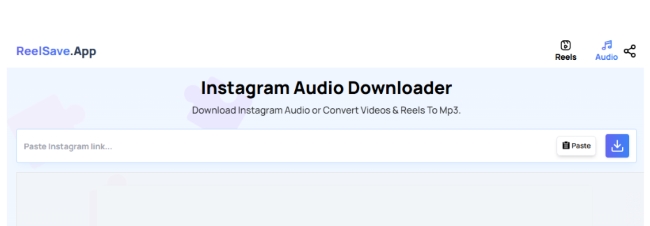
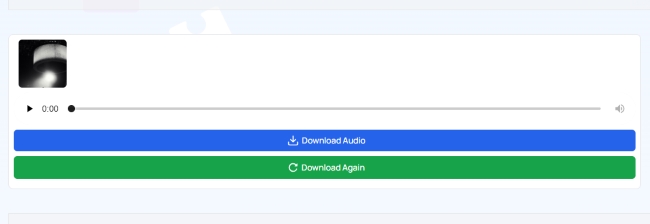
Step 2. Once the Reel information is displayed, select "Download Audio". If prompted, click "Download Again" on the next page to start saving the extracted audio file to your device.
Pros
- Dedicated specifically to MP3 conversions
- Zero account registration required
Cons
- Heavy pop-up ads can be frustrating
- No advanced editing or trimming tools
5. Coalt.tools
Cobalt.tools is arguably the safest and cleanest instagram audio downloader without watermark available today. Built by the open-source community, Cobalt eliminates the annoying display ads, pop-ups, and trackers that plague most free converter websites. It respects your digital privacy while delivering blazing-fast Instagram audio extraction to your local drive.
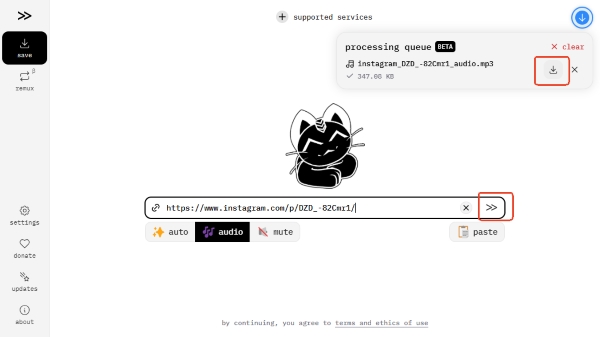
Step 1. Grab the Instagram Reel or post link that contains the audio you want and drop it into Cobalt's input field.
Step 2. Hit "Enter" or click the arrow button to let Cobalt process the URL. Once the extraction is complete, select Download to save the audio file to your device.
Pros
- Zero ads, trackers, or redirects
- Blazing fast, privacy-focused server extraction
Cons
- No advanced format conversion options
6. INDownloader
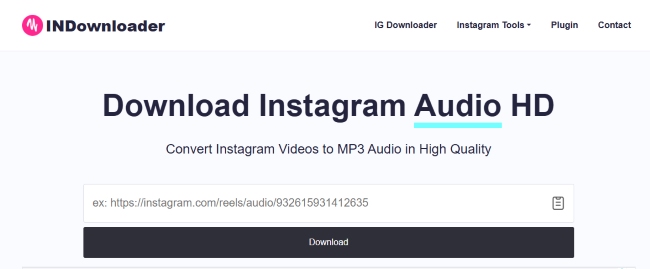
INDownloader is an excellent all-in-one media solution for frequent users. While many web tools only handle Reels, this platform acts as a comprehensive instagram story downloader with audio as well as a post saver. It is the perfect bookmark for anyone who needs to quickly switch between saving videos, photos, and high-quality MP3 tracks in one place.
Step 1. Copy the shareable link from any public Instagram story, post, or Reel.
Step 2. Paste the link on the INDownloader box and tap "Download".
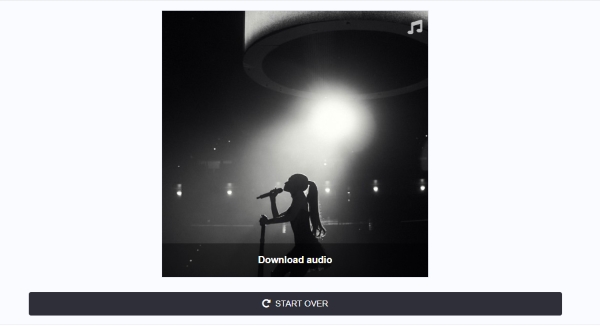
Step 3. Choose the "Download audio" option from the results and start downloading.
Pros
- Versatile all-in-one media downloading
- Seamless cross-device compatibility
Cons
- Heavily ad-supported interface
- Cannot extract audio from private links
Part 3. Comparison of Instagram Audio Downloaders
| Tool Name | Ad-Free? | Save Type | Format | Platform Type | Best For |
|---|---|---|---|---|---|
| DRmare Audio Capture | ✔ | Audio only | MP3, M4A, M4B, AIFF, WAV, FLAC | Desktop App | Studio-grade lossless recording and precise trimming |
| Reelsvideo | ❌️ | Video & Audio | MP4, MP3 | Web Browser | Fast, raw server-level media scraping |
| SpeakApp | ✔ | Audio, Text Transcript | MP3 | Web Browser | Extracting speech and auto-generating video scripts |
| ReelSave.App | ❌️ | Audio only | MP3 | Web Browser | Quick, casual background music extraction |
| Cobalt.tools | ✔ | Video & Audio | Raw source formats | Web Browser | Maximum security, high-speed, zero-ad downloads |
| INDownloader | ❌️ | Audio, Video, Photo | MP4, JPG, MP3 | Web Browser | Bulk scraping across Stories, Highlights, and Reels |
Part 4. FAQs about Instagram Reel Audio Downloaders
Can I download audio from a private Instagram account?
No. Web-based platforms scrape data via public APIs, meaning they cannot access private profiles. If you try to paste a link from a private account, the system will trigger an error.
How do I use downloaded audio in my own Instagram Reels?
Once you save the MP3 file, you cannot upload it directly to Instagram's native audio library. You need to use a mobile video editing app like CapCut or InShot. Import your footage, add the downloaded audio as a separate background track, sync them perfectly, and export the final video.
Is it legal to use a free instagram audio downloader?
Extracting audio for personal, offline listening falls under fair use in most regions. However, using copyrighted music or voiceovers in your own commercial content without permission is a direct violation of copyright laws. If you plan to repurpose another creator's audio for public distribution, always ask for permission or ensure the audio track is copyright-free.

 Home
Home





User Comments
Leave a Comment