





Pandora remains one of the most popular ways to discover new music, but relying on a constant internet connection can quickly drain your data plan and battery. If you are wondering whether you can download music from Pandora directly to your iPhone, the answer is yes. Although the app itself is free to install, your ability to save tracks for offline listening depends entirely on your specific subscription plan. In this guide, we will break down how to secure your favorite stations and explore a permanent solution to keep your Pandora music forever.
Part 1. How to Download Music from Pandora to iPhone with a Subscription
For most users, the most straightforward way to download Pandora music on an iPhone is through an official subscription. Pandora offers two distinct paid tiers that allow you to save tracks directly within the iOS app. While each tier handles downloads a bit differently, both provide a flawless experience for you.
How to Download Pandora Stations on iPhone with the Plus Plan
The Pandora Plus plan is the entry-level subscription that introduces offline listening on iPhone. It automatically downloads your most-listened stations, making the process simple and hands-free. However, it does not support selecting or downloading specific tracks on demand.
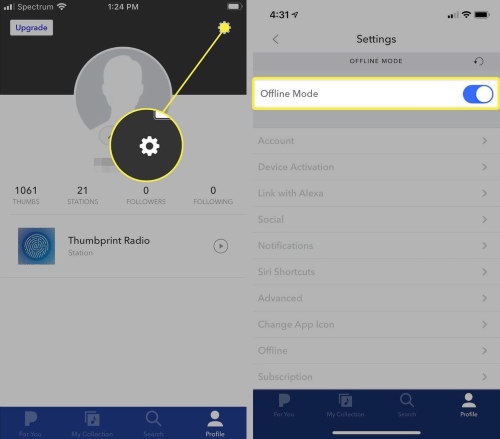
Step 1. Install Pandora from App Store, then launch the Pandora app, tap your Profile icon, and select the Settings gear located in the upper right corner to access your account preferences.
Step 2. Locate the "Offline Mode" toggle and switch it to the "on" position.
Step 3. To quickly find your saved music, tap "My Collection" at the bottom of your screen. Apply the "Show downloads only" filter. This isolates your localized content, letting you enjoy your personalized radio stations instantly without the internet.
How to Download Songs from Pandora to iPhone with Premium Plan
If you want total control over your music, the Pandora Premium plan allows you to download specific songs, albums, and custom playlists on demand. This is the best official method to download music from Pandora to iPhone.
Step 1. Use the search function within the Pandora app to pinpoint the specific song, album, or custom playlist you wish to save.
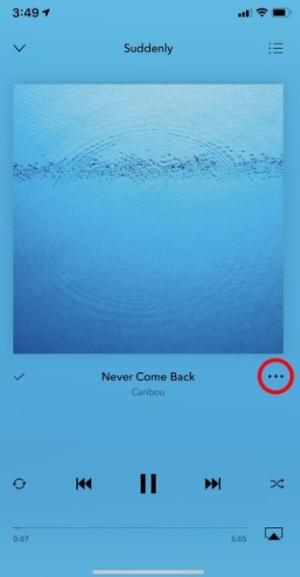
Step 2. Tap your chosen item to open its details page, then press the three-dot "Menu" icon to pull up the extended track options.
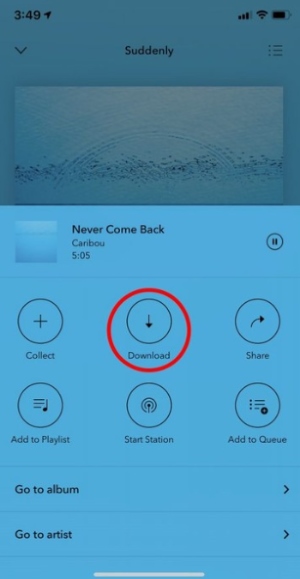
Step 3. Hit the "Download" icon. You will see a spinning progress indicator; simply leave the app open until it finishes. Once complete, your Pandora music is stored on your phone for offline playback.
Part 2. How to Get Pandora on iPhone Forever Without Subscription
If you want the freedom to handpick specific songs, albums, and stations without committing to a monthly Premium plan, the DRmare Streaming Audio Recorder provides a powerful alternative. This desktop software bypasses Pandora's strict DRM restrictions, allowing you to batch-download audio to your computer. By converting your favorite tracks to lossless files and automatically retaining all the original ID3 tags, you gain your offline music permanently. This means you can keep listening on your iPhone forever, regardless of your account status.
How to Download Music from Pandora on iPhone
- Step 1Select Output Audio Format
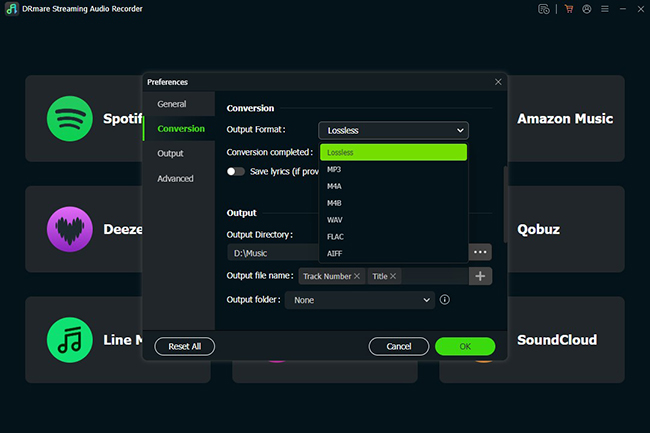
Launch the DRmare software on your computer. Click the "Menu" icon, navigate to "Preferences", and select the "Conversion" section. Choose an iOS-friendly audio output, such as standard MP3 or high-fidelity FLAC, to guarantee the tracks play flawlessly once moved to your phone.
- Step 2Log In and Add Music to the Queue
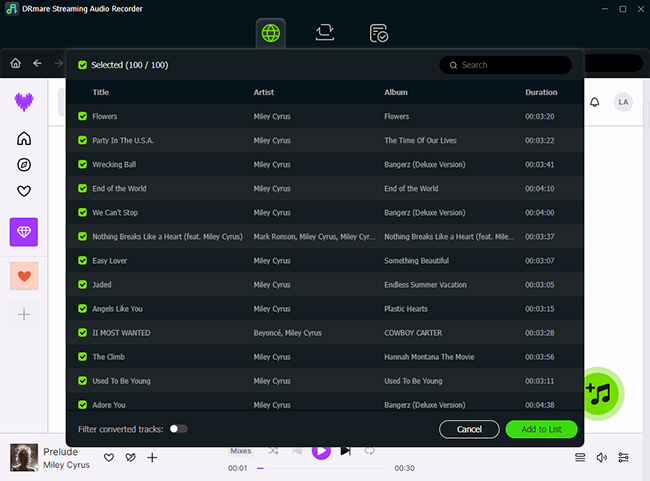
On the main DRmare dashboard, click the Pandora icon to open the built-in web player. Log in to your account through the integrated browser to access your personal library. Then, select the stations and playlists to download. Click the green "Add"> "Add to List" button on the right side to queue your selected tracks.
- Step 3Start Downloading Your Pandora Music
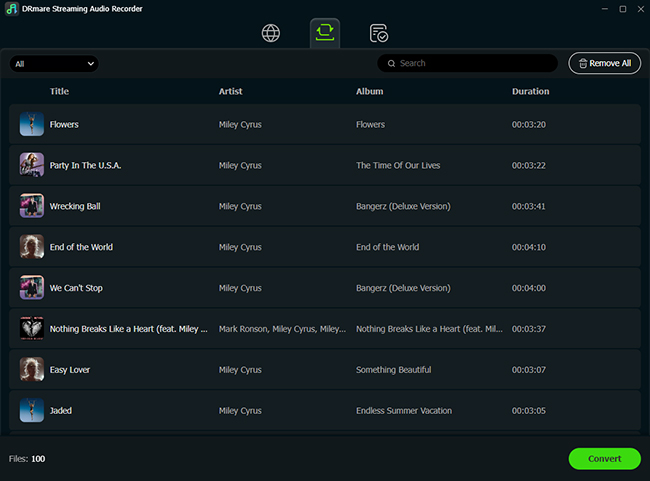
Once your tracks are added, go to the conversion panel and click the "Convert" button. The software will quickly process and save your selected Pandora music as high-quality audio files directly to your computer. During this conversion, the tool automatically retains all the crucial ID3 metadata for every single track. This means the album art, artist names, track titles, and genre tags are perfectly preserved within the new converted files.
- Step 4Transfer the Permanent Files to Your iPhone
Once the conversion process finishes, open the "Converted" tab to locate your permanent music files. Connect your iPhone to your computer using a USB cable, and then use Finder or iTunes to sync the downloaded Pandora tracks to your iOS device. You now have complete freedom to enjoy your favorite stations and custom playlists completely offline, without any buffering issues or ongoing subscription fees.
Video Tutorial: How to Download Pandora Music on Mobile & Desktop
Part 4. Pandora Premium Plan vs. DRmare: Which is Best?
| Feature | Pandora Plus | Pandora Premium | DRmare Streaming Audio Recorder |
|---|---|---|---|
| Price (Monthly) | $4.99 | $10.99 | $27.95 |
| Download Flexibility | Limited (no manual selection) | High (manual downloads allowed) | Unlimited |
| File Format | Encrypted (in-app only) | Encrypted (in-app only) | MP3, FLAC, WAV, M4A, M4B, AIFF |
| Audio Quality | Standard (up tp 64 kbps) | High (up to 192 kbps) | Lossless |
| Offline Playback | Within Pandora app only | Within Pandora app only | Any media player |
| Subscription Required | Yes | Yes | No |
| Playlist Support | No | Yes | Yes |
| Batch Processing | No | Yes | Yes |
If you prioritize ease of use and instant access, the Pandora Premium Plan is your best bet. However, if you want to download Pandora music on iPhone and keep it even after your subscription expires, using DRmare on your computer to record tracks and then syncing them to your iPhone is the superior long-term solution.
Part 5. FAQs on Listen to Pandora Music Offline
Can I transfer downloaded Pandora songs to Apple Music or an MP3 player?
No, official downloads are encrypted and can only be played within the Pandora app. To move music to an external player, you would need a tool like DRmare to convert the Pandora tracks into DRM-free files.
Why Can't I Download music from Pandora?
If you are having trouble downloading your favorite tracks, a few common device settings are usually to blame:
- Storage Limits: Pandora requires a minimum amount of free space to save files. Check your iPhone's storage to ensure it isn't completely full.
- Network Restrictions: Ensure you are connected to a stable Wi-Fi network, as your app settings might be restricting large downloads over cellular data.
- Battery Settings: iOS often pauses background activity, including music downloads, when your phone is in "Low Power Mode." Turn this feature off or plug in your device to resume saving.
Why did my downloaded music suddenly disappear from my iPhone?
Your offline library is tied directly to the active status of your subscription and your app login. Downloads usually disappear to protect your account security if you log out of the app, uninstall it, or if your device has not connected to the internet in over 30 days.
How to stop Pandora from automatically playing on iPhone?
This usually happens when your iPhone connects to your car's Bluetooth and Pandora is set to auto-launch. To stop it, open the Pandora app, go to "Settings > Advanced", and turn off "Enable Auto-Start". If the issue persists, you can also check your iPhone's Bluetooth settings or disable background app refresh for Pandora to prevent it from launching automatically.
Part 4. Final Thoughts
To get Pandora on iPhone for offline use, the most direct path is a Premium subscription. It offers a seamless experience with high-quality audio. However, for those looking to build a permanent library without recurring fees, DRmare offer a more flexible alternative, ensuring your favorite stations are always ready to play on your iphone without subscription.

 Home
Home





User Comments
Leave a Comment