





Whether you're commuting, on a long flight, or at the gym with spotty Wi-Fi, losing internet access doesn't have to mean losing your music. If you have ever wondered can you listen to Pandora offline, the good news is that you absolutely can. In this guide, you'll learn how to listen to Pandora offline, including steps for paid subscribers and practical tips for listening without a premium plan, so your favorite stations are always within reach.
Part 1. Can You Listen to Pandora Offline
Yes, you can listen to Pandora offline, but there are a few restrictions. Playing your Pandora music offline is a feature reserved exclusively for paying subscribers using the mobile app. If you are using a desktop browser or the free tier of the service, you will not find an official download button to enjoy offline Pandora radio stations.
To use Pandora offline, you must first upgrade to a Pandora Plus or Premium plan to unlock the official Pandora offline mode. Once upgraded, you are able to download offline Pandora playlists or albums directly in the mobile app, enabling continuous playback without relying on Wi-Fi or cellular data.
Part 2. How Do You Listen to Pandora Offline with Subscription
If you pay for a subscription on Pandora, taking your music off the grid is incredibly easy. The platform allow you to seamlessly transition your listening experience from online to offline mode. However, the level of control you have over what gets downloaded depends entirely on the specific tier you pay for. Understanding the difference between the two paid tiers is crucial for managing your offline Pandora library.
Pandora Plus vs. Premium for Offline Listening
Before you start downloading, it is essential to understand the differences between Pandora Plus and Premium for offline listening. While both tiers allow you to listen to Pandora music offline, they differ significantly in automation and control.
Pandora Plus is the entry-level subscription, and it handles offline listening automatically. With this plan, the app simply downloads your top three most-listened-to stations, along with your Thumbprint Radio, whenever you are connected to Wi-Fi. You cannot manually choose which individual tracks or albums get saved to your device.
Pandora Premium, gives you complete manual control over your offline library. Premium subscribers can browse the entire catalog and handpick specific songs, albums, playlists, or stations to download. Your only limitation is the amount of physical storage space available on your smartphone.
| Feature | Pandora Plus | Pandora Premium |
|---|---|---|
| Download Method | Automatic | Manual |
| Content Included | Top 3 most-listened-to stations, thumbprint radio | Any specific song, album, playlist, or station |
| Manual Selection | No | Yes |
How to Download Offline Pandora Stations with Plus Plan
Pandora Plus offers an automated approach to play Pandora offline, allowing you to seamlessly save your top Pandora radio stations for offline listening. Because the app manages the downloads for you behind the scenes, you just need to check your localized library to find your favorite offline Pandora stations.
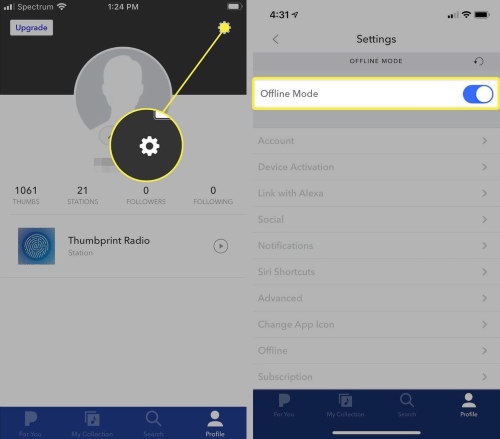
Step 1. Open the Pandora app on your iPhone or Android device and tap on the "Profile" icon. From there, locate the "Settings" gear icon in the top right corner. Then toggle the "Offline Mode" switch to the on position.
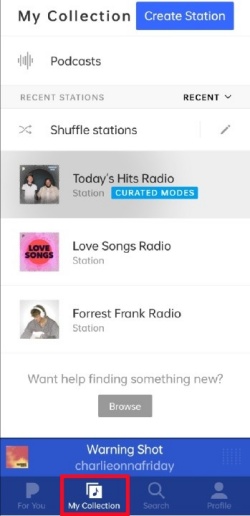
Step 2. Navigate to the "My Collection" section located at the bottom of the screen. Tap the "Show downloads only" option to filter your library, allowing you to see all localized content and enjoy your offline Pandora radio without an internet connection.
How to Download Offline Music from Pandora with Premium Plan
If you want complete control over your Pandora music offline experience, the Premium tier is perfect. Pandora Premium gives you the freedom to manually download music from Pandora to listen offline, allowing you to handpick specific playlists, or even entire Pandora stations.
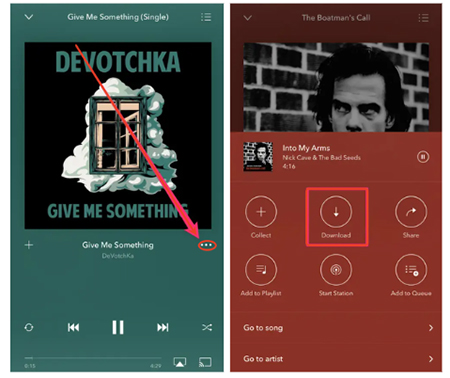
Step 1. Launch the Pandora app on your phone and search for the music you want to listen to offline. Select your preferred item, then tap the three-dot "Menu" icon to reveal more options.
Step 2. Choose the "Download" icon and wait for the indicator to finish spinning, securely saving the Pandora music directly to your phone for seamless playback.
Part 3. How to Listen to Pandora Offline Without Premium Subscription
If you aren't ready to commit to a subscription, you can use third-party software to reach Pandora offline. The DRmare Streaming Audio Recorder is a standout solution, enabling you to use Pandora music offline even with a free account. Bypassing the "in-app only" restriction, you gain the freedom to listen to music from Pandora offline on any device even after subscription ends.
- Fast Batch Downloads: Leveraging advanced encoding technology, it can batch download entire Pandora albums and stations from the web player at up to 100X speed on Windows and macOS.
- Universal Format Support: You can convert Pandora content into MP3, FLAC, WAV, M4A, M4B, or AIFF formats. This means your music is no longer trapped in one app; you can transfer it to MP3 players, USB drives, or even smartwatches.
- Automatic Organization: The tool automatically identifies and retains all original ID3 tags, ensuring your local music library stays as organized as the official app.
- Step 1Set Up Your Audio Output Preferences
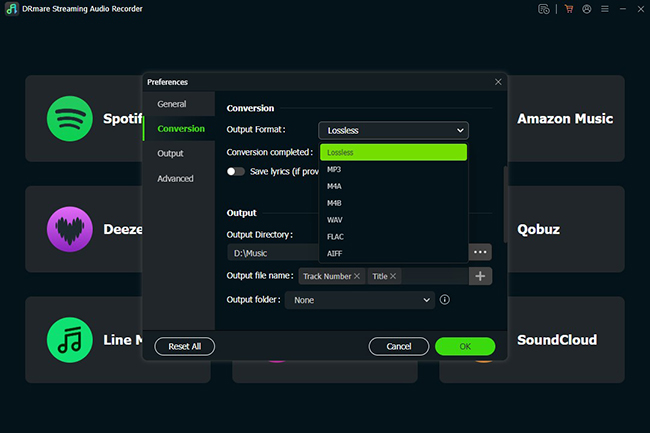
Launch the DRmare Streaming Audio Recorder on your computer. Before you begin downloading, click the Menu icon and select Preferences > Conversion from the list. Here, you can choose compatible format like MP3 or a high-fidelity option like FLAC, ensure your offline Pandora radio tracks will play flawlessly on your device.
- Step 2Access the Pandora Music Downloader
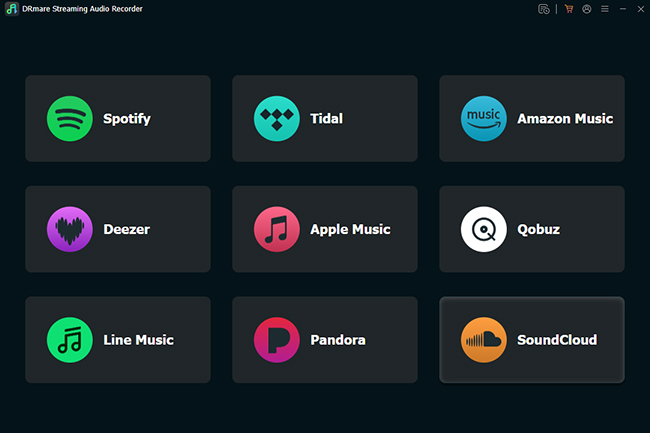
On the main interface, you will see a variety of supported streaming service icons. Click the Pandora icon to launch the built-in web player; simply log into your Pandora account directly within the secure browser window.
- Step 3Select and Queue Your Pandora Stations
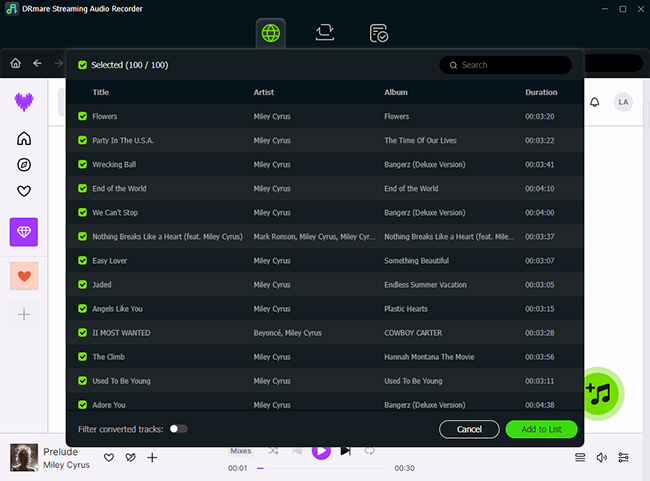
Choose a station, playlist, or album from your Pandora library, look for the green Add button in the right corner of the screen. Click it, and you can then check the boxes for specific songs or select the entire list. Once you're ready, click Add to List to move these tracks into the conversion queue.
- Step 4Download Pandora Music for Offline Playback
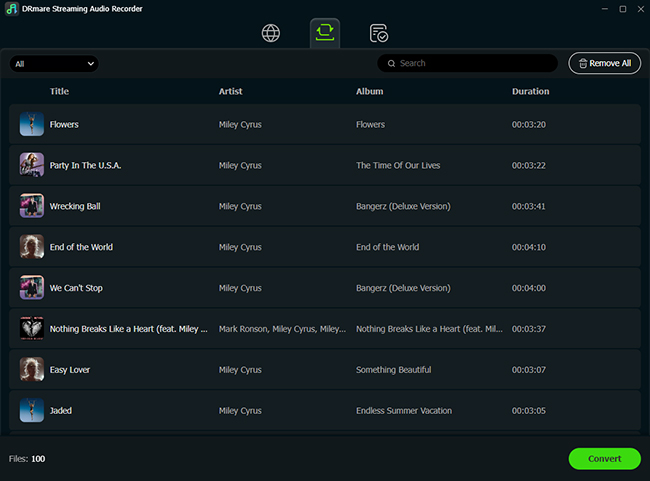
Click the large Convert button and DRmare will save the lossless music into your designated local folder. Once the process is finished, you can find your permanent offline files in the Converted tab.
Part 4. How to Fix Pandora Offline Mode Not Working
If you find that your offline Pandora stations are missing or refusing to play, don't worry. Most issues are caused by sync errors or simple device settings. Use the following troubleshooting steps to get your Pandora offline mode back on track.
Quick Fixes for All Devices
- Refresh Your Offline Mode: Sometimes the app needs a quick reset to recognize your localized files. Navigate to your "Profile", tap "Settings", and toggle the "Offline Mode" switch off. Wait a few seconds, then toggle it back on.
- Check Your Download Status: Always confirm your music has finished saving. Look for the download icon. A highlighted arrow instead of a rotating arrow means the download is complete and ready for Pandora music offline playback.
- Verify Storage and Subscription: Ensure your device has enough free space to store your Pandora music files. Additionally, verify that your Plus or Premium subscription is still active; if your payment fails or the plan lapses, Pandora will automatically remove all offline content from your device.
- Refresh Your Account and App: Try signing out of your Pandora account and signing back in to refresh your content permissions. If the problem persists, reinstall the Pandora app and restart your phone to clear the cache.
Device-Specific Troubleshooting
For iPhone: If your songs won't play when you lose connection, go to your iPhone's main "Settings">"Pandora" ensure that "Cellular Data" is enabled, which allows the app to verify your credentials.
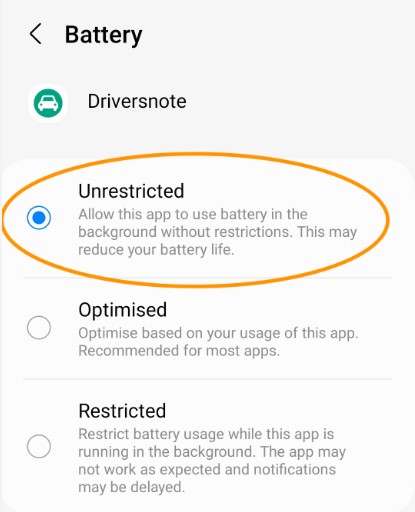
For Android: Check your "Battery Optimization" settings. Ensure that optimization is disabled for the Pandora app; otherwise, Android may "kill" the app in the background, preventing it from finishing your downloads.
Part 5. FAQs on Listen to Pandora Music Offline
Can you listen to Pandora offline for free?
No. The native Pandora offline mode is a feature reserved for Plus or Premium subscribers. If you are a free user, you can only stream music while connected to the internet. However, you can use DRmare Streaming Audio Recorder to save tracks for playing Pandora offline without premium restrictions.
Can I listen to my Pandora downloads offline if subscription ends?
No. Once your subscription lapses or is canceled, the app will automatically remove your access to all offline content. To keep your music permanently, you would need to use DRmare to save Pandora music as local files.
Can you download Pandora podcasts for offline listening?
Yes, but only if you are a Plus or Premium subscriber. Paid users can download podcast episodes to their mobile devices just like they would with music or offline Pandora stations.
Part 6. Summary
Listening to Pandora without an internet connection is highly convenient. Paid subscribers can easily sync stations automatically or manually for their offline listening. For free users or play music on unsupported devices, DRmare Streaming Audio Recorder offer a practical workaround for save offline Pandora without premium. Regardless of the method you choose, having your music pre-loaded ensures your soundtrack never stops.

 Home
Home




User Comments
Leave a Comment