





If you've spent years building playlists, uploading tracks, and following your favorite artists on SoundCloud, you might want to update your email to keep your account secure, especially when your old email is no longer active. But how exactly do you change your email on SoundCloud? In this section, you'll learn how to change your SoundCloud email while keeping all your content safe, along with practical tips to ensure your playlists remain fully accessible so you can continue enjoying your account without any interruptions.
Part 1. What to Know Before Changing Your SoundCloud Email
Before you change your SoundCloud email, it helps to understand a few important rules that could affect your account. When you know what to expect in advance, you're less likely to run into problems like failed verification, temporary feature restrictions, or trouble accessing your account later.
Can You Change Your SoundCloud Email
Yes, you can switch the email address linked to your SoundCloud account. SoundCloud lets you update your email directly in the account settings, as long as the new email address isn't being used by another SoundCloud account.
Requirements for Your SoundCloud Email Address
When choosing a new email address, make sure you can actively access it. SoundCloud uses your email to verify changes, send security notifications, and contact you about your account. If you use an email address you can't access, you may have trouble completing verification or restoring full account features.
You should also know that one email address can only be linked to one SoundCloud account. This means you can't use the same email to manage multiple accounts. After you add a new email, SoundCloud will send a confirmation email to that address. Until you verify it, some features may be temporarily unavailable, such as uploading tracks or images. For a smooth experience, always use an email address you can open and confirm right away.
Part 2. How to Change Email on SoundCloud
With these details in mind, you're ready to update your email on SoundCloud. The next sections explain how to change your SoundCloud email on desktop, which is the most straightforward method, and how to switch it on mobile using a browser workaround, ensuring your account remains secure and fully functional.
Change SoundCloud Email on Desktop
If you want to update your email on SoundCloud, using a desktop is the easiest and most reliable way. The desktop interface gives you full access to email settings, making it simple to add a new address, verify it, and set it as your primary email without any extra steps. For a faster and smoother experience, it generally recommends updating your email through the desktop site.
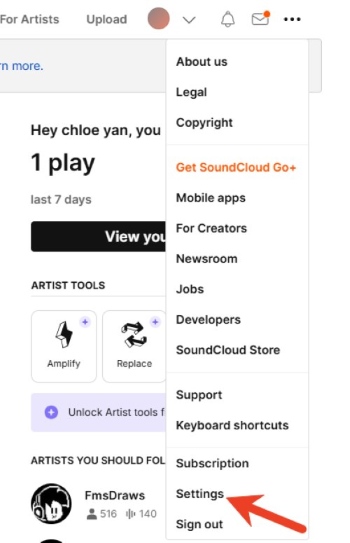
Step 1. The process starts at the SoundCloud website. After signing in to your account, choose the menu option and locate "Settings", where the email section is displayed on the "Account" list.
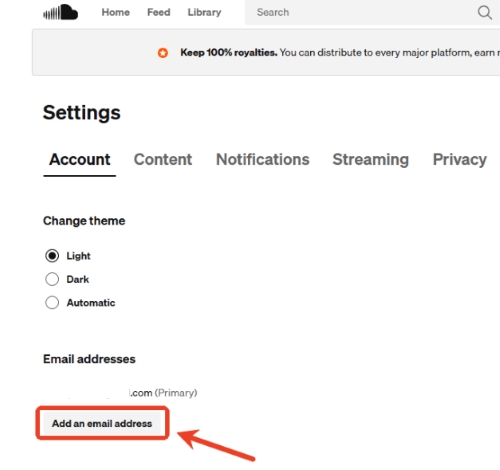
Step 2. In the "Email addresses" section, a new email address can be added by clicking "Add an email address". Enter your new email and tap "Add" to confirm it.
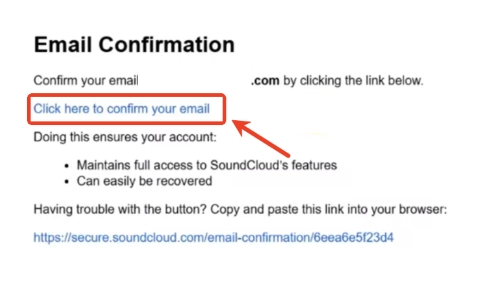
Step 3. After the new email is added, SoundCloud sends a verification message to that address you just used. Then open the email and click the blue confirmation link to complete the verification step.
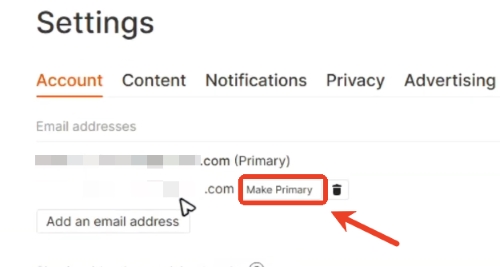
Step 4. Once verified, the new email appears in the settings list and can be set as the primary email by clicking "Make Primary". The previous email remains listed until you decide to remove it.
Switch SoundCloud Email on Mobile
SoundCloud does not allow you to add or remove your email directly within the Android or iPhone app. To update your SoundCloud email on a smartphone, you need to complete the process through a web browser. The steps below will walk you through the process to change your SoundCloud email on your mobile.
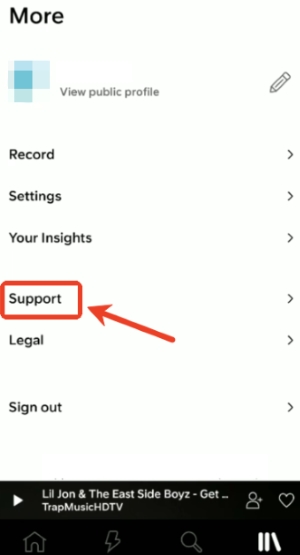
Step 1. Enter the SoundCloud app on your phone. Tap the "Library" icon, and tap your profile picture in the top-right corner, then select "Support", which opens the SoundCloud Help Center.
Step 2. When the Help Center opens in your browser, switch the browser to "Desktop site". In the Help Center, choose "My Account" and search for "Change Email Address" to locate the correct settings page.
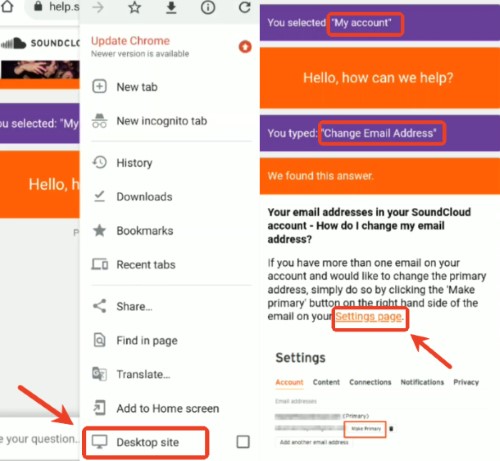
Step 3. Open the email settings link in the browser and sign in to your SoundCloud account. Once signed in, the Settings page will display the email section associated with your account.
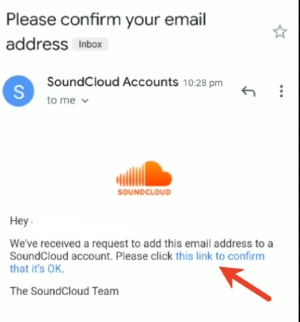
Step 4. From the email section, add a new email by selecting "Add an email address" just like the steps on desktop. Enter the new email address and confirm it by clicking the verification link sent to your inbox. After verification is complete, you can set the new email as the primary email or remove it.
Part 3. Why Can't I Change My Email on SoundCloud
Even after following the steps to change your SoundCloud email, you may still run into issues during the process. In the sections below, we'll go through the most frequent situations that block you from changing your email on SoundCloud and share practical solutions, from dealing with verification problems to lost access to your email.
Don't Receive the Confirmation Email
If you don't get the confirmation email from SoundCloud, the first thing to do is check your spam or junk folder. It's also important to double-check that the email address you entered is correct, as a simple typo can prevent delivery. If your accounts were created through Facebook or Google, your profile may be linked to that service rather than an email you directly control. In such cases, using a password reset via your profile URL can help identify the linked email.
Can't Confirm Your SoundCloud Email
Sometimes you get stuck in a verification loop and can't confirm their email. Switching to a different browser or clearing your cache and cookies can resolve the problem. If the confirmation email still doesn't arrive, resend it from your account settings. When all else fails, the only way to move forward is to reach out to SoundCloud Support directly, providing them with your account details so they can help you complete the email verification process.
Lost Access to Original Email on SoundCloud
If you no longer have access to your old email on SoundCloud, SoundCloud will ask you to prove your authority. And you'll be asked to share basic details like the original email, when the account was created, and recent login activity. You can send a message like this: "I need to change my primary email, but I can't access the email on my account. I still have login access. Please escalate to a support agent." After that, support usually reviews the request and helps you switch to the new email, without needing to create a new account.
Part 4. How to Keep Your SoundCloud Music Safe After Changing Email
While changing your SoundCloud email is usually straightforward, account verification issues can sometimes temporarily restrict features like uploading tracks or managing playlists. It could make your music harder to access or organize if something goes wrong. To minimize any risk of losing your playlists or important tracks, it's wise to back up your SoundCloud music in advance.
One reliable way to protect your library is with a tool like DRmare Streaming Audio Recorder. DRmare allows you to download your playlists and tracks in high-quality formats such as MP3, WAV, or FLAC, while preserving ID3 tags and metadata. This ensures your playlists stay complete and fully accessible offline on any device, giving you peace of mind that your music is safe while you change your email address.
- Step 1Choose Your Preferred Audio Format
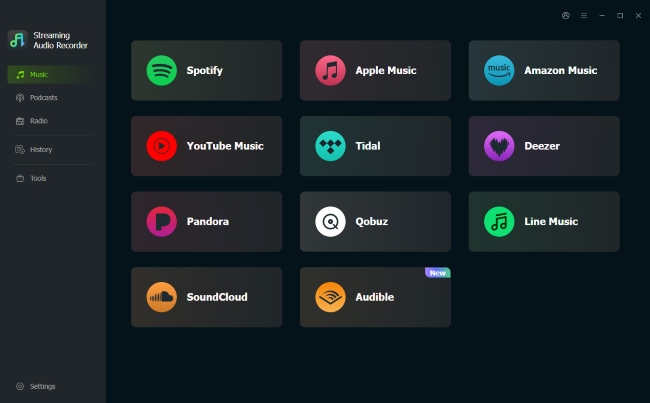
Before backing up your SoundCloud playlists, set the audio format in DRmare to match your preferences. Go to "Settings > Music", and select from formats like MP3, FLAC, or WAV. You can also adjust settings such as audio quality and channels.

- Step 2Access SoundCloud and Sign In Your Account
With your audio settings saved, launch the built-in SoundCloud web player from DRmare's main interface. Sign in to your SoundCloud account to allow DRmare to access your playlists.
- Step 3Add Playlists or Top Tracks
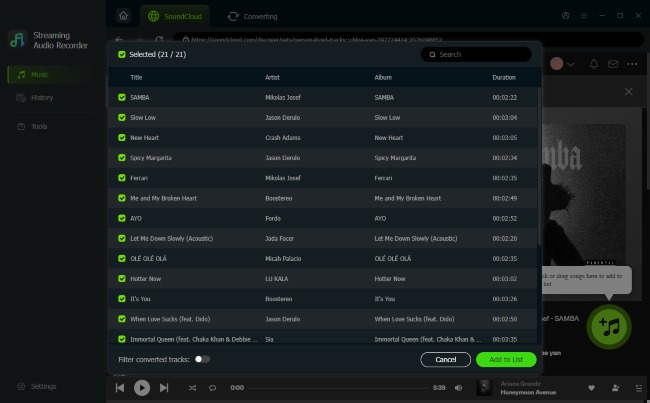
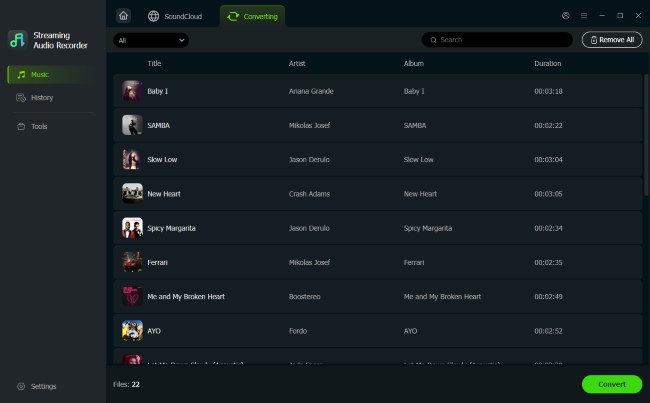
Browse your most important playlists or frequently played tracks in the SoundCloud web player. Use "Add > Add to List" to import them into DRmare. This method keeps your playlists fully intact, ensuring that all your favorite tracks are ready to be backed up before you change your email on SoundCloud.
- Step 4Export and Save Your Playlists fromSoundCloud
Once your desired tracks are added, click "Convert" to download and save them locally. After conversion, access them via the "History" tab or the folder on your computer. Having a local backup ensures that your playlists and tracks remain fully accessible and complete, no matter what happens during a SoundCloud email change or any account verification process.

 Home
Home





User Comments
Leave a Comment