





SoundCloud is one of the most popular platforms for discovering, streaming, and sharing music, where you can discover new tracks and upload and promote your work. However, you may forget your SoundCloud password, especially when you haven't logged in for a long time. You're not alone if you run into issues when trying to change your SoundCloud password.
This guide is designed to clear up that confusion. Below, you'll learn how to reset your SoundCloud password and fix common password reset problems, and make sure your SoundCloud music remains available even if you lose account access in the future.
Part 1. How to Reset SoundCloud Password If You Forgot It
If you've forgotten your SoundCloud password, resetting it is usually the fastest way to get back into your account. Whether you're trying to change your SoundCloud password on your phone or computer, the overall process is essentially the same—request a reset link, and set a new password. Below, you'll find step-by-step instructions for both the SoundCloud app and desktop, so you can follow the method that matches your device.
Change the Password on the SoundCloud App
Resetting your SoundCloud password on iPhone or Android is simple thanks to the mobile app's built-in recovery feature, which helps you regain access to your account directly from your phone.
Step 1. Launch SoundCloud on your phone, and you'll see the main login screen. Then choose the option "I already have an account".

Step 2. Enter the email address used when you registered the SoundCloud account and tap "Continue", then click "Forgot your password" on the screen.
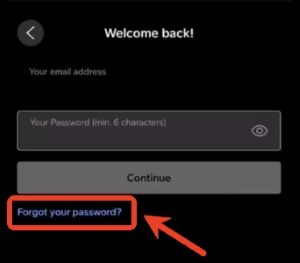
Step 3. Once the reset option is selected, SoundCloud then sends a password reset email to your registered address.
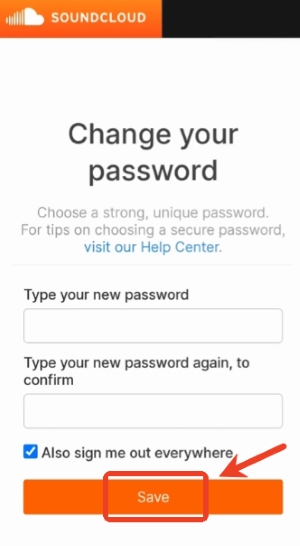
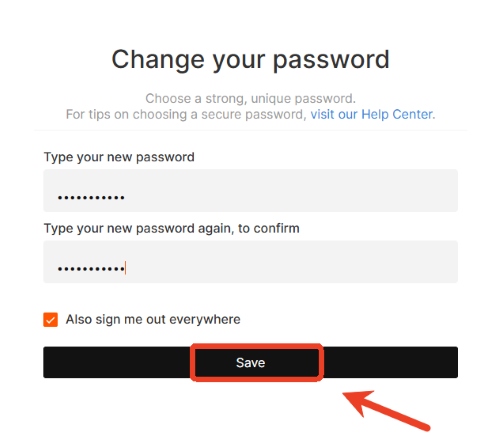
Step 4. Click the link from the email that leads to the password reset page. Here, you can create a new SoundCloud password and "Save" it. There's also an option to "Also sign me out of everywhere", which can be helpful for security. Then you can sign back into SoundCloud with the updated password to restore access to your SoundCloud account.
Change the Password on Soundcloud Desktop
The reset password process is very similar to the mobile, but it takes place through the SoundCloud website.
Step 1. On your computer, visit the SoundCloud website and click "Sign in". Start by typing the email address associated with your SoundCloud account.
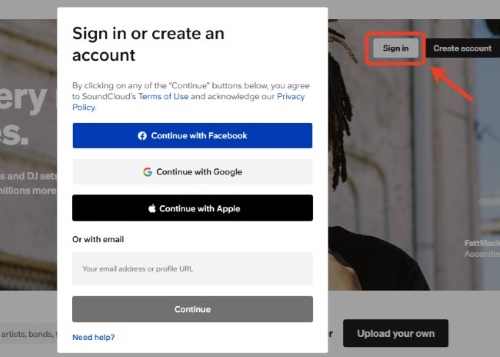
Step 2. Tap "Continue", SoundCloud will prompt for a password. Then, choose the "Forgot your password" option and click the "Reset my password" button to confirm the request to change your SoundCloud password.
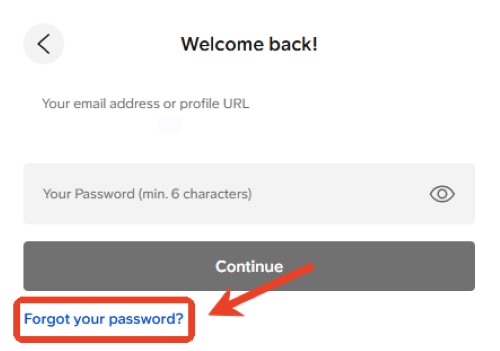
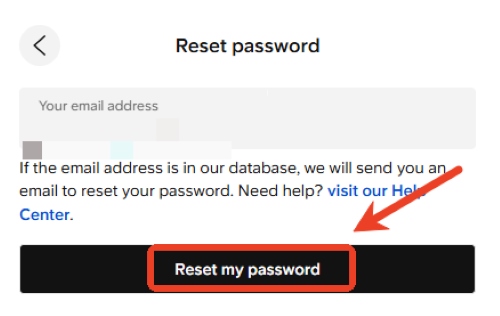
Step 3. SoundCloud will send a password reset message to the registered email address. Then open the email and click the reset link to proceed.
Step 4. The link opens the password reset page in your browser, where you can create a new SoundCloud password and "Save" it. Once completed, you can return to the SoundCloud website and sign in normally with the updated password.
If You Register for a SoundCloud Account with Facebook
If your SoundCloud account was created using Facebook, the password reset process is mostly the same as a regular account—the key difference is which email receives the reset link. Even if you no longer use Facebook or have deleted the linked SoundCloud account, you can still change your SoundCloud password through the official reset page. The reset email will be sent to the email address associated with your Facebook account, and once a new password is set, you can sign in directly with your email and password without using Facebook. If you're unsure which email is linked, checking your Facebook settings can help, or SoundCloud support can assist with account recovery.
If You Forgot Both SoundCloud Email and Password
If you've forgotten both your SoundCloud email and password, start by checking all your email inboxes for any old messages from SoundCloud, as the account that received these emails is likely linked to your SoundCloud profile. If you cannot recover the email or no longer have access to it, visit the SoundCloud Help Center and submit a support request, including your username, any previous email addresses you may have used. You can also use the Help Center chatbot to provide additional details, such as your profile URL, associated emails, or usernames. To help verify ownership, be ready to provide information about your uploaded tracks, payment details if applicable, your IP address, and so on.
Part 2. How to Change SoundCloud Password If You Are Logged in
If you're already logged into your SoundCloud account and want to change your password, the process can be done directly from the account settings. Here's how it works:
Step 1. Click the menu icon on the right side of the screen, and select the "Settings" option from the menu list.
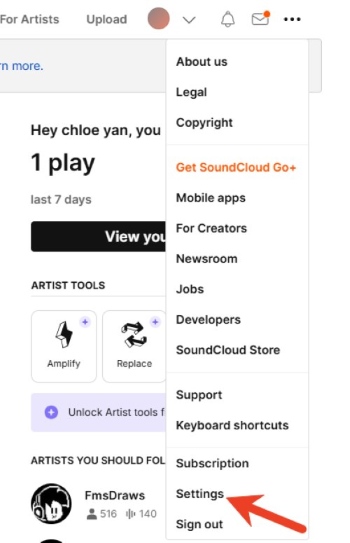
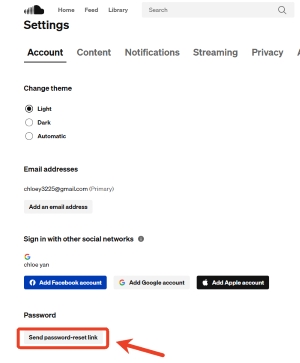
Step 2. Inside this page, locate the "Account" section. Scrolling down and you'll see a "Password" section. There is an option labeled "send password-reset link". After clicking this option, SoundCloud sends a password reset email to the email address linked to the account.
Step 3. Next, open your email inbox, and the message from SoundCloud should appear at the top. Open this email to view the password reset link by clicking the "Reset Password" button.
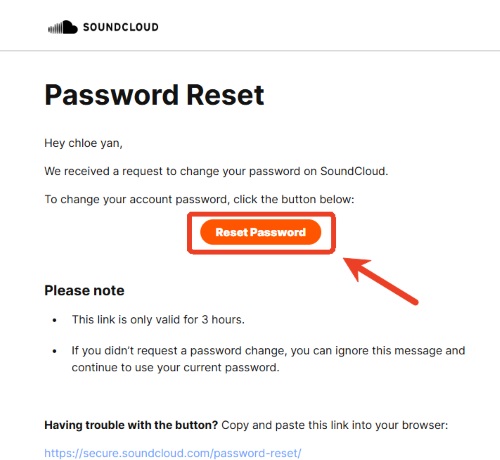
Step 4. Click the link provided that redirects to the SoundCloud password reset page. Here, you can change your SoundCloud password. After saving your new password, the SoundCloud account password is successfully updated. Then you can go back to the login page on SoundCloud.
Part 3. Fix SoundCloud Password Reset Not Working
Even though SoundCloud makes it easy to reset your password, sometimes the process doesn't go as smoothly as expected. You may encounter errors, fail to receive the reset email, or find that your account is temporarily locked. These issues can be frustrating, especially if you need to regain access quickly. We'll provide Step-by-step solutions to reset your SoundCloud password and help you get back into your account.
Not Receiving SoundCloud Password Reset Email
If you've requested a password reset but haven't received the email, it is a common issue. First, check your email in the spam, junk, or promotions folder, as sometimes the email can be filtered there. It's also important to make sure the request was sent to the email address currently linked to the SoundCloud account. If the email still hasn't arrived, try requesting a new password reset.
Remember to avoid repeatedly requesting resets in a short period, as multiple requests can temporarily delay email delivery. In some cases, email providers may block automated messages, so if the reset email still doesn't show up, contacting SoundCloud support directly is the best option. They can assist you with changing your password and help you regain access to your account.
Can't Access the Email Linked to the SoundCloud Account
Losing access to the email linked to your SoundCloud account can make changing your password a bit tricky. In situations like this, reaching out to SoundCloud support is usually the way to go. Sharing information like your username, any old email addresses, connected social accounts, or other account details can help confirm that the account belongs to you and make your SoundCloud account recovery possible.
Even without access to your original email, support can walk you through how to change your SoundCloud password and get back into your account safely. This way, your music and account settings stay protected. It's a good idea to use an email you can always access to avoid running into the same problem again.
Part 4. Extra Tip: Keep Your SoundCloud Music Accessible Even If You Forgot the Password
Even if you forget or need to reset your SoundCloud password, there's a way to make sure your favorite music stays within reach. Download your favorite SoundCloud playlists locally, which ensures that account issues won't interrupt your listening experience.
By using a tool like DRmare Streaming Audio Recorder, you can download your SoundCloud music to MP3 and other formats such as WAV, FLAC, AIFF. This means that even while dealing with password changes or account access issues, your music remains available offline. With DRmare, playlists stay complete on any device and maintain high-quality audio along with ID3 tags, giving you peace of mind that your SoundCloud library is safe, whatever happens with your account.
- Step 1Set Your Preferred Audio Format
Before exporting your top SoundCloud tracks, start by choosing the audio format in DRmare. Head over to the "Settings" > "Music". Here, you can select formats to convert your SoundCloud music to FLAC, MP3, or WAV, and adjust settings such as audio quality and channel. This ensures that your exported playlist matches your listening preferences and keeps your music organized, even if you later need to change your SoundCloud password.

- Step 2Open SoundCloud and Log In
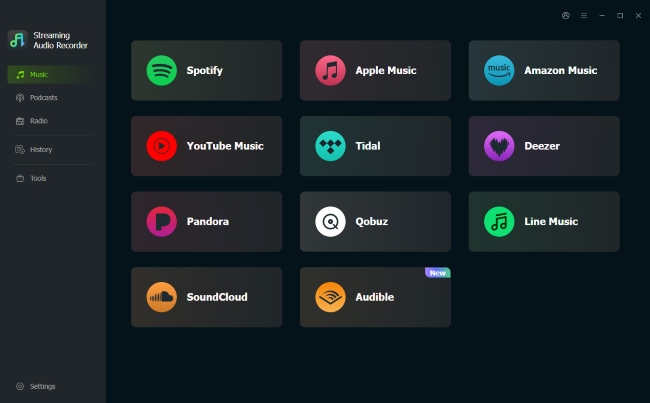
Once your audio settings are ready, click SoundCloud on DRmare's main screen to launch the built-in web player. Then sign in to your SoundCloud account. Connecting your account allows DRmare to access your playlists safely.
- Step 3Add Your SoundCloud Playlist
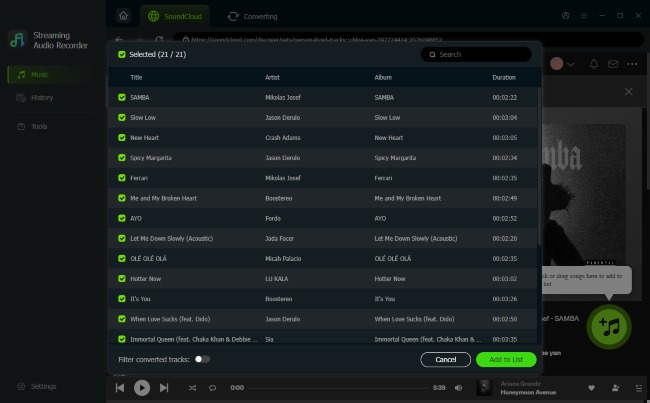
Browse your top tracks or playlists in the SoundCloud web player. Click "Add" > "Add to List" to load them into DRmare. You can include your most played songs or playlists, and they will appear in the program ready for export. Using DRmare in this way keeps your favorite tracks accessible even if you need to reset your SoundCloud password later.
- Step 4Export Your SoundCloud Playlist
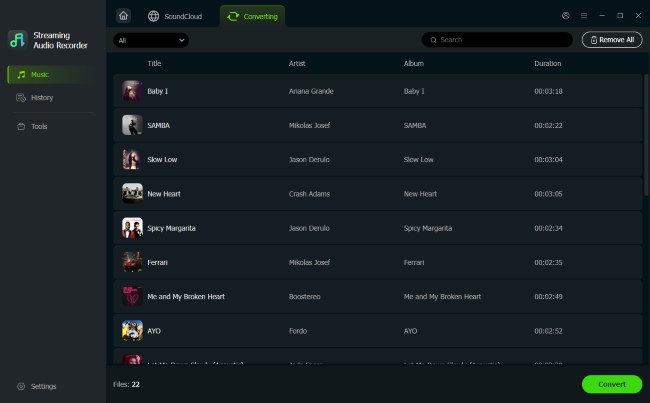
After adding all desired tracks, hit the "Convert" button to start downloading and converting your playlists. Once the process is complete, click the "History" icon to view all exported tracks, or use the folder to locate them on your computer. By keeping local copies of your playlists, you can continue enjoying your music seamlessly, regardless of any future SoundCloud password changes or account access issues.

 Home
Home





User Comments
Leave a Comment