





Ever wondered which songs are being played the most on SoundCloud? And how can you find out exactly how many times a song has been played in your SoundCloud account? Whether you're a casual listener or an active creator, knowing the top tracks and your most played songs on SoundCloud can reveal a lot about your tastes and engagement. In this guide, you'll get the answers: we'll explore the top 10 most streamed songs of SoundCloud, see how to check your most-played songs and playback stats, and share practical tips for analyzing trends and downloading top songs from SoundCloud.
Part 1. Top 10 Most Streamed Songs on SoundCloud
SoundCloud doesn't have one official chart for the top-streamed songs, so there's no single definitive list. But you can still get a good sense of which tracks are trending by checking their play counts, likes, and reposts. If you want to explore what's popular right now, try searching for playlists such as "Top 100 Aktuelle Charts", "Top Songs 2025", "Top Hits 2025", or similar collections on SoundCloud.
Here is a collection of songs that frequently rank among the most streamed songs on SoundCloud to help you get started.
| Rank | Song | Artist | Plays (Million) | Upload Date |
|---|---|---|---|---|
| 1 | 약속 (Promise) | JIMIN (of BTS) | 387.8 | 2018.12.30 |
| 2 | Fuck Love | XXXTENTACION | 341.5 | 2017.08.24 |
| 3 | 1.5-XOTOURLif3 (Produced By TM88) | Lil Uzi Vert | 270.5 | 2017.02.26 |
| 4 | Lucid Dreams | Juice WRLD | 266.9 | 2018.05.22 |
| 5 | All Girls Are The Same | Juice WRLD | 241.0 | 2018.05.23 |
| 6 | Lean On (feat. MØ) | Major Lazer & DJ Snake | 236.8 | 2015.02.16 |
| 7 | Bad and Boujee (feat. Lil Uzi Vert) [Prod. By Metro Boomin] | Migos | 235.8 | 2016.08.27 |
| 8 | From The D To The A feat. Lil Yachty | Tee Grizzley | 230.1 | 2017.03.16 |
| 9 | Drip Too Hard | Lil Baby & Gunna | 228.9 | 2018.09.12 |
| 10 | BROCCOLI feat. Lil Yachty (Prod. By J Gramm) | D.R.A.M. | 221.5 | 2016.04.06 |
Note:
This Top 10 list reflects SoundCloud statistics as of December 3rd, 2025. Keep in mind that play counts are approximate and may change over time as songs get more plays or are removed.
Part 2. How to See Your Most Played Track as a Listener
Once you have a sense of which songs are trending on SoundCloud, you might be curious about your own listening habits. Knowing your most played songs can help you better understand your personal music taste to organize your playlists more effectively. However, SoundCloud doesn't provide a full log of all the tracks you've listened to because its analytics focus on artists' own uploads. This means you can't see the total play counts of your listening activity. Instead, you can get a quick snapshot of your habits by checking recently played tracks or using playback recaps, which highlight the songs you revisit most often.
Check Recently Played
To start tracking your own listening trends, the easiest way to begin is with the "Recently Played" section. This gives you an immediate look at the songs you've been enjoying lately.
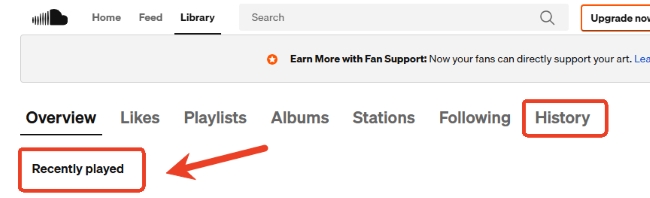
Step 1. Open SoundCloud and head to the Library from the main interface. This is where all your liked tracks, playlists, and listening activity are organized, making it easy to find your personal music history.

Step 2. Look for the Overview toolbar, where you'll find a "Recently Played" section. This shows a quick snapshot of the tracks you've listened to recently. If you want a more detailed view, click "History" to see a complete list of songs you've played, helping you rediscover favorites or catch up on tracks you might have missed on SoundCloud.
Look for "Playback" Recaps
SoundCloud regularly provides playback recaps for users, showing the top songs you've listened to over a year. This is particularly useful if you want to track your personal listening trends. You can check your SoundCloud Recap with your computer or phone.
View SoundCloud Playback on Web
Step 1. Go to SoundCloud and log in to your account.
Step 2. When your playback recap is ready, a banner titled "Meet your 2025 Playback" will appear on your homepage. Click it to view your personalized SoundCloud yearly summary.

Check SoundCloud Recap on Phone
Step 1. Open the SoundCloud app and make sure it's updated to the latest version.
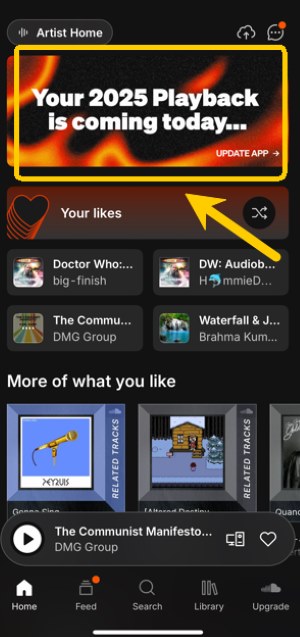
Step 2. Once your Wrapped is available, you'll see a banner on your home feed, which is usually near the middle of the screen. Tap the banner to open your SoundCloud Wrapped, then you can swipe through your top tracks, artists, and playlists to see what defined your listening habits over the past year.
Part 3. How to Check Your Most Listened to Song as a Creator
While SoundCloud gives listeners only a limited view of their playback activity, it offers much more powerful analytics for artists. SoundCloud provides Insights that show how your tracks are performing across plays, likes, comments, reposts, and downloads within any chosen time period. Here's how you can explore your most played songs on SoundCloud, whether on your phone or computer:
Tips:
If you upgrade to an Artist Pro account, you can get access to deeper data, including top listeners and key listener locations, so you can clearly see who's engaging with your music and where your growth is coming from. Pro features also help you reach new audiences through algorithmic recommendations and message top fans for promos. Moreover, there is a Quiet Mode that allows you to hide public stats like plays and comments.
Via Mobile App
You can check your most played songs directly on your phone:
Step 1. Open the SoundCloud app and go to "Profile" > "Library".
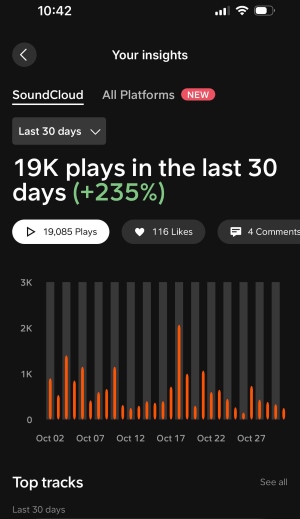
Step 2. Tap "Your Insights" and head to the "Overview" section. There, click the bar-graph Insights icon to open your analytics. You'll be able to view your total plays by day, week, month, or year, along with details like likes, comments, reposts, and downloads.
Via Web Page
Checking Insights on a desktop gives you a clearer view:
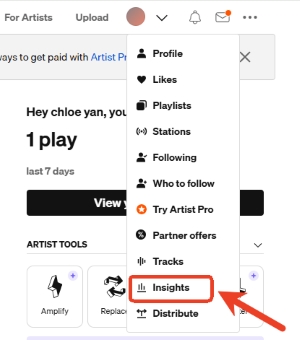
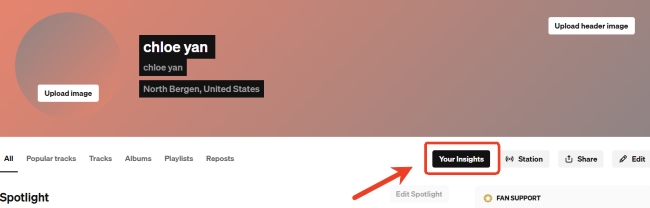
Step 1. To view your account's insights, you just need to open the drop-down menu beside your avatar and click "Insights", or simply hit "Insights" from your profile page.
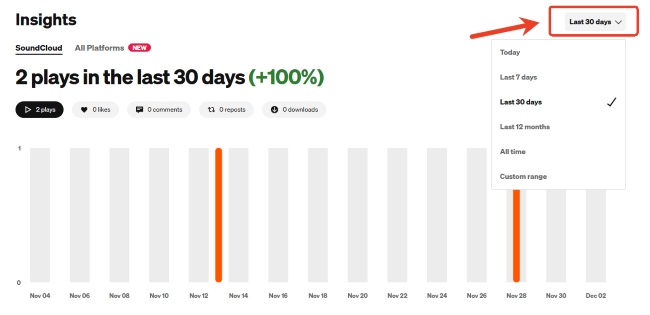
Step 2. You'll land on the Overview graph, which shows your plays, likes, comments, reposts, and downloads over time. The chart automatically displays activity from the last 7 days and highlights your top 5 performing tracks for the action you're viewing. You can use the date selector in the upper-right corner to adjust the timeframe.
Part 4. Quick Tips to Manage Your Listening Trends on SoundCloud
Now that you know how to check your most listened-to songs on SoundCloud, it becomes much easier to spot patterns in your music habits—whether you're a creator or a listener. Getting familiar with these trends can enhance your overall SoundCloud experience, helping you understand what you truly enjoy and how your tastes change over time. Here are two tips that can help you make the most of your listening data on SoundCloud.
Analyzing SoundCloud Stats for Higher Track Performance
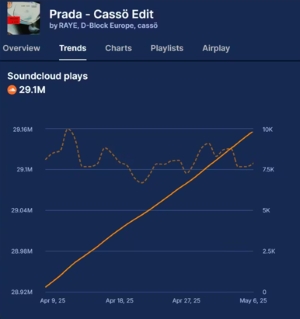
If you're a creator, taking a closer look at your stats can make a real difference in how your tracks perform. SoundCloud Insights already gives you a solid overview of your audience and track activity. But if you want deeper analysis, tools like Viberate, Songstats, and Chartmetric can offer broader data. They help you spot audience trends, understand engagement patterns, compare performance across platforms, and refine your release strategy with greater confidence.
Soundcharts
Soundcharts stands out for its huge data coverage. It pulls real-time updates from millions of playlists, helping you spot where your momentum is coming from by country, platform, or specific track for deeper insights. It's great for spotting trends early and understanding how your music moves across different markets.
Songstats
Songstats focuses on real-time updates across Digital Service Providers, making it perfect if you want instant visibility into how your music is performing. It tracks streams, followers, comments, and chart positions, and even sends push notifications when you land on a playlist or hit a new milestone. You can easily share achievements with fans on social media and keep an eye on playlist reach and overall engagement. if you want quick updates, easy social-sharing tools,
Viberate
Viberate offers a comprehensive look at your growth across streaming platforms. It highlights your top tracks, audience changes, and playlist activity, and gives weekly performance summaries so you can see what's trending. You also get detailed track analytics and audience insights by location, genre, and demographics, making it ideal for developing long-term strategies and understanding your full audience landscape.
Downloading the Most Played Song on SoundCloud of All Time
Keeping track of your most-played song is a great way to understand your long-term listening habits. You can save these playlists offline to help you review your listening data and revisit your all-time favorites anytime. The problem is that SoundCloud doesn't let you download every song. That's why tools like DRmare Streaming Audio Recorder come in handy, which let you save your most played SoundCloud tracks locally with no restrictions.
- Step 1Customize Your Audio Format
Before exporting your playlist of the most played songs on SoundCloud, you should set the audio format in DRmare. From the "Settings"> "Music" tab, you can pick multiple formats you prefer and adjust audio settings like channel or quality, which ensures the exported playlist matches your listening needs.

- Step 2Open SoundCloud and Sign In
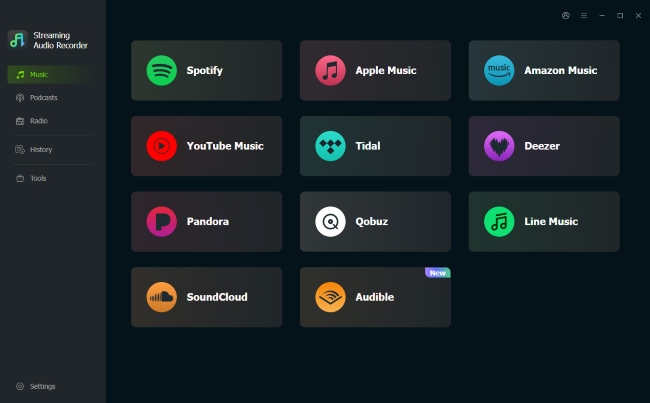
After setting your preference for SoundCloud audio files, you need to click the "SoundCloud" on the main screen to launch the built-in web player. Then tap "Sign In" to log into your SoundCloud account. This connects DRmare to your playlists and makes them ready for export.
- Step 3Add Your Most Played Playlist to DRmare
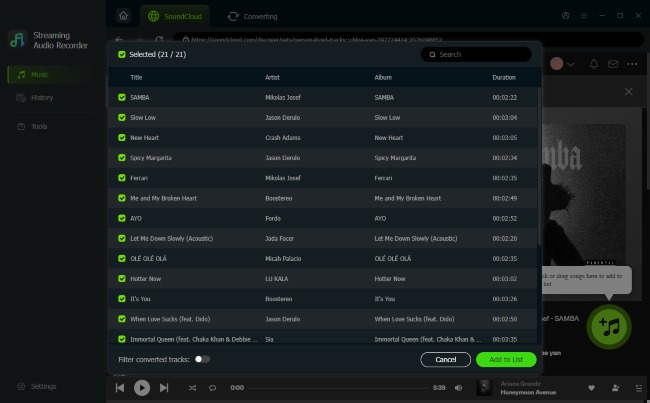
Find the song you played most in the SoundCloud web player, then click "Add" > "Add to List", and your top track will be loaded into DRmare. You can also add the most played playlists on SoundCloud, and they'll line up in the program for conversion.
- Step 4Export the Playlist You Played Most on SoundCloud
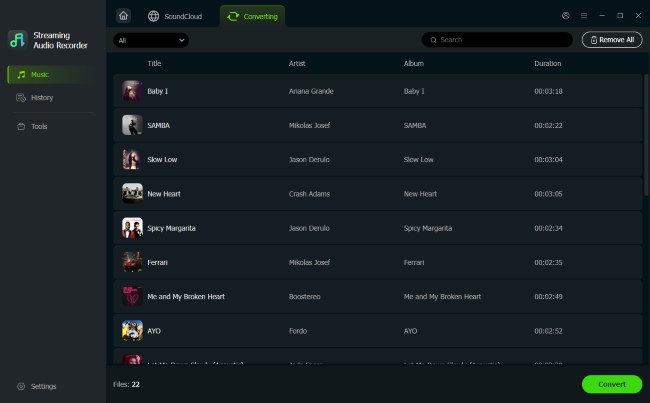
When all things are ready, hit the "Convert" button, and DRmare will start downloading and converting your top playlist immediately. When it's done, click the "History" icon to see all your most listened to playlists from SoundCloud. You can also click the "folder" icon to locate it on your computer.

 Home
Home





User Comments
Leave a Comment