





If you found this article by searching for "Spotify vs. YouTube Red", I have to tell you something: you are searching for a ghost.
"YouTube Red" was the old name for Google's premium service back in 2015. It's dead. But the question you are really asking—"Should I pay for Spotify, or should I get that YouTube subscription that removes ads?", or to say: Spotify vs. YouTube Premium—is more relevant now than ever before.
I've been a loyal Spotify user for nearly a decade. My "Spotify Wrapped" data is practically a diary of my life. But recently, with subscription prices climbing and YouTube ads becoming increasingly aggressive, I faced a dilemma. Do I stick with the music specialist, or do I jump ship to the "do-it-all" bundle?
I spent the last month using both. Here is the honest, personal breakdown of the battle between Spotify and YouTube Premium (the artist formerly known as Red).
Part 1. Is the Bundle the Killer Feature?
Let's get the money talk out of the way first, because this is usually where the decision is made.
If you just want music, the prices are competitive. Spotify Premium generally costs around $12.99/month for an individual. YouTube Music Premium is usually a dollar cheaper at $10.99/month.
But nobody really buys YouTube Music on its own. The real heavyweight contender here is YouTube Premium (the full bundle).
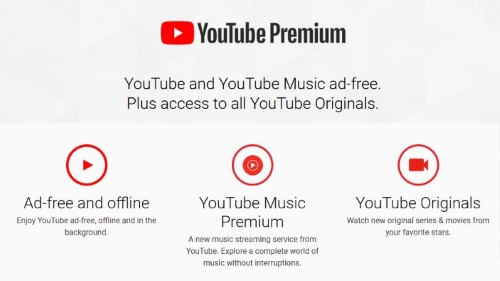
For approximately $13.99/month—roughly the price of a fancy coffee more than Spotify—you get:
- 1 YouTube Music Premium (Full access, works just like Spotify).
- 2 Ad-free YouTube videos (On your TV, phone, and desktop).
- 3 Background play (So videos don't stop when you lock your phone).
My take: Value-wise, YouTube Premium obliterates Spotify. Eliminating those double unskippable ads before every video I watch on my TV felt like a quality-of-life upgrade I didn't know I needed. If you watch a lot of YouTube, the music service feels like a "free bonus".
Part 2. The Spotify Experience: Why It's Still the "King of Music"
So, why haven't I just canceled Spotify immediately? Because Spotify does a few things so beautifully that it's hard to leave.
The Magic of Spotify Connect
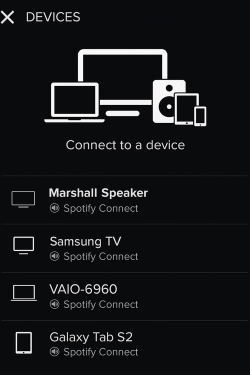
This is the feature I missed the most when testing YouTube Music. With Spotify Connect, I can be listening on my phone, walk into my living room, and tap one button to send the music to my PS5 or smart speaker without the music stopping or skipping a beat.
YouTube requires "Casting" (Chromecast), which feels clunky. It often disconnects, drains battery, or requires the TV app to launch fully. Spotify feels like a remote control for my life; YouTube feels like I'm beaming a signal to space and hoping it lands.
The Algorithm Knows Me Better
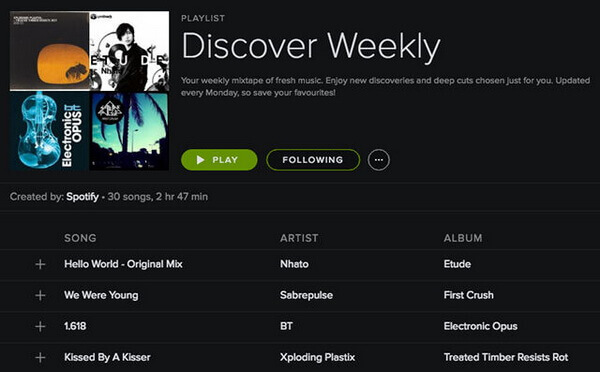
Spotify's Discover Weekly and the new Daylist features are scary good. They understand that I like lo-fi jazz in the morning and high-energy indie rock at 2 PM.
YouTube's algorithm is powerful, but it's messy. Because it pulls from my video history, my "Supermix" was occasionally interrupted by random tracks related to meme videos or tech reviews I watched, which ruined the vibe.
Part 3. The YouTube Advantage: It Has What Spotify Can't Have
While Spotify is polished, YouTube Music is deep.
Have you ever looked for a specific remix, a slowed-and-revered version of a song, or a live cover performed by a random YouTuber, only to find it doesn't exist on Spotify?
That is YouTube Music's superpower.
Because the app pulls audio from YouTube videos, the library is effectively infinite. I found a specific 10-hour loop of "Zelda Rain Music" and a rare live set from 2008 that simply aren't on Spotify due to licensing issues.
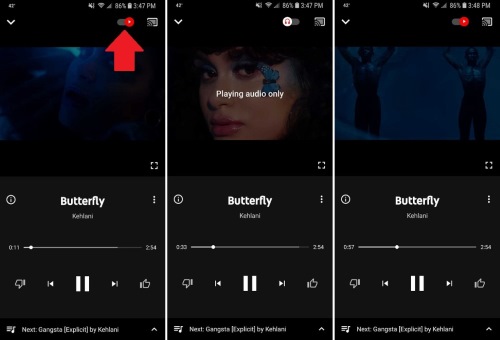
Plus, there is the Video Toggle. With one tap at the top of the screen, I can instantly switch from the audio track to the music video, perfectly synced. It's a party trick that never gets old.
Part 4. The Shared Problem: You Don't Actually Own Anything
Here is the uncomfortable truth I realized while juggling these subscriptions: I am just renting my favorite songs.
Whether I choose Spotify or YouTube, the moment I stop paying $12 or $14 a month, my curated playlists vanish. Even the "Offline Mode" on both apps is just a lease—the files are encrypted, hidden deep in the app's cache, and unplayable on anything other than the app itself.
This bothered me. I have an old iPod I like to use for running (no distractions), and I wanted to back up my "Best of 2024" playlist to a USB drive for my car. Neither app allows this.
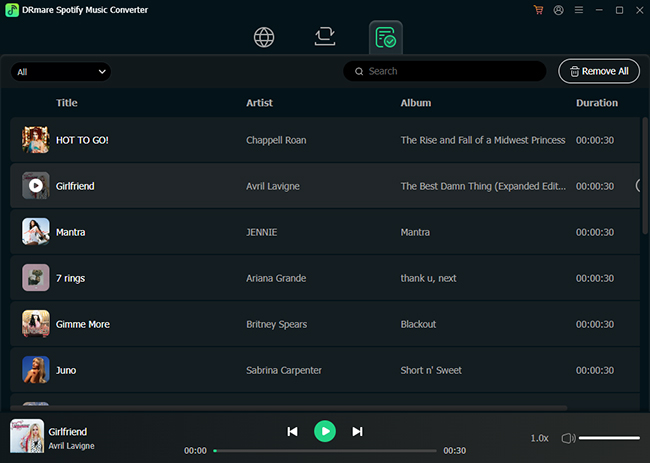
This is where I found a workaround that bridges the gap between modern streaming convenience and old-school ownership. If you lean towards Spotify for its superior discovery but hate the "rental" aspect, a tool like DRmare Spotify Music Converter is genuinely useful.
It's a piece of software designed to download and convert Spotify songs into actual MP3, FLAC, or WAV files that you can keep forever.
Why I found it helpful:
- Format Freedom: I could finally put my Spotify playlists on my MP3 player and my car's legacy stereo system.
- Backup: If I ever decide to fully switch to YouTube Premium later, I won't lose the hundreds of playlists I built on Spotify. I can download them first.
- Quality Retention: It keeps the original audio quality and ID3 tags (album art, artist name), so my library doesn't look like a mess.
Part 5. Sound Quality: The "Specs" vs. "Reality"
You will see people arguing about this on Reddit endlessly. Let's look at the numbers.
Spotify: Maxes out at 320kbps (Ogg Vorbis).
YouTube Music: Maxes out at 256kbps (AAC).
On paper, Spotify wins. In reality? It's complicated.
YouTube's AAC codec is very efficient. Unless you are using high-end audiophile headphones in a quiet room, you likely won't hear a massive difference.
However, I did notice that YouTube Music often sounds "louder" or "punchier" by default, while Spotify has stricter loudness normalization. If you are a strict audiophile, Spotify (especially true with the newly released Spotify lossless) is the safer bet. For the gym or the commute? Both sound great.
Part 6. Verdict: Which Subscription Wins in 2025?
After my month-long experiment, here is my final recommendation.
You should stick with (or choose) Spotify if:
- You are a music purist who wants the absolute best user interface and desktop app.
- You use multiple devices (Sonos, PS5, Alexa) and want seamless control via Spotify Connect.
- Social features like "Wrapped" and seeing what friends are listening to matter to you.
- Tip: Pair it with DRmare if you want to ensure you truly own your favorite discoveries.
You should switch to YouTube Premium if:
- You watch YouTube videos almost every day. The removal of ads is, frankly, life-changing.
- You listen to niche genres (remixes, covers, DJ sets) that aren't on standard streaming platforms.
- You want the best "bang for your buck" for a single monthly subscription.
For me? I ended up keeping YouTube Premium. The value of ad-free videos was just too high to give up, and the music app is "good enough" for my daily commute. But I admit, I still miss Spotify's interface every single day.

 Home
Home





User Comments
Leave a Comment