





If you've been relying on Verizon to cover your Apple Music subscription, you might be wondering why your bill looks a little different lately. What's the short answer? Apple Music isn't as widely included for free as it used to be, but depending on your plan, you can still save a decent chunk of change.
I recently spent some time navigating Verizon's latest plan changes and testing out their activation process firsthand to see how everything works now. Here is what I learned and how you can make sure you're getting the best Verizon Apple Music deal.
Is Apple Music Still Free with Verizon?
In the past, snagging free Apple Music was as simple as signing up for one of Verizon's flagship Unlimited plans. Today, Verizon handles Apple Music a bit differently.
1. Apple Music Family as a Paid Verizon Perk
Customers on eligible myPlan or Home Internet accounts can add an Apple Music Family subscription as a paid perk for $13/month. It provides full Apple Music access for up to 6 people via Apple Family Sharing.

When I calculated the math during my testing, I realized this Verizon Apple Music Family perk is still a solid deal if you have a family or group. Standalone Apple Music Family directly from Apple costs $19.99/month, so even at $13/month, you're saving around $7 every month for up to six people.
But here's a quick heads-up I discovered: if you're single and only need access for yourself, you're actually better off buying Apple Music Individual directly from Apple for $11.99/month rather than paying $13 for Verizon's Family perk.
2. Free Apple Music Included with Some Legacy Plans
Some discontinued Verizon plans continue to include Apple Music or Apple One for existing customers. If you haven't changed your Verizon plan in recent years, you may still get Apple Music included for free:
- 5G Get More: Includes Apple Music for as long as you keep the plan.
- One Unlimited for iPhone: Includes Apple One (Apple Music, Apple TV+, Apple Arcade, iCloud+).
- Older Unlimited Plans: Get More Unlimited, Beyond Unlimited, and Above Unlimited (activated before Aug 20, 2020) may retain included access.
3. Expired Six-Month Apple Music Free Trial Promotion
Verizon previously offered 6 months of free Apple Music on plans like 5G Start, 5G Play More, 5G Do More, Play More Unlimited, and several older shared-data plans. This offer is closed to new enrollment. Customers who activated prior to the deadline can finish their remaining trial period.
Which Verizon Plans Include Apple Music?
The following tables distinguish current paid perks from benefits associated with older plans.
Current Eligible Plans (Paid Perk Available)
| Service / Plan Category | Plan Name | Apple Music Benefit | Availability |
|---|---|---|---|
| Mobile Plans | Verizon Simplicity, Unlimited Ultimate, Unlimited Plus, Unlimited Welcome | Apple Music Family ($13/mo) | Available for enrollment |
| Legacy Mobile | Unlimited Ultimate 1.0, Welcome Unlimited | Apple Music Family ($13/mo) | Existing customers only |
| Home Internet | 5G Home, Verizon Home Internet Lite, Eligible Fios | Apple Music Family ($13/mo) | Available on eligible accounts |
Note:
Fios Classic standalone internet plans are excluded.
Grandfathered Plans (Included Benefits)
| Plan Name | Included Benefit | Status |
|---|---|---|
| One Unlimited for iPhone | Apple One Included | Legacy |
| 5G Get More / Get More Unlimited | Apple Music Included | Legacy |
| Beyond Unlimited / Above Unlimited | Apple Music Included (if activated prior to cutoff) | Legacy |
How to Activate Your Verizon Apple Music Perk
When I went to set up the Apple Music perk on my own device, I hit a slight bump that's worth mentioning.
If you're using an iPhone or iPad, you cannot purchase the paid Apple Music perk inside the My Verizon app due to Apple's App Store rules. When I tried doing it through the iOS app, the option simply wasn't there for paid perks. You actually have to open a web browser on your phone or computer, log into Verizon.com, and add the perk from there. (If you're on Android or just claiming a legacy free benefit, the My Verizon app works just fine.) Here is the exact step-by-step process that worked for me:
Method 1: Activate via the My Verizon App
Step 1. Open My Verizon and sign in with the account that manages your mobile or home internet plan.
Step 2. Tap the Mobile tab.
Step 3. Navigate to: Shop products & plan perks > Entertainment > Apple Music.
Step 4. Tap Get it now. Yelect Apple Music for the desired line(s), then tap Continue.
Step 5. Accept the Terms & Conditions and tap Continue, then tap Got it.
Method 2: Activate via the Verizon Website
Step 1. Log in to your account as the Account Owner or Account Manager on Verizon.com.
Step 2. Go to Shop products & plan perks > Entertainment > Apple Music.
Step 3. Select the target phone line or home internet account.
Step 4. Follow the prompts to review the price, accept the Terms & Conditions, and complete the enrollment.
Final Step: Complete the Apple Music Registration
Crucial:
Buying the perk does not automatically activate Apple Music.
Step 1. After purchasing, click Set up or Register on the perks page. Verizon then sends a text message containing the Apple Music activation link.
Step 2. Open the activation link sent via text message and sign in with the Apple Account you wish to bind to the subscription.
Step 3. Set up Apple Family Sharing to invite up to 5 family members.
Note:
1. Only the Verizon Account Owner or an Account Manager can add or remove a perk. Another person on the account may still be able to complete the Apple Music activation after the perk has been purchased.
2. Make sure you complete the link process within 90 days, or Verizon might cancel the perk automatically.
What If You Already Have Apple Music?
Existing Apple Music Subscribers Must Cancel First
One big thing I noticed during my setup: if you already pay Apple (or another third party) directly for Apple Music, Verizon won't automatically cancel your existing subscription. If you aren't careful, you could end up paying twice. Before activating through Verizon, you can do the following sptes:
- Go to your Apple Device's Settings > [Your Name] > Subscriptions.
- Tap Apple Music to cancel Apple Music, and wait until the remaining days on your current billing cycle run out and show as expired.
- After that, activate the Verizon perk using the exact same Apple Account.
- Rest assured, all your saved songs, albums, and custom playlists will instantly reappear once you log back in.
Existing Apple One Subscribers
Since Apple One bundles Apple Music, adding the Verizon Apple Music Family perk to the same line will create a redundancy. You must evaluate whether the standalone Verizon Family perk is more cost-effective than keeping your entire Apple One bundle.
What Happens to Your Offline Apple Music If You Cancel?
During my testing, I also wanted to see what happens when you decide to leave Verizon or drop the perk. As expected, the moment your subscription ends, any songs you downloaded for offline playback through Apple Music become unplayable due to DRM protection.
If you want to keep your favorite tracks accessible locally across all your devices, like MP3 players, car stereos, or USB drives, without worrying about plan changes, you'll need to back them up locally. I tested out DRmare Apple Music Converter to see how it handles catalog backups. The process was surprisingly smooth:
- I opened the built-in web player inside DRmare, logged into my account, and selected a few of my custom playlists.
- In the settings, I chose MP3 for maximum compatibility (though you can also choose FLAC if you prefer lossless quality).
- After clicking Convert, it downloaded and saved the tracks into DRM-free audio files right on my computer.
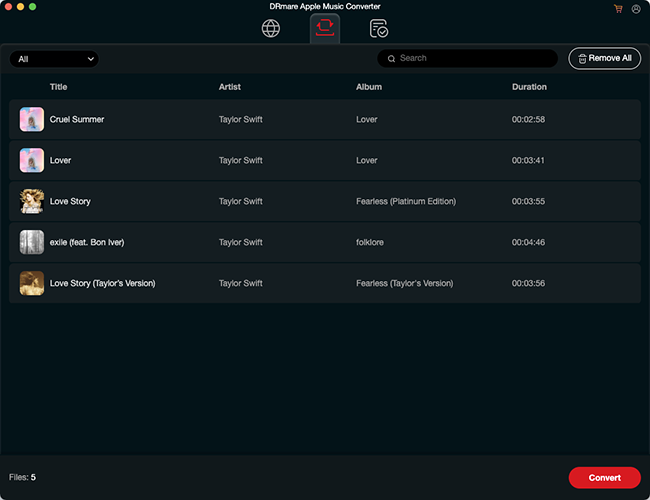
It's a handy tool if you want to keep a permanent offline copy of your personal music library for individual use before making any major carrier changes.
FAQs About Verizon Apple Music
Is Apple Music included free with Unlimited Plus or Welcome?
No. Unlimited Plus and Unlimited Welcome do not include free Apple Music. However, both plans allow you to add the Apple Music Family perk for $10/month ($13/month starting Sept 1, 2026).
Can Android users get the Verizon Apple Music Perk?
Yes. Once activated through Verizon, download the Apple Music app on Android, log in with your linked Apple Account, and enjoy full streaming access.
What happens if I cancel my Verizon perk?
Access to the streaming catalog and downloaded offline tracks will end on the cancellation date. Verizon will prorate the remaining balance for that billing period.
How to fix Verizon Apple Music not working?
Activation problems often come from the Verizon account, the registration link, or the Apple Account rather than the Apple Music app itself. Here are some solutions to fix Verizon Apple Music not working
- Apple Music Perk Not Showing: Ensure you are signed in as the Account Owner/Manager and checking an eligible plan line.
- App Asks to Subscribe After Purchase: Complete the registration step by finding the texted link or clicking Register in My Verizon.
- Missing Playlists: Verify that you signed into Apple Music with the exact Apple Account linked during activation, and ensure Sync Library on Apple Music is toggled ON in your device settings.
- Double Charges: Inspect your subscriptions across My Verizon, your Apple Account Settings, and third-party billers to cancel redundant memberships.
Final Thoughts
While Verizon's days of handing out free Apple Music to everyone are mostly behind us, the $13/month Family perk is still a great way for households to cut down their monthly streaming bill. Just make sure to double-check your current plan details in My Verizon before making any upgrades, and remember to cancel any direct Apple subscriptions first so you don't get charged twice!

 Home
Home





User Comments
Leave a Comment