





Tired of intrusive ads and the inability to play music in the background without paying for Premium? YouTube Music ReVanced offers a popular workaround, unlocking ad-free playback and premium-style features for free. However, installing the ReVanced YouTube Music APK and fixing common playback issues can be confusing for beginners.
This guide explains everything you need to know about ReVanced YouTube Music, shows the safe way to build and install it on your device, and provides simple fixes when ReVanced YouTube Music is not working.
Part 1. What ReVanced YouTube Music Actually Does
ReVanced YouTube Music is a custom-modified application engineered to elevate your daily YouTube Music streaming without a monthly subscription. By bypassing standard restrictions, this version seamlessly unlocks premium functionalities like uninterrupted background listening, zero audio advertisements, and superior audio codec settings. Beyond simply removing paywalls, the application grants users granular control over their interface by stripping away intrusive or otherwise unnecessary visual elements.
Key Features of ReVanced YouTube Music:
- Ad-Free Streaming: It eliminates all audio and video advertisements between songs, while also removing annoying "Get Premium" promotional prompts and upgrade tabs so your playlists play seamlessly.
- Broad Compatibility: Full Android Auto support for seamless in-car use, alongside minimized playback capabilities specifically tailored for Kids music.
- Safe Setup: Offers a rootless installation with a package name change, meaning it will safely run alongside your existing applications without causing software conflicts.
Want True Offline Listening for YouTube?
While ReVanced is excellent for ad-free online streaming, it completely lacks the ability to download songs for genuine offline playback. If your primary goal is to build a permanent local music library without server errors or monthly fees, you need a dedicated tool. DRmare Streaming Audio Recorder effortlessly converts your favorite YouTube Music tracks into high-quality, DRM-free audio files.
Part 2. ReVanced vs. ReVanced Extended vs. YTM Premium
While the ReVanced project focuses on providing a stable, ad-free core experience, you may eventually discover a popular fork. This advanced version, known as YouTube Music Revanced Extended (RVX Music), is designed for listeners who crave ultimate control over their streaming environment. Beyond the standard ad-free feature, RVX Music introduces several robust enhancements:
- Deep UI Customization: It offers extensive visual tweaks, including a pure black theme, custom navigation bar colors, and the ability to restore old-style library views while completely hiding any unwanted interface elements.
- Advanced Audio & Playback Controls: Users gain access to enhanced audio quality settings with Opus codec support, convenient sleep timers, and expanded playback speed options.
- Smart Integrations: It seamlessly features SponsorBlock to automatically skip non-music audio segments, and includes certificate spoofing for flawless in-car streaming.
Because of these extensive capabilities, you could be torn between the standard patched app, the Extended version, and the official Premium. To help you determine the best fit for your daily routine, it is important to clearly understand the specific capabilities and limitations of each option.
| Feature | ReVanced YouTube Music | ReVanced Extended (RVX) | YouTube Music Premium |
|---|---|---|---|
| Ad-Free Streaming | √ | √ | √ |
| Background Playback | √ | √ | √ |
| Audio Quality | Standard (128 kbps) | Standard (128 kbps) | High (256 kbps) |
| True Offline Downloads | No | No | Yes |
| UI Customization | Moderate | High | None |
| Stability & Updates | Moderate | Moderate | High |
| Cost | Free | Free | $10.99/month |
Part 3. How to Install ReVanced YouTube Music
Now that you have a better understanding of what the app offers, you're likely ready to get it running on your own device. Then, how to install YouTube Music ReVanced safely? To guarantee your privacy, the only officially recommended method is to manually download from the official website and patch the application yourself. Our step-by-step ReVanced YouTube Music guide makes the process incredibly straightforward.
Note:
While it might be tempting to download a pre-patched YouTube Music ReVanced APK from a random third-party website, doing so exposes your phone to severe security risks, hidden malware, and potential Google account bans.
- Step 1Secure the Official Framework
First, download the latest ReVanced Manager YouTube Music tool from the official ReVanced website or the ReVanced GitHub repository. This manager is the core utility used to install YouTube Music ReVanced. At the same time, install the GmsCore framework, which allows the patched app to sign in to your Google account without triggering security checks.
- Step 2Obtain the Unmodified Music App
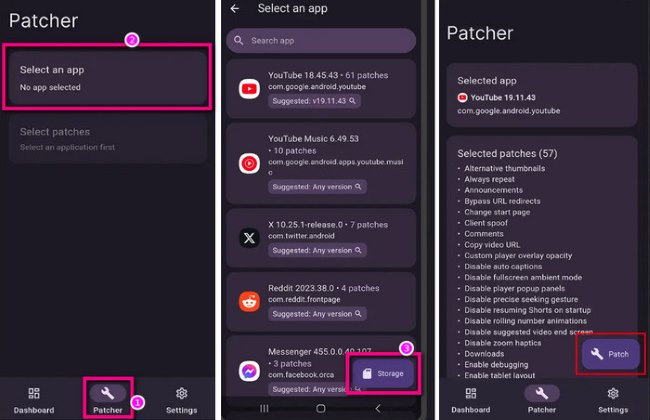
Open ReVanced Manager, go to the "Patcher" section, and check the Suggested version of the YouTube Music APK listed there. Then, download that exact YouTube Music ReVanced APK base version from a trusted repository such as APKMirror. Do not install it yet; simply save the raw file in your device's downloads folder.
- Step 3Compile and Patch Your App
Launch ReVanced Manager again, open the "Patcher" tool, and select "Storage" to choose the downloaded APK file from your folders. The manager will scan the file and display available patches for ReVanced YouTube Music. Make sure the GmsCore support patch is enabled before continuing; otherwise, the app will crash or fail to sync your library.
- Step 4Finalize the Installation
Tap the "Patch" button at the bottom of the screen to build the modified application. After the compilation process completes, press Install to deploy your new ReVanced YouTube Music app. Once installed, open the app, sign in securely via GmsCore, and start streaming without ads. With the patched player running, features like background playback become instantly available.
Part 4. How to Fix ReVanced YouTube Music Not Working
Since this modified app relies on bypassing official server restrictions, Google's routine backend updates can occasionally cause it to buffer endlessly or crash. However, if you find ReVanced YouTube Music not working, there is no need to panic. We have compiled their most effective, community-tested workarounds below to quickly fix these frustrating playback errors and get your music streaming again.
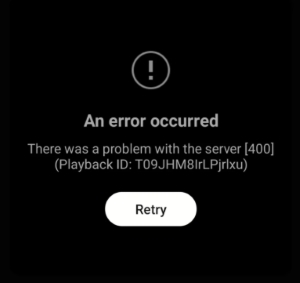
Fix ReVanced YouTube Music "Error 400"
The "Error 400" is typically a signal that YouTube's API has flagged your app version as outdated or unauthorized. While a simple restart might work, persistent errors usually require a deeper dive into the settings or a fresh patch.
-
Adjust Your Spoofing Settings
If you are using the RVX (Extended) version, navigate to "Settings > RVX > Miscellaneous". Try toggling the "Spoof Client" option off. If the error remains, go to "Settings > RVX > General" and enable "Spoof App Version." These toggles trick the server into treating your request as coming from a legitimate, updated device.
-
The "Clean Slate" Method
Long-press the YouTube Music icon and enter "App Info". Go to "Storage & Cache" and select both "Clear Cache" and "Clear Data". This removes corrupted temporary files that often trigger API conflicts.
-
Advanced CLI Patching
If the mobile Manager fails, patching via the ReVanced CLI (Command Line Interface) on a PC often bypasses Error 400 more effectively. This involves using Java on your computer to build the APK, which tends to be more stable against Google's recent server-side changes.
-
Disable the QUIC Protocol
During the initial patching process in the ReVanced Manager, ensure you select the "Disable QUIC Protocol" patch. This prevents the app from using a specific Google-developed connection method that is frequently used to identify and block modified clients.
Fix "Could not fetch any client streams" Error
If your music suddenly stops or refuses to load with a "could not fetch any client streams" message, it usually means the app's request is being rejected by YouTube's servers. This is often accompanied by the "one-minute playback bug." The following steps can help you to bypass the restriction:

-

1. Fine-Tune the "Spoof Client" Settings
The most effective fix involves changing how the app identifies itself to Google's servers. Navigate to "Settings > ReVanced (or RVX) > Miscellaneous > Spoof streaming data", and disable it. Find the "Default client" option and change it to "Android No SDK" or "iOS".
-
2. Perform a Deep GmsCore (microG) Refresh
The communication between the app and your Google account is handled by GmsCore. If this link is "stale," the server may reject your stream request. Go to your phone's system settings and Disable Battery Optimization for GmsCore. Open GmsCore settings and ensure SafetyNet is enabled (if available).
-
3. Audit Your VPN and DNS Configuration
Google has begun blacklisting specific IP addresses associated with VPNs and ad-blocking DNS services. If you are using a VPN, try disabling it or switching to a different country. Enabling a VPN in a different region actually fixes the error by bypassing local IP throttling. If you use AdGuard or Cloudflare WARP (1.1.1.1), try adding YouTube Music ReVanced to the "App Exclusion" list.
-
4. Switch Between WiFi and Mobile Data
Sometimes the error is a temporary 24-hour IP ban on your home network. Switching to mobile data can assign you a new IP address, often restoring playback instantly.
Part 5. Bonus Tips: Top Alternatives to ReVanced YouTube Music
Since you cannot use YouTube Music Revanced to download songs for true offline storage, you may need a better way to build your local media library. DRmare Streaming Audio Recorder serves as an excellent and practical workaround. It allows you to seamlessly convert streaming audio from YouTube Music. Instead of wrestling with constant app patches and frustrating server errors, you can use DRmare to download tracks to your computer as high-quality MP3, FLAC, or WAV files with all original ID3 tags, granting you complete ownership of your music library to transfer to any device.
Step 1. Open the DRmare app on your computer and head to the "Settings" and "Music" on the menu to set your audio settings. Unlike the ReVanced YouTube Music app, which cannot bypass server-side quality caps, you can secure high-fidelity audio with DRmare. Choose a format like MP3 or FLAC, and set the audio bitrate for the best possible sound.

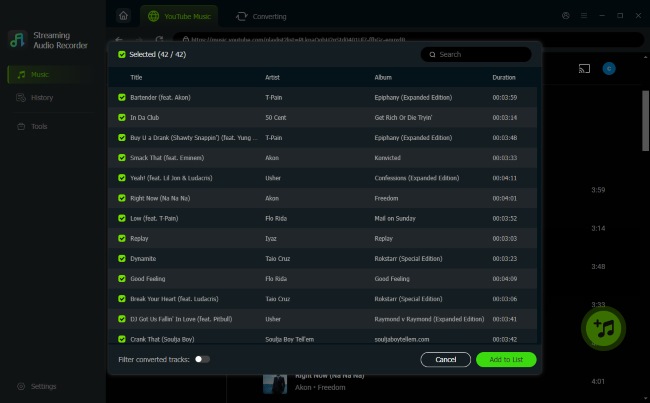
Step 2. Click the YouTube Music icon on the main interface and log in through the built-in YouTube Music web player. Then click the "Add> Add to List" button once you find playlists or albums you want to keep to move those tracks into DRmare's conversion queue.
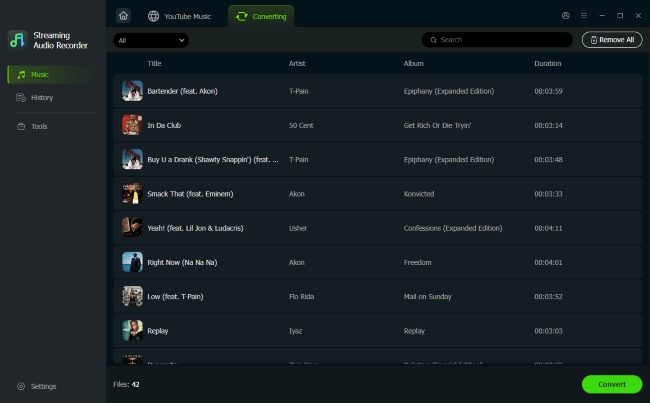
Step 3. Click the "Convert" button to start the download process. In just a few moments, your lossless music files will be safely stored on your local drive and visible in the "History" tab. You can easily transfer them to your Android phone, iOS device, or even your car's media system without ever worrying about crashing or losing server connection.
Part 6. FAQs About ReVanced YouTube Music
Is ReVanced YouTube Music safe?
Yes, it is generally considered safe, but only if you build the application yourself using the tools from the official source. Because the project is entirely open-source, the underlying code is constantly audited by a massive community of developers, which drastically reduces the chances of hidden malware. However, downloading pre-patched APK files from unverified, fake websites is highly dangerous and can easily infect your device.
Does ReVanced YouTube Music work on Windows or iOS?
No, the ReVanced patching ecosystem is engineered exclusively for Android devices. iOS and Windows operate on entirely different software frameworks. If you want to enjoy an upgraded, unrestricted YouTube Music experience on your Windows computer, DRmare Streaming Audio Recorder is your best option.
Can I download songs for offline listening with ReVanced YouTube Music?
No, you cannot natively save tracks for offline playback using this mod. While the application successfully unlocks interface features like background listening and ad-blocking, actual offline downloading remains unavailable. The ReVanced YouTube Music APK cannot generate or bypass these encrypted files. To genuinely own your YouTube Music offline without paying for a Premium subscription, you can use DRmare Streaming Audio Recorder.
Part 7. Final Thought
Your ideal setup depends entirely on what you prioritize in a listening experience. YouTube Revanced music is fantastic, a cost-free solution if your only goal is ad-free streaming while connected to the internet. Conversely, if you want to bypass server restrictions altogether and own your music permanently, DRmare Streaming Audio Recorder provides a permanent way to build a robust offline library.

 Home
Home





User Comments
Leave a Comment