





 "Many users struggle to find a YouTube to MP3 converter that isn't riddled with malware and intrusive ads. However, I found an ad-free, safe, easy-to-use converter called CNVMP3. It covers server costs by relying on community donations instead of ads. It delivers high-quality downloads directly to your device.
— From Reddit
On forums like Reddit, the most common warning you'll see is: "Be careful downloading YouTube videos; those online YouTube to MP3 download sites are magnets for malware." Recently, the above user-led discussion highlighted a refreshing exception to this rule. After visiting the CNVMP3 website, we found that it does promise a clean, high-quality, and simple experience.
However, is CNVMP3 actually safe and good for long-term use? Does it truly provide 320kbps quality and handle an entire 50-song playlist in one click? In this article, we will put CNVMP3 to the test, exploring its features, safety, usability, legal concerns, and limitations. We will also introduce a top-tier CNVMP3 alternative to ensure you can build your music library securely and efficiently.
Part 1. What Is CNVMP3 Converter?
CNVMP3 is an online YouTube downloader that enables you to download and convert YouTube videos to MP3 or MP4 formats. It doesn't require you to install extra apps on your device or pay for a subscription; even better, no need to register or log in to an account for both this software and your YouTube account. Unlike its predecessors, which are often cluttered with spammy ads, it stands out because it prioritizes the user experience. By opting for a donation-based model, it provides a clean, distraction-free interface. It claims to support up to 320kbps MP3 quality and 1080p MP4 quality.
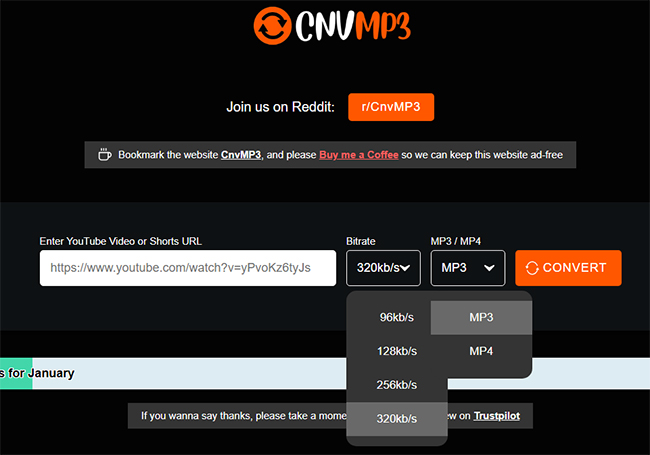
CNVMP3 markets itself as a premium free converter. Before we get into the lab results, here is a breakdown of what the tool actually offers versus what it claims.
Key Features of CNVMP3
| Feature | Specification | Notes |
|---|---|---|
| Supported Sites | YouTube only | The CNVMP4 supports TikTok, Instagram, or X videos. |
| Output Formats | MP3, MP4 | Limited to basic audio and video formats. |
| Claimed Audio Quality | Up to 320kbps | Note: See "Audio Analysis" below for the truth. |
| Ad Model | Donation-based | Currently no pop-ups or banner ads on the official site. |
| Registration | None required | No email sign-up needed. |
Part 2. How to Use CNVMP3 to Download YouTube to MP3
The enduring appeal of CNVMP3 lies in its "no-friction" workflow. The current v51 gateway remains remarkably streamlined. Here's a quick breakdown of how the process works:
Step 1. Go to the YouTube website and find the favorite video you want to download on your web browser.
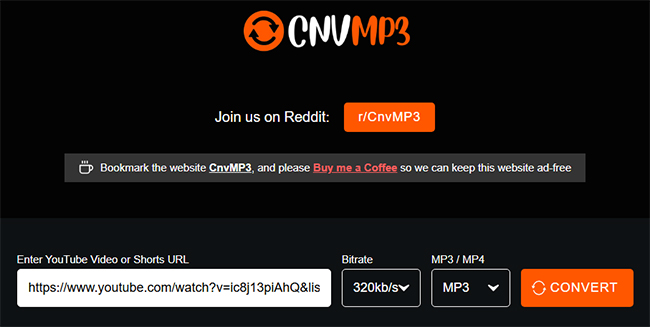
Step 2. Copy the YouTube URL from the browser address bar and paste it into CNVMP3's conversion tool.
Step 3. You can start to choose the MP3 format, customize the bitrate, and tap the "Convert" button. The website will automatically download and convert the YouTube file to your local device.
Test Results:
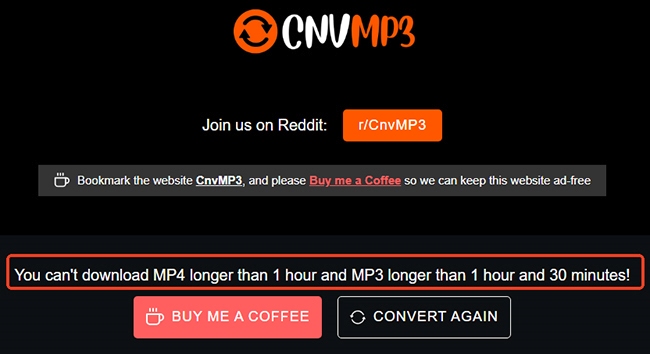
In our testing, CNVMP3 performed exceptionally well with short content, converting a 3-minute YouTube video quickly and seamlessly. However, it struggled with long-form media; attempting to download a 3-hour video triggered a limitation error stating that "You can't download MP4 longer than 1 hour and MP3 longer than 1 hour and 30 minutes!"
Part 3. CNVMP3 Audio Quality Test: Pros and Limitations
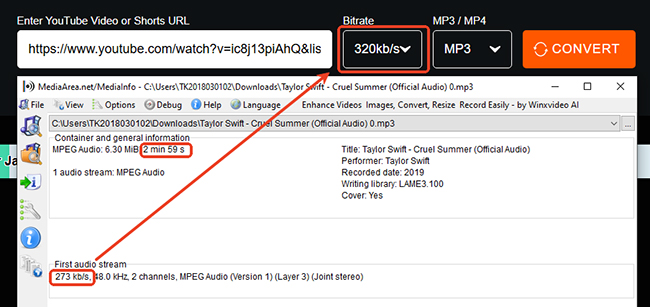
We tested CNVMP3 with a three-minute YouTube video and checked the downloaded file using MediaInfo and an audio spectrum analyzer.
The "320kbps" Output Is Not True High-Fidelity Audio
Although we selected the 320kbps option, MediaInfo reported an average bitrate of about 273kbps using variable bitrate encoding. And the spectrum analysis also showed a noticeable cutoff near 16kHz. This suggests that the higher bitrate setting did not restore audio detail missing from the original YouTube stream.
Besides, we used an audio analyzer to check the audio quality, as you can see in the image. It prompts that CNVMP3 provides "inflated" specifications; the numbers look professional on the surface, but the actual acoustic integrity is mediocre. The report shows a 48.0 kHz sample rate, which sounds impressive. However, for a 3-minute track, a file size is only 6.3 MB. It means that CNVMP3 forces a high sample rate onto a low-quality source. This doesn't add any missing musical detail; it just creates a larger file with the same "lossy" sound.
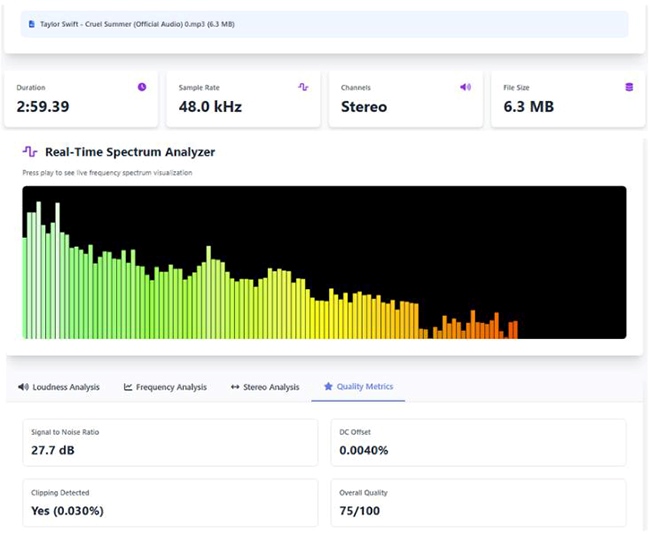
A 48kHz Sample Rate Does Not Add Missing Detail
The downloaded file reported a 48kHz sample rate, but the three-minute MP3 was only about 6.3MB. This confirms that the output remained a compressed audio file rather than lossless or high-resolution audio. A higher sample rate may change the file’s technical specifications, but it cannot recreate frequencies or musical detail that were already removed from the source.
Test Verdict of CNMP3
CNVMP3 successfully produced a playable MP3 file, but its 320kbps option should not be treated as proof of high-fidelity audio. In our test, the output was suitable for casual listening, short clips, and spoken content, but less suitable for professional editing or long-term audio archiving.
These results are based on one test file. Actual bitrate and frequency response may vary depending on the original YouTube upload and CNVMP3’s current conversion process.
Pros
 Zero Ads: The user experience is refreshing compared to the spam-filled alternatives.
- Simplicity: Paste the link, click go. No confusing options.
- Mobile Friendly: Works well on iOS (Safari) and Android (Chrome) without redirects.
- Free to Use: No need for subscriptions or payments.
Cons
 Misleading Quality: CNVMP3 uses VBR encoding; while tagged at 320kbps, spectral analysis reveals a 16kHz cutoff, typical of lower 128-192kbps streams.
- Server Instability: Frequently throws "Secure Connection Failed" errors during peak hours.
- No Batch Support: You cannot download playlists or multiple videos at once.
- Length Limitations: MP4s are capped at 1 hour and MP3s at 1.5 hours
- Legal Risks: Use it for personal backups and content that falls under 'Fair Use' to avoid any potential copyright disputes.
Part 4. Is CNVMP3 Safe and Legal to Use?
The short answer is: Yes, but only if you are on the correct website. Compared to notorious sites like MP3Juices or Y2Mate, the legitimate version of CNVMP3 is currently one of the safer options available. This is primarily because it operates on a donation model (via Ko-fi) rather than relying on aggressive "malvertising" networks that often serve malicious pop-ups. However, you must be vigilant about three specific risks:
The Danger of "Clone" Sites
Because CNVMP3 is popular, scammers have registered similar domain names (like cnvmp3.net, cnvmp3.org, or slight misspellings). These clone sites look identical to the original but are often packed with malware, fake "update" buttons, and phishing scams.
- Safety Rule: Always ensure the URL in your browser bar is exactly cnvmp3.com.
Note:
CNVMP3 is not down. The current official website for CNVMP3 is https://cnvmp3.com/v51 (Previously https://cnvmp3.com/). The v51 redirect is the most stable gateway to bypass YouTube's latest signature cipher updates.
Data Privacy Concerns
Like almost all online converters, CNVMP3 is a third-party server. When you paste a link, their server downloads the video, converts it, and sends it to you. This means the site administrators can theoretically see your IP address and download history.
- Advice: Never use online converters for private, unlisted, or sensitive videos.
Copyright and Legality
According to recent digital copyright summaries, downloading for personal archival use remains a gray area, but using converters for commercial redistribution is a direct violation of YouTube's updated TOS.
Real Test Results:
- Clean Record: I ran the official domain through VirusTotal and Google Transparency Report. It came back clean with 0/90 security vendors flagging it as malicious.
- Ad Behavior: Unlike competitors that force open new tabs with betting ads, CNVMP3 remained contained.
Part 5. How to Fix CNVMP3 Not Working
Users frequently report issues where the site simply refuses to convert. Here are the most common errors and their fixes.
"Secure Connection Failed" or "Error 502"
This usually happens when the CNVMP3 servers are overloaded or undergoing maintenance.
- The Fix: Wait 10–15 minutes and try again. If it persists, the site may be down globally; switch to an alternative listed below.
CNVMP3 Failed to Download
If the progress bar gets stuck at "Converting..." forever, the video is likely too long.
- The Fix: CNVMP3 struggles with videos longer than 90 minutes. For long DJ mixes or podcasts, you need a desktop application.
Region Blocks
In countries with strict copyright enforcement (like Germany or India), ISPs may block access to stream-ripping sites.
- The Fix: Use a VPN and set your location to a country with looser restrictions, such as the USA, Canada, or Switzerland.
Part 6. Best CNVMP3 Alternative (Safer & Faster)
While CNVMP3 is an excellent choice for quick, ad-free downloads, its technical limitations, such as the 90-minute length cap and the bitrate discrepancy, mean it isn't the perfect fit for everyone. If you are looking for a more robust, professional-grade solution, DRmare All-in-One Music Downloader for YouTube is the best alternative.
- No Length or Batch Limits: Handles long recordings and entire playlists without CNVMP3’s 90-minute MP3 cap.
- Higher-Quality Output: Saves the source tracks as MP3, FLAC, WAV, M4A, AIFF, and M4B without another lossy export.
- Multi-Platform Support: Works with 11 platforms like Spotify, Apple Music, Tidal, Deezer, Amazon Music, and more.
- Metadata Preservation: Keeps titles, artists, albums, artwork, and lyrics to reduce manual file cleanup.
- Fewer Web Errors: Desktop processing avoids the "Secure Connection Failed" errors or VPN requirements that affect CNVMP3.
- Step 1Set Your YouTube Music Output Parameters
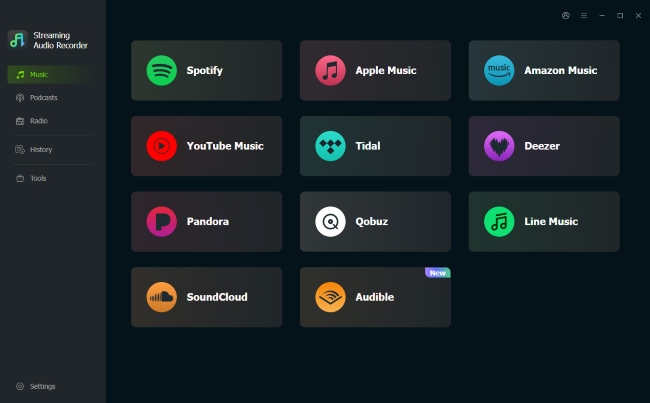
Launch the DRmare Streaming Audio Recorder on your PC or Mac. Before diving into the music, fine-tune your output by clicking Settings > Conversion. This is where you can select your preferred format (like MP3 or FLAC) and adjust the bit rate to ensure your offline library sounds exactly how you want it.
- Step 2Curate Your YouTube Music Download Queue
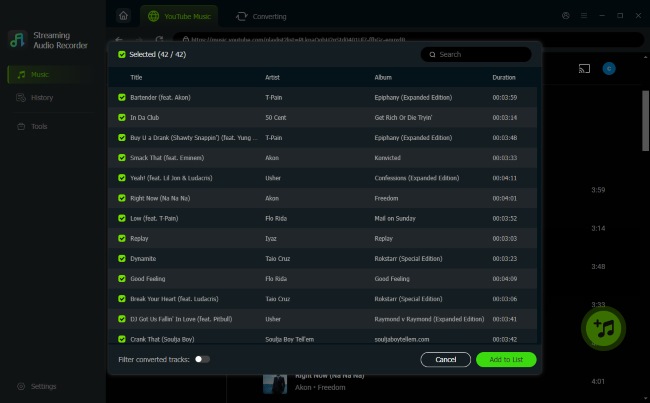
Select the YouTube Music icon from the main dashboard to open the integrated web player. Log in and navigate through your library or search for specific tracks. Once you've found the perfect playlist or song, simply hit the Add (plus icon) and select Add to List to prep them for the download queue.
- Step 3Download YouTube to MP3 at 30X Speed
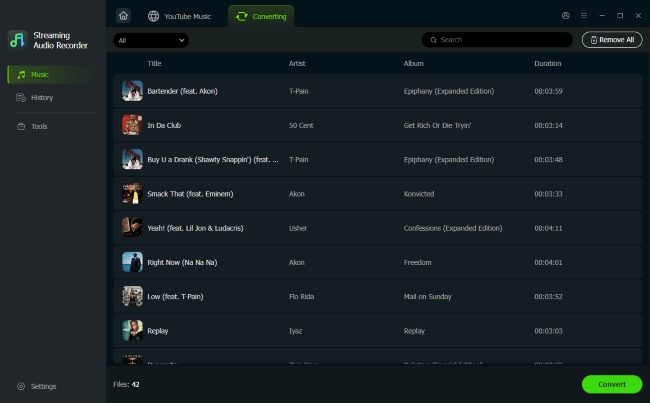
Switch over to the Converting tab and click the Convert button. DRmare takes over from there, processing your list at high speeds while maintaining lossless quality and original ID3 tags. You'll be left with clean, high-fidelity audio files saved directly to your local drive.
Comparison Table Between DRmare vs CNVMP3
| Feature | CNVMP3 (Online) | DRmare (Desktop) |
|---|---|---|
| Price | Free (Donation based) | Paid (Trial available) |
| Ads | Zero Ads | Zero Ads |
| Max Length | 90 Minutes (MP3) | Unlimited |
| Batch Download | No | Yes (30X Speed) |
| Audio Quality | Up to 273kbps (Actual) | 100% Lossless / 320kbps |
| Platforms | YouTube, TikTok, Social Media | Spotify, Amazon, Apple Music, etc. |
Part 7. FAQs about CNVMP3 YouTube Converter
Is CNVMP3 down?
No. The official website is currently online, but it is experiencing frequent stability issues and always changes its domain.
Does CNVMP3 have viruses?
No, but with a major warning. The official site currently ad-free and runs on donations. It does not contain viruses. But scammers have created fake versions. These sites DO have viruses, malicious pop-ups, and fake "update" buttons. Please don't use them.
Why is CNVMP3 not working in my country?
CNVMP3 is blocked in several countries due to "Stream Ripping" laws and copyright enforcement. Users frequently report blocks in the United Kingdom (UK), India, and parts of the European Union.
Why do I get a 'Conversion Error' in CNVMP3?
People often ask this when trying to download videos longer than the site's actual limits (usually 90 minutes for MP3 and 60 minutes for MP4), despite the site claiming to support up to 180 minutes.
Can I use CNVMP3 on my iPhone?
Yes. Since it's a web-based v51 gateway, it works on Safari. However, files will be saved to your "Files" app rather than the Music library due to iOS restrictions.
Is the 320kbps quality real?
Not entirely. Our laboratory tests show the actual bitrate is closer to 273kbps with a frequency cutoff at 16kHz. For true 320kbps, a desktop recorder is necessary.
Part 8. Final Thoughts
Is CNVMP3 good? Yes. In a market filled with dangerous, spammy websites, CNVMP3 stands out as a respectable, user-friendly option for quick audio downloads. However, if you are building a high-quality music collection and need to download long-form content from various streaming services without legal risks or quality loss, DRmare Streaming Audio Recorder is the superior investment.

 Home
Home





User Comments
Leave a Comment