





VD6S is a free online YouTube downloader that lets you save YouTube videos as MP4 files or extract audio in MP3 and M4A formats. It also offers some useful extras, including thumbnail downloads, subtitles, and video trimming. But is VD6S safe to use? And does its advertised 320 kbps MP3 output actually deliver good audio quality?
To find out, I put VD6S YouTube downloader through a full hands-on test. I tested VD6S with YouTube downloads, examined its output files using Spek, and checked its advertising behavior. I also reviewed independent security assessments and user feedback on Trustpilot. Here is what I discovered.
VD6S YouTube Downloader: Test Results at a Glance
If you just want the short version, here is how VD6S held up during my testing experience:
| Category | What I Found |
|---|---|
| Site URL | https://vd6s.net/en5/ |
| Cost & Sign-Up | Completely free; no account or software required. |
| Supported Audio Formats | MP3 (128/320 kbps), M4A (128 kbps) |
| Supported Video Formats | MP4 (360p up to 8K, depending on source) |
| Extra Features | Subtitle extraction, thumbnail saver, custom video trimmer. |
| Ads & Pop-Ups | One persistent banner for iFlyDown; occasional short-lived window popups on MP4 downloads. |
| Audio Quality Check | The 320 kbps MP3 hit a frequency cutoff around 19–20 kHz; M4A cut off around 16 kHz. |
| User Reviews on Trustpilot | ~4.9 / 5 stars across 540+ public user reviews |
| Safety Verdict | Clean security scan results, but use caution with external ad links as always. |
| Main Drawback | No playlist batching, and 360p MP4s suffer from heavily compressed 48kbps audio |
Is VD6S.net Safe to Use?
For everyday single-video saves, the official vd6s.net site is generally a safe and remarkably clean web utility. It operates entirely inside your web browser without asking you to install sketchy browser extensions, download unknown executable files, or hand over personal login details. I evaluated VD6S from a few different angles during my testing:
1. Security Scans
I ran security checks across engine aggregators like PCRisk and MalwareTips. PCrisk assigns the domain a high 95/100 trust rating with zero malware detections across 91 security engines, while Gridinsoft gives it a respectable 79/100 score.
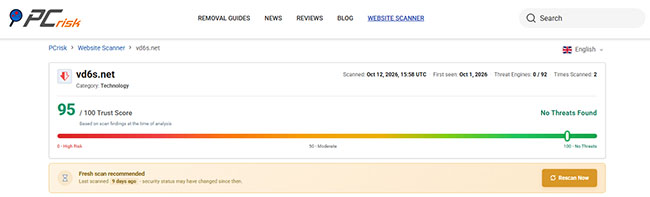
The reports also confirmed a valid TLS/HTTPS certificate. While a clean domain scan is reassuring, keep in mind that it doesn't guarantee every converted file or external link will remain 100% risk-free forever.
2. Ads and Pop-up Behavior
When I pasted a YouTube URL, I didn't get blasted with fake "Your System is Infected" banners. However, I did notice a persistent ad banner for a tool called iFlyDown.
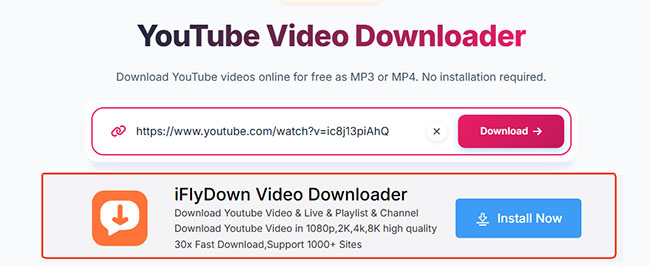
When testing audio downloads (MP3/M4A), files downloaded directly. But when I tried fetching an MP4 video, a temporary blank window popped up and auto-closed before the download started. It wasn't harmful in my test, but it's worth keeping your eye on.
3. Privacy
VD6S records basic technical data like IP addresses, browser specs, and temporary URL queries to run its service. It's standard practice for web apps, but if you're looking for total anonymity, this isn't a dedicated privacy tool.
Safety Tips:
Your safety depends heavily on typing the exact domain name into your address bar. While the official .net site maintains a clean bill of health, copycat domains like vd6s.com have been flagged by researchers as risky portals with hidden ownership data and potential adware redirects. Stick strictly to the legitimate .net address to keep your browsing session secure.
How to Use VD6S to Download YouTube Videos to MP3/M4A/MP4
Using VD6S to grab a quick clip or video you have permission to download requires very little technical effort. Here is the exact flow I followed during my test runs:
Step 1. Copy the URL of a public YouTube video or Short directly from your browser's address bar or the native share menu.
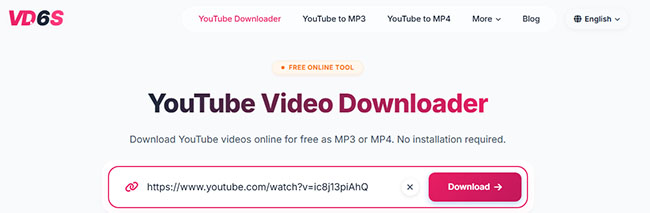
Step 2. Paste the link into the main input field on vd6s.net and hit the Download button to let the server parse the available streams.
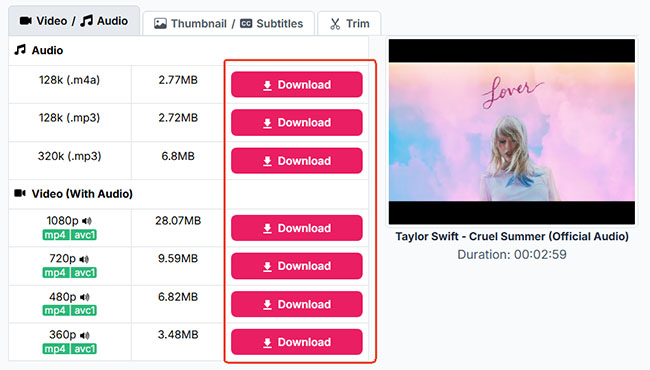
Step 3. Click the Download button next to your preferred audio or video quality from the generated list, or switch tabs to use the built-in trimming, thumbnail, or caption tools before saving the file locally.
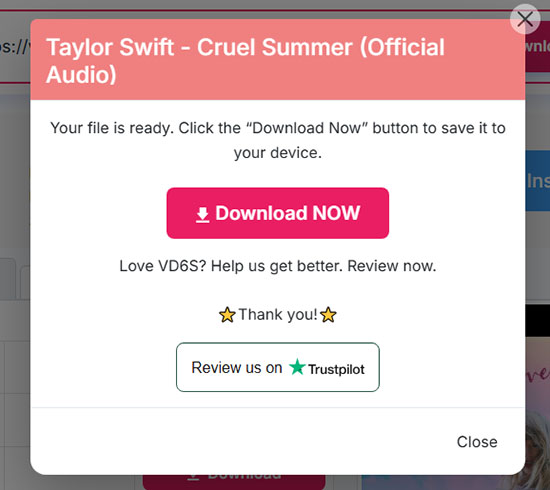
- For downloading YouTube videos to MP3/M4A, when your file is ready, click the Download Now button to save it to your device.
- For downloading YouTube videos to MP4, it will automatically and directly save it to your local device. If a temporary secondary window opens, nothing needs to do. VD6S will automatically close it and start the download process.

Extra Features in VD6S I Found Useful
VD6S includes a few unexpected built-in tools that worked surprisingly well:
Video Trimmer and Keyframe Nuances
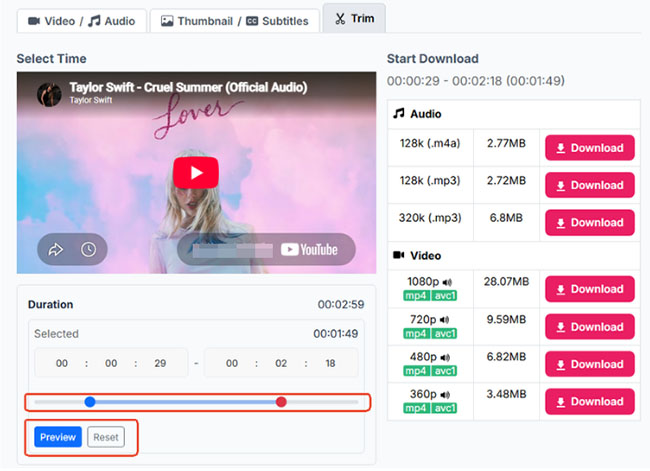
One of the handiest additions built into the interface is the custom Trim option, which lets you drag sliders to isolate a specific duration, preview the cut in real time, or hit reset if you make a mistake. I found this super convenient for grabbing short soundbites.
Note:
To keep processing speeds fast in the browser, the server slices these clips without re-encoding the entire video stream. Because this method relies on the source video's existing keyframes, your final exported clip will start or end a fraction of a second off from the exact timestamp you selected.
Thumbnail Downloader
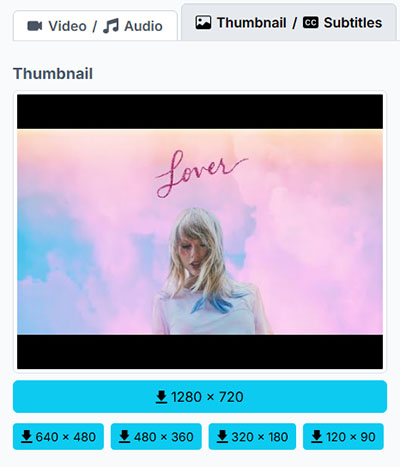
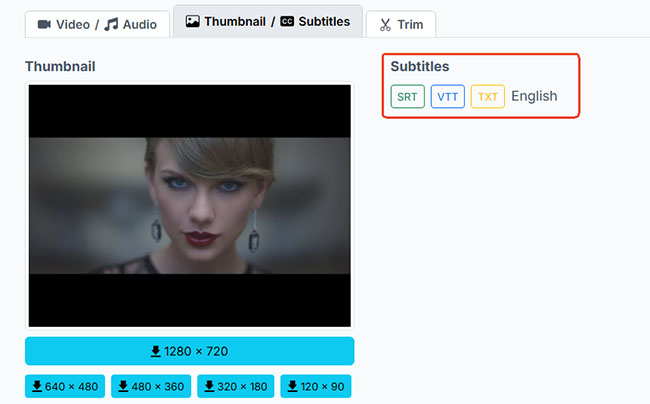
If you manage video assets or need quick design references, the thumbnail tab lets you grab JPG cover images across five distinct resolutions: 120×90, 320×180, 480×360, 640×480, and up to 1280×720 HD.
Subtitle Extraction
Next to that sits the subtitle extractor, which can pull available captions as timestamped .SRT or .VTT files for video editing, or as plain .TXT documents stripped of timeline codes for easy note-taking.

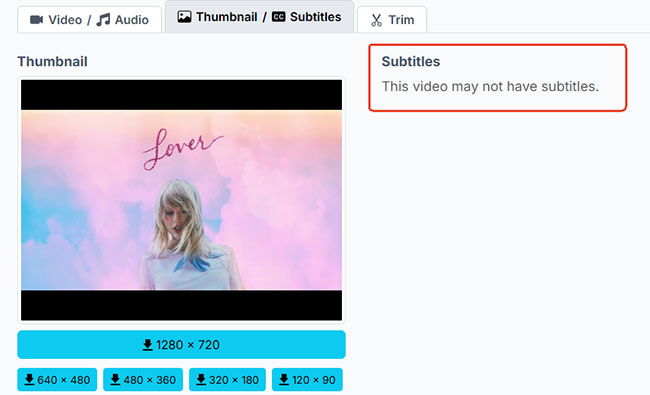
When I tested a music video that lacked closed captions, the interface handled it cleanly by displaying a straightforward notice: "This video may not have subtitles."
Deep-Dive Quality Test: Is VD6S Truly 320kbps and 4K?
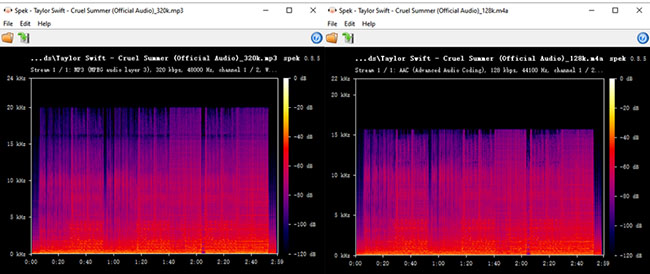
Rather than taking the download menu at face value, I wanted to see what was actually going on inside the files. To verify the audio fidelity, I downloaded Taylor Swift – Cruel Summer (Official Audio) in both the 320kbps MP3 and 128kbps M4A formats and ran the resulting files through the Spek acoustic spectrum analyzer.
Audio Quality Lab Test: M4A vs. MP3 in Spek
- 128kbps M4A (AAC, 44,100 Hz): The spectrum revealed frequencies extending up to around 19–20 kHz.
- 320kbps MP3 (MPEG Audio Layer 3, 48,000 Hz): The frequency cut off visibly around 16 kHz.
What This Actually Means:?
During my testing, I confirmed VD6S does re-encode the file to output a 320 kbps bitrate. However, here's the catch: YouTube itself compresses source audio using lossy formats (usually AAC or Opus at around 128–160 kbps). Converting an already compressed stream into a 320 kbps MP3 doesn't magically bring back lost acoustic detail. It just gives you a larger file with a higher label.
Video Resolution and Hidden Audio Bitrate Drops
I also noticed something interesting when pulling down MP4 files: a 360p MP4 had an underlying audio track encoded at 48 kbps, whereas the 1080p MP4 jumped up to 128 kbps. If you care about sound clarity, picking higher video resolutions generally gives you better audio streams as well.
What Do Users Say About VD6S on Trustpilot?
Curious if my experience was just a fluke, I checked VD6S on Trustpilot. At the time of testing, it held an impressive 4.9 out of 5 TrustScore across over 500 reviews.
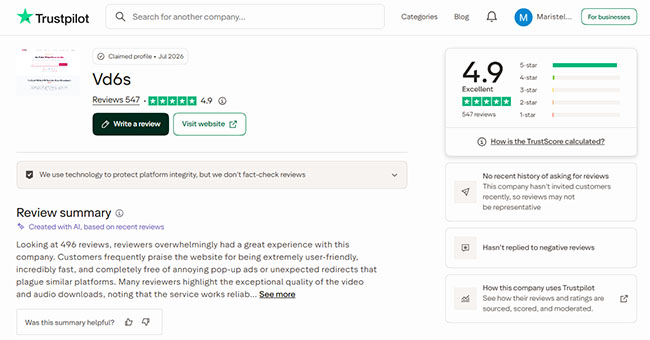
Reading through user feedback, the overwhelmingly positive sentiment actually echoed a lot of what I experienced during my own test:
- The Praise: People love how fast, clean, and straightforward it is. Users frequently mention being relieved that they can grab a quick 1080p MP4 or 320 kbps MP3 without having to pay, create an account, or dodge endless redirect loops.
- The Complaints: Negative feedback is sparse, but it hits on key details. Some users noted occasional processing lag, while others expressed frustration at being nudged toward the promoted iFlyDown tool when trying to fetch certain high-res options.
This last complaint closely matches what I saw during my test. While VD6S itself didn't spam me with malicious pop-ups, that persistent iFlyDown banner can definitely blur the lines for someone just looking for a one-click download.
A 4.9/5 TrustScore is a great sign for user satisfaction and ease of use, but remember: Trustpilot measures user happiness, not file security. Star ratings can confirm that a tool is convenient, but you should still rely on security tools and your own common sense when downloading files from the web.
Where VD6S Falls Short (Pros and Cons)
Even a well-designed web tool runs into structural limits when operating strictly inside a browser tab. While the convenience is tough to beat for quick tasks, power users will quickly bump into a few walls.
Pros
 No Software Required:100% web-based; no installation or account needed.
- Clean & Relatively Safe: Workspace stays free from intrusive or malicious pop-ups.
- Genuinely Useful Extras: Includes handy built-in video trimming and caption extraction tools.
- Full Video-Audio Merging: Automatically merges higher-quality audio streams into 1080p+ MP4s.
Cons
 Single Link Processing Only: No support for full playlists, channels, or batch downloads.
- Restricted Content Blocked: Cannot bypass DRM, paid movies, private/members-only videos, or live streams.
- Expiring Links: Generated download links expire automatically after a few hours.
- Large File Timeouts: Pulling massive 4K/8K files over unstable networks can trigger server timeouts.
Best VD6S Alternatives When You Need More Power
For grabbing a quick tutorial clip, a video thumbnail, or a single podcast episode, staying in your browser on vd6s.net makes total sense. But depending on what you're trying to save, a web-based converter isn't always the ideal tool. Here is how the top alternatives stack up:
1. Official Methods
- YouTube Premium: The official choice if you just want smooth offline playback within official apps on your phone or TV without dealing with local MP4/MP3 files.
- YouTube Studio: The go-to, native method for cleanly downloading full-quality videos you've uploaded to your own channel.
2. For Pure Audio Saving: DRmare Streaming Audio Recorder
If your main goal is building a clean, high-quality music library rather than downloading video clips, web downloaders often leave you with heavily compressed audio and missing song info.
In that case, a dedicated desktop tool like DRmare Streaming Audio Recorder is a much better fit. Unlike web parsers, DRmare operates as an all-in-one downloader that downloads audio straight from the source stream across platforms like YouTube Music, Spotify, Apple Music, and Amazon Music.
3. For Desktop 4K Video & Batch Downloads
If you regularly archive multi-hour 4K documentaries or entire channel playlists, browser server limits will eventually slow you down. For heavy video downloading, consider:
- Desktop Downloaders (e.g., 4K Video Downloader or iFlyDown): Built to handle batch queues, high-bitrate 4K/8K rendering, and multi-thread stability without link expiration issues.
- yt-dlp / Stacher: The ultimate power-user option. yt-dlp is a free, open-source command-line tool (and Stacher provides a handy visual GUI for it) that offers unmatched, ad-free control over downloading raw video and audio streams.
FAQs About Using VD6S
Why is there no sound on my downloaded MP4 video?
YouTube stores high-definition video and audio on separate tracks (known as DASH streams). While the site merges most standard options, some raw streams are offered as video-only files, always check for a muted speaker icon next to the format size before clicking download.
Why did my download link give me a 404 error?
Server-generated media links are temporary and usually expire after a few hours, or even faster during peak traffic windows. If a link goes dead or your connection drops, simply head back to the homepage and parse the YouTube URL again to generate a fresh session.
Is it legal to download videos using VD6S?
Downloading copyrighted material without permission generally goes against YouTube's Terms of Service and may conflict with local copyright laws. It is best practice to use online downloaders only for your own uploaded content, Creative Commons media, or videos where you have explicit permission from the rights holder.
What platforms and social media sites are supported by VD6S?
While VD6S is primarily marketed as a YouTube downloader, it also supports pulling video and audio content from several major social platforms, including YouTube, Facebook, Instagram, and X (formerly Twitter).
The Final Verdict
After testing it hands-on, I'd say VD6S is a solid, convenient web downloader for quick, casual tasks. It delivers working files without requiring accounts or installs, and the built-in trimming tool is a genuinely useful bonus.
Just keep realistic expectations: the "320 kbps MP3" option won't turn compressed YouTube audio into studio FLACs, and you should always stay mindful of third-party ad banners. For quick, authorized downloads on the fly, it gets the job done cleanly.

 Home
Home





User Comments
Leave a Comment