





 Is the Loader.to site I used safe? I already used Loader.to to convert YouTube to MP3, and the file is already on my drive. I ran a Windows Defender scan, and it came back clean, but I'm spiraling a bit: can an MP3 hide something that a standard scan misses? Or am I just overthinking a simple download? By the way, the audio sounds a bit muffled. Did I get a fake high-quality file?
— Calenmiriel from Reddit
Standard antivirus scans often fail to detect adware or browser hijackers, which are precisely the most common risks associated with these free converter sites. If you're searching for a Loader.to review, to wonder whether it is safe, reliable, or even worth using anymore, you are in the right place. This guide takes a clear, evidence-based look at Loader YouTube Video Downloader, clarifies a critical safety confusion regarding malware, explains its real-world pros and cons, and walks you through the best Loader.to alternatives based on different needs.
Part 1. What Is Loader.to? (The Official Pitch)
Loader.to is a web-based YouTube video downloader that allows you to paste a YouTube URL and convert it into multiple audio and video formats, such as MP3 or MP4. If you visit the Loader.to homepage, the pitch is incredibly seductive. Their value proposition is built on four main pillars:
Key Features of Loader.to Claimed
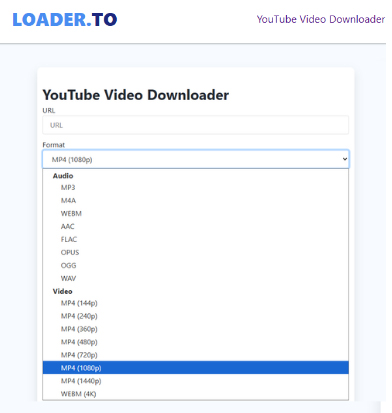
- Format Variety: Supports MP3, M4A, WEBM, AAC, FLAC, OPUS, OGG, and the highly coveted WAV (lossless audio).
- Resolution Support: Claims to keep video quality at Full HD (1080p) and handle 4K (2160p) and even 8K (4320p) video downloads in WEBM format.
- Batch Downloading: Claims to convert entire YouTube playlists with more than 20 videos and even grab subtitles without making it rocket science. (This feature is currently highly unstable.)
- No Ads: It features "little to no ads" to protect user devices.
Note:
The Loader.to website displays links to download content from SoundCloud, TikTok, and X (formerly Twitter), but clicking on them redirects to other websites.
Pros and cons of Loader.to
Pros
 Free to use
- No login required
- Works on Windows, macOS, and mobile browsers
- Supports multiple formats (MP3, MP4, WAV, etc.)
Cons
 Heavy ads and misleading download buttons
- Frequent redirects to third-party pages
- Inconsistent audio/video quality
- Playlist downloads often fail
- No metadata (artist, album, title) in audio files
Part 2. The Reality: User Experience of Loader.to: Does It Still Work?
Note:
Our audio engineering team tested Loader.to using a clean Windows 11 (24H2) environment with Chrome v145 to ensure our safety and spectral data is current as of January 2026.
Loader.to is technically active, but its reliability has degraded significantly compared to its peak popularity. While it remains one of the few web-based tools that claims to support 4K and 8K video downloads as well as lossless audio formats like WAV, the user experience is currently mixed. Here are the current performance issues:
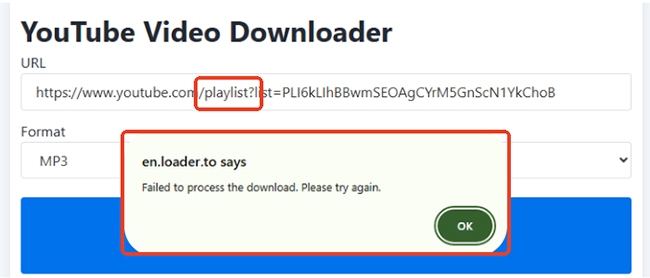
Stuck Conversions (Not Working for YouTube Playlist):
The most common issue is the "infinite loading" loop. Videos often get stuck at 90% processing and never generate a download link, especially for YouTube playlists. It just pops up an error message, saying "Failed to process the download. Please try again."
The No-ads Myth:
The official site claims "little to no ads," but in practice, the "Download" button often acts as a trigger for aggressive redirects. You might click the "Download" button to save your song, but instead, a new tab opens claiming your "PC is infected" or pushing a domain. This is exactly why users on Reddit feel "nervous over nothing"—the interface feels like a minefield.
Browser Compatibility:
During my testing, I noticed a frustrating pattern that matches what many are screaming about on Reddit: Loader.to simply doesn't treat all browsers equally.
If you're a Chrome user, you'll likely have the smoothest experience, the scripts trigger correctly, and the progress bar actually moves. However, for those of us on Safari or Firefox, it's a total toss-up. You can often see the conversion hang at 99%.
The "High-Spec, Low-Fi" Trap: A Technical Illusion:
We used a professional audio analysis tool to check audio quality and analyze the frequency spectrum of MP3 files Loader.to download. While the metadata for the file claims "Professional 48kHz Quality," the actual audio metrics tell a story of a low-grade recording masked by high-end settings. It is a classic case of "Empty Containers" in the world of digital audio.
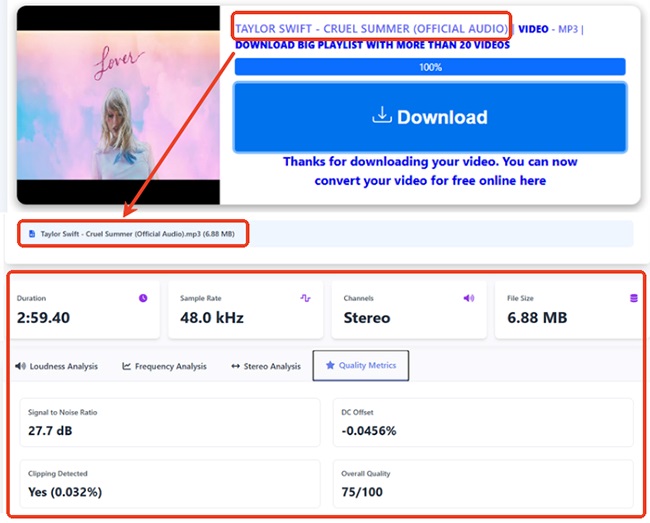
- The "Luxury" Shell (48kHz/320kbps): On paper, this file looks like a studio-grade recording. By using a 48.0 kHz sample rate and a file size that suggests high-bitrate MP3, the tool is giving you a "high-resolution" container.
- The "Dirty" Content (27.7 dB SNR): The signal-to-noise ratio is the "smoking gun." A true high-quality digital file should be crystal clear, but at 27.7 dB, your audio is filled with background hiss and digital "mud." This suggests the source was either a poor-quality stream or a low-end analog recording.
- The "Redline" Distortion (Clipping): The presence of Clipping (0.032%) proves that the audio was boosted too loudly during the conversion or recording process. Instead of getting "rich" sound, you are getting "broken" sound where the peaks are chopped off, causing audible crackling.
Incomplete ID3 Metadata for Organization:
This en.loader.to website almost entirely ignores ID3 tags. When you download an MP3 from Loader.to, you'll often find:
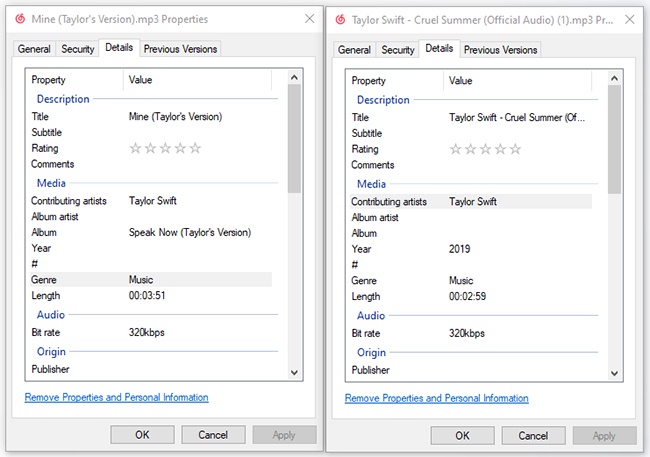
- Missing Album Info: Fields for "Album" and "Album Artist" are usually left blank or filled with generic text.
- Generic Thumbnails: Instead of high-resolution cover art, you often get a low-quality frame from the YouTube video itself, or no image at all.
Part 3. Is Loader.to Safe and Legal to Use?
When you're staring at that "Download" button, the question isn't just "Will I get my MP3?" but "What else am I inviting onto my device?" To answer that, we need to look at the two biggest hurdles: Malware Confusion and Legal Grey Areas.
The Safety Reality: Malware vs. Malicious Ads
From a technical standpoint, the Loader.to website itself is rarely the source of a direct virus. However, the danger has shifted from the file to the process.
- Malware Confusion (Olymp Loader): There is a critical distinction users must understand. A piece of malware known as "Olymp Loader" often appears in search results for "Loader." Users looking for the desktop version of Loader.to often stumble upon dangerous
.exefiles.
Tips:
Never download an .exe file from a random converter site unless it is a verified software brand.
- The Ad-Heavy Minefield: While the site itself might not host direct malware, navigating its intrusive pop-ups, suspicious redirects, and frequent security warnings requires extreme caution, especially on mobile devices where "mis-clicks" are harder to avoid.

The Legal Reality: Who is Responsible?
Is it legal? The short answer is: It's a debate where you are the one holding the risk.
- Terms of Service (ToS): Using Loader.to is a direct violation of YouTube's ToS, which strictly prohibits "stream-ripping." While Google rarely sues individual users, they do frequently block the IP addresses of sites like Loader.to.
- Copyright Law: Technically, converting a video you own or a Creative Commons clip is generally considered "Fair Use." However, downloading copyrighted music or movies without permission is illegal in most jurisdictions.
- The Responsibility Shift: Loader.to does not verify usage rights. Their legal defense is that they are just a "tool provider." This means all legal responsibility rests entirely on you, the user.
Part 4. How to Use Loader.to to Download YouTube to MP3 Safely
If you decide to use Loader.to despite its limitations, following the correct steps and safety precautions can help reduce risks. Below is a clear walkthrough on how to use Loader.to to download YouTube to MP3 safely, along with essential tips to protect your device.
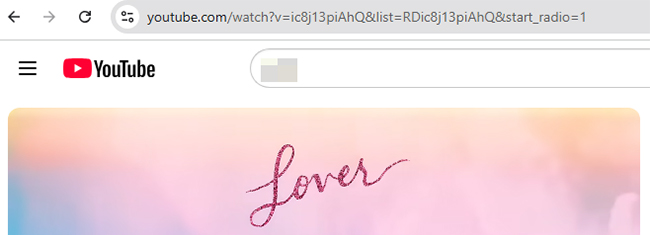
Step 1. Open the YouTube website on your web browser and find the video you want to convert. Copy the video URL directly from the browser address bar.
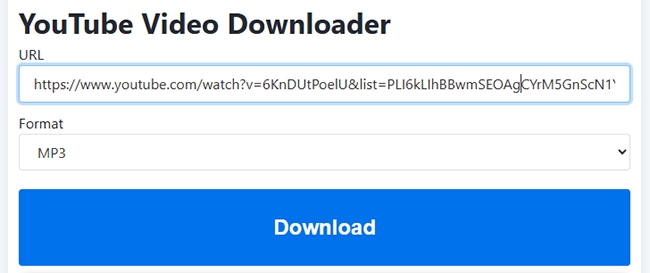
Step 2. Visit the https://en.loader.to/ website and paste the link into the URL input box and customize the output format, such as MP3, according to your needs. Tap the "Download" button to begin processing the file.
Warning:
If a new tab opens instantly when you click "Download," close that tab immediately. That is an ad, not your download.
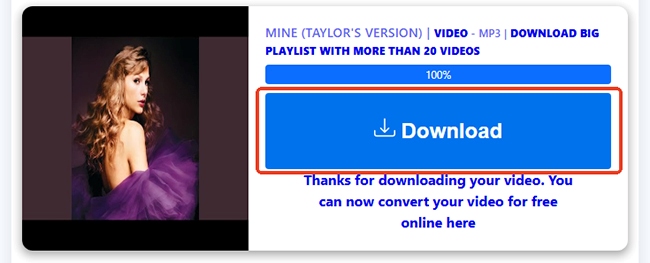
Step 3. Wait a few seconds for Loader.to to generate the download link. Once it's complete, scroll down and press the new "Download" button to save YouTube MP3 files to your device.
Safety Tips When Using Loader.to
- ✅ Use a modern browser with built-in phishing protection
- ✅ Avoid clicking pop-ups and fake buttons
- ✅ Enable reputable ad-blocker and popup-blocker extensions to reduce malicious redirects and intrusive ads
- ✅ Avoid browser notifications from unknown sites
- ✅ Enable Antivirus protection to detect suspicious downloads before they harm your system.
- ❌ Never install browser extensions prompted by pop-ups
- ❌ Do not allow site permissions (notifications, redirects, downloads)
Part 5. Top 2 Best Loader.to Alternatives
If Loader.to's muffled audio, failed playlist conversion, aggressive redirects, and incomplete metadata have you looking for the exit, you aren't alone. In 2026, the market has split into two clear directions: Professional Recorders for serious collectors and Clean Web Tools for quick hits. Here are the two best Loader.to alternatives to consider:
For the Power User: DRmare All-in-One Music Downloader (Desktop)
If you want a permanent, high-fidelity YouTube Music library, a desktop tool is a solution. DRmare All-in-One Music Downloader is such a tool that can download YouTube playlists to MP3, FLAC, WAV, AIFF, and more with zero quality loss. You get actual high-bitrate files rather than the "fake 320kbps" often found on Loader.to.
It features built-in web players for not only YouTube Music but also Spotify, Apple Music, Tidal, Amazon Music, Deezer, Pandora, Qobuz, Line Music, and SoundCloud Music. It intelligently detects and preserves ID3 tags, including song titles, artists, and high-res album covers. You can even edit them manually or save lyrics for perfect organization and playback.
Step 1. Download and install the DRmare All-in-One Downloader on your Windows or Mac. Once you open the software, you'll see a list of supported streaming music services. Before choosing the YouTube Music option, you can tap the "Menu" > "Preferences" > "Conversion" to customize the YouTube audio output settings.

Step 2. When you go back to the main interface, you can tap the YouTube Music button to access the built-in YouTube Music Web Player. Here, you can browse your library and find favorite tracks that you'd like to download. After that, you can click the "Add" > "Add to List" button to load them to the conversion list.
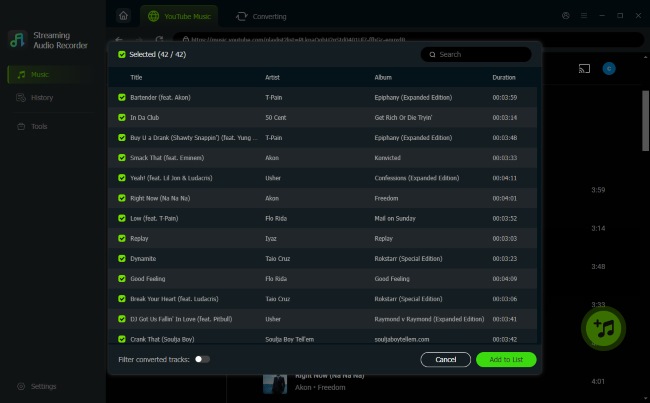
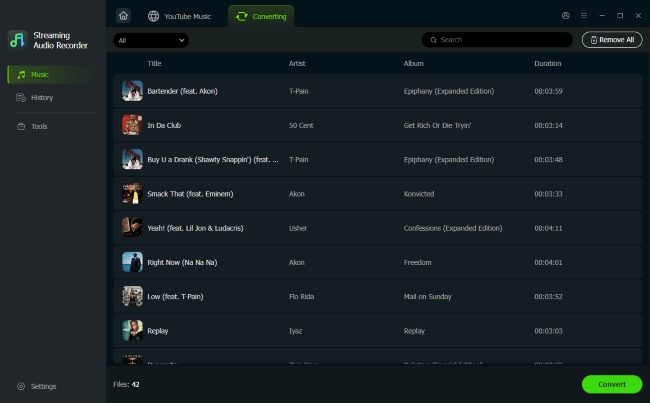
Step 3. Press the "Convert" button in the "Converting" section, DRmare YouTube Music Downloader will automatically download the entire YouTube Playlist to the target audio files and save them on your computer, no redirects, no malware, and no muffled sound.
For the Minimalist: CNVMP3 (Online & Ad-Free)
If you love the convenience of a website but hate the "security roulette" of Loader.to, CNVMP3 is the current community favorite. Unlike Loader.to, CNVMP3 prides itself on a Zero Ads policy. It relies on a donation-based model ("Buy Me a Coffee") rather than selling your clicks to shady redirect domains. Besides, it works perfectly on Safari and Chrome mobile without triggering keyboard-stealing pop-ups. However, like most free sites, it struggles with YouTube videos over 1-3 hours, and doesn't support batch conversion or grab the correct album art or artist tags.
Step 1. Go to YouTube and find the content you want to save. Click the "Share" button and select "Copy Link" or simply copy the URL directly from your browser's address bar.
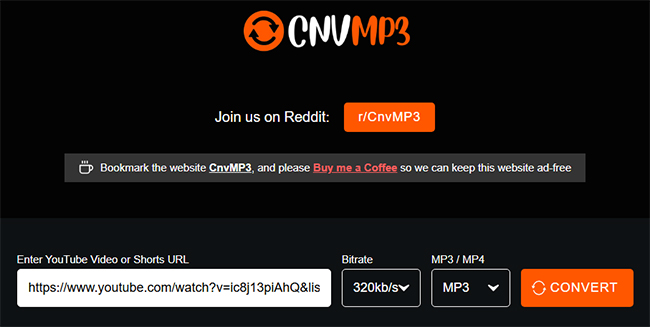
Step 2. Navigate to the CNVMP3 website and paste the YouTube link in the input box. You'll notice the interface is remarkably clean compared to Loader.to. You can also customize the bitrate and output format in this step.
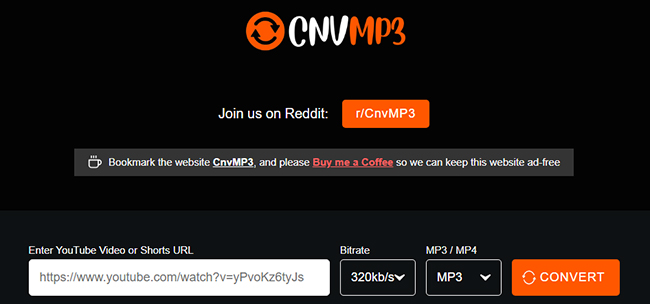
Step 3. Click the "Convert" button. The site will process the link (usually taking 5–10 seconds for a standard song) and start to download the YouTube video to MP3. The file will be saved directly to your device's default download folder.
Loader.to vs Alternatives: Quick Comparison
| Feature | Loader.to | DRmare Streaming Recorder | CNVMP3 |
|---|---|---|---|
| Solution Type | Online Web Tool | Professional Desktop App | Online Web Tool |
| Ads | High (Aggressive Redirects) | None (100% Clean) | Zero Ads (Donation-based) |
| Quality Control | Inconsistent (Upscaled) | Lossless / Original Hi-Fi | Inconsistent (Upscaled) |
| Support Playlists | No | Yes (Full Support) | Yes, but has length limit |
| Batch Download | No | Yes (30X Speed) | No |
| Complete ID3 Tags | No (Missing/Messy) | Yes (Auto-Detect + Edit) | No (Title only) |
| Output Formats | MP3, MP4, FLAC, WAV, 8K | MP3, FLAC, WAV, M4A, etc. | MP3, MP4 only |
| Safety | Medium (Risk of Redirects) | High (Encrypted & Secure) | High (Clean Interface) |
| Rating | ⭐⭐☆☆☆ | ⭐⭐⭐⭐⭐ | ⭐⭐⭐⭐☆ |
Part 6. FAQs about Loader.to YouTube Video Downloader
Is Loader.to really safe, or did I just get lucky?
While the site typically provides clean MP3 and MP4 files, it relies on ad revenue, which introduces external risks. User safety is contingent on avoiding deceptive redirects; interacting with 'System Update' or 'Virus Warning' pop-ups can lead to security compromises.
Does Loader.to actually download entire YouTube playlists?
No. YouTube playlist links either fail to load or redirect you to a third-party software ad (like ByClick Downloader). If you have a playlist with more than 20 songs, Loader.to will likely struggle or crash your browser tab.
Does Loader.to really provide 320 kbps MP3 quality?
This is the "Fake Bitrate" issue. Loader.to often takes a low-quality audio stream and "upscales" it. For true, high-fidelity audio that isn't compressed into oblivion, DRmare All-in-One Music Downloader is much more reliable.
Is there a YouTube download limit per day in Loader.to?
No. There is no download number limit per day of Loader.to. However, it can't work with a YouTube playlist.
What should I do if my antivirus flags Loader.to?
Most antivirus programs flag the site due to its malicious redirects, not necessarily because of the MP3s themselves. If you are uncomfortable with the warnings, switch to its alternatives.
Final Verdict: Should You Use Loader.to?
Loader.to remains a functional "quick fix," but it's no longer the gold standard. As the Reddit user Calenmiriel discovered, the price of a "free" download is often paid in muffled audio and the constant anxiety of navigating a security minefield. While your antivirus might give you a clean bill of health, it won't save you from "fake" 320kbps files or messy, incomplete metadata.
Our Final Recommendation:
- Choose CNVMP3 if you want a simple, ad-free web tool for occasional single-track downloads.
- Choose DRmare All-in-One Music Downloader if you are a serious collector. It is the only way to guarantee lossless quality, full ID3 tags, and 100% safety for your permanent music library.

 Home
Home





30X download YouTube Music, Spotify, Apple Music, etc. to MP3, FLAC, WAV, and more without touching the original quality and listen to them offline on all devices.