





If you frequently watch videos online, you have likely searched for a reliable YouTube video downloader or come across the Downloaderto website. Promising free media extraction directly from your browser, it sounds like the perfect solution for offline viewing. But does it actually deliver? In this review, we will examine whether Downloaderto is a helpful tool or a frustrating trap by testing its real performance, evaluating its safety, and introducing a professional alternative.
Part 1. What is Downloaderto?
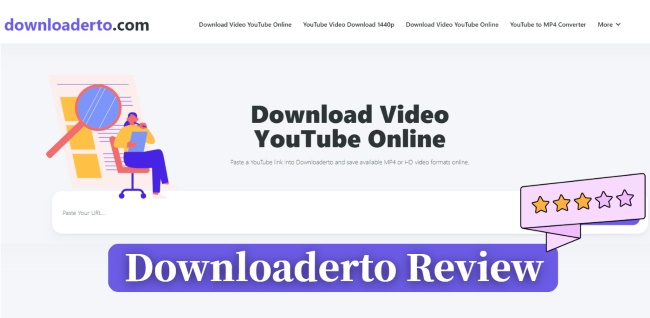
Downloaderto is a browser-based media downloader designed to extract videos and audio from popular streaming platforms. It is primarily marketed as a YouTube MP3 and video downloader, while also supporting content from other social media platforms such as Facebook and X. Before we dive into the details of our actual test, let's take a quick look at what this tool claims to do. To save you some time, we've put together a quick cheat sheet covering its basic features.
| Website | Work On | Video Formats | Audio Formats | Platforms |
|---|---|---|---|---|
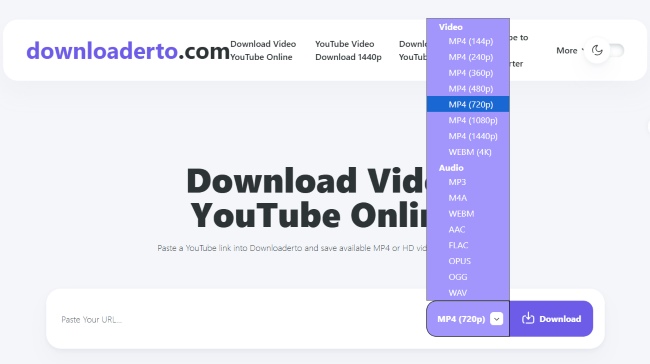
| downloaderto.com | Web Browser | MP4, WEBM (Claimed up to 4K) | MP3, M4A, AAC, FLAC, WAV, OPUS, OGG | YouTube, Facebook, X, TikTok, Twitch, Vimeo, SoundCloud, IMDb |
Part 2. How to Use Downloaderto for YouTube Music Downloading
If you want to try Downloaderto for yourself, the process is fairly easy. Like most browser-based media downloaders, it only requires copying and pasting a video URL before selecting an output format. Below is a step-by-step walkthrough of how to use Downloaderto to download online YouTube videos or audio files.
Step 1. Open the video you wish to save in your browser and copy its URL from the address bar. Navigate to the downloaderto website and paste the copied link into the main search box on the homepage.
Step 2. Select your desired format, choose the MP4 resolution or and audio formats from the dropdown menu. Click the "Download" button, carefully close any ad popups that open in new tabs, and wait for the file transfer to begin.
Part 3. Real Test: Does Downloaderto Actually Work?
Editor's Experience:
I recently tested Downloaderto to see if it actually works, and the experience was highly frustrating. Every time I click the download button, the site simply redirects me to an irrelevant YouTube video instead. This deceptive setup wastes time and makes it impossible to get the actual files you need. If you want to skip these annoying redirects, you can stick to premium or ad-free tools that guarantee local processing for your data privacy, like DRmare Streaming Audio Recorder.
To evaluate its actual performance, we tested the Downloaderto tool with several standard YouTube video links. Despite the website claims to offer a fast and seamless downloading experience, our tests showed that the tool was unreliable in practice, and often failed to complete downloads successfully.
Endless Ad Redirects
Instead of initiating the download process, the download button frequently redirects you to third-party advertising pages. In most cases, you have to click multiple times while repeatedly closing suspicious pop-up tabs before anything actually happens.
"Fail to Fetch" Errors
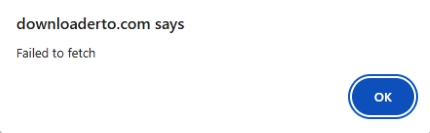
Even if you manage to get past the deceptive ads, the actual downloading performance remains highly unreliable. During our YouTube video download tests with Downloaderto, the website repeatedly displayed a "Fail to Fetch" error, suggesting that its servers were unable to process the video URL properly.
Fake Files and Playback Problems
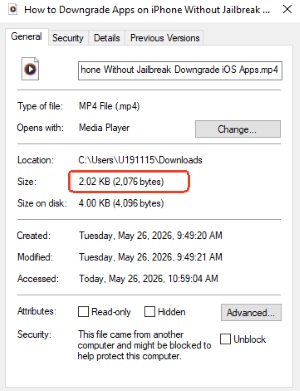
To further evaluate its capabilities, we attempted to download a standard 3-minute video. The site claimed it would provide a high-quality 1080p MP4 file. However, the final result was merely a corrupted 2 KB file. Naturally, a file of that size contains no usable video data and cannot be opened by any media player.
On the rare occasions when Downloaderto successfully generates a playable file, the output quality is still far below acceptable standards. In our testing, it was impossible to properly adjust the video timeline during playback. and the extracted MP3 files also suffered from aggressive compression, with audio quality limited to low-bitrate 128 kbps output. As a result, the music sounded noticeably flat, muffled, and lacking in detail.
Strengths and Limitations on Downloaderto
Pros
 No Installation: Works directly online without requiring local software.
- Format Variety: Broad selection of audio and video output options.
- Completely Free: No subscription fees or account sign-ups required.
Cons
 Aggressive Ads: Heavily monetized with intrusive popups and redirects.
- Technical Instability: High-resolution videos frequently fail to process.
- Broken Files: Often results in "empty file" errors or unplayable downloads.
Part 4. Is Downloaderto Safe?
No, while the Downloaderto website itself may not host direct malware files, the environment it forces you into is highly risky. The intrusive advertising network powering the site presents a severe security hazard.
- Malicious Redirection: Clicking pseudo "Download" buttons frequently triggers unauthorized browser redirects. These often land on fake tech-support scams, sketchy survey traps, or phishing portals designed to harvesting personal data.
- Intrusive Data Tracking: The shady third-party ad networks embedded across the site utilize aggressive tracking scripts, logging your IP address, location, and browsing habits without transparent privacy disclosures.
Part 5. Best Alternative to YouTube Downloaderto Tool
Given the constant errors and sketchy ad redirects of the web-based tool, switching to a dedicated desktop program is a much safer move. If your main goal is simply extracting YouTube Music but you are exhausted by the endless popups, it is time to look at a reliable, audio-focused alternative.
DRmare Streaming Audio Recorder bypasses those annoying web errors by download those files directly from your system. It delivers 100% lossless audio in versatile formats like MP3, FLAC, and WAV at an impressive 30X speed. Plus, it automatically blocks ads and preserves ID3 tags like album art, making it perfect for your offline library.
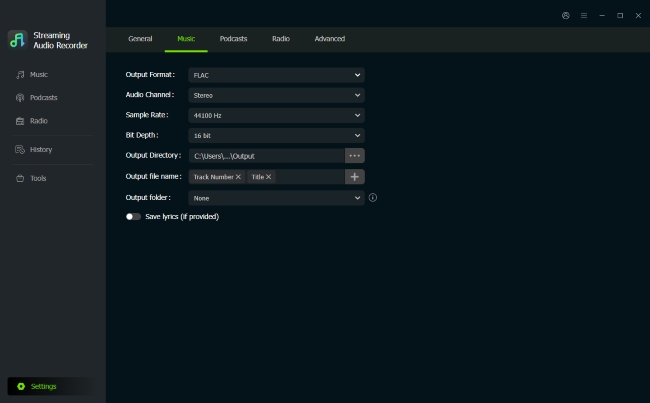
Step 1. Open the DRmare app and head over to the "Settings"menu. Click on the "Music" tab to set up your desired output settings. Instead of settling for the heavily compressed audio you usually get from some online youtube mp3 downloader, you can choose a premium lossless format like FLAC or WAV and manually adjust the bitrate for the best possible listening experience.
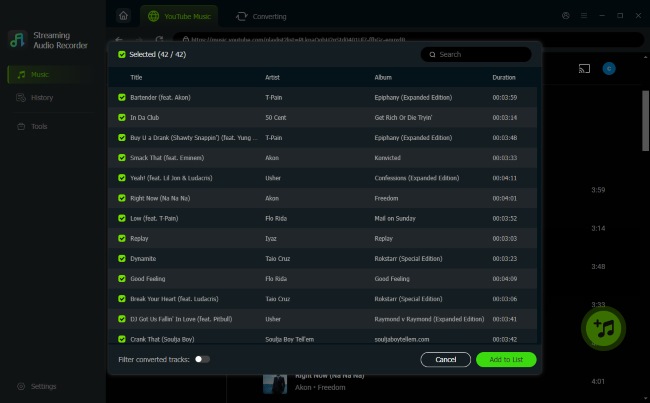
Step 2. Click on the YouTube Music icon directly from the main software interface to open the integrated web player. You can securely search for the exact songs, albums, or playlists you want to save. Once you find your music, simply click the "Add" button and choose "Add to List" to queue up multiple tracks for batch downloading.
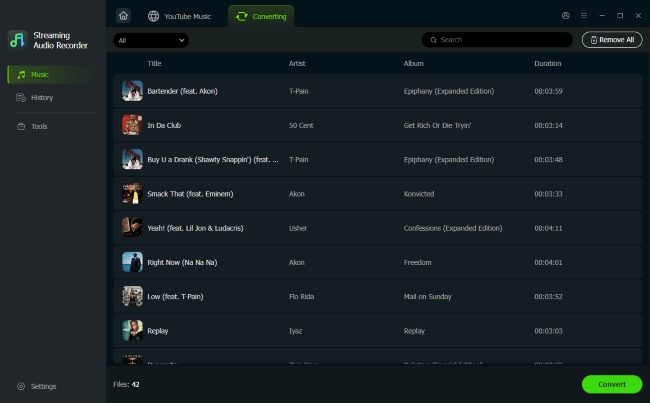
Step 3. Hit the "Convert" button to initiate the downloading process. You will not encounter any ad redirects or "fail to fetch" errors here. It swiftly extract the audio and saves your ad-free, full-sized music locally. You can find all your completed downloads neatly organized under the "History" tab, ready to be transferred to your devices.
Final Verdict
While Downloaderto promises a free way to save media, it completely fails to deliver. From aggressive ad redirects to constant errors, using this site is a frustrating security risk. For a reliable, ad-free experience that guarantees high-fidelity playback, skipping sketchy web tools and switching to a dedicated desktop solution like DRmare is the smartest choice.

 Home
Home





User Comments
Leave a Comment