





 Could you provide a technical and functional overview of the Apple Music Sound Check? Specifically, explain the mechanism it uses to normalize volume across different tracks, how it differs from traditional dynamic range compression, and how to enable or disable it in different devices.
-- From Reddit
Sound Check on Apple Music is designed to enhance your listening experience by ensuring that the volume levels between tracks are consistent. Whether you're listening to an album, playlist, or individual tracks, Sound Check helps balance volume differences, so you won't have to manually adjust the volume between songs. In this comprehensive guide, we'll explain what Sound Check is, how it works, how to enable or disable it, troubleshoot common issues, and compare it with other volume normalization features.
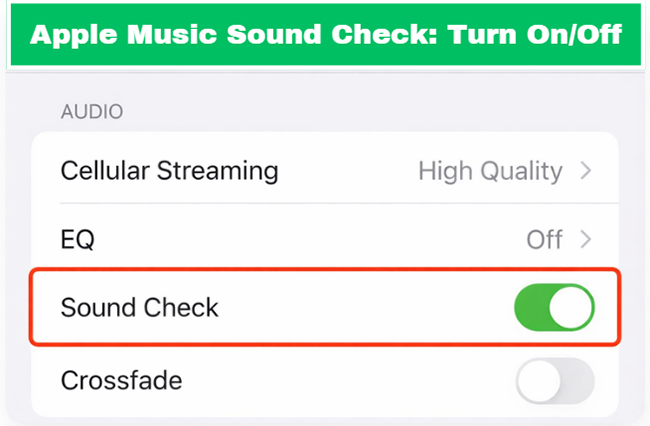
Part 1. What Is Sound Check in Apple Music?
Have you ever been startled by a sudden blast of volume when a new song starts? That jarring transition is exactly what Apple Music Sound Check is built to prevent. This built-in volume normalization tool analyzes your library and automatically normalizes the volume levels across tracks in your library, ensuring a smooth and consistent listening experience.
It ensures that songs in an album, playlist, or mix all play at the same volume level, minimizing the need for manual volume adjustments. This is particularly helpful when listening to playlists that contain songs with varying volume levels, which is common in curated playlists or when switching between different genres. Sound Check in Apple Music lets you enjoy your music without constantly reaching for the volume button. It aims to protect your hearing and your sanity.
Pros and cons of Sound Check
Pros
 It creates a smooth, "lean-back" listening experience, especially during shuffling or background listening at parties.
- It is also highly effective at balancing the volume gap between Dolby Atmos (Spatial Audio) tracks and standard Stereo tracks, which are often significantly louder.
Cons
 It can occasionally glitch (causing some tracks to sound unexpectedly quiet).
- It may reduce the overall maximum volume output of your device
Part 2. How Does Apple Music Sound Check Work
At its core, Sound Check is a built-in audio normalization tool, not a dynamic range compressor. It works by scanning the metadata of your songs to determine their average perceived loudness. Therefore, it doesn't ruin the audio quality of Apple Music. Apple measures this loudness in LUFS (Loudness Units relative to Full Scale), targeting a consistent baseline of around -16 LUFS.
When a track plays, Sound Check applies a global gain adjustment behind the scenes. It gently lowers the volume of modern, hyper-loud tracks and slightly boosts older, quieter recordings. This means the song retains its original dynamic punch, but the overall baseline volume aligns perfectly with the rest of your playlist.
Part 3. How to Turn Apple Music Sound Check On or Off
Managing your Sound Check on Apple Music settings is incredibly straightforward, regardless of the device you use to stream music. Whether you need to enable it for a party playlist or disable it for critical audiophile listening, it only takes a few seconds.
Turn Off/On Sound Check on Apple Music on iPhone and iPad
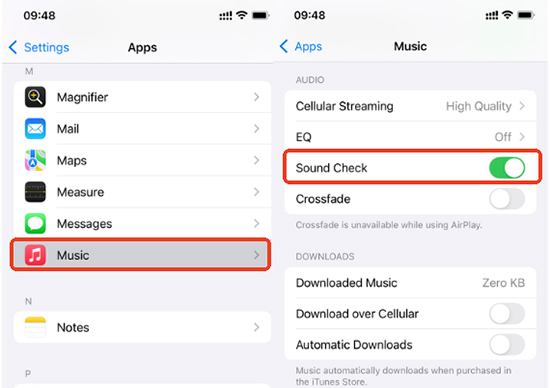
Step 1. Open the Settings app on your iOS or iPadOS device and scroll down to select "Music."
Step 2. Locate the "Audio" section within the Music settings.
Step 3. Toggle the switch next to "Sound Check" to the ON (green) position. Tap it again to turn it off.
Turn Sound Check Off/On on Apple Music on Mac
Step 1. Launch the Apple Music app on your Mac computer.
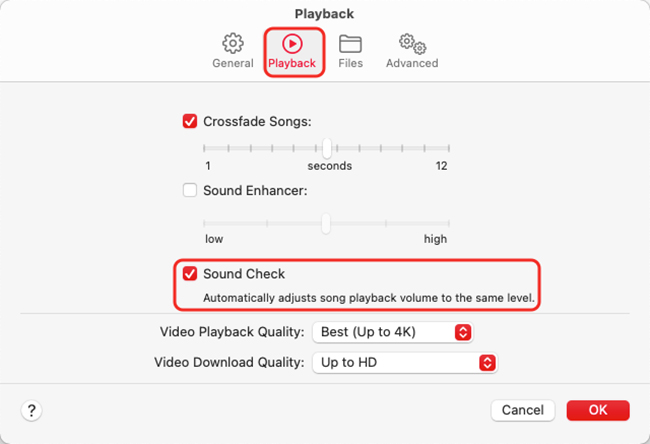
Step 2. Click on "Music" in the top menu bar, then choose "Settings" (or "Preferences" if you are on an older version of macOS).
Step 3. Navigate to the "Playback" tab and check the box next to "Sound Check". You can uncheck the mark to turn it off.
Enable/Disable Sound Check on Apple Music on Android
Step 1. On an Android device, open the Apple Music app.
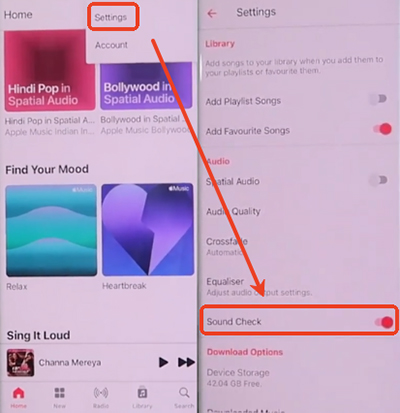
Step 2. Tap the three-dot menu for Settings and scroll down to the "Audio" section.
Step 3. Toggle the switch next to "Sound Check" to turn it on or off.
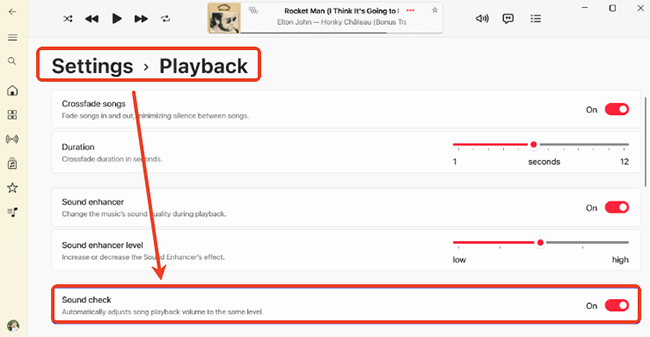
Enable/Disable Sound Check on Apple Music on Windows
Step 1. On your Windows PC, you can open the iTunes or Music app from the desktop.
Step 2. Click the "Edit" option and go to "Preferences" on iTunes or "Settings" on Music app, and select the "Playback" tab.
Step 3. Check or uncheck the box next to "Sound Check" to close or use Sound Check on Apple Music.
Part 4. How to Fix Apple Music Sound Check Not Working: Volume Issues
Even with Sound Check enabled, you might occasionally encounter frustrating volume fluctuations. Sometimes, users report that their music is universally too quiet, or that a track starts loud and suddenly dips in volume.
A major culprit is the "streaming delay bug," where Apple Music takes a few seconds to fetch the loudness metadata from the cloud. To resolve inconsistent volume adjustments, try these tested solutions:
Fix 1. Download the problematic Apple Music tracks at once directly to your device for local playback, bypassing the metadata streaming delay.
Fix 2. Toggle Sound Check off and then back on in your device settings to force a system reset of the audio parameters.
Fix 3. If the overall volume remains chronically low on standard stereo equipment, try temporarily disabling Dolby Atmos entirely.
Tips:
To bypass metadata streaming delays and volume glitches entirely, you can use DRmare Apple Music Converter. By converting your Apple Music tracks into local MP3 or FLAC files, the loudness metadata is baked into the file structure. This ensures a consistent volume level across any media player, even those that don't natively support Apple's Sound Check protocol.
Part 5. Apple Music Sound Check vs. Other Volume Normalization Features
Every major streaming platform has its own method for tackling the loudness wars, but they do not all operate the same way.
While Spotify uses a system called "Loudness Normalization," they offer different tiers (Quiet, Normal, Loud) that actively apply limiters to the audio if the "Loud" setting is chosen. This effectively introduces dynamic range compression, which squashes the highest audio peaks to make the track sound louder artificially. Apple Music Sound Check, by contrast, relies strictly on peak-agnostic gain adjustments.
Because it refuses to compress the audio track's inherent dynamic range, purists generally consider Apple's approach to be much more faithful to the original studio mastering intent.
Part 6. FAQs about Using Sound Check on Apple Music
What does Sound Check do in Apple Music?
Apple Music Sound Check is a built-in volume normalization feature that ensures all your songs play at a consistent loudness level. It scans a track's metadata to determine its inherent loudness. It then automatically lowers the volume of hyper-loud modern tracks and slightly boosts quieter, older recordings.
Why use Sound Check on Apple Music?
The primary benefit of Apple Music Sound Check is unmatched volume consistency. When you shuffle a massive playlist spanning different decades and genres, the original mastering levels can vary wildly. This feature acts as an invisible audio engineer, bringing everything to a comfortable, uniform baseline.
It is especially useful during headphone listening or when hosting a party, as it prevents sudden, painfully loud volume spikes. Furthermore, if you frequently switch between standard stereo tracks and Apple Music Dolby Atmos (Spatial Audio) mixes, Sound Check seamlessly bridges the noticeable volume gap between these two vastly different formats.
Is Sound Check good on Apple Music?
For most users, yes. It is a high-value convenience feature that prevents "volume shock" when moving between songs from different eras or genres.
Does Apple Music Sound Check affect quality?
No, Apple Music Sound Check does not affect audio quality. Since it only adjusts playback volume levels based on LUFS measurements (targeting around -16 LUFS)rather than compressing or altering the audio file itself, your music's quality remains intact.
When to use Apple Music Sound Check
There are specific listening scenarios where leaving Sound Check activated is highly beneficial.
- Shuffled Playlists: If your playlists jump between decades, genres, or mastering styles, normalization prevents constant manual volume adjustments.
- Headphone Listening: Protecting your ears from sudden loud spikes is crucial when wearing earbuds or closed-back headphones.
- Spatial Audio Playback: Dolby Atmos tracks are mastered significantly quieter than standard stereo tracks, and Sound Check effectively bridges this massive volume gap when switching between formats.
For casual listening sessions, the convenience of a flat volume curve almost always outweighs the subtle technical tweaks.
Conclusion
Navigating the varied landscape of modern audio streaming requires a smart, automated approach to playback. Apple Music Sound Check provides that much-needed volume consistency, smoothing out the harsh transitions between the loudest pop anthems and the quietest acoustic ballads.
By understanding how to turn Sound Check Apple Music on or off and troubleshoot basic metadata delays, you can drastically improve your daily listening experience. Give it a try during your next Apple Music mixed-playlist session, and enjoy the uninterrupted flow of your favorite music.

 Home
Home




User Comments
Leave a Comment