





If you have ever searched for "YouTube to MP3 download site" or "download YouTube video," you have almost certainly encountered the Y2Mate downloader. For years, Y2Mate has been one of the most searched terms on Google for users looking to convert YouTube videos to MP3 or MP4 files. Its appeal is obvious: it is free, requires no registration, and works directly in your browser.
However, popularity does not always equal quality or safety. Is Y2Mate actually safe to use? This comprehensive Y2Mate review breaks down its features, pros and cons, how it works, its hidden security risks, and the best safe alternatives to the Y2Mate video and audio downloader.
Part 1. What Is Y2Mate Video/Audio Downloader?
Y2Mate is a free online video downloader and audio downloader that allows users to download and convert videos from various sources, primarily YouTube. It gained popularity as a YouTube video downloader, enabling users to save YouTube videos in MP4 or MP3 formats.
Y2Mate works by processing the URL of the video you want to download and then providing options for different qualities. It requires no software installation, no user registration, and works on almost any device, including Android and iOS.
Key Features of Y2Mate Downloader
- No registration required: This means you can access its features instantly and start downloading your favorite content without any delays.
- No Software Downloading Needed: Simply visit the Y2Mate website through your web browser on any device – be it your computer, smartphone, or tablet – and start downloading.
- Fast download speeds: Don't waste time waiting for downloads to finish. Y2Mate is designed to provide relatively quick download speeds, ensuring you can save videos efficiently and get to watching them offline sooner.
- High-quality downloads: Enjoy your videos in the best possible quality. Y2Mate offers a range of resolution options for your downloads, including high-definition choices.
- Unlimited downloads: Download to your heart's content! Y2Mate doesn't impose any limits on the number of videos you can download. Feel free to save as many videos as you need.
- Totally Free: Enjoy all of Y2Mate's features without spending a dime. Y2Mate is a completely free service, making it accessible to everyone.
- Easy-to-Use: Downloading videos shouldn't be complicated. Y2Mate features a user-friendly interface that's easy to navigate, even for those who are new to online video downloaders.
Pros and Cons of Y2Mate Downloader
Pros
 Completely Free
- Support various output formats, like MP4, MP3, M4V FLV, AVI, 3GP, WEBM, WMV, etc.
- No installation needed
- Provide fast downloads without limits
Cons
 You "pay" with your privacy and security.
- Audio quality is often compressed/low bitrate.
- Heavily cluttered with misleading ads.
- Frequently offline or blocked by ISPs or YouTube.
- You can only convert one YouTube video at a time.
- Downloaded files often lack artist names, album art, or correct tagging.
Part 2. How to Use Y2Mate to Download YouTube Video/Audio
Downloading YouTube videos to MP4 or MP3 with Y2Mate is a breeze, even for those unfamiliar with online video downloaders. Here's a step-by-step guide to help you get started:
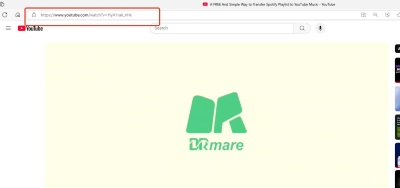
Step 1. Go to the YouTube website and find the video you want to download. After that, you can copy the YouTube video's URL from the address bar of your browser.
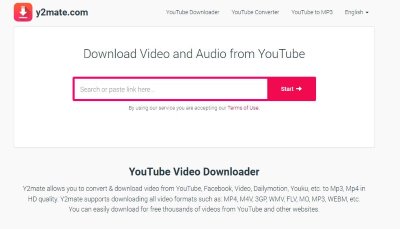
Step 2. Go to Y2Mate.com on your device and paste the copied URL into the input field on the Y2Mate homepage. Then Y2Mate will process the URL and present you with various download options.
Step 3. Select your preferred format (MP4 for video or MP3 for audio) and the desired quality (e.g., 720p or 1080p). The available quality options will depend on the original video.
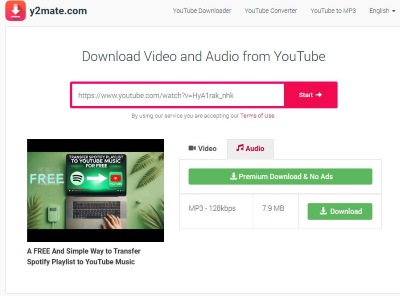
Step 4. Click the "Download" button next to your chosen format and quality. Y2Mate will then prepare the download link for you.
Step 5. Once the download link is ready, click on it to save the YouTube video or audio file to your device.
Part 3. Is Y2Mate Safe to Use?
While Y2Mate is a popular tool, it's important to be aware of potential security risks. Technically, Y2Mate is not a "virus" in the traditional sense. It is a legitimate file conversion website. However, visiting the site and interacting with it exposes you to Malvertising (Malicious Advertising) and Potentially Unwanted Programs (PUPs). Security researchers and user reports highlight three primary risks when using the site:
1. Notification Spam Tricks
This is the most common complaint. When you enter the site, Y2Mate often asks you to "Allow Notifications" to proceed or verify you are not a robot. Do not click Allow. If you do, the site gains permission to bombard your desktop with fake virus alerts (e.g., "Your McAfee has expired!"), attempting to scare you into buying scam software or giving away credit card details.
2. Drive-by Redirects and Phishing
Clicking the "Download" button on Y2Mate rarely starts the download immediately. Instead, it frequently opens a new tab redirecting you to:
- Betting or adult content sites.
- "Phishing" pages that look like official Microsoft or Apple support warnings.
- Pages hosting exploit kits that attempt to find vulnerabilities in your browser.
3. Data Privacy Concerns
As a free web service, Y2Mate monetizes traffic by tracking user behavior. Your IP address, device type, and browsing history are often shared with third-party ad networks that have very loose ethical standards.
Part 4. Y2Mate Clones: A Comparison
Note:
Currently, Y2Mate.com has been permanently shut down following a targeted legal enforcement action by the IFPI for copyright infringement. While the original service and its associated domains are now closed, users should exercise caution: current search results for "Y2Mate" only lead to unverified clone websites that may pose security risks.
Due to the closure of Y2Mate, many clone websites have emerged with similar interfaces but varying functionalities. To help users distinguish between these clones, I've compiled information on some of the top-ranking Y2Mate clones found when searching "Y2Mate" on Google:
| Website | Max Video Resolution | Max Audio Bitrate | Download Method |
|---|---|---|---|
| Y2Mate.com | 1080p | 128kbps | Search or video link |
| Y2Mate.nu | 360p | 192kbps | Video link |
| en.Y2Mate.is | Not functional | Not functional | Video link |
| farylmusic.com | Not functional | Not functional | Video link |
| Y2Matego.com | 1080p | 192kbps | Search or video link |
| i-Y2Mate.com | Varies depending on source video | 124kbps (actual) | Video link |
| Y2Mate-us.com/Y2Mate.tube | 720p (Downloading speed very slow) | 320kbps | Search or video link |
Part 5. Safe Alternatives to Y2Mate Video/Audio Downloader
Following the IFPI's permanent shutdown of Y2Mate.com, the web is now flooded with high-risk clones that often harbor malware. To protect your device and enjoy better audio quality, it is essential to move toward safe and legal alternatives. For users seeking safety, reliability, and quality, the best alternative is not another website, but dedicated desktop software.
1. DRmare Streaming Audio Downloader for YouTube
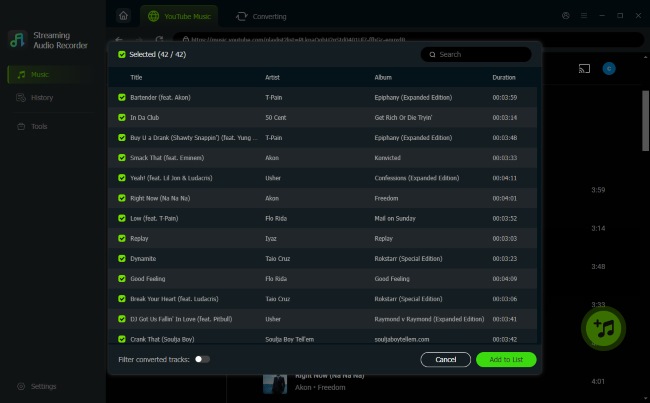
For those who demand high-fidelity audio, DRmare Streaming Audio Downloader for YouTube presents a compelling alternative. This powerful tool is fully compatible with the built-in YouTube Music website, allowing you to download YouTube videos and audios to MP3, FLAC, WAV, AIFF, M4A, and M4B at a faster speed.
No need to download YouTube files one by one; it supports batch download. Besides, it can bypass the audio quality limitations of Y2Mate and enjoy your favorite YouTube Music with exceptional clarity and detail. By the way, this all-in-one music downloader also works with Spotify, Apple Music, Tidal, Amazon Music, Pandora, SoundCloud, and more popular streaming music services.
4K Video Downloader+
4K Video Downloader+ is another Y2Mate alternative, available for Windows, macOS, and Linux. Unlike risky web-based rippers, this software provides a clean, secure user experience with zero ads, intrusive toolbars, or bundled malware. It is designed for high-fidelity media management, supporting resolutions up to 4K and 8K, and offers the ability to download entire playlists or even full channels with subtitles included.
The standout "Smart Mode" feature allows you to pre-configure your preferred format and quality settings, enabling a seamless, one-click download process. For users seeking a reliable, "set it and forget it" solution that works across almost all popular video platforms, it remains one of the safest and most efficient choices.

Part 6. FAQs about Y2Mate Downloader
What is the maximum video resolution available on Y2Mate?
What is the longest video that can be downloaded through Y2Mate?
Y2Mate has a duration limit and can only download videos up to 60 minutes long. For longer videos, you may need to explore alternative tools.
What are the best alternatives to Y2Mate?
If you're searching for alternatives, consider tools like DRmare Streaming Audio Recorder and 4K Video Downloader+. These options offer advanced features, including higher resolution downloads, superior audio quality, and a more secure downloading experience.
What video and audio formats does Y2Mate support?
While Y2Mate claims to support multiple formats, testing reveals that Y2Mate video downloader primarily supports MP4, and Y2Mate audio downloader extracts files only in MP3 format.
Why is y2mate.nu taking forever to load?
If y2mate.nu is loading slowly, it could be due to server issues, high traffic on the website, or a weak internet connection. Try refreshing the page, clearing your browser cache, or accessing the site during off-peak hours. Alternatively, consider using another Y2Mate clone.
Why is Y2Mate not working on my Chromebook?
If Y2Mate is not functioning on your Chromebook, it could be related to browser compatibility or an issue with Chrome's security settings. Ensure that your browser is updated to the latest version and that cookies and JavaScript are enabled. You can also try accessing Y2Mate using an incognito tab or a different browser, such as Firefox or Edge.
Part 7. In Conclusion
Y2Mate was the go-to destination for millions of users seeking a quick and free way to download YouTube content. The permanent shutdown of Y2Mate.com marks the end of an era for quick, browser-based stream-ripping.
If you'd like to find a Y2Mate alternative, it's better to use a desktop software, like DRmare Streaming Audio Recorder or 4K Video Downloader+. They both provide a clean, ad-free experience with superior lossless quality and batch downloading.

 Home
Home





User Comments
Leave a Comment