





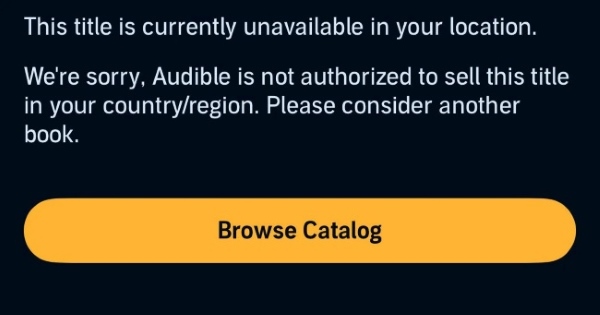
Have you ever searched for a highly anticipated audiobook, only to be hit with the message: "Audible title not available in your region"? Licensing agreements and geographical restrictions often prevent you from accessing the full, global library of audiobooks. The good news is that there are proven ways to get around these region limitations when you are dealing with an Audible wrong marketplace error. Here is a complete, step-by-step guide on how to bypass Audible region lock and reclaim your listening freedom for Audible audiobooks.
Part 1. Change Your Audible Marketplace & Region
Audible operates different marketplaces for different countries. Your account is tied to a specific region, which dictates exactly which books you are permitted to browse and purchase. Learning how to change marketplace on Audible is often the most direct way to solve this regional issue.
Note:
When you switch Audible marketplace settings to access international titles, your digital libraries do not merge. Your existing collection remains securely stored in the original storefront where the books were purchased, but they will not be visible in your new regional library view.
How to Change Marketplace on the Audible Website
If you prefer browsing on your computer, you can easily change your audible marketplace directly through your web browser. This process simply involves migrating your login to the correct regional domain.
Step 1. Open your preferred browser and make sure you are fully signed out of your current Audible account. Visit the Audible website, click on your account name in the top navigation bar, and select "Sign Out".
Step 2. On the sign-in page, locate the Marketplace selector under the "Sign in" icon. Choose the region you want to switch to from the dropdown menu.
Step 3. Once you've selected the new region, click "Sign In" and enter your Amazon account credentials. You will now be logged into Audible under the selected marketplace.
How to Switch Marketplace on the Audible App
Just like on the desktop website, switching your region on the Audible mobile app starts with signing out of your current account. Once you locate the correct menu option, the entire process takes only a few seconds to complete. In the following steps, you'll learn how to switch Audible regions quickly on your smartphone.
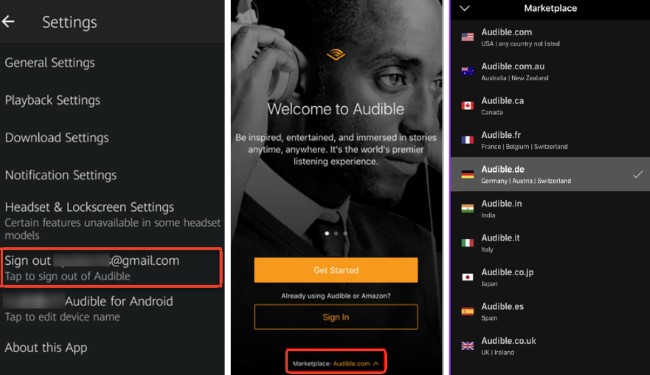
Step 1. Open the Audible app and navigate to your settings to sign out of your current account.
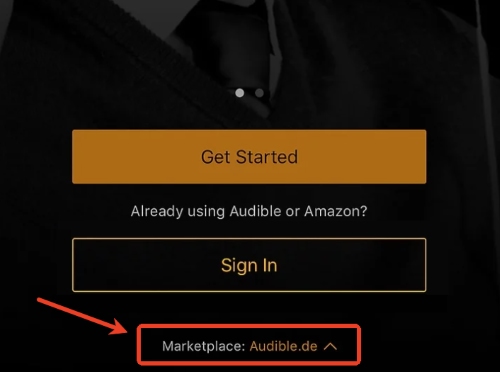
Step 2. On the main login screen, do not enter your credentials yet. Instead, tap the "Marketplace" option located at the bottom of the screen. A menu will pop up listing different regions. Select your desired region.
Step 3. Sign in with your account details to access the newly selected Audible region.
Part 2. Switch IP and Payment Address to Unblock Audible Region Restrictions
While changing your Audible marketplace is a crucial step, it may not be enough on its own. Amazon's regional security system also checks your IP address and the country linked to your payment method. If this information doesn't match, the transaction may be flagged or blocked. To successfully bypass Audible region restrictions, you'll need a two-pronged approach: masking your location and updating your payment details.
Use a VPN to Bypass Audible Region Lock
A Virtual Private Network (VPN) achieves this by routing your internet traffic through a secure server in another country. By doing this, you trick the platform into believing you are genuinely browsing from within their authorized territory.
Step 1. Subscribe to a reputable VPN provider and install the application on your computer or mobile device. Launch the VPN and connect to a server that perfectly matches your target Audible marketplace.
Step 2. Open a fresh "Incognito" or "Private" browsing window to ensure no leftover location cookies interfere with your new session.
Step 3. Navigate to the regional website, log in to your account, and prepare to handle the payment block at checkout.
Tips:
It is crucial to buy the card from the specific marketplace you intend to use, or you'll meet a U.S. Amazon gift card not work on Audible.co.uk. If you have trouble purchasing directly from a foreign Amazon site, reliable third-party platforms like MyGiftCardSupply are excellent alternatives for obtaining the correct regional credits.
Overcome Payment Blocks for International Accounts
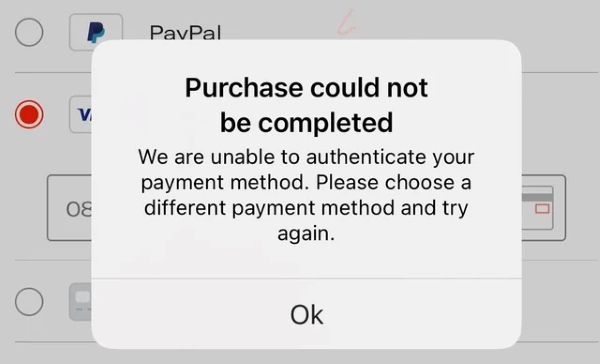
Once you have disguised your location with a VPN, the final hurdle is providing a payment method that the system recognizes as "local." Even if you have updated your billing address, using a standard foreign credit card can still trigger the "Audible title not for sale in this country" error because the system identifies the card's country of origin. To sit firmly in your new marketplace and finalize your purchase, you can overcome this financial hurdle using two highly effective workarounds:
- Regional Digital Amazon Gift Cards: You can purchase an Amazon/Audible gift card specifically for your target region using your regular credit card. Once purchased, redeem the gift card balance on your new regional Audible account. Since you are paying with local digital currency, the system does not check for a foreign bank.
- Virtual Credit Cards: Services like Wise or Privacy.com allow you to generate virtual debit cards. You can attach a local, international billing address to these virtual cards, allowing your transaction to pass through Amazon's geographic security checks seamlessly.
Part 3. Use DRmare Audible Converter Get Around Region Lock
Constantly switching marketplaces and toggling VPNs can become exhausting over time. More importantly, executing an Audible region change often causes your previously purchased audiobooks to temporarily disappear from your active app library. If you prefer a permanent method to remove regional barriers and keep your entire collection intact in one place, utilizing third-party software is incredibly effective.
The DRmare Audible Converter is a powerful tool designed to strip DRM protection from your Audible files. By converting them into widely supported formats, your audio files are entirely liberated from the restrictive Audible app ecosystem. This allows you to effortlessly transfer and enjoy them on any device worldwide without ever facing a region lock or missing titles again.
How to Access Any Audiobook without Region Restriction
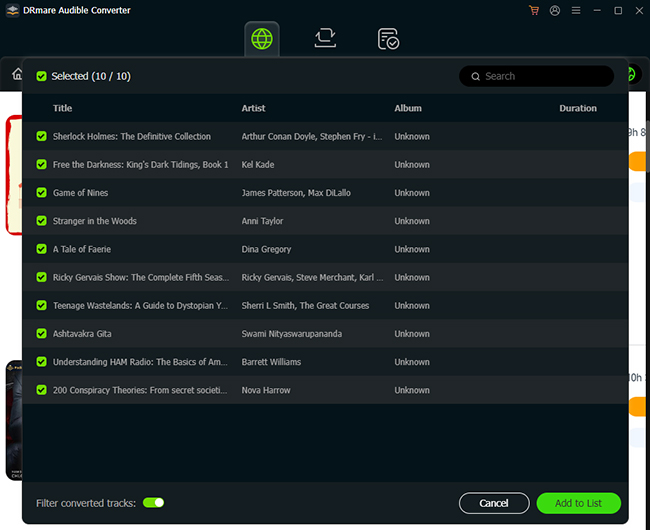
- Step 1Select Your Geo-Restricted Audiobooks
Open the DRmare Audible Converter and securely log in using the built-in web player. Navigate to your full library and find the specific books you want to unlock, then click the floating "Add" and "Add to List" buttons to load them into the conversion queue.
- Step 2Customize Output for Region-Free Listening
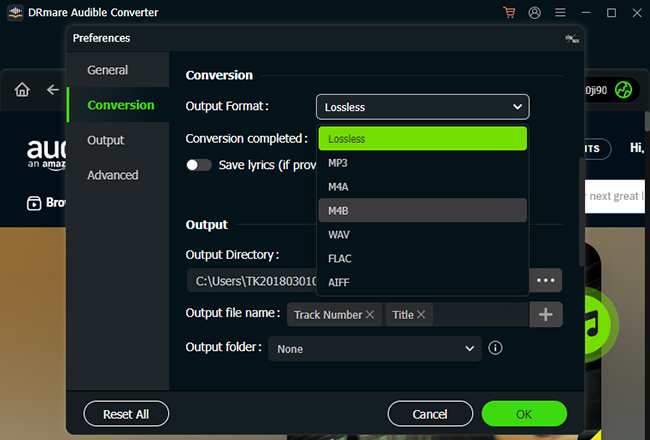
Go to the top menu, click on "Preferences," and open the "Conversion" tab to tweak your audio settings. To successfully *bypass *Audible region lock issues across all your personal devices, choose format from MP3, FLAC, WAV, or AIFF. If you prefer to retain the original audiobook chapter markers for easy navigation, selecting M4B or M4A is the ideal choice.
- Step 3Convert and Save Your Unlocked Library
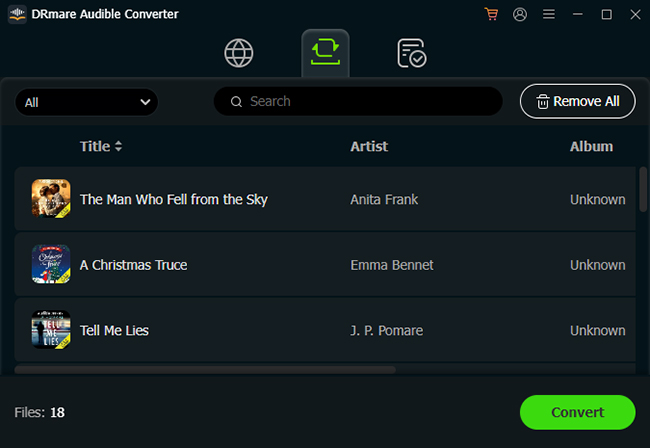
Press the "Convert" button located at the bottom of the window. The program will swiftly export the DRM-free audio files to your local drive. With these downloaded files, you don't have to change Audible region just to listen to your favorite stories again.
Part 4. FAQs about Audible Region Lock
Why are some Audible books not available in my region?
Publishing rights are highly territorial. Authors and publishers sell distribution rights to different companies on a country-by-country basis. If Audible has not purchased the specific digital licensing rights to distribute an audiobook in your current geographic location, they are legally prohibited from selling it to you, resulting in the "audible book not available in region" error.
Can I transfer an Audible book to another marketplace?
No, you cannot transfer your purchased books from one marketplace to another. If you buy an audiobook on the Audible US marketplace, it stays permanently tied to that US account. When you switch your application to the UK region, your library will appear empty. To listen to your older titles, you must switch the marketplace back to its original location.
Do I keep my membership credits when I change my Audible region?
Your membership credits do not transfer between regions. Credits are tied exclusively to the currency and marketplace where they were issued. If you have unused credits on your Canadian account, you cannot spend them on the US website. It is highly recommended to spend all your remaining credits before committing to a permanent region change.
Part 5. Summary
Encountering regional restrictions should never stop you from enjoying the audiobooks you want to hear. you can easily circumvent their location checks and reclaim access to the global library on Audible with a quick marketplace settings adjustment or a permanent workaround.

 Home
Home





User Comments
Leave a Comment