





The allure of Audible is undeniable. With a vast library of audiobooks spanning genres and languages, it's a heaven for book lovers. However, Audible's DRM protection can be a frustrating hurdle for those who wish to enjoy their audiobooks offline on various devices. Meet the GitHub project — Libation, a popular free, open-source tool hosted on GitHub that allows you to remove Audible DRM and download AAX audiobooks in MP3 or M4B format.
This article serves as your comprehensive guide to Libation Audible Converter, exploring its features, providing a step-by-step tutorial on how to use it, and revealing advanced techniques to enhance your audiobook experience.
Part 1. What is Libation Audible Converter?
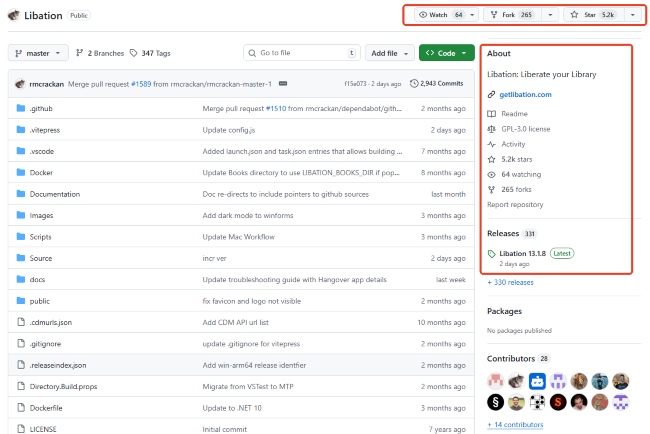
Libation on GitHub is a free and open-source Audible converter app that allows you to liberate your audiobook collection. It's compatible with Windows, macOS, and Linux, offering a cross-platform solution for audiobook enthusiasts. As of June 2026, the project has reached a significant milestone on GitHub, boasting over 5.8k Stars and 297 Forks, reflecting its high trust level within the audiobook community.
Essentially, Libation acts as a bridge between your Audible account and your computer, enabling you to bypass the DRM protection that restricts their usage. This means you can keep your audiobooks forever, listen to them on any device, and even share them with family. Here's a closer look at the standout capabilities of this powerful tool.
- Direct Download and Conversion: The software eliminates the need for middleman apps by pulling titles directly from your library or the Audible Plus catalog, instantly converting them into MP3 or M4B formats.
- Comprehensive Metadata and Extras: It acts as an automated media manager by preserving essential ID3 tags while also grabbing any accompanying supplementary PDFs.
- Automated Chapter Splitting: The program can automatically slice massive audiobook files into individual chapter tracks, improving your daily listening experience and navigation.
- Offline Library Export: You can effortlessly catalog, filter, and track your entire collection completely offline by exporting your library data into a structured XLSX spreadsheet.
Part 2. How to Use Libation to Convert AAX Audiobooks to MP3
The latest stable release, v13.1.8, features the "Chardonnay" and "Classic" engines, which utilize AAXClean for high-speed decryption without the need for heavy external dependencies like ffmpeg.
Using Libation to convert your Audible audiobooks into local files is a straightforward process. Follow these steps to set up Libation, download your audiobooks, and enjoy them on any device. Here, we'll walk you through the installation and usage process on Windows. If you're using macOS or Linux, refer to this detailed Libation installation guide.
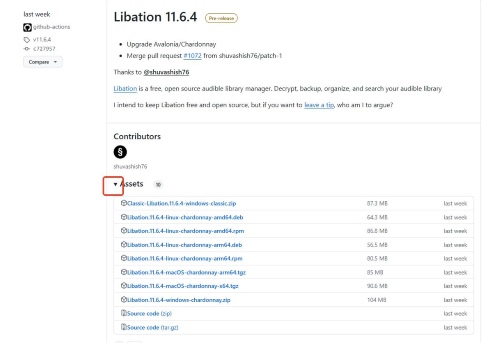
Step 1. Visit the Libation GitHub Releases page. Click the small triangle icon next to Assets to expand the list of available files. Download the latest version of Libation app for your operating system. For this guide, we'll download the file ending in ".zip" for Windows.
Step 2. Extract the downloaded zip file to a directory of your choice.
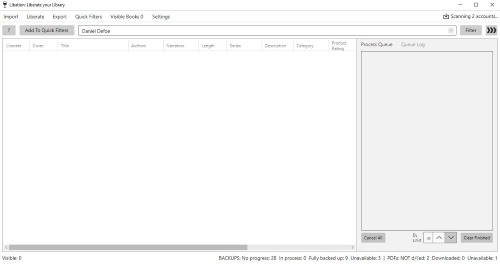
Step 3. Open the extracted folder and locate the "Libation.exe" file, double-click on it to launch.
Step 4. Navigate to the "Settings" tab at the top, and from the dropdown menu, select "Accounts".
Step 5. In the popup window, enter your Audible email address under the "Audible email" field. Then, choose the correct Audible region by selecting the appropriate locale from the "Locale" dropdown menu.
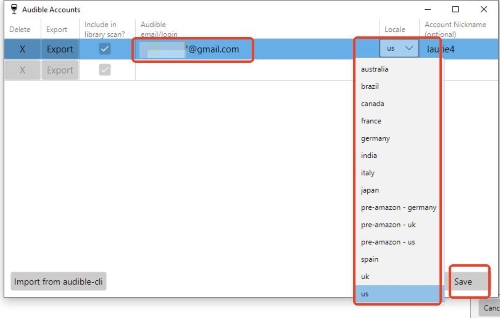
Step 6. Click the "Save" button in the bottom-right corner. This will trigger an Audible login page to appear. Complete the login process by entering your Audible credentials.
Step 7. After successfully logging in, return to the main interface of Libation. Click the "Import" tab in the top-left corner, then select "Scan library". Libation will load all the audiobooks available in your Audible library.
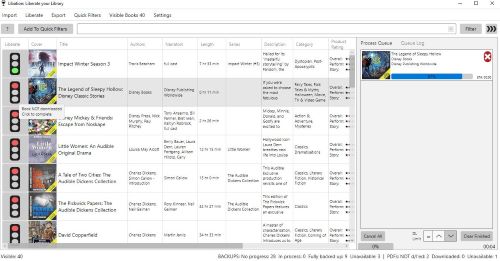
Step 8. To download an audiobook, click the "traffic light" icon next to the audiobook you want. Libation will automatically begin converting the audiobook to MP3/M4B format and saving it locally.
Step 9. Locate your downloaded files in the designated folder specified in the Settings tab. These files are now DRM-free and ready to be used on any device.
Part 3. Is Libation App for Audiobooks Perfect? (Limitations & Risk)
While Libation is a highly respected open-source project, it does have certain limitations that may impact your overall experience. Understanding these drawbacks is very important.
1. Limited Output Formats
Libation primarily supports MP3 and M4B formats . While these are common audiobook formats, users who require other formats like FLAC or WAV for specific devices or preferences will need to use additional software for conversion. This adds an extra step and potential inconvenience to the process.
2. Complex User Interface
Libation's interface can be quite complex and overwhelming for new users. Navigating the various settings, options, and menus can require a significant learning curve, making it less user-friendly compared to more streamlined alternatives.
3. Infrequent Updates and Potential Bugs
As an open-source project maintained by a single developer, Libation may not receive updates as frequently as commercial software . This can lead to potential bugs or compatibility issues that might not be addressed promptly. Additionally, the lack of dedicated customer support can be a problem for users who encounter difficulties and need assistance.
4. Deployment Challenges
Setting up and installing Libation can be particularly challenging for Mac and Linux users. This can be a deterrent for those who are not comfortable with more technical installation processes.
5. Account Security Risk
Using Libation requires logging in to your Audible account, which could potentially pose a security risk. While Libation claims to handle login credentials securely, there's always a possibility of unauthorized access or account compromise when using third-party applications.
Part 4. Best Alternative to Libation Software — DRmare Audible Converter
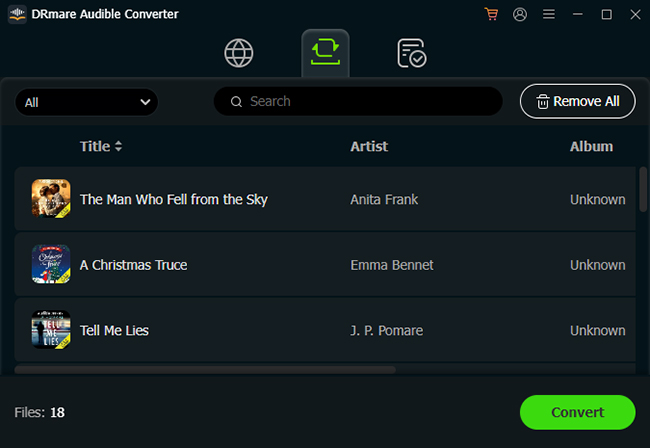
For those who find Libation too technical or unstable, DRmare Audible Converter is the industry-leading professional solution. It's well designed to effortlessly download and convert Audible books into multiple formats like MP3, M4B, FLAC, and WAV with an intuitive interface. It provides 100% original quality preservation, whereas open-source tools can sometimes result in compression artifacts. It also offers advanced options such as adjustable bitrate, sample rate, and chapter splitting. Compatible with both macOS and Windows, DRmare also boasts lightning-fast conversion speeds, batch processing, and a built-in ID3 tag editor, making audiobook management seamless.
Comparative Analysis: Libation vs. DRmare
| Feature | Libation (GitHub) | DRmare Audible Converter |
|---|---|---|
| Ease of Use | Complex (Technical) | Simple (1-Click) |
| Audio Quality | Lossy | Lossless |
| Speed Tech | AAXClean Decryption | 100X Ultra-Fast Batch Processing |
| Format Variety | MP3, M4B | MP3, M4B, FLAC, WAV, M4A, AIFF, Lossless |
| Download Plus Catalog | Yes | Yes |
| Edit ID3 Tags | No | Yes |
| Support | Community Forums | 24/7 Professional Tech Support |
| Update Frequency | Developer's free time | Regular Monthly Patches |
How to Use DRmare to Convert Audible Audiobooks to MP3/Lossless Format
Step 1. Launch the DRmare Audible Converter and authorize your Audible account within the built-in Web Player. Browse your library and find the favorite audiobooks that you'd like to download. Click the "Add" > "Add to List" button to load them to the conversion queue.
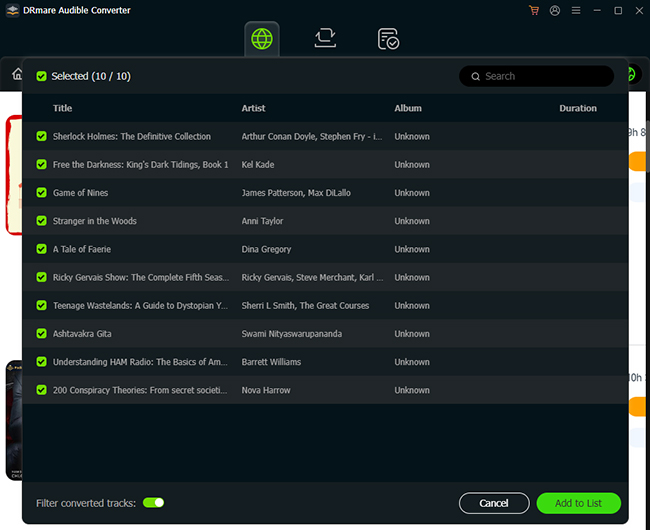
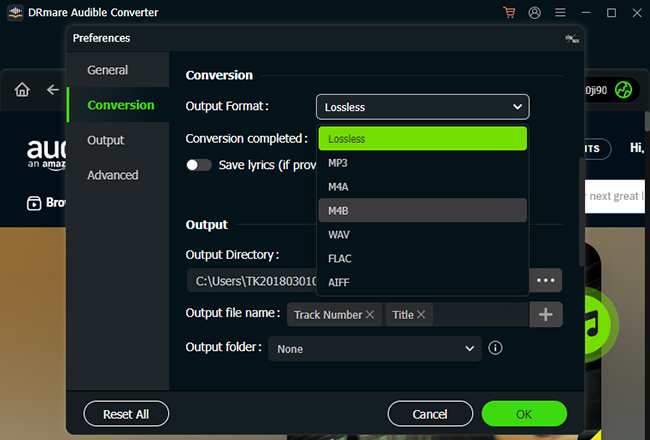
Step 2. After the audiobooks are imported, click the "Menu" > "Preferences" > "Conversion" option to select your desired output format. For preserving chapter structures, choose M4B. You can also customize settings like bitrate, sample rate, channels, and codec to adjust the audio quality. Additionally, use the "Edit" option to modify ID3 tags or split the audiobook into smaller parts, such as by chapters.
Step 3. Once all settings are configured, click the "Convert" button to begin the process. DRmare will handle multiple files simultaneously, converting them quickly. After a few minutes, your DRM-free M4B files will be available in the output folder, ready to be played on any device.
Part 5. FAQs about Libation GitHub Project
Is Libation v13.1.8 safe?
Yes, the source code is transparent and the developer (rmcrackan) is highly active. However, the 2026 algorithm flags many downloaders as "Potentially Unwanted Programs" (PUPs). To ensure total safety, always verify the SHA-256 checksum of the release on GitHub.
Is Libation legal to personal use?
Yes, using Libation to remove DRM from your purchased Audible audiobooks is perfectly legal. You have already paid for these audiobooks, and Libation simply allows you to enjoy them with greater flexibility and on more devices.
Can Libation download Audible Plus Catalog titles?
Yes, Libation can download and save them locally as MP3 or M4B files. This allows you to access and enjoy Plus catalog audiobooks offline without incurring any additional costs, provided you have a Premium Audible subscription.
Can I get banned for downloading the Plus Catalog?
There have been zero credible reports of bans for personal backup. However, Audible's 2026 backend may temporarily throttle your IP if you attempt to batch-download over 100 Plus titles in 24 hours.
Is there any customer support for Libation?
No, Libation, being an open-source project, does not provide official customer support. Users seeking assistance must rely on resources like the GitHub documentation, issue trackers, or community forums for troubleshooting and guidance.
If you prefer a tool that offers professional-grade reliability along with dedicated customer support, DRmare Audible Converter is an excellent alternative.
What's the differences between OpenAudible vs Libation?
The main difference between Libation vs OpenAudible lies in their cost. Libation is completely free and open-source, making it accessible to all users. In contrast, OpenAudible is a paid tool that requires a license purchase. If you're looking for a no-cost solution, Libation is the better choice.
Part 6. Final Verdict: Which One Should You Choose
The choice between Libation and DRmare Audible Converter comes down to your personal priorities.
- Choose Libation if you are a tech-savvy user who values open-source transparency and wants a completely free, community-driven tool to manage your library.
- Choose DRmare if you prioritize account safety, lossless audio quality, and time efficiency. With its 100X conversion speed, DRmare offers a seamless, professional experience that Libation's manual setup simply cannot match.
No matter which path you take, liberating your Audible library is the best way to ensure your favorite stories belong to you forever, independent of any platform's restrictions.

 Home
Home




User Comments
Leave a Comment