





Finding rare, out-of-print music in today's streaming era can be incredibly frustrating. While mainstream platforms dominate the market, they frequently lack niche, independent, or unreleased tracks. That's why Soulseek stand out. Here, we will explore what makes the Soulseek software unique, examine its limitations, provide a step-by-step usage guide, and highlight the best alternatives for building your offline library.
Part 1. What is Soulseek
Soulseek is a free, decentralized peer-to-peer (P2P) file-sharing network that has remained fully operational and active since the early 2000s. The soulseek software functions by connecting individual digital collectors directly with one another, establishing a shared ecosystem where users can browse each other's local directories.It creates a direct bridge between enthusiasts looking to discover and share rare, underground or media that are missing from streaming services.
Key Features of Soulseek:
- Beyond Just Music: Best known for soulseek music downloads, especially rare tracks, underground releases, live recordings, ebooks, films, and hard-to-find digital collections.
- Direct Peer-to-Peer Sharing: Files are transferred directly from one user's computer to another instead of through torrents or centralized cloud servers.
- Community-Driven Discovery: Built-in chat rooms and messaging let users request files, join niche communities, and connect with collectors worldwide.
- Free and Lightweight Software: The soulseek software is free to use, easy to install, and available for both Windows and macOS.
Part 2. Limitations of the Soulseek Download
Although Soulseek offers access to an enormous collection of rare media, the official client interface feels outdated. The interface is heavily text-driven, and it takes time to understand how searches, queues, and user shares work, especially for users unfamiliar with traditional P2P software.
Another drawback is inconsistent file quality. Since downloads come directly from individual users, audio fidelity depends entirely on the uploader. You may discover pristine lossless FLAC releases, but low-quality or badly transcoded MP3 files are also common.
Part 3. How to Use Soulseek for Media Downloading
Navigating a traditional peer-to-peer network might feel a bit intimidating if you are only accustomed to modern streaming apps. The following sections will walk you through the essential technical setup and the vital social etiquette required to build your digital library effectively without encountering restrictions. Mastering how to use soulseek is straightforward once you grasp its foundational mechanics.
Do You Need a VPN for Soulseek?
No, using a VPN with the soulseek software is entirely optional. Unlike public torrent swarms, this direct P2P network is rarely targeted by monitoring agencies. However, because it relies on direct IP sharing, your VPN must support port forwarding. Standard services like ExpressVPN block this, leaving your network ports "closed" and leading to automated community bans. For smooth transfers, select a provider that allows manual port configuration.
How to Use Soulseek to Download Music
- Step 1Install the Soulseek Software and Register Your Account.
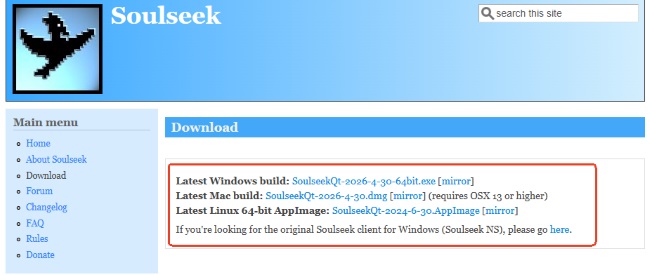
You can acquire the original software directly from the official Soulseek website, which provides versions for Windows, Mac, and Linux operating systems. Once installed, launch and create a unique username and password.
- Step 2Set Up Your Shared Folder
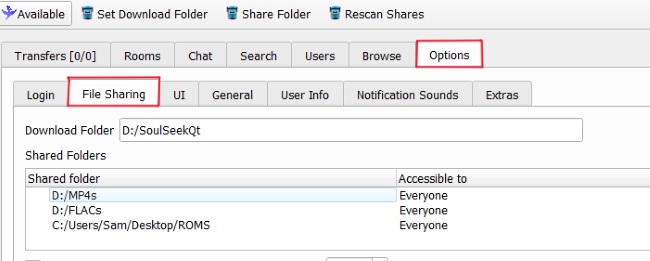
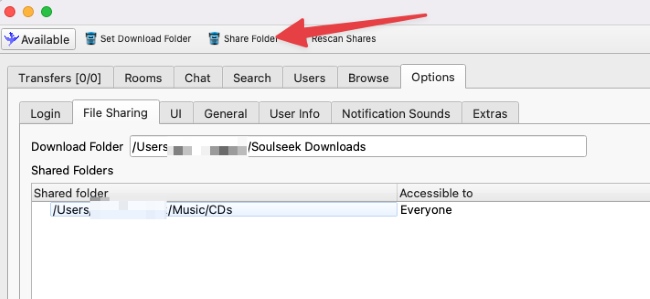
Before initiating any transfers, navigate to your file-sharing settings to establish your local directories. First, designate a specific destination folder where all your downloaded music will be safely saved. Next, you must share at least one folder containing media to become an active part of the community. Open the sharing settings and add a folder from your computer that contains music. Once enabled, other Soulseek users will be able to browse and download files from your shared collection.
- Step 3Optimize Your Network Ports
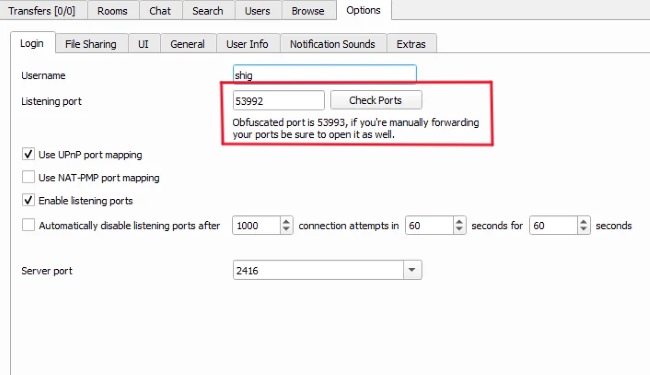
While searches may still work with the default configuration, downloads often stall if incoming connections are blocked by your firewall or router. Open the "Login" and test your listening port. If it appears closed, configure port forwarding on your router to improve connectivity and achieve more stable transfer speeds.
- Step 4Search and Start Downloading
Once your connection is properly configured, enter an artist, album, or track name into the search tab. Review the results carefully, check file formats and bitrates, then right-click your preferred files or folders to add them to the download queue. You can monitor transfer progress directly from the "Transfers" tab.
Precaution You Need to Know When Using Soulseek
- Pace your download requests. Avoid queuing up massive discographies from a single host all at once, which can easily overwhelm their personal upload bandwidth.
- Respond to automated blocks courteously. If you encounter a ban notice, a polite direct message explaining that you are new will often prompt the host to restore your access.
- Share what you have. While neatly organized albums are ideal, offering an untidy folder is vastly superior to hiding your files entirely. A healthy sharing habit is the easiest way to prevent a soulseek banned status.
Part 4. Is Soulseek Safe and Legit
Yes, the Soulseek software is generally considered safe and legitimate when used responsibly. The official client is ad-free and does not include bundled malware or spyware. However, because files are shared directly between users rather than through a centralized database, file quality and integrity can vary. To reduce security risks, it is best to download standard media formats only and avoid executable files such as .exe or .bat, which may contain malicious software.
Is Soulseek Legal?
The Soulseek platform itself is legal to download and use. However, sharing or downloading copyrighted music and media without permission may violate copyright laws in many countries. Although enforcement efforts are typically more focused on large public torrent networks, downloading copyrighted material through Soulseek can still carry legal risks depending on your region.
Personal Privacy
Since Soulseek uses direct peer-to-peer connections, other users can potentially see your IP address during transfers. For additional privacy, some users choose to route Soulseek traffic through a VPN that supports port forwarding, helping mask their personal network information while maintaining stable download speeds.
Part 5. Top Alternatives to Soulseek
While the Soulseek software remains an incredible resource for rare and underground media, its outdated interface and strict peer-to-peer sharing rules aren't a perfect fit for everyone. Fortunately, there are excellent Soulseek alternatives designed to elevate your music collection.
Nicotine+
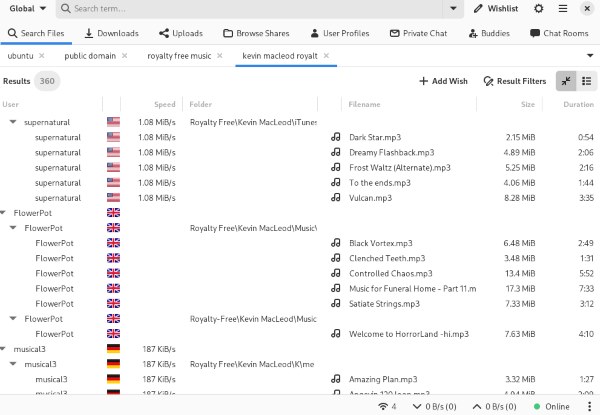
If you love the vast library of the original network but find its interface frustrating to navigate, upgrading your client is the perfect solution. Nicotine+ is widely regarded as the ultimate open-source soulseek alternative. Rather than switching to a different platform, this modernized nicotine+ soulseek application connects you directly to the exact same P2P servers. It revamps the user experience by offering a sleek visual layout, robust search filters, automatic port forwarding support, and enhanced privacy controls. It delivers the same rare music access without the clunky design.
DRmare Streaming Audio Recorder
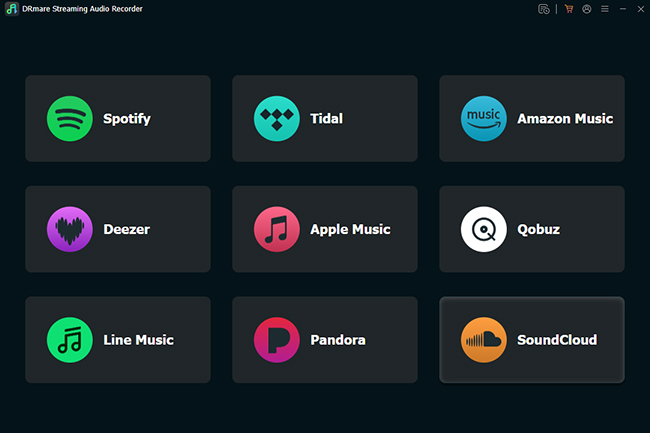
For listeners who want to avoid the complexities of P2P sharing entirely, downloading tracks directly from mainstream platforms is a safer, more convenient route. DRmare Streaming Audio Recorder is a powerful alternative featuring a modern GUI (Graphical User Interface). Without varying file quality, DRmare acts as a premium music downloader tool. Its key selling points include the ability to flawlessly gain music from popular streaming services, automatically preserve original ID3 tags, and convert media into universal formats. It lets you safely build a collection of mainstream hits without worrying about community bans or complex settings.
Part 6. FAQs about Soulseek Software
Is there a Soulseek for Android?
No, the official developers have never released an application for iOS or Android. However, you can find third-party apps like Seeker on the Google Play Store, which serve as an unofficial android Soulseek client for mobile browsing.
Why did I get banned from Soulseek?
A Soulseek banned status usually occurs because your shared folder is completely empty. The community relies heavily on mutual exchange, and veteran hosts often run automated scripts to block users who only take without contributing.
How to change Soulseek download folder?
To adjust your directory paths, navigate to the "Options" menu at the top of the interface and click on the "File Sharing" tab. From there, you can specify exactly where your incoming files are saved and which folders you are actively broadcasting to the network.
Ultimately, Soulseek remains an unparalleled treasure trove for dedicated audiophiles and media hoarders. While it requires a bit of patience, the reward of discovering rare, lossless files is well worthing. If you prefer a modernized user experience, upgrading to Nicotine+ or utilizing an intuitive graphical tool like DRmare are excellent alternative paths.

 Home
Home





User Comments
Leave a Comment