





Enjoying your favorite YouTube podcasts and music offline is highly convenient, but finding a safe downloader is difficult. Most online converters are heavily plagued with intrusive pop-ups and hidden malware risks. While the HireQuotient YouTube converter offers a surprisingly fast and ad-free solution. In this review, we will evaluate its core features, verify its safety, and see exactly how it compares to the best alternatives.
Part 1. What is HireQuotient YouTube Converter
The HireQuotient YouTube downloader is an online utility designed to effortlessly convert YouTube to WAV or MP3 formats without installing heavy software. It empowers you to transform video links into high-quality audio without navigating confusing menus or intrusive pop-ups. And the YouTube converter ensures that all file processing happens swiftly, keeping your daily workflow entirely uninterrupted.
Key Features of ReVanced YouTube Music:
- Registration-Free: You can process an endless number of videos without ever creating an account or handing over personal email addresses, ensuring total anonymity and privacy.
- Ad-free Experience: Backed by strict SSL encryption and regular backend updates, the platform actively protects your device from the malware, pop-ups, and phishing.
- Rapid Conversions: The tool leverages high-speed servers to deliver your HireQuotient YouTube to MP3 files in mere seconds, preserving the original acoustic clarity with output capabilities reaching up to 320 kbps.
- Universal Compatibility: The online tool works seamlessly on Windows, Mac, Android, and iOS, ensuring a smooth conversion experience across all major platforms.
Pros
 Free & Ad-Free: Clean interface with no pop-ups.
- No Installation: Fully web-based; no software or account required.
- Cross-Platform: Works on Windows, Mac, iOS, and Android browsers.
- Beginner-Friendly: Simple and intuitive interface.
Cons
 No Batch Downloads: Cannot download playlists or channels.
- No Metadata: ID3 tags are not preserved.
- Limited Support: Only supports standard YouTube videos.
- Basic Features: No bitrate control or advanced audio settings.
Part 2. How to Convert YouTube to MP3 with HireQuotient
Using this web-based YouTube to MP3 converter is incredibly simple, and the entire process requires just a few clicks from start to finish. You can comfortably follow these exact instructions on either your desktop computer or mobile device.
Step 1. Navigate to the YouTube website and locate the specific video or podcast you wish to extract. Copy its full URL directly from your browser's address bar or by utilizing the platform's native "Share" button.
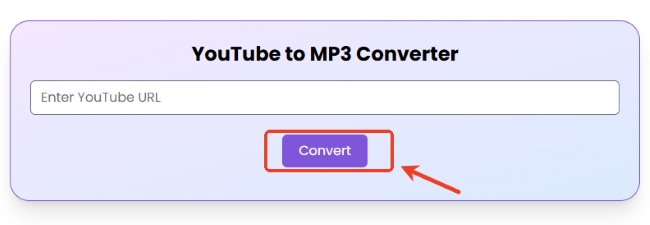
Step 2. Open a new browser tab and access the HireQuotient YouTube Converter page. Then paste your copied link inside the input field displayed at the center of the screen.
Step 3. Initiate the extraction by hitting the designated "Convert" button under the search box. The platform's cloud servers will immediately begin processing the video, preparing it to be saved as an MP3 audio file.
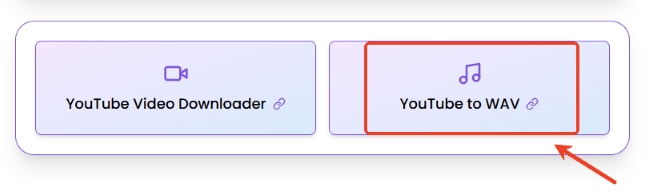
If you prefer high-fidelity audio instead of a standard MP3, simply click the dedicated HireQuotient "YouTube to WAV" option located just below the main search bar before starting your conversion.
Step 4. Wait a few seconds for the backend conversion to finish, which will typically generate a small audio preview player on your screen. Finally, select "Download" to save the finalized track directly to your devices.
Note:
While the tool is generally easy to use, you may frequently encounter a "fail to convert" error. Because it is a free web utility, it often struggles with server overloads, longer videos, or YouTube's strict backend protections.

Part 3. Is HireQuotient YouTube Converter Safe
It might seem strange to find a media extraction tool hosted by a B2B human resources platform, but this is exactly what makes it reliable. HireQuotient is a fully legitimate corporate entity. They offer this free web utility primarily to build their website's domain authority and drive organic traffic to their main business.
Malware & Phishing Risks: The HireQuotient YouTube tool removes these threats by maintaining an entirely ad-free environment. It drastically reduces the risk of accidental malicious clicks because there are simply no fake buttons to click on. Furthermore, you don't need to install sketchy third-party browser extensions or bundled desktop applications, ensuring your local hard drive remains completely protected from embedded trojans.
Privacy Concerns: With the HireQuotient platform, your digital anonymity is completely guaranteed. You do not have to provide any personal information, complete annoying human verification captchas, or hand over login credentials at any point. The tool simply processes the public video URL you provide and delivers your audio file with zero strings attached.
Part 4. Best Alternatives to HireQuotient YouTube to MP3
While the HireQuotient YouTube downloader is convenient for quick, one-off audio extractions, it lacks the advanced toolsets for batch playlist downloading. If you require a more robust, comprehensive suite to handle your daily media conversions, exploring premium desktop alternatives and robust online options is highly recommended.
Desktop Alternatives to HireQuotient YouTube Converter
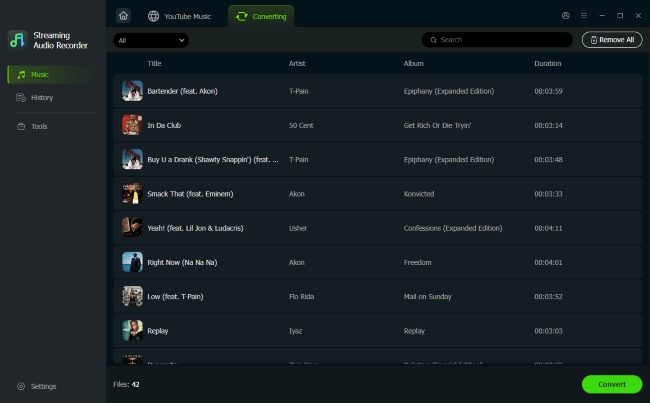
If you frequently encounter "fail to convert" errors or hit length limits when using free web tools like the HireQuotient YouTube to MP3 converter, DRmare Streaming Audio Recorder serves as a robust alternative that addresses the common limitations of online converters. Unlike basic online options, this program is specifically designed to download high-fidelity audio directly from platforms like YouTube Music.
- Automated Metadata Preservation: It preserves the artist name, album cover, track title, and even the lyrics. This eliminates the tedious hassle of manually organizing your tracks after a conversion finishes.
- Unrestricted Batch Downloading: There are absolutely no duration limits. You can effortlessly queue up entire playlists, three-hour educational podcasts, or full-length live concerts and save them all in one go.
- Customizable Output Parameters: Tailor your final audio files to your exact specifications by adjusting the sample rate and bit depth, with full support for versatile formats like MP3, uncompressed WAV, and lossless FLAC.
Step 1. Launch the software on your desktop and navigate to the "Settings" and locate the "Music"tab, you can customize your output profile. allows you to secure high-fidelity audio. Simply select a versatile format to convert your YouTube file to MP3, WAV, or FLAC to ensure the best possible acoustic clarity.

Step 2. Access the built-in YouTube Music web player via the main dashboard by clicking on the YouTube Music icon. Sign in and find the content you wish to extract. Unlike the hirequotient, which handles one link at a time, you can simply click "Add>Add to List" to instantly move multiple tracks into the conversion queue for batch processing.
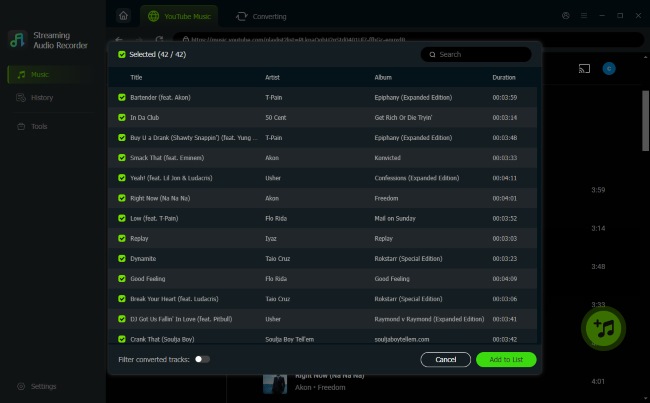
Step 3. Click the "Convert" button to initiate the high-speed extraction. In just a few moments, your finalized files will be safely stored on your local drive and listed in the "History" tab. From here, you can seamlessly transfer your tracks and enjoy your music smoothly.
Online Alternatives to HireQuotient YouTube Converter
If you are looking for a quick, browser-based alternative that offers a few more customization options than the standard HireQuotient YouTube downloader, EzMP3 is a solid choice. It remains 100% free and is specifically designed for users who need to grab single tracks without installing any software.
Step 1. Start by heading to the YouTube website or app to find the media you want to save. Copy the video's unique URL from your address bar.
Step 2. Navigate to the EzMP3.cc homepage. Locate the prominent search box and paste your YouTube link directly into the field to let the tool analyze the video metadata.
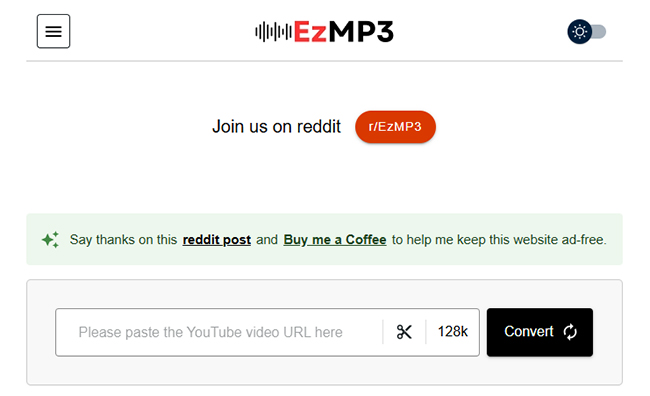
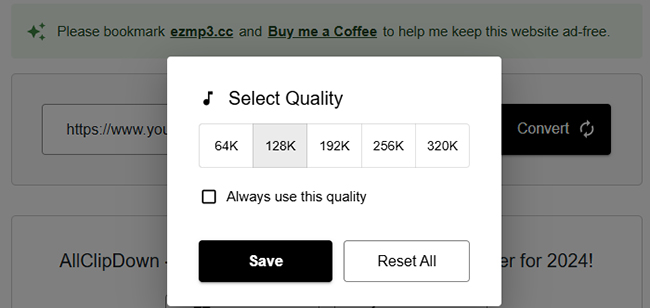
Step 3. Click on the bitrate label, and a selection menu will appear, allowing you to choose your preferred fidelity. If you only need a specific segment of a long video, tap the "Scissors" icon to open the built-in trimming tool.
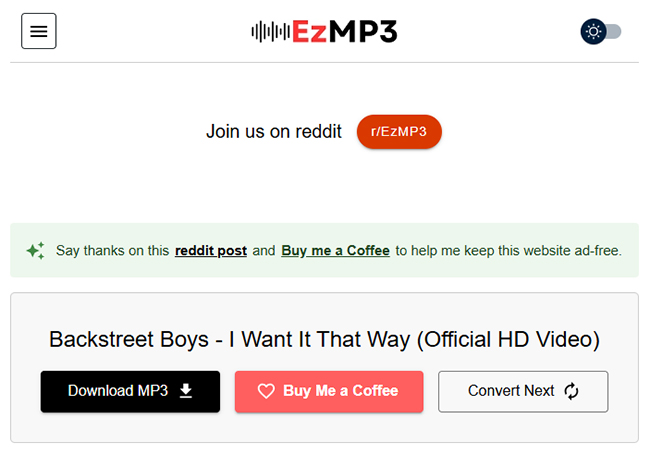
Step 4. Initiate the process by clicking the "Convert" button. Once the processing is finished, hit the "Download MP3" button to save the finalized audio file.
Part 5. Final Verdict
| Feature | HireQuotient | EzMP3 | DRmare Streaming Audio Recorder |
|---|---|---|---|
| Best For | Quick, secure one-off downloads | Trimming specific audio clips | Building a high-quality library |
| Batch Download | ❌ | ❌ | ✅ |
| Audio Format | MP3, WAV | MP3 | MP3, FLAC, WAV, M4A, AIFF, M4B |
| ID3 Tag Support | ❌ | ❌ | ✅ |
| Safety | ✅ | ✅ | ✅ |
| Ads-Free | ✅ | ❌ | ✅ |
If you need a fast and effective way to get a YouTube audio file, the hirequotient YouTube to MP3 tool is a good option. However, if you need to download entire playlists with perfect metadata, investing in a professional tool like DRmare Streaming Audio Recorder will save you hours and provide significantly better sound quality.

 Home
Home





User Comments
Leave a Comment