





SoundCloud is an essential platform for discovering new music, but what happens when you want to take your favorite tracks offline? You're looking for a simple, free, and reliable SoundCloud downloader extension that just works. The problem is, many of these tools are a moving target—they work one day and are broken the next, or worse, they slow your browser down.
If you're tired of searching, you've come to the right place. This guide will walk you through the best SoundCloud downloader extensions for your browser, complete with step-by-step instructions. We'll also cover their limitations and introduce a premium alternative for those who need more power and reliability.
- 🏆 Best Overall: SoundCloud Track Downloader — Best suited to Chrome users who want to save individual tracks or handle large playlists, albums, and Likes with convenient background batch downloads.
- ⚙️ Best Feature-Rich Option: SoundCloud Enhanced Pro — A strong choice if you want quality selection, playlist downloads, ID3 metadata, cover art, and download management in one extension.
- 🦊 Best for Firefox: SoundCloud Downloader by NotTobi — Simple one-click downloading with metadata, plus higher-quality M4A downloads for eligible SoundCloud Go+ users.
Part 1. For All-Around Browser Support: Addoncrop Soundcloud Music Downloader
Addoncrop is a well-known name in the world of browser add-ons, and their SoundCloud Music Downloader is a versatile option for users who might switch between different browsers like Chrome and Firefox. It aims to be a feature-rich, all-in-one solution. It supports six browsers: Chrome, Firefox, Opera, Edge, Yandex, Vivaldi and Brave.
Option 1. Addoncrop SoundCloud Music Downloader
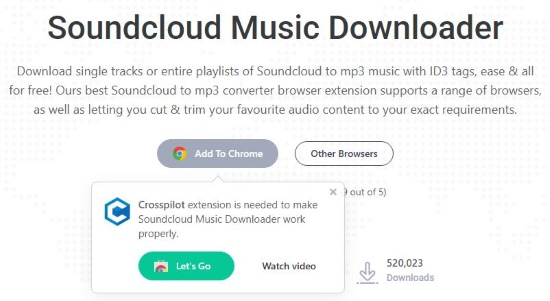
Step 1. Head over to the Addoncrop website and locate the SoundCloud Music Downloader page. To get started, the site will prompt you to add the core "Crosspilot" extension to your browser. Simply authorize this initial installation to proceed with the setup. Then return to the original page, where you can now seamlessly add the main SoundCloud downloader module.
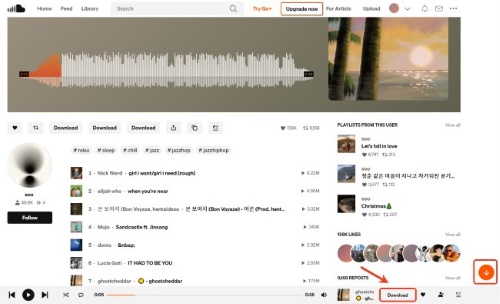
Step 2.Navigate to the SoundCloud website and open any track or playlist that you want to save for offline listening. A dedicated download icon should now be visible directly beneath the audio waveform, positioned right next to the "Like" options. Click it to grab your favorite SoundCloud songs.
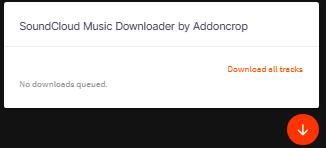
Step 3.If you are looking to save an entire album at once, keep an eye out for the "Download all tracks" feature. Clicking this button triggers the extension to quickly scan the entire webpage for all available audio files, and saves your chosen music from SoundCloud in MP3 files.
Editor's Real Test:
Although the extension claims it can download individual SoundCloud songs, I can't find any other options other than the download all button mentioned above. which can be quite inconvenient if you only want to download single track.
Pros
 A single, consistent option if you use multiple web browsers
Cons
 Requires installation of a separate "Crosspilot" companion extension to function
- May raise privacy or performance concerns for some users
- Can't only download tracks in batch
- Can only download SoundCloud to MP3
Part 2. Top Chrome SoundCloud Downloader Extensions
If Google Chrome is your daily driver for web browsing, you will likely prefer a reliable Chrome SoundCloud downloader extension. In this section, we will explore some of the top-rated options tailored exclusively for the Chrome Web Store. Most as a SoundCloud MP3 downloader Chrome extension, these specialized tools will help you effortlessly save your favorite tracks for offline playback.
Option 2. SoundCloud Track Downloader
For those who live in the Google Chrome ecosystem, SoundCloud Track Downloader is a lightweight and straightforward extension. It avoids complex features and instead focuses on doing one job well: enabling a download from its toolbar icon.
Step 1. Open the Google Chrome Web Store and go to SoundCloud Track Downloader extension page. Click the "Add to Chrome" button and confirm the installation when prompted.

Step 2. Go to any SoundCloud track page. Click on the SoundCloud Track Downloader icon in the extensions. Remember that you have to go to the main page of the track, or you will be getting this warning:

Step 3. After navigate to the main page of the track, click the extension icon in the address bar again, now you should be able be download the SoundCloud track as MP3 file to your computer.
Pros
- Very easy to install and use
- Minimal impact on browser performance
Cons
- Lacks advanced features like batch playlist downloading
- May not offer format selection
- Can only download SoundCloud to MP3
Option 3. SoundCloud Enhanced Pro
For users who demand more than a basic downloader, SoundCloud Enhanced Pro serves as a sophisticated media archiving tool. This extension focuses on a seamless, high-end user experience, prioritizing metadata integrity. It ensures that your local files are organized, correctly named, and visually complete with high-resolution imagery.
Step 1.Add this extension to your chrome browser. Then navigate to any individual track or full playlist on the official SoundCloud website.
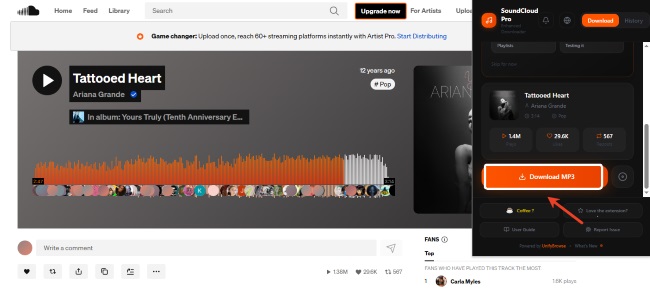
Step 2. Open the extension popup by clicking its icon in your browser toolbar. And you can view all available export options for the current page. Tap the "Download MP3" button to save your favorite songs from SoundCloud. And you can check your download history in the "History" tab.
Step 3.You can export the track with full metadata embedded, or use the dedicated "Disc" icon to download the standalone album cover in its highest resolution.
Pros
- Automatically tags artist, title, and genre; supports standalone high-res artwork export.
- Backend optimizations help bypass regional streaming restrictions.
Cons
- Limited to the information provided by the SoundCloud API.
- Requires manual interaction with the popup for single-track saves.
Part 3. SoundCloud Downloader Extensions For Firefox Users
The open-source community has developed several outstanding SoundCloud downloader extensions for Firefox that perfectly match the performance of their Chrome equivalents. These dedicated add-ons are widely celebrated by users for their rock-solid stability and clean integration directly into SoundCloud's native interface. Here are the most efficient Firefox tools to help you build your local SoundCloud music library.
Option 4. SoundCloud Downloader by anyo
This add-on is a popular and well-regarded choice specifically for Firefox users. "SoundCloud Downloader by anyo" is often praised in the community for its stability and seamless integration into the SoundCloud interface.
Step 1. Open the official Firefox Browser ADD-ONS library from within your browser. Go to SoundCloud Downloader by anyo extension page and click the "Add to Firefox" button. Allow the necessary permissions to complete the installation.

Step 2. Visit a song on SoundCloud. A download button will now be visible in the controls section under each track, next to the share and like buttons. Click the download button to save the audio file directly to your computer.

Pros
- Highly stable and feels like a native part of the SoundCloud website
Cons
- Functionality is exclusive to the Firefox browser
- Can only download SoundCloud to MP3
- Can't download SoundCloud music in batch
Option 5. SoundCloud Downloader by NotTobi
Unlike many tools that rely on external, often unreliable servers, SoundCloud Downloader extension by NotTobi communicates directly with official APIs. This technical advantage ensures a safer, more stable connection while maintaining a high level of privacy. Furthermore, it offers unique organizational tools to clean up your SoundCloud feed, making it a favorite for those who want a clutter-free experience.
Step 1. Visit the official SoundCloud website and navigate to the specific song or artist page you wish to archive.
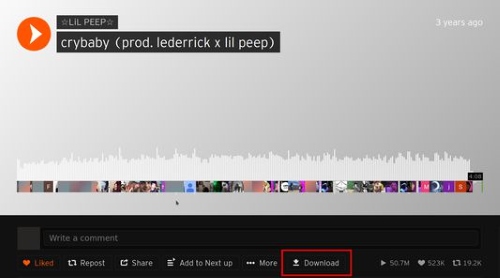
Step 2. Locate the new "Download" button that the extension adds to the interface. You will find it conveniently placed directly below the track's waveform, sitting right alongside the "Like" and "Share" options.
Step 3.Customize your output by clicking the extension icon in your browser toolbar to access the "Options" menu.
Step 4.Complete the save by clicking the download button. The file will be sent directly to your default download location, with all metadata and cover art already embedded.
Note:
If you are a SoundCloud Go+ subscriber, you can enable the "High Quality" setting to save SoundCloud tracks as M4A files; otherwise, the extension will default to a standard MP3 download. You can also enable "Track Name Normalization" for consistent file naming or toggle the "Stream Cleaning" feature to hide reposts and playlists from your feed.
Pros
- Uses official APIs rather than risky third-party websites for a safer experience.
- Exclusive support for downloading high-quality M4A files for Go+ subscribers.
- Includes "Stream Cleaning" to block reposts and simplify your music discovery.
Cons
- Requires frequent updates to remain compatible with API changes.
- Non-Go+ users are generally limited to standard MP3 quality.
- Lacks advanced multi-format conversion (e.g., to WAV or FLAC).
Part 4. The Best Alternative to SoundCloud Downloader Extensions
Browser extensions are convenient for occasional downloads because they work directly inside SoundCloud. Their limitations become more noticeable when you need to process a large playlist, choose between multiple output formats, manage bitrate and sample-rate settings, or organize a larger offline library. In that case, a desktop tool such as DRmare Streaming Audio Recorder provides more output control than a browser extension.
DRmare stands out as the premier alternative to SoundCloud MP3 downloader extension. Designed as a professional-grade music converter, it guarantees highly stable performance, offers lossless audio extraction, and easily handles massive playlist downloads in multiple formats, ensuring your offline library organized with all the ID tags.
SoundCloud Downloader Comparison-- Extensions vs. DRmare
| Feature | Browser Extensions | DRmare Audio Recorder |
|---|---|---|
| Browser Support | Specific to Chrome/Firefox | Works with any browser |
| Playlist Downloads | Limited / Varies | Yes, with high speed |
| Max Audio Quality | Usually 128kbps MP3 | Lossless (MP3, FLAC, etc.) |
| Batch Speed | Slow / Manual | Very Fast (Up to 100X) |
| Reliability | Low (Breaks often) | High (Professionally updated) |
- Step 1Configure Your Output Settings
Launch DRmare Streaming Audio Recorder. Before adding music, click the "Settings" icon in the left corner. In the new window, go to the "Music" tab to choose your desired output format (like MP3, FLAC, WAV, etc.) and customize audio parameters such as bit rate and sample rate to meet your needs.
- Step 2Select and Add Music for Conversion
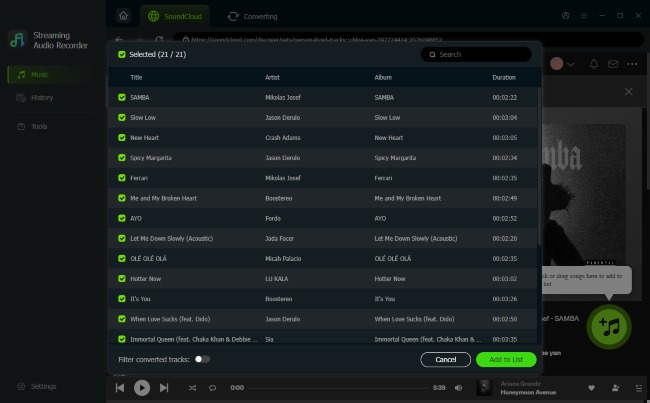
From the software's main screen, choose a streaming music platform like SoundCloud from the list. The built-in browser will open, allowing you to log in and navigate to the playlist, album, or track you want. Once you have found it, click the "Add" button and then "Add to List" to load the songs into the conversion queue.
- Step 3Download and Access Your Music
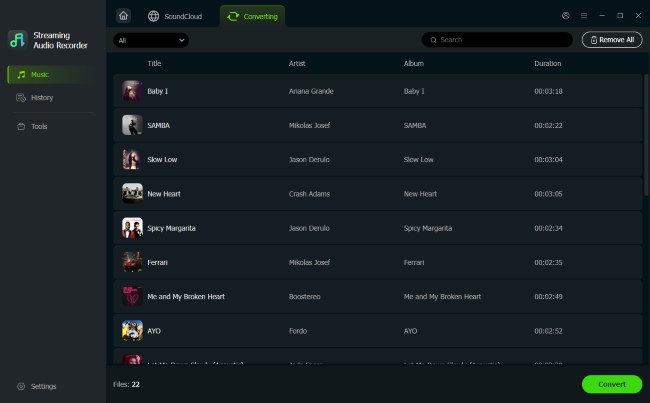
After adding all your desired tracks to the list, navigate to the "Converting" tab and click the "Convert" button. The software will begin downloading and converting the files to your chosen format. Once the process is complete, you can find the finished tracks under the "History" tab and click the folder icon to access the local audio files on your computer.
Part 5. Quick Comparison of 5 SoundCloud Downloader Extensions
Here is a quick comparison of five currently available SoundCloud downloader extensions. Their features and availability can change as browsers and SoundCloud update, so check the latest extension listing before installation.
| SoundCloud Downloader Extension | Browser | Batch Download | Metadata | Best For |
|---|---|---|---|---|
| Addoncrop SoundCloud Music Downloader | Chrome, Edge, Opera, Brave, Vivaldi, Yandex | ✅ | ✅ ID3 tags | Playlist download and audio trimming |
| SoundCloud Track Downloader | Chrome | ✅ | ✅ | Large playlists and bulk downloads |
| SoundCloud Enhanced Pro | Chrome | ✅ Up to 10 tracks once |
✅ ID3, cover art | Feature-rich Chrome experience |
| SoundCloud Downloader by anyo | Firefox | ❌ | ✅ Full metadata | Lightweight, simple Firefox downloads |
| SoundCloud Downloader by NotTobi | Firefox | ❌ | ✅ Title, artist, album, artwork | Firefox users and Go+ subscribers |
For a quick, free download of a single song, a browser extension is the perfect tool. They are easy to install and get the job done for casual listening. However, if you want to download entire playlists, need the best possible audio quality, and want a reliable tool that always works, a dedicated application like DRmare Streaming Audio Recorder is the superior choice. It's the best option for building a high-quality music library.

 Home
Home





User Comments
Leave a Comment