





Although a late entry to the streaming industry, launching in 2015, Apple Music's integration with devices like MacBooks, iPhones, iPads, and iPods has made it immensely popular. In fact, Apple Music now ranks as the second-largest music streaming service globally and even surpasses Spotify as the top music platform in the U.S. However, this popularity has led to Apple Music being frequently blocked in schools, workplaces, and other public networks to reduce network congestion or limit distractions. By 2026, network filters like Securly, GoGuardian, and FortiGuard have become more sophisticated at detecting VPN traffic and app signatures.
Fortunately, there are several safe ways to unblock these restrictions without hassle. This guide walks you through the best options to get Apple Music unblocked, ranging from "zero-trace" offline methods to advanced network masking. Then, you can enjoy your favorite tunes from Apple Music at school, workplaces, etc.
Quick Verdict: How to Get Apple Music Unblocked in 2026
| Method | Stealth Level | Success Rate | Best For... |
|---|---|---|---|
| DRmare Converter | ✅ Highest | 100% | Permanent offline use; zero network trace. |
| Offline Mode | ✅ Highest | 100% | Evading DPI firewalls; saving battery and mobile data. |
| Personal Hotspot | ✅ High | 95% | Personal devices; total network independence. |
| Proxy Server | ✅ High | 90% | Bypassing geo-blocks with low latency. |
| VPN | ⚠️ Moderate | 70% | Real-time unblocking (if not DPI-blocked). |
| Web Player | ⚠️ Low | 50% | Quick access on shared desktop browsers. |
Part 1. How to Get Apple Music Unblocked at School via Converting
If your school uses advanced traffic monitoring, the most invisible way is to listen is to avoid the school network entirely. By using DRmare Apple Music Converter, you can convert protected Apple Music streams into local files that require no internet connection to play. Since the school computer only sees a standard MP3 file, it's impossible for network firewalls to identify the music source.
It can convert Apple Music tracks to MP3, M4A, AIFF, FLAC, etc., making them accessible on any media player, even without an internet connection. What's better, it retains 100% of Spatial Audio and Lossless metadata during the conversion process. Under this circumstance, local files generate zero network traffic, making your listening activity undetectable to IT admins. You can access Apple Music at school and anywhere.
How to Get Apple Music Unblocked at School Computer
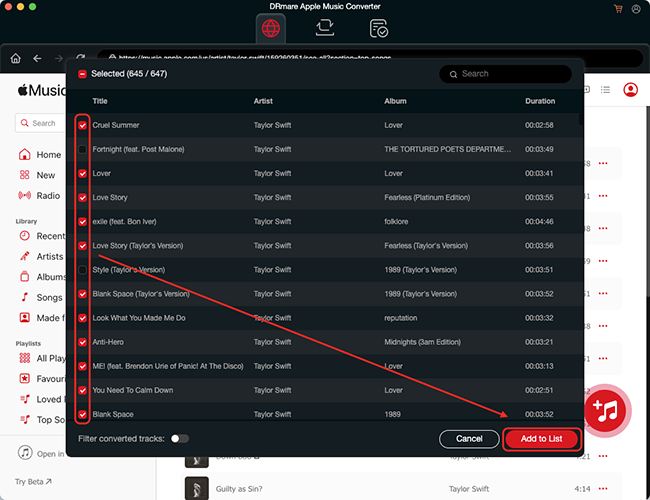
Step 1. Start by downloading the DRmare Apple Music Converter on your computer. Open it and authorize your Apple Account from the main interface by clicking the "Sign In" button. Now you can browse your library and click the "+" > "Add to List" button to load them.
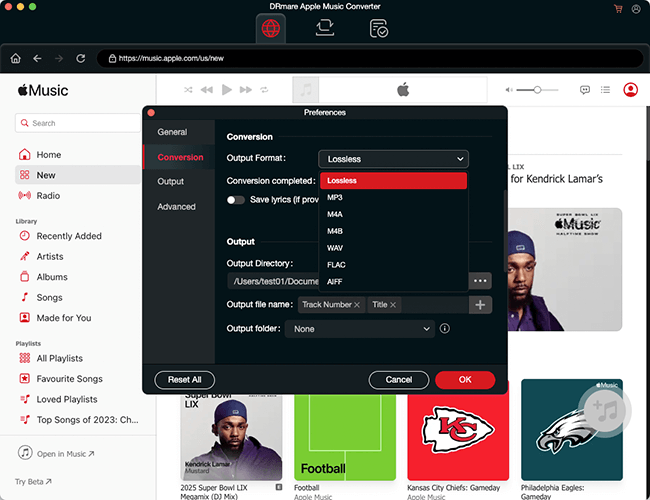
Step 2. Click the "DRmare Apple Music Converter" or "Menu" icon, and choose "Preferences" to open the setting windows, in which you can select MP3 as your desired output format of Apple Music.
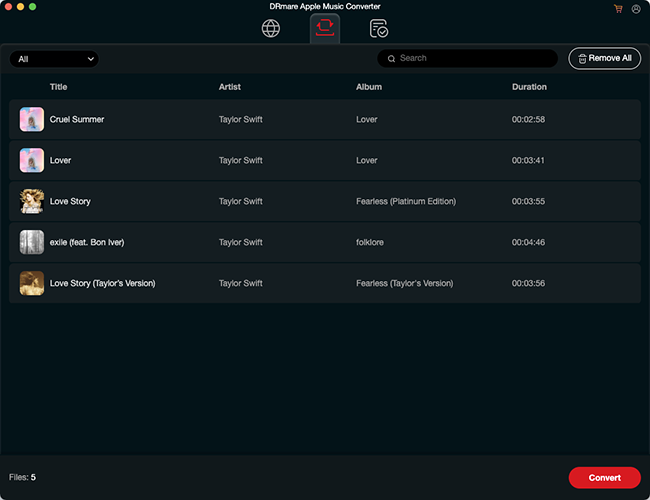
Step 3. Click the "Convert" button to remove Apple Music restriction and convert Apple Music to MP3 files at 30X faster conversion speed.
Step 4. Once converted, transfer the Apple Music MP3 files to any device, and you'll be able to play them offline without restrictions at school.
Note:
This method requires that you have access to Apple Music. To use it, convert your Apple Music tracks to MP3 on your home computer, then transfer the converted files to your school or work computer. Alternatively, if possible, connect your device to a different accessible network to complete the conversion directly.
Part 2. How to Get Apple Music Unblocked Using Personal Hotspot (Mobile Data)
If you have sufficient mobile data, setting up a personal hotspot from your phone can be a simple way to unblock Apple Music without modifying network settings. Alternatively, you can directly listen to Apple Music on your mobile devices by using mobile data.
Steps to Connect via Personal Hotspot:
Step 1. Enable the hotspot feature on your mobile device.
Step 2. Connect your laptop, tablet, or another device to your phone's hotspot.
Step 3. Open Apple Music and listen to unblocked songs and playlists without restrictions.
Note:
This method uses your mobile data, so ensure you have a sufficient data plan to avoid overage charges.
Part 3. How to Get Unblocked Apple Music via Web Player
The Apple Music Web Player can sometimes bypass network restrictions at school, work, or other places. Because HTTPS port 443, used by the Web Player, is open; however, traffic patterns specific to the dedicated App are more easily identifiable. You can use Apple Music Web Player to access your favorite songs. Here's how to!
How to Use Unblocked Apple Music Web Player at School
Step 1. Go to music.apple.com on your browser.
Step 2. Log in with your Apple ID.
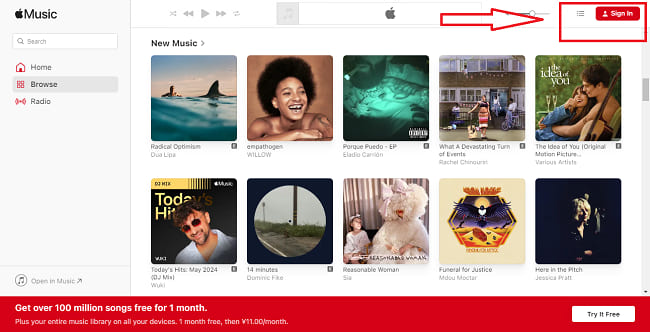
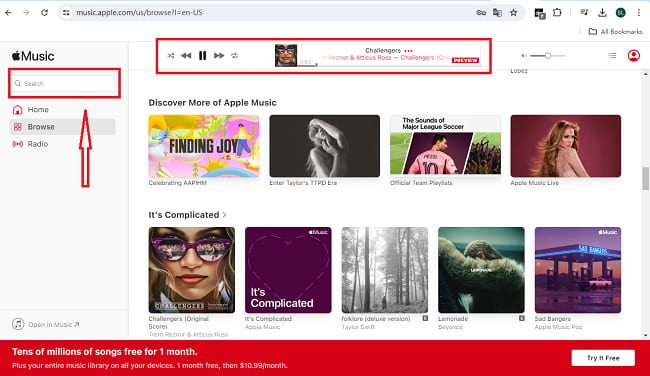
Step 3. Access and play your music directly from the web interface without needing the Apple Music app.
Benefits:
The web player uses less data and can be less restricted compared to the Apple Music app, which may be detected by stricter network firewalls.
Part 4. How to Unblock on Apple Music via Offline Mode
If you don't need real-time access to Apple Music, apart from using DRmare Apple Music Converter, its offline mode can be a great alternative. Apple Music lets you download songs, albums, and playlists directly to your device, allowing you to listen without an internet connection.
Steps to Get Apple Music Unlocked at School via Offline Listening:
Step 1. Before you arrive at school, open Apple Music on your device.
Step 2. Download your favorite Apple Music playlists, albums, or songs to your device.
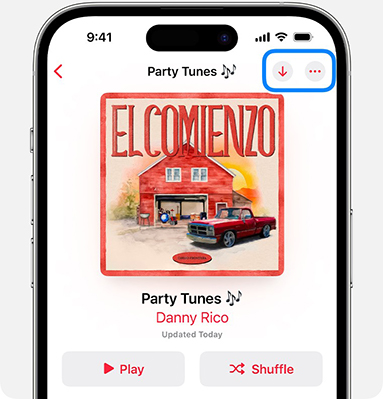
Step 3. Enjoy your Apple Music offline without the need to connect to the school's Wi-Fi.
Part 5. How to Get Unblocked Apple Music with VPN
A VPN can be one of the most effective tools to unblock Apple Music for school. By creating a secure tunnel for your internet connection, a VPN hides your activity and makes it look like you're accessing Apple Music from a different location.
How to Use a VPN to Get Apple Music Login Unblocked:
Step 1. Download a trusted VPN app (e.g., NordVPN, ExpressVPN).
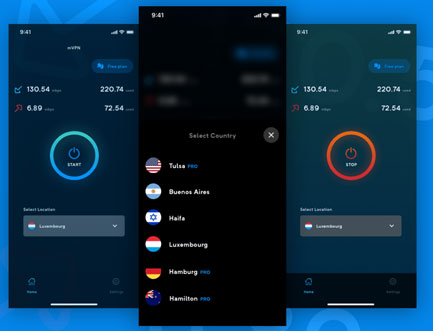
Step 2. Connect to a server outside your current network (choose a nearby server for better speed).
Step 3. Now, you can get Apple Music login unblocked and start to enjoy your playlists at school.
Note:
Some institutions may restrict VPN apps on their Wi-Fi. In that case, try using your mobile data if possible or a VPN that offers stealth options.
Part 6. How to Use a Proxy Server for Low-Latency Access
A Proxy Server acts as an intermediary between your device and the Apple Music servers. In 2026, proxies have become a preferred alternative to VPNs for streaming because they often provide faster speeds by only re-routing specific traffic.
- Geo-Blocking Fix: If Apple Music is restricted in your region or specific network, a proxy masks your IP with one from an accessible zone.
- Stealth Advantage: Proxies are often less "conspicuous" than VPN protocols, allowing them to slip through firewalls that specifically look for VPN signatures.
Part 7. FAQs about Staying Apple Music Unbocked at School
Why does my VPN get blocked at school?
Most school firewalls now use DPI (Deep Packet Inspection). If your VPN doesn't offer "Stealth" or "Obfuscated" servers, the network will kill the connection instantly. In this case, the Offline Conversion method is your best alternative.
Does the Web Player support Lossless audio?
No. As of early 2026, the Web Player is capped at 256kbps. For high-fidelity unblocked listening, we recommend converting Apple Music to FLAC via DRmare.
Is using a Proxy safer than a VPN?
A Proxy is generally faster for streaming, but it does not encrypt all your traffic like a VPN does. For school environments where privacy is key, a VPN or Offline Mode is safer.
Part 8. In Conclusion
Accessing Apple Music in restricted locations, such as schools or workplaces, is possible with the right tools and methods. Whether you choose a DRmare Apple Music Converter, VPN, offline mode, Web Player, personal hotspot, or Proxy server, these tips allow you to get Apple Music unblocked and enjoy your favorite playlists without interference.

 Home
Home




User Comments
Leave a Comment