





Waiting 12 months for your annual Spotify Wrapped to see your listening habits isn't always enough for data-curious listeners. This is where third-party tools like Favorite Music Guru step in. Instead of flashy graphics or waiting for a yearly recap, Favorite Music Guru gives you instant, on-demand access to your core listening habits, including favorite artists, top songs, genres, and other music patterns.
In this guide, we will explain what Favorite Music Guru is, how it works, what Spotify stats it can analyze, how it compares with Spotify Wrapped and Spotify 20, and whether it is a useful tool for understanding your music taste.

Important Note:
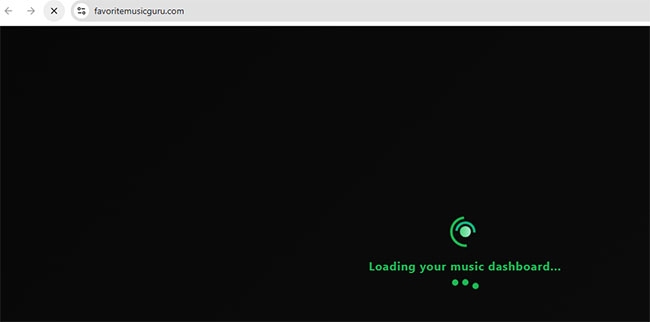
Please be aware that this guide specifically covers the tool located at https://favoritemusic.guru/, not the similarly named https://favoritemusicguru.com/. While they share the same name, the .com version is currently non-functional. After granting Spotify authorization on that site, it remains endlessly stuck on a "Loading your music dashboard" screen. Please ensure you are using the correct URL.
Part 1. What Is Favorite Music Guru?
- Website Link: https://favoritemusic.guru/
Favorite Music Guru is a streamlined, web-based Spotify statistics tool. By securely connecting to your Spotify account, it analyzes your playback history to reveal your most-listened-to artists and tracks.
Unlike heavy analytics platforms, its appeal lies in its simplicity. It strips away the clutter and gives you a straightforward, text-based ranking of your music identity. Unlike Spotify Wrapped, which is released as a yearly summary, Favorite Music Guru is designed for users who want to check their Spotify statistics on demand. You get immediate access to your listening habits across three distinct time horizons: the last four weeks, the last six months, and all time.
Part 2. What Spotify Stats Can Favorite Music Guru Analyze?
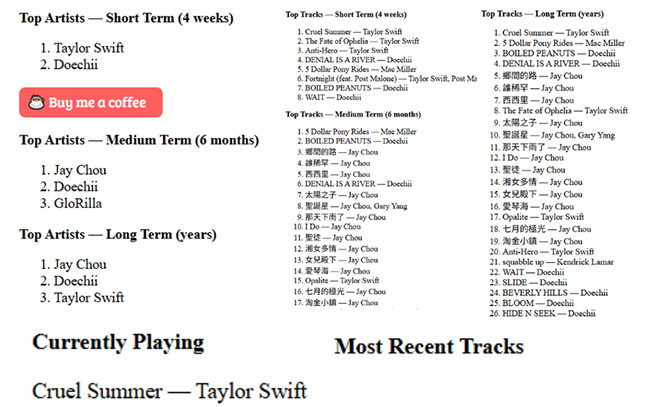
Based on our testing, Favorite Music Guru is purposefully minimalist. It focuses entirely on ranking your top tracks and artists across three distinct timeframes:
- Short-Term (Last 4 Weeks): Reflects your current obsessions and newest discoveries.
- Medium-Term (Last 6 Months): Captures broader trends, seasonal phases, and consistent favorites.
- Long-Term (All-Time): Reveals your foundational music identity since you first created your Spotify account.
Note on Advanced Analytics:
Favorite Music Guru does not track audio characteristics like tempo, energy, or danceability. If you are looking for deep mood analysis or complex genre visualizations, you will want to complement this tool with platforms like Stats.fm or Spotify Pie.
Part 3. How to Use Favorite Music Guru to Discover Your Listening Habits
Using Favorite Music Guru usually involves connecting your Spotify account through Spotify's authorization system. Getting started with your personal dashboard takes less than a minute. The interface is highly intuitive, allowing you to jump straight into your data.
How to See Spotify Stats Via Favorite Music Guru
Step 1. Open your web browser and visit the Spotify Web Player. Log into your Spotify account by entering your name passwords.
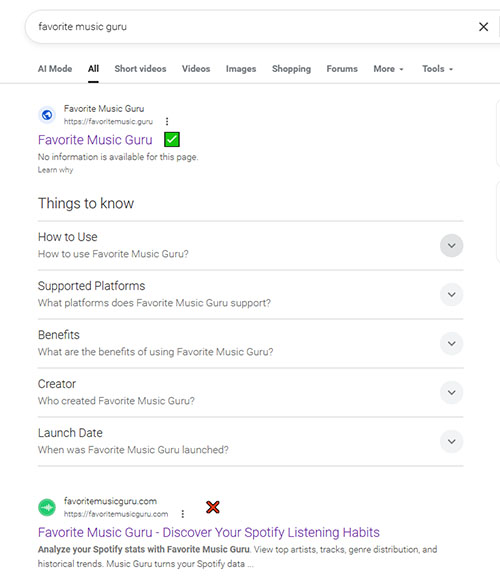
Step 2. Search for Favorite Music Guru in your web browser and click this right result to navigate to the official Favorite Music Guru website.
Step 3. It will show the listening habits based on your short-term, medium-term, and long-term listening horizons. You can instantly view your top artists and tracks.
Quick Tips:
- Results look wrong? Ensure you are connected to the Spotify account currently logged into your browser.
- Checking a different account? Go to Spotify.com, log into the desired account, and then return here.
Part 4. How to Download Favorite Music Guru Spotify Playlists for Offline Listening
Favorite Music Guru captures a perfect snapshot of your current musical taste. Because your listening habits and Spotify's algorithms are constantly evolving, many users want to preserve these specific top charts as permanent playlists before their stats inevitably change.
Whether you want to lock in your current summer rotation or prepare for a trip without internet access, here is how you can download your Favorite Music Guru results for offline listening.
For Spotify Premium Users: The Built-In Method
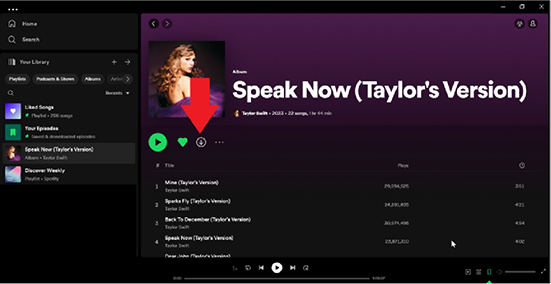
Once you use Favorite Music Guru to generate your customized top charts, you can easily save those results as new, dedicated playlists within your Spotify account. From there, simply open the Spotify app and toggle the built-in Download button to save the entire list directly to your device for offline playback.
For Spotify Free Users: The Permanent Backup Method
If you are a Spotify Free user, native offline downloading is restricted. To bypass this, you can use the DRmare Spotify Music Converter to save your Favorite Music Guru playlists locally.
Modern iterations of DRmare operate using an integrated web player module. Because it relies on this streamlined internal web browser pipeline rather than requiring standalone Spotify desktop application dependencies, it achieves significantly faster and more stable conversion speeds. It can download your top Spotify tracks directly into MP3, FLAC, WAV, M4A, AIFF, or M4B formats.
This approach ensures that your favorite musical eras are permanently preserved on your device, no matter what happens to your streaming library in the future.
Part 5. Is Favorite Music Guru Safe to Use?
When evaluating any third-party Spotify statistics tool, data privacy is usually the most pressing concern. It is completely natural to hesitate before granting a web app access to your primary music account.
Fortunately, Favorite Music Guru operates is widely considered safe by using industry-standard security protocols. The tool connects via the official Spotify OAuth API, meaning you log in directly through Spotify's secure servers and never actually hand your password over to the guru site.
- No Passwords Shared: You log in directly through Spotify's secure portal; Favorite Music Guru never sees your password.
- Read-Only Access: The tool can only view your public data and listening history. It cannot edit your playlists, delete your music, or post on your behalf.
Part 6. Favorite Music Guru vs Spotify Wrapped vs Spotify 20 vs Stats.fm
Favorite Music Guru is not the only way to explore Spotify listening history. Different tools serve different purposes. Here is how Favorite Music Guru stacks up against Spotify's official features and other popular Spotify trackers.
| Feature / Tool | Favorite Music Guru | Spotify Wrapped | Stats.fm | Spotify 20 |
|---|---|---|---|---|
| Main Purpose | Quick, straightforward list of top tracks/artists. | Official, highly visual annual recap. | Deep, continuous data tracking and mood analysis. | Nostalgic celebration of long-term milestones. |
| Availability | On-Demand (Anytime) | Annually (Late Nov/Dec) | On-Demand (App required) | Special Anniversary Event |
| Best For | Users who want a fast, no-nonsense look at what they are listening to right now. | Social media sharing and official yearly highlights. | Data nerds who want to track listening minutes, energy, and obscure genres. | Looking back at your historical firsts on the platform. |
Part 7. FAQs About Favorite Music Guru
Is Favorite Music Guru free?
Yes, the tool is completely free to use and does not require a premium Spotify account to generate your lists.
Does Favorite Music Guru show my exact listening minutes?
No. It provides rankings (1st, 2nd, 3rd, etc.) of your most-played music, but it does not tally the exact number of minutes or hours listened.
Why are my stats not loading in Favorite Music Guru?
If your lists are blank, it is usually due to a browser cache issue, a temporary server timeout, or having a brand-new Spotify account without enough listening data to analyze. Try clearing your browser cache or reconnecting your account.
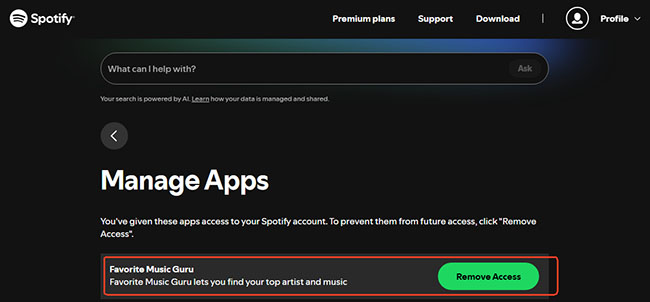
How do I remove Favorite Music Guru from Spotify?
If you no longer want Favorite Music Guru to access your Spotify account, you can remove its permissions through your Spotify account settings:
- Open Spotify app and go to Settings and Connected Apps.
- Find Favorite Music Guru in the list of connected applications.
- Click Remove Access.
- Confirm the action if prompted.
Part 8. In Conclusion
Favorite Music Guru offers a refreshingly simple, no-nonsense way to check your Spotify stats without waiting for December's annual Wrapped recap. By stripping away complex visualizations and focusing on straightforward lists, it provides an immediate, on-demand look at your most-played tracks and artists across your short, medium, and all-time listening history. You can now start to see your Spotify stats through Favorite Music Guru.

 Home
Home





User Comments
Leave a Comment