





Numark offers several DJ controllers, ranging from compact options like the DJ2GO2 Touch and Party Mix series to professional standalone units like the Mixstream Pro and Mixstream Pro+. For music enthusiasts and professional DJs alike, the combination of powerful Numark DJ controllers and Spotify's vast music library represents an ideal setup. However, the official integration between Spotify and Numark DJ controllers is totally differences.
In this comprehensive guide, we'll explore the relationship between Numark and Spotify, current compatibility challenges, and practical solutions that will have you mixing with your favorite Spotify tracks in no time.
Part 1. The Official Integration: Which Numark Controllers Work with Spotify?
The current compatibility of your Numark DJ equipment and Spotify depends entirely on whether it needs a laptop to run, or if it operates as a standalone unit.
Software-Dependent Numark DJ Controllers (Party Mix, DJ2GO2, Mixtrack)
If you use Numark DJ controller, you probably remember when Spotify abruptly pulled its DJ software integration back in 2020. For years, DJs had to jump through hoops or switch streaming services just to play their favorite playlists. But the good news is that now Spotify has officially returned to major DJ software platforms like Serato DJ, Rekordbox, and Algoriddim djay.
As long as you have a Spotify Premium account and have updated to the latest versions of Serato DJ (Lite/Pro), or Algoriddim djay, you can log in directly within the software and drag Spotify tracks onto your digital decks.
Standalone Numark Consoles (Mixstream Pro / Pro+)
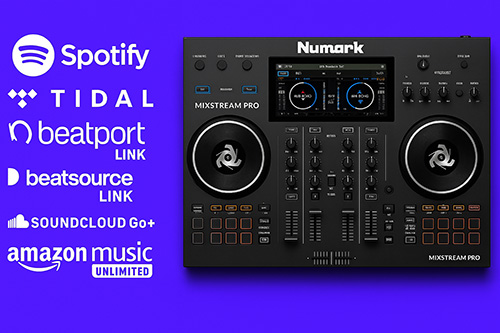
Here is where things get tricky. If you use an all-in-one standalone console like the Numark Mixstream Pro or Mixstream Pro+, you rely on the Engine DJ operating system. Currently, Engine DJ does not have a native Spotify integration.
While you can stream directly from TIDAL, SoundCloud Go+, Beatport LINK, Beatsource LINK, SoundCloud Go+, or Amazon Music over Wi-Fi, you still cannot log into Spotify directly on the Mixstream hardware. To play your Spotify playlists on these standalone units, you have to use a local file workaround.
Part 2. How to Use Spotify with Numark Party Mix
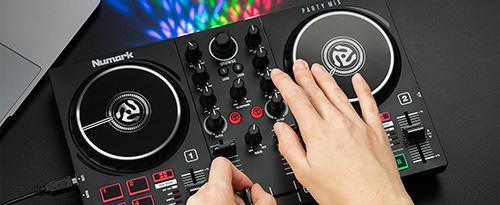
The Numark Party Mix (along with its newer siblings, the Party Mix II and Party Mix Live) is arguably the most popular entry-level controller on the market. Because it relies on a connected laptop, tablet, or phone to run the actual DJ software, it gets to take full advantage of the 2026 return of Spotify integration.
You can update the DJ software on your laptop to the latest version and connect the Numark Party Mix directly to your PC or Mac using the included USB cable. Then, you can refer to the guides below to perform a DJ set using Spotify.

The Three Major Limitations of Official Spotify Streaming with Numark Party Mix
- No Offline Mode: You must maintain a constant, stable Wi-Fi connection. If the venue's internet drops, the music stops. For serious gigging DJs, relying on club Wi-Fi is a massive gamble.
- Stems Are Disabled: Audio separation (Stems) is the biggest DJ innovation of the decade, allowing you to isolate vocals or drums on the fly. However, DRM copyright restrictions mean Serato and djay forcibly disable their Stems features when loading a streamed Spotify track.
- No Mix Recording: Want to record your set for SoundCloud or Mixcloud? If you play even a single streamed Spotify track during your set, the DJ software will lock the record button to prevent music piracy.
Part 3. How to Use Numark Mixstream Pro with Spotify
DJs have developed several workarounds to continue using their favorite Spotify tracks with Numark Mixstream Pro. Let's explore these options:
Option 1: Switch to Supported Streaming Services
The simplest solution is to switch to streaming services that are officially supported by Numark controllers and DJ software. Services like TIDAL and SoundCloud Go+ offer extensive music libraries similar to Spotify and integrate directly with many DJ controllers and software platforms.
For Mixstream Pro/Pro+ users, this is particularly straightforward as these controllers have native support for multiple streaming services built right into their Engine DJ operating system.
Option 2: Use Music Converter Software
Because of the limitations above, relying solely on live streaming isn't viable for everyone. Besides, Spotify is not compatible with Numark Mixstream Pro Go and Plus. If you need guaranteed offline stability, want to create live mashups using Stems, or need to load your tracks onto a USB for a Mixstream Pro, you need local audio files.
This is where a dedicated tool like the DRmare Spotify Music Converter comes in. Instead of being a mere backup plan, it acts as a bridge to unlock the full potential of your DJ software. It allows you to convert your Spotify playlists into high-quality, DRM-free local files (like 320kbps MP3 or lossless WAV/FLAC).
Once converted, these files belong to you. Serato won't disable Stems, Engine DJ will read them off your USB drive flawlessly, and a Wi-Fi outage won't ruin your dancefloor.
DRmare Spotify Music Converter offers a straightforward process to transform your Spotify music library into DJ-ready formats for your Numark controller. Here's how to use it:
- Step 1Download and Log In Spotify
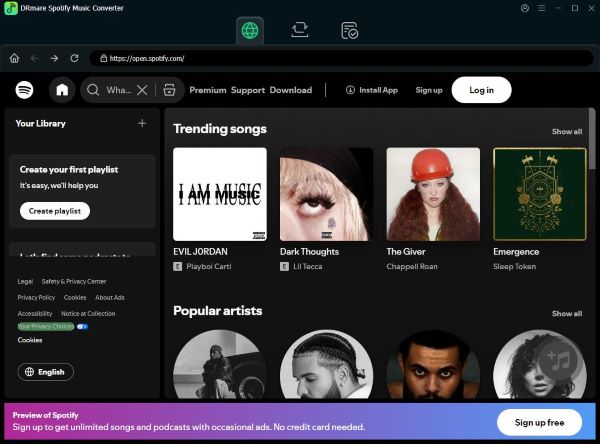
First, download and install DRmare Spotify Music Converter on your computer, then launch the program. Next, log into your Spotify account using the built-in Spotify web player.
- Step 2Add Spotify Music and Configure Output Settings
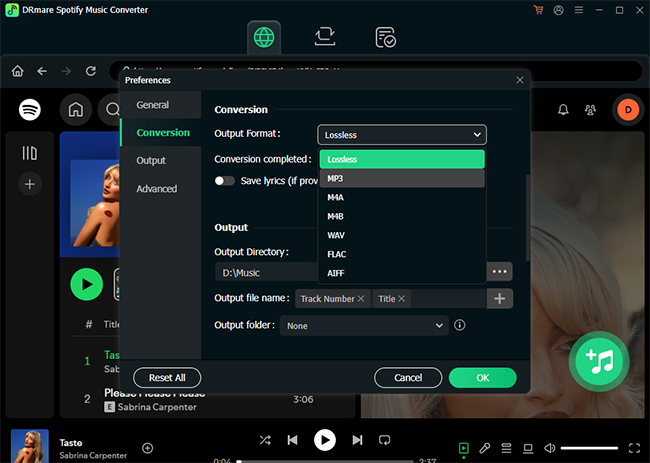
Second, select the music you want to convert by browsing through your Spotify content within the DRmare interface. You can add tracks by dragging and dropping them directly onto the green Music icon in the bottom-right corner. Before converting, access the Preferences menu to customize your output settings including audio format, bitrate, etc..
- Step 3Download Spotify Music for Numark
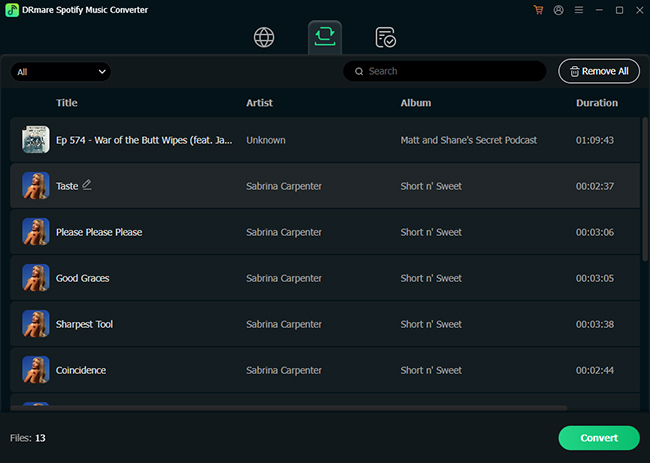
Third, click the Convert button to start the process. DRmare will automatically download and convert your Spotify music at 15X speed. When complete, you'll find your converted tracks under the Converted tab, ready to import into your DJ software and use with your Numark controller. The software preserves all original metadata and ID3 tags, making library organization seamless for your DJ sessions.
Comparison: Official Spotify Streaming vs. Local MP3s with Numark
To summarize the current landscape, here is how the two methods stack up for working DJs:
| Feature | Official Spotify Streaming | DRmare Local File Method |
|---|---|---|
| Internet Requirement | Constant Wi-Fi needed | 100% Offline playback |
| Numark Mixstream Support | Not Supported | Perfect via USB drive |
| Stems / Audio Separation | Disabled by software | Fully Unlocked |
| Set Recording | Blocked | Fully Unlocked |
Part 4. FAQs About Numark Spotify Integration
Why doesn't my Numark Mixstream Pro have a Spotify option?
The Mixstream Pro runs on Engine DJ, a standalone operating system. Spotify has currently only signed licensing agreements with laptop-based software like Serato and djay. Until a deal is struck with Engine DJ, you must convert your Spotify playlists to a USB drive to play them on standalone hardware.
Can I record my live mix if I use Spotify through Serato?
No. DJ software automatically disables the internal recording feature when a streamed track from Spotify is loaded to the deck due to strict copyright enforcement. If you want to record your sets, you must use locally stored tracks.
Part 5. Conclusion
DJing with Spotify is easier than ever, but the best setup depends on your hardware. Whether you're using a beginner-friendly controller like the Numark Party Mix or a standalone system like the Mixstream Pro, there are ways to integrate Spotify into your workflow.
Official Spotify Numark DJ integration is convenient for casual mixing, but limitations such as requiring an internet connection, disabled Stems, no recording support, and lack of compatibility with standalone Engine DJ devices can be restrictive.
For complete flexibility, DRmare Spotify Music Converter provides a practical alternative by converting Spotify tracks into local audio files. This enables true offline playback, full access to DJ software features, and compatibility with virtually any Numark device.

 Home
Home





User Comments
Leave a Comment