





While Tidal delivers top-tier lossless audio, its strict offline playback restrictions remain a major frustration for subscribers wanting to listen on MP3 players. To bypass the limitations, you may turn to dedicated third-party downloading software. And NoteBurner frequently emerges as a popular tool among the available options. In this comprehensive Noteburner Tidal music converter review, we break down its core features and authentic user feedback to help you determine if it is truly the right investment for your offline listening needs.
Part 1. What is NoteBurner Tidal Music Converter
NoteBurner is a dedicated desktop application designed to help you bypass platform restrictions and download Tidal tracks on your Mac or Windows. It offers flexible download ports, allowing you to extract tracks via either the dedicated Tidal desktop application or the built-in web player interface. This enables you to transfer your favorite Tidal albums to MP3 players or any device without needing an active internet connection. When evaluating any digital audio tool, its core capabilities dictate whether it can truly meet your offline listening demands. NoteBurner is able to handle audio extraction while preserving the original listening experience.
Key Features of NoteBurner Tidal Music Converter
-

Universal Formats
It faithfully preserves both High-Fidelity and Master audio resolutions during the extraction process. You can seamlessly convert your favorite albums into formats, including MP3, FLAC, WAV, AAC, AIFF, and ALAC, ensuring compatibility with any device.
-
Accelerated 10X Batch Processing
Say goodbye to waiting hours for a single album to download. NoteBurner supports batch processing, allowing you to queue up massive playlists and capture them at up to 10 times the normal speed.
-
Smart Organization
The software automatically retains all critical ID3 tags. Additionally, it is equipped with an ID3 tag editor, a local audio converter, and a CD burner for physical media enthusiasts.
Part 2. Real User Feedback on NoteBurner Tidal Music Converter
Many users praise NoteBurner for its clean, beginner-friendly interface that makes converting music quick and simple. It is also valued for preserving HiFi audio quality and keeping full ID3 tags, which helps organize large offline libraries efficiently.
Some users criticize NoteBurner's relatively high price and strict subscription model, noting potential extra charges when renewing an expired license. Others mention occasional slow performance or playlist loading delays after updates. A few audiophiles also report slight audio quality differences compared with the original Tidal master streams.
 I've bought 'lifetime' noteburner for tidal about a year ago. It's not cheap but it works great - easy to use, labels tracks correctly and sorts them if you want it to. I've had problems with logging back in, but support responded quickly and everything is working again.
-- From Trustpilot
Software worked fine. But now there's no option for me to renew my monthly subscription or sign up for a new one under another account. Their website only offers yearly and lifetime subscriptions. I don't want or need either. And since I updated the noteburner it has gone really slow opening up and getting the music to load.
-- From Trustpilot
Part 3. How to Use NoteBurner to Convert Tidal Music
Despite some of the problems mentioned in the user feedback section, operating NoteBurner Tidal Music Converter is actually a highly manageable process. The entire audio extraction process takes only a few clicks. The following step-by-step guide will walk you through the workflow of downloading Tidal tracks to build your offline library.
Note:
The actual output quality of NoteBurner heavily depends on the specific download mode and format you select. To preserve the ultimate HD or Ultra HD lossless audio, you must extract tracks directly through the Tidal App mode. Conversely, the built-in Web Player mode offers faster conversion speeds but caps the audio quality between 256 kbps and 320 kbps.
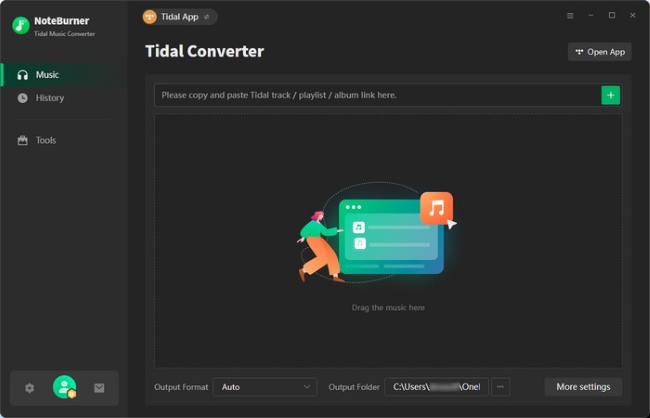
- Step 1Launch NoteBurner Tidal Music Converter
Start the installed NoteBurner app on your computer. Upon opening, the intuitive interface will ask you to select your preferred audio source. It is highly recommended to pick the "Tidal app" option over the web player, as this ensures you can obtain premium HiFi and MQA sound quality.
- Step 2Choose Output Format
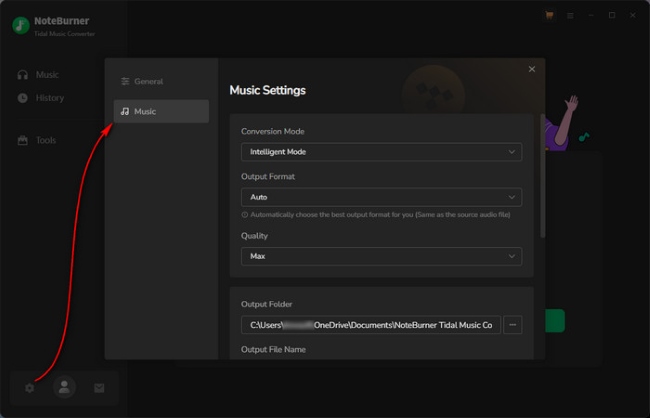
Click the gear-shaped "Settings" icon situated at the bottom-left corner. Here, you can define your core audio parameters and select a format that fits your playback needs. You can also keep your local music library perfectly organized by categorizing the upcoming downloads into specific folders based on artist or album names.
- Step 3Add Tidal Songs and Playlists
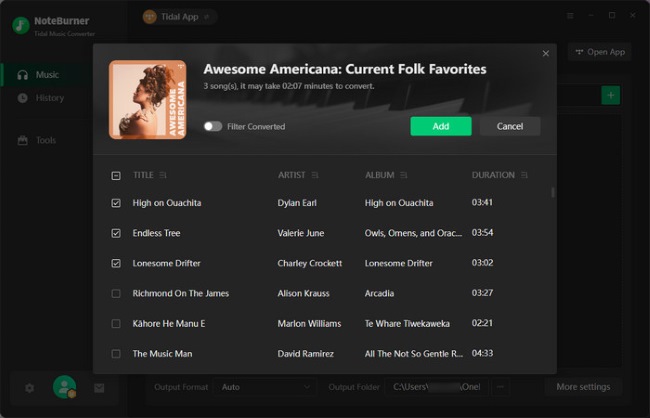
With the official streaming application open alongside the converter, browse for the specific tracks you wish to keep forever. Simply drag and drop the target playlist or album directly into the NoteBurner parsing window. Once the program reads the data, a list will appear where you can check the exact songs you need and click the "Add" button.
- Step 4Convert Tidal Music to MP3
After your conversion queue is fully loaded, click the prominent "Convert" button to initiate the downloading phase. The tool will remove DRM from your selected Tidal tracks while simultaneously embedding all crucial ID3 metadata directly into the new files.
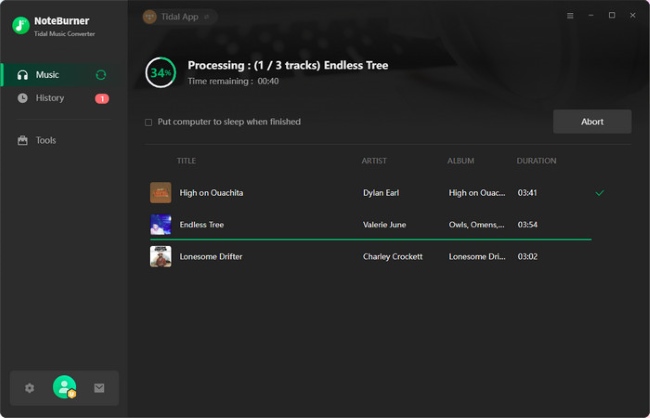
- Step 5Find Offline Tidal Music Files
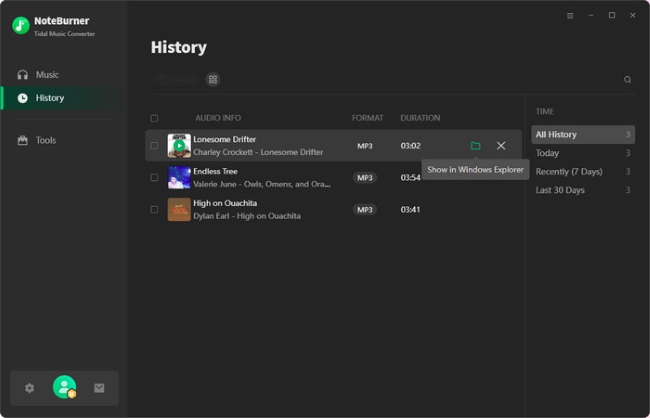
When the progress bar finishes, easily locate your newly downloaded Tidal music by navigating to the "History" tab on the left-side panel. Or you can also find them by hovering your mouse over any completed track and clicking the small folder icon.
Part 4. DRmare vs. NoteBurner Tidal Music Converter
For listeners who exclusively use Tidal, NoteBurner certainly gets the job done. However, if your music habits bridge across multiple services, buying a separate converter for every single app is simply not cost-effective. This is where DRmare Streaming Audio Recorder steps in as a highly practical alternative. It acts as an all-in-one hub capable of high-fidelity audio from ten different streaming platforms with fully integrated web players. It is a highly efficient and long-term solution to build an expansive offline music library without juggling multiple software subscriptions. The detailed steps for using DRmare Streaming Audio Recorder to download Tidal music can be found in the article below.
Why choose DRmare Streaming Audio Recorder:
- Fast Downloads: Rapidly saves tracks at 37X speed to your local computer regardless of your account tier, empowering you with permanent offline playback even if you cancel your subscription.
- Hi-Res Audio Preservation: Faithfully captures the original 24-bit/192kHz lossless sound, ensuring your downloaded files deliver a top-tier, audiophile-grade listening experience.
- Universal Format Output: Converts protected streams into standard formats like MP3, FLAC, WAV, and AIFF, making it effortless to transfer your music to smartwatches, MP3 players, or smart speakers.
- Automated Library Organization: Meticulously retains all essential ID3 metadata—including titles, artists, and album covers—so your massive offline collection remains perfectly sorted.
Here is a quick comparison to help you visualize the differences:
| Feature | NoteBurner Tidal Converter | DRmare Streaming Audio Recorder |
|---|---|---|
| Primary Function | Dedicated Tidal converter | All-in-one recorder for 10 platforms |
| Supported Platforms | Tidal only | Tidal, Spotify, Amazon Music, Apple Music, etc. |
| Output Formats | MP3, FLAC, WAV, AAC, AIFF, ALAC | MP3, FLAC, WAV, M4A, AIFF, M4B |
| Conversion Speed | 10X | 37X |
| Lossless Quality | High-Fidelity and Master Quality | HiFi and HiRes FLAC |
| ID3 Tag Preservation | Yes | Yes |
| Price (Monthly) | $14.95 (Not Available Now) | $27.95 |
| Price (Yearly) | $44.95 | $79.95 |
| Price (Lifetime) | $89.90 | $139.95 |
| Podcast Download | √ | √ |
| Audiobook Download | √ | √ |
| Free Trial Limitation | First minute | First minute |
| Tidal Premium Needed | No | No |
Note:
The pricing details provided in this review reflect the standard rates at the time of writing, but they are subject to change due to limited-time promotions. Therefore, it is highly recommended to visit the official NoteBurner and DRmare websites to check for the most up-to-date pricing before making your final purchase decision.
Part 5. Final Verdict
The NoteBurner Tidal Converter is a capable and reliable choice for dedicated Tidal subscribers who want to secure their favorite high-resolution albums locally. If your music tastes span across multiple streaming platforms, DRmare Streaming Audio Recorder stands out as the superior, multi-purpose alternative. Whichever software you ultimately choose, both provide a secure, high-quality solution to permanently liberate your favorite tracks for unrestricted offline playback.

 Home
Home





This is the complete user guide of downloading and converting Tidal music with DRmare Streaming Audio Recorder for Windows and Mac.