





Because of limited playback devices, many Apple Music users are searching for a reliable way to create permanent backups for offline access on any device. This is where AM-DL (Apple Music Downloader) enters the conversation as a streamlined, web-based solution that promises high-quality audio without the typical bloatware.
But does AM-DL actually work well in practice? Is it safe? And can it really compete with paid Apple Music converters? In this comprehensive review, we will explore whether AM-DL lives up to the hype. We will analyze its technical capabilities, user interface, and whether it truly offers a lossless experience.
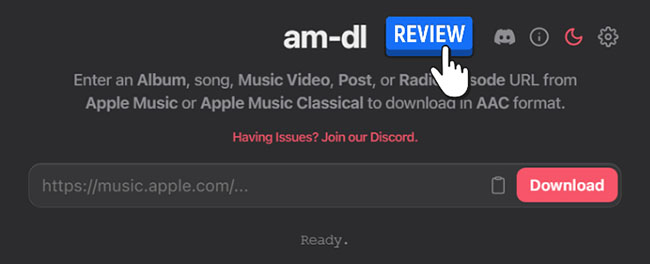
Quick Verdict:
AM-DL performs well for quick, single-link downloads and even supports playlist-to-ZIP processing with decent audio quality. In testing, it delivers high-quality AAC output with proper metadata preservation.
However, stability is inconsistent, especially with large playlists and server-heavy requests. For casual access and fast exports, it works well, but power users may find a desktop solution more dependable.
Part 1. What Is AM-DL? An Overview of the Tool
Basic Info:
- Link: https://am-dl.pages.dev/
- Availability: Mac, Windows, iOS, and Android
- Support Music Content: Album, Song, Music Video, Post, or Radio Episode URL from Apple Music or Apple Music Classical
- Download Output: M4A, ZIP
- Recommend Level:⭐⭐⭐⭐
AM-DL is a specialized Apple Music downloader online hosted via Cloudflare Pages that allows users to parse Apple Music links and download content to their devices. Unlike many competitors that function as recorders, AM-DL processes Apple Music links and retrieves available audio streams. Because it is browser-based, it reduces the security risks associated with downloading untrusted executable files on Windows or macOS.
Part 2. Key Features of AM-DL Apple Music Downloader
AM-DL distinguishes itself as a specialized web-based utility designed for comprehensive content extraction from Apple Music. To give you a better idea of what this tool can do, here are the core features of AM-DL:
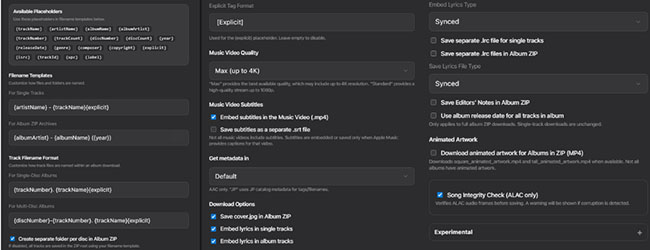
Song and Album Downloads: It enables direct downloads of individual Apple Music tracks or full albums via pasted links. The browser-based workflow requires no software installation or account creation.
4K Music Video Support: Unlike many audio-only tools, AM-DL supports high-resolution video downloads up to 4K. Advanced video features include multiple quality selections and subtitle embedding and exporting.
Support M4A and ALAC Output Formats: It supports M4A (AAC) at 256kbps, the native standard for Apple Music, as well as ALAC (Apple Lossless Audio Codec) for those who demand bit-perfect replicas.
Preserve Metadata, Lyrics, and Artwork: AM-DL excels at preserving file integrity for organized Apple Music libraries. Supported elements include:
- Metadata: Artist, album, and editor's notes.
- Visuals: High-quality and animated cover art.
- Lyrics: Synced lyrics and LRC file export.
Playlist and Batch Processing: Users can process entire playlists or export multi-disc albums as structured ZIP archives. While efficient for bulk downloads, reliability may vary with exceptionally large playlists, occasionally requiring manual retries for failed tracks.
Custom File Organization: To eliminate manual renaming, AM-DL offers advanced customization tools:
- Naming Templates: Define custom file naming conventions.
- Folder Structures: Automated organization by artist or album.
- Storefront Metadata: Regional metadata options for accuracy.
Part 3. How to Use AM-DL to Download Apple Music Online
AM-DL is designed for efficiency. Using the tool is remarkably straightforward, even for those who aren't tech-savvy. The process is entirely link-based, meaning you only need the URL from your Apple Music app or browser.
- Step 1Copy the Apple Music Link
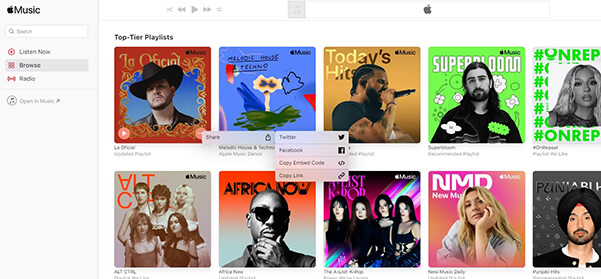
Open the Apple Music app or web player. Navigate to the specific song, album, playlist, or music video you wish to save. Click the three-dot menu (...), select Share, and then click Copy Link to copy the link to your clipboard.
- Step 2Paste the Apple Music URL into AM-DL
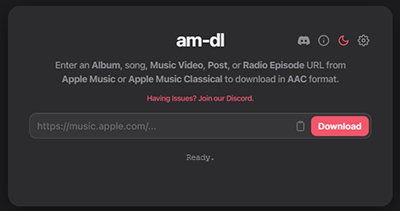
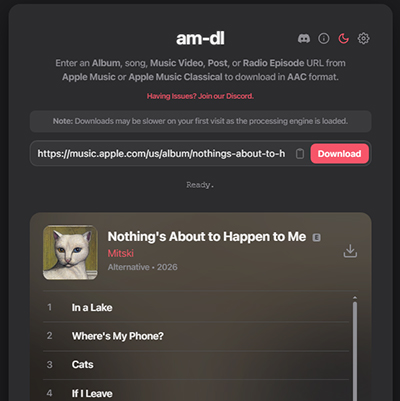
Visit the AM-DL website and paste your link into the primary input field located in the center of the homepage. Tap the Download button, and the tool will automatically analyze the URL and display the available tracks or video content.
- Step 3Configure Apple Music Download Settings
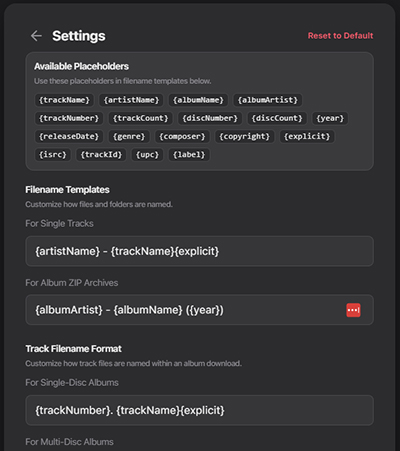
Before clicking download, navigate to the "Settings" menu at the top-right corner of the main interface and tailor the output to your library's needs by adjusting the following preferences:
- Audio/Video Quality: Choose your preferred resolution (up to 4K for video).
- Metadata & Lyrics: Toggle options for embedded artwork, synced lyrics, or LRC file exports.
- Packaging: Select ZIP packaging for albums or playlists to keep files bundled together.
- Step 4Execute the Apple Music Download
Once your settings are finalized, click the Download button next to the playlist or album title or the single track title. The browser will process the files; for large playlists, ensure your browser window remains active to prevent interruptions. Once complete, your files will be ready for offline use in your local storage.
Part 4. Performance & Audio Quality: Editor's Real-World Test
To evaluate the reliability and output quality of AM-DL, we conducted a series of tests focusing on batch processing and spectral analysis.
Test Environment:
- Devices: Windows 11
- Web Browser: Chrome
- Album: Mitski's Nothing's About to Happen to Me
- Audio Analyzer: Spek
Performance & Stability
During our testing, we processed a playlist containing over 10 tracks. The tool successfully packaged the entire set into a single M4A ZIP archive, maintaining the original track order and metadata.
- Individual Tracks: Downloading single tracks from the same playlist was seamless and fast.
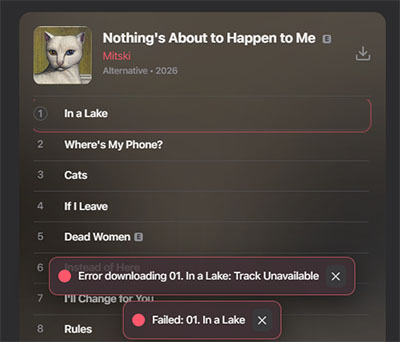
- Known Issues: We occasionally encountered "Error Download, Track Unavailable" prompts. These are triggered by server-side timeouts or local internet fluctuations; usually, a simple page refresh or a retry of the specific track resolves the issue.
Audio Quality Analysis
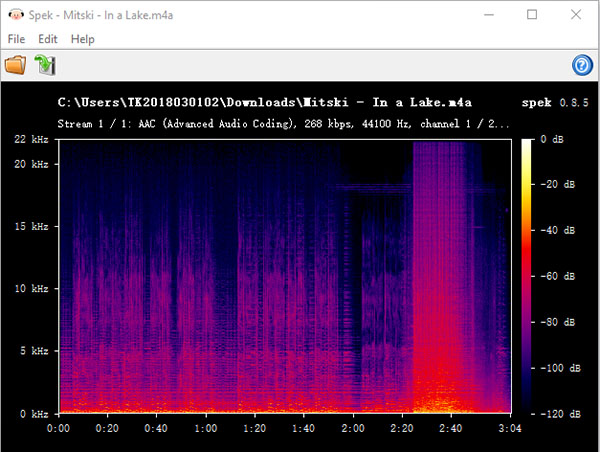
We analyzed the downloaded Apple Music M4A files using Spek (Acoustic Spectrum Analyser) to verify if the tool delivers genuine quality or simply upscales low-bitrate files.
| Metric | Technical Result |
|---|---|
| Format | AAC (Advanced Audio Coding) |
| Bitrate | ~268 kbps (Variable) |
| Sample Rate | 44,100 Hz |
| Frequency Cut-off | 20 kHz |
Expert Verdict:
The spectral analysis reveals a consistent frequency cut-off at 20 kHz, which is the hallmark of high-quality 256kbps–320kbps AAC encoding. This matches the "High Quality" tier provided by Apple Music's official web stream.
While it does not reach "Hi-Res Lossless" levels, the audio is remarkably clean with no signs of transcoding artifacts or fake bitrate inflation. For the vast majority of listeners and hardware setups, this provides a transparent, studio-standard listening experience.
Note:
Results may vary depending on track availability, regional licensing, and server conditions at the time of testing.
Part 5. Pros and Cons of AM-DL: A Balanced Perspective
While AM-DL offers incredible utility, it is important to weigh its strengths against its limitations to ensure it fits your specific workflow.
Pros
 Zero installation; fully compatible with mobile and desktop browsers.
- Delivers genuine 256kbps AAC; supports high-fidelity output.
- Ad-free and minimalist; exceptionally fast link parsing.
- Automatic extraction of synced lyrics and high-res art.
- Supports playlist-to-ZIP conversion for easy library building.
Cons
 Dependent on the site's server status and domain stability.
- Higher-quality files increase processing time and server load.
- No built-in web player to preview tracks before downloading.
- Occasional metadata gaps with regional or "Storefront" exclusives.
- Large playlists can be unstable, sometimes requiring manual retries.
Part 6. Best Alternative to AM-DL Apple Music Downloader
While AM-DL is an excellent quick-fix for browser-based downloads, its dependency on web servers and occasional stability issues with large playlists can be limiting for power users. For users who require more stable batch processing or consistent lossless output, desktop-based tools, like DRmare Apple Music Converter may provide a more predictable experience.
Why Choose DRmare Over Web-Based Tools?
Unlike online downloaders that rely on browser scripts, DRmare is a dedicated desktop application that provides a more stable and high-performance environment for managing your library.
- 100% Lossless Quality: While AM-DL is capped at high-quality AAC, DRmare can preserve the original 100% Lossless audio quality, capturing every detail of your music.
- 30X Conversion Speed: Equipped with advanced decryption technology, it processes entire albums and playlists up to 30 times faster than standard web-based tools.
- Built-in Apple Music Web Player: You no longer need to jump between your browser and an app. You can search, browse, and add tracks directly within the DRmare interface for a more streamlined workflow.
- Universal Format Support: Beyond M4A, DRmare allows you to convert Apple Music into a variety of formats, including MP3, FLAC, WAV, AIFF, and M4B, ensuring compatibility with any device.
- Advanced Metadata & ID3 Editing: It automatically retains all ID3 tags (artist, album, year, genre) and even allows you to manually edit them to keep your offline library perfectly organized.
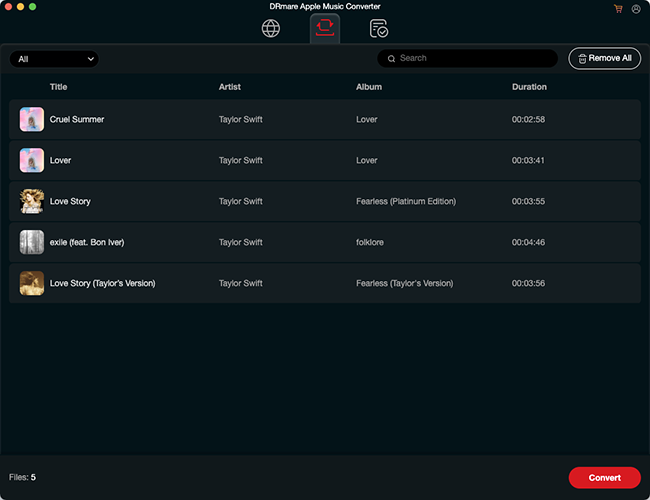
Comparison: AM-DL vs. DRmare Apple Music Converter
The following table compares AM-DL and DRmare Apple Music Converter to help you decide which tool best fits your library management needs.
| Feature | AM-DL (Online) | DRmare Apple Music Converter |
|---|---|---|
| Platform | Web-based (Browser) | Desktop (Windows / macOS) |
| Installation | None required | Requires software installation |
| Max Audio Quality | ~268kbps AAC (High Quality) | 100% Lossless (ALAC/FLAC) |
| Conversion Speed | Standard (Internet dependent) | 30X Ultra-Fast |
| Batch Downloading | Supports ZIPs (May be unstable) | Stable Batch Processing (Large Playlists) |
| Video Support | Up to 4K (MP4) | No (Audio only) |
| Output Formats | M4A | MP3, FLAC, WAV, AAC, M4A, M4B |
| Metadata & ID3 | Automatic (Lyrics & Art) | Advanced Editor (Manual tag editing) |
| Offline Player | No | Integrated Media Player |
| Success Rate | Moderate (Link parsing errors) | High (99% Success Rate) |
| Price | Free (with daily limits) | Premium (Starts at $19.95) |
FAQs About AM-DL Downloader
Why is AM-DL not working sometimes?
AM-DL may fail due to server load, expired links, or temporary parsing issues. Refreshing the page or retrying often resolves the issue.
Does AM-DL support Apple Music playlists?
Yes, playlists are supported, but large playlists may require retries for some tracks due to server limitations.
Is AM-DL safe to use?
AM-DL does not require installation, which reduces software-related risks, but as a browser-based tool, users should still be cautious of third-party dependencies.
Does AM-DL provide true lossless audio?
No. In testing, output is high-quality AAC (around 256–268kbps), but not true lossless ALAC.
Final Verdict: Is AM-DL Worth Your Time?
If you need a fast, free, and high-quality solution for managing Apple Music content offline without the hassle of software installations, AM-DL is a highly recommended utility that consistently delivers on its promises. However, if you are a heavy music lover, want to build a permanent high-fidelity collection, you can use its alternative, DRmare Apple Music Converter. As with any third-party tool, users should remain mindful of copyright regulations and utilize the service for personal backups only.

 Home
Home





User Comments
Leave a Comment