





 I recently got a Walkman and want to load it with a few hundred songs from Apple Music. I primarily use it for audiobooks but want to expand my library. Has anyone used APLMate? I'm looking for feedback on its reliability or better alternatives for high-volume downloads.
Many users searching for a way to save their favorite Apple Music tracks offline eventually stumble upon APLMate. It markets itself as a free, online solution to convert Apple Music links into downloadable MP3 files. But does it actually work as expected? Is APLMate safe in real-world use? This review breaks down APLMate's features, safety considerations, audio quality performance, and practical limitations based on real testing patterns and technical analysis.
Quick Verdict:
APLMate is a convenient online tool for occasional single-track use. It works in some cases, but stability is inconsistent, and playlist processing is unreliable. Audio quality may vary depending on the source and processing path. For users who need consistent batch downloads and higher reliability, desktop tools such as DRmare Apple Music Converter provide a more stable workflow.
Part 1. What Is APLMate
Basic Info:
- Link: https://aplmate.com/
- Availability: Web browsers on Mac, Windows, Android, and iOS
- Claimed Content Support: Songs, Albums, Playlists
- Download Output: MP3
- Recommendation Rating:⭐⭐⭐
APLMate is a free, web-based Apple Music downloader designed to process links of Apple Music tracks, albums, and playlists and generate downloadable audio files in MP3 files. It runs entirely in a browser, meaning no installation or account setup is required. Users simply paste a track, album, or playlist link, and the tool generates downloadable results.
Key Features of APLMate
- Format Conversion: Automatically outputs MP3 format downloads.
- Platform Accessibility: As a browser-based utility, it works across Windows, macOS, iOS, and Android.
- Metadata Preservation: The tool attempts to retain ID3 tags, such as artist names and album art, to keep local music libraries organized.
- Intuitive Interface: Designed for accessibility, allowing non-technical users to navigate the downloading process easily.
- No Subscription Required: It allows for the retrieval of music without requiring an active Apple Music account or login credentials.
- Zero Cost: The service is marketed as a "completely free" alternative to paid recording software.
The main appeal of APLMate is its simplicity. However, its performance depends heavily on server conditions and link compatibility.
Part 2. How Does APLMate Actually Work for Ripping Apple Music?
The platform advertises high-fidelity 320kbps MP3 downloads sourced directly from Apple Music. However, based on observed behavior during testing, APLMate processes Apple Music links through a metadata matching system.
Instead of directly accessing Apple Music's protected streams, the tool appears to match track information and generate downloadable audio from available sources. This design explains why:
- Some tracks may vary in quality
- Playlist results are not always consistent
- Certain links may fail to process
However, actual behavior may vary depending on region, network, and server load.
Note:
Because APLMate does not require an Apple Music login, its downloadable files are unlikely to be direct copies of the protected stream associated with the pasted link. Our test results suggest that the service may use metadata matching to locate audio from another source. However, APLMate does not publicly document its retrieval process, so the exact source could not be independently verified.
Part 3. Is APLMate Safe and Legit to Use?
When considering a third-party tool like APLMate, safety and privacy are primary concerns. Below is an analysis of its security posture, potential risks, and the legal implications of using the service.
Security Features and Risks
APLMate offers a mix of inherent privacy benefits and common web-based risks:
- Account Security: APLMate does not request an Apple Account login, which removes one direct credential-sharing risk. But, this does not eliminate risks from phishing redirects, tracking, deceptive advertisements, or unrelated malicious pages.
- Data Privacy: The platform lacks transparency regarding data encryption or protection protocols. While there are no confirmed reports of data theft, the absence of a detailed security policy means privacy-conscious users should proceed with caution.
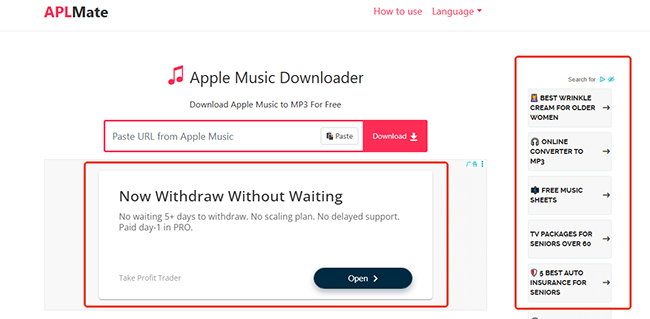
- Ad Exposure: The website utilizes aggressive advertising tactics. Users should be vigilant and avoid clicking on pop-ups or external links within the interface, as these can occasionally lead to misleading sites or potentially unwanted programs (PUPs).
Legal and Copyright Considerations
Using tools to download content from streaming services involves significant intellectual property considerations:
- Copyright Infringement: APLMate is designed to extract media from streaming platforms. Downloading copyrighted material without explicit permission from the rights holder can violate intellectual property laws and the terms of service of the source platform.
- Proper Licensing: Users are responsible for ensuring that the content they download is either in the public domain or that they possess the necessary licenses for offline storage.
Disclaimer:
This tool is intended strictly for personal, non-commercial use. Any form of distribution, public performance, or commercial exploitation of downloaded content is strictly prohibited and may result in legal consequences.
Part 4. How to Use APLMate - Step-by-step Guide
The workflow for APLMate is engineered for simplicity, requiring no technical expertise or software installation. Below is the step-by-step process to use APLMate
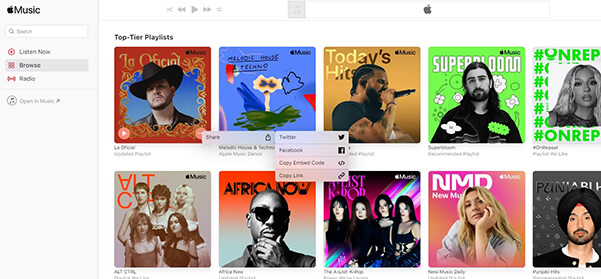
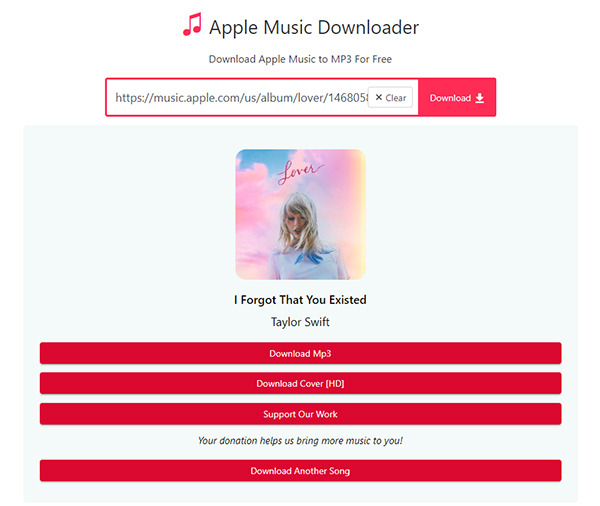
Step 1. Navigate to the Apple Music app or web player. Find your desired song, album, or playlist, click the three dots (... ), select Share, and then Copy Link.
Step 2. Visit the APLMate website and paste the URL into the prominent input field on the homepage. Click the Download button to load all songs.
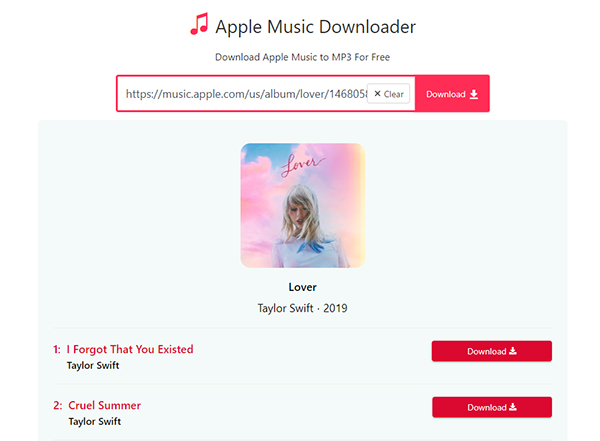
Step 3. Tap the Download button next to the track, and then the tool will parse the metadata and generate a download link. Once ready, click the final Download MP3 button to save the MP3 file directly to your computer or mobile device.
Part 5. Real-World APLMate Performance (Testing Overview)
To separate marketing claims from reality, we put APLMate through a limited hands-on test. While the interface is simple, our findings reveal significant functional limitations and misleading quality metrics.
Note:
Testing was conducted on:
- Device: Windows 10
- Browser: Chrome latest version
- Network: Standard broadband connection
- Tested Content: Nothing's About to Happen to Me playlist link, Taylor Swift artist link, a station link
Functional Limitations & UX Issues
- Forced Branding: The platform automatically injects the "APLMate.com" tag into every filename of the download MP3 tracks, requiring manual renaming if you want a clean library.

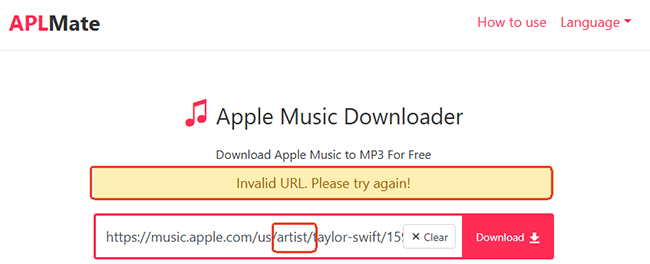
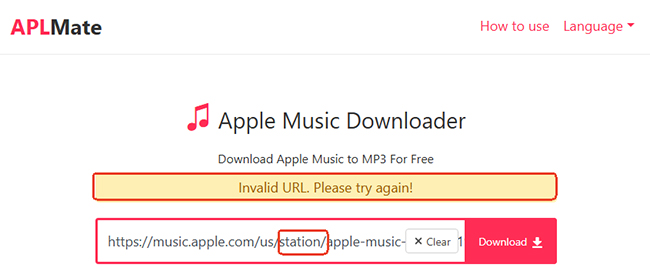
- Poor Link Recognition: During our tests, APLMate failed to recognize Artist URLs and Radio Station URLs, consistently triggering an "Invalid URL. Please try again!" error. It currently only supports direct Track, Album, or Playlist links.
- No True Batch Downloading: Despite appearing to support playlists, it does not offer a "Download All" feature. Users are forced to manually click 'Download' followed by 'Download MP3' for every single track, making large library transfers tedious and time-consuming.
Is APLMate 320kbps Real or Fake? Technical Quality Analysis
Using Spek acoustic spectrum analysis, we discovered that APLMate's "High Quality" claims are mathematically false.
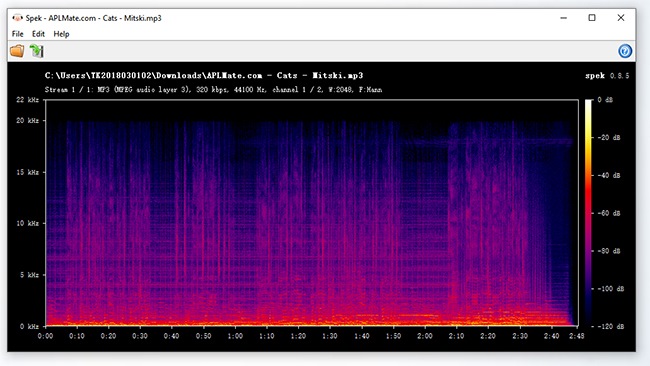
The 16 kHz "Hard Ceiling": Our testing confirmed a sharp frequency cut-off at 16 kHz. This is the "smoking gun" of a 128 kbps source. APLMate pulls a low-quality stream and "upsamples" it into a 320 kbps container, increasing the file size without adding any actual audio detail.
| Metric | Observation | Technical Truth |
|---|---|---|
| Claimed Bitrate | 320 kbps | Fake. The spectral density is identical to a 128 kbps compression. |
| Frequency Ceiling | 16 kHz Shelf | Severe Loss. All "Brilliance" and high-end harmonics are permanently deleted. |
| Audio Source | Discontinuous Spectrum | Transcoded. The audio is captured from a compressed video source, not a native Apple Music stream. |
Part 6. Pros and Cons of APLMate
The following section outlines the main strengths and limitations observed during testing, focusing on usability, performance, and overall reliability in real-world use.
Pros
 No installation required
- Easy to use across devices
- Works for single-track downloads
- Preserves basic metadata
- Free access available
Cons
 Playlist processing is unstable
- No advanced library management
- Output quality may vary
- Dependent on server performance
- Limited batch download efficiency
Part 7. Safer and Higher-Quality APLMate Alternative
For users who need a more stable and scalable solution, desktop-based tools provide better performance and control. One widely used option is DRmare Apple Music Converter, which focuses on software processing rather than browser-based conversion.
Unlike "smart search" tools that grab audio from secondary video sources, it accesses the Apple Music infrastructure directly via a built-in Apple Music web player to ensure bit-for-bit accuracy.
Why It Outperforms Web Tools
- True Lossless Fidelity: It bypasses the 16 kHz frequency ceiling found in APLMate. You can export tracks in FLAC, WAV, or 320kbps MP3, maintaining the full brilliance and depth of the original recording.
- 30X Batch Conversion: Instead of clicking "Download" for every individual track, you can load entire playlists or an artist's full discography and convert them all at once at high speed.
- Advanced Metadata Management: It automatically embeds high-resolution album art and original ID3 tags (artist, album, year, genre). You can even use the built-in editor to customize tags for a perfectly organized Walkman library.
- Format Versatility: Beyond standard MP3s, it supports FLAC, WAV, M4A, M4B (for audiobooks) and AIFF, allowing you to choose the best format for your specific playback device.
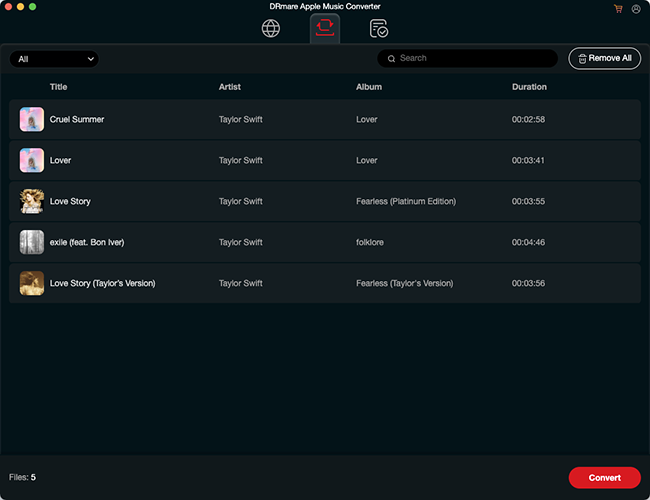
APLMate vs DRmare Apple Music Converter
| Feature | APLMate (Web-Based) | DRmare Apple Music Converter |
|---|---|---|
| Type | Web-based tool | Desktop software |
| Installation | Not Required | Required |
| Audio Consistency | Variable | More Stable |
| Batch Downloading | No (One by one) | Yes (Full Library Support) |
| Formats | MP3 Only | Multiple Formats |
| File Naming | Includes "APLMate.com" tag | Fully Customizable |
| Stability | Occasional URL errors | High Success Rate |
Part 8. In Conclusion
APLMate is best described as a lightweight and convenient Apple Music downloader for occasional use. It works for simple tasks but lacks consistency when handling larger playlists or long-term library building.
For users who prioritize stability, batch processing, and better library management, desktop tools such as DRmare Apple Music Converter offer a more reliable solution.

 Home
Home





User Comments
Leave a Comment