





T-Mobile has been a go-to carrier for entertainment fans, offering the Apple TV On Us promotion that allows you to get Apple TV free with T-Mobile plans. However, the promotion has changed in 2026. If you're feeling uncertain about the pricing and eligibility, you aren't alone. This guide explains the latest pricing, Apple TV T-Mobile activation steps, and fixes for when Apple TV on T-Mobile is not working.
Part 1. Is Apple TV Free with T-Mobile in 2026
No, free Apple TV on T-Mobile has officially ended since January 1, 2026. Apple's subscription price hike has prompted a change in how T-Mobile applies its promo for Apple TV.
The $3 Solution: If you are on a premium plan (such as Go5G Next, Go5G Plus, Magenta MAX, or ONE Plus), T-Mobile now provides a monthly discount of $9.99. This means you will see a net charge of $3.00/month on your bill.
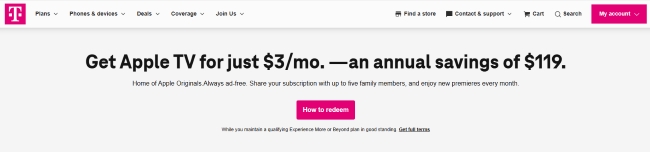
Six-Month Trials: Users on standard plans may still access a 6-month free trial. However, once this period ends, the subscription automatically renews at the full market rate of $12.99/month.
Tips:
If you are seeking alternatives to get Apple TV for free, consider a one-month Apple One trial that allows you to enjoy the Apple TV and other Apple services. Also, the Apple Music Student Plan often includes Apple TV.
Check T-Mobile Apple TV Promotion
With the 2026 updates, it's crucial to verify whether you are receiving the $9.99 discount or paying full price. You can manage your T-Mobile Apple TV promotion directly through the T-Life app or your online account.
Step 1. Log in to the T-Life app and navigate to Manage > Plan Details. Select "Manage Add-ons" under your active line to see your current entertainment perks.
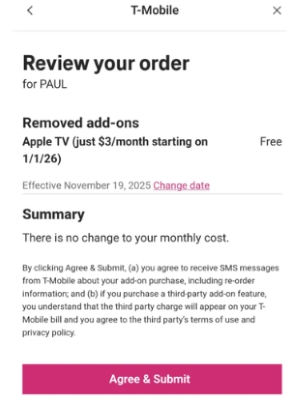
Step 2. Locate Apple TV under the "Services" section. If you are switching from an old promotion to the new 2026 version, you may need to "Agree & Submit" to remove the conflicting legacy feature and add the new discounted subscription.
Step 3. If you redeemed your offer via a code rather than a plan add-on, check your status within the Apple TV App under "Profile > Manage Subscriptions".
Part 2. How to Activate Apple TV From T-Mobile
Activating your T-Mobile Apple TV promotion is a straightforward process, whether you prefer using the mobile app or a desktop browser. To ensure a smooth setup, verify that you are the Primary Account Holder(PAH) before beginning and follow the steps below.
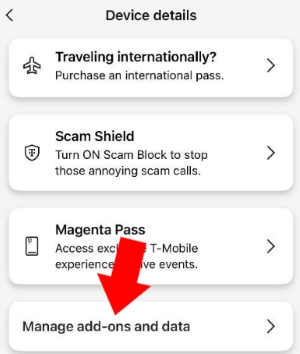
Step 1. Log in to the T-Life app or T-Mobile website. Navigate to the "Manage" tab, then select "Device details > Manage add-ons and data".
Step 2. Locate Apple TV under the "Services" list. Select it and choose your activation timing, either immediately or starting your next billing cycle.
Step 3. Review your order summary and select "Agree & Submit". Select "Start Activation". A text message containing a unique registration link will be sent to the primary line on your account.
Step 4. Click the link in the text message to launch the Apple TV portal. Tap "Activate Apple TV" and verify your mobile number. Once verified, you will see a "Subscribed to Apple TV" confirmation.
Note:
If no PAH is designated, the activation text will automatically go to the oldest phone number on the account.
Part 3. How to Fix Apple TV Not Working with T-Mobile
If you've completed the Apple TV activation on T-Mobile but still can't access your favorite shows, don't worry. Most T-Mobile Apple TV not working issues stem from simple account or network conflicts.
Quick Fixes for Apple TV T-Mobile
Before diving into complete settings, try these three "quick fixes" that resolve 90% of connectivity problems on T-Mobile:
- Re-Login: Open the Apple TV app, sign out of your Apple Account, and then sign back in. This forces the app to re-verify your T-Mobile Apple TV promotion status.
- Power Cycle & Update: Restart your Apple TV device, router, and T-Mobile Gateway. Additionally, check for software updates for the latest version.
- Status Check: Open the T-Life App and ensure the Apple TV add-on is listed as "Active". If it's missing, you will need to re-add it to your plan.
Troubleshooting Apple TV T-Mobile Login Issues
Apple TV login errors on TV T-Mobile often occur when there is a mismatch between your carrier credentials and your streaming account.
-
Verify Credentials: Ensure you are using your Apple Account, not your T-Mobile ID, to sign in to the Apple TV app.
-
Re-trigger Activation: If the login fails to recognize your discount, remove the Apple TV add-on in your T-Mobile account and re-add it to generate a fresh activation link.
-
Clear Cache: Clear cookies and cache on your browser or app to ensure no legacy login data is interfering with the 2026 subscription update on T-Mobile.
Advanced Network & Hardware Solutions
If the app opens but videos won't play or you see a black screen, the issue likely lies with your internet configuration or hardware handshake.
-
Optimize Your Connection: If using T-Mobile Home Internet, place your gateway near a window for maximum signal. For 3rd Gen Apple TVs, set your router's security to WPA2 only to ensure compatibility.
-
Refine Network Settings: Create a dedicated 2.4 GHz network in the T-Life app for legacy Apple TVs that struggle with 5 GHz band steering.
-
Remove Interference: Disable any VPNs or ad-blockers on your device. These can prevent your device from communicating with Apple's billing servers to verify your T-Mobile subscription.
-
Check HDMI: A black screen with audio often indicates an HDCP issue. Ensure you are using a high-speed HDMI cable securely plugged into the TV's primary port.
Part 4. How to Download Apple TV to Avoid Higher Costs
While T-Mobile's discounted Apple TV offer still works for many users, it doesn't solve every problem. As prices increase, you may start looking for other reliable ways to watch Apple TV, without worrying about monthly fees or suddenly losing access to Apple TV on T-Mobile.
If you want full control over your Apple TV content, especially if you're considering canceling T-Mobile or avoiding future price hikes, downloading Apple TV shows for offline viewing becomes a practical long-term solution. Tools like DRmare Apple TV Downloader let you save Apple TV videos as local MP4 or MKV files, so your Apple Originals stay accessible even if your subscription or carrier benefits change on T-Mobile.
- Step 1Set Up Output Format for Apple TV
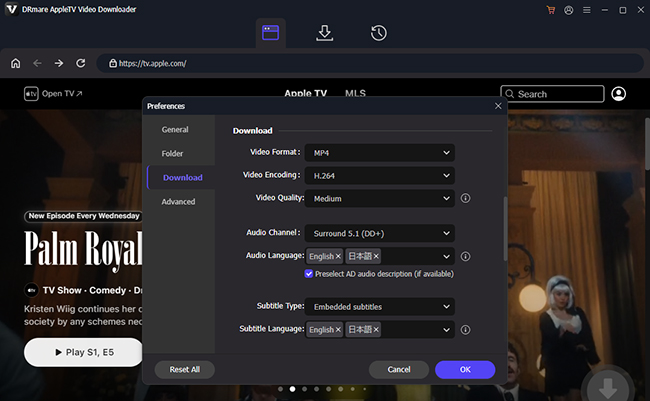
Launch DRmare Apple TV Downloader and sign in with the same Apple Account you use for Apple TV on T-Mobile. Open the menu panel and change the setting by choosing "Preferences>Download". You can select the format here and adjust video quality for a better experience.
- Step 2Save Apple TV Shows for Offline Use
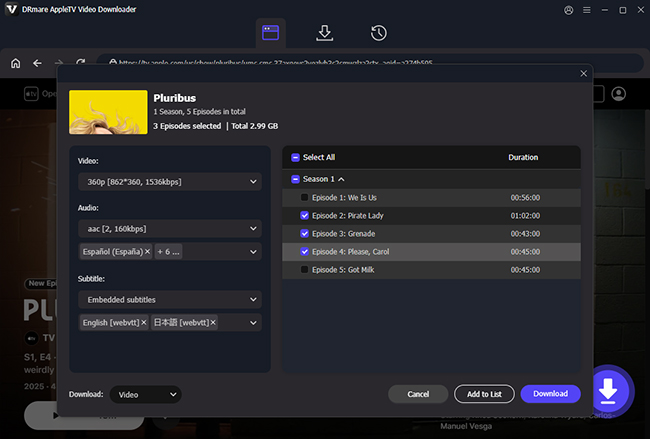
Browse Apple TV and pick the movies or series you want to keep available offline. Instead of downloading episodes one by one, you can queue entire seasons at once by clicking "Add to List". This approach is especially useful if your Apple TV T-Mobile benefit is ending or becoming unstable.
- Step 3Download Apple TV Content Locally
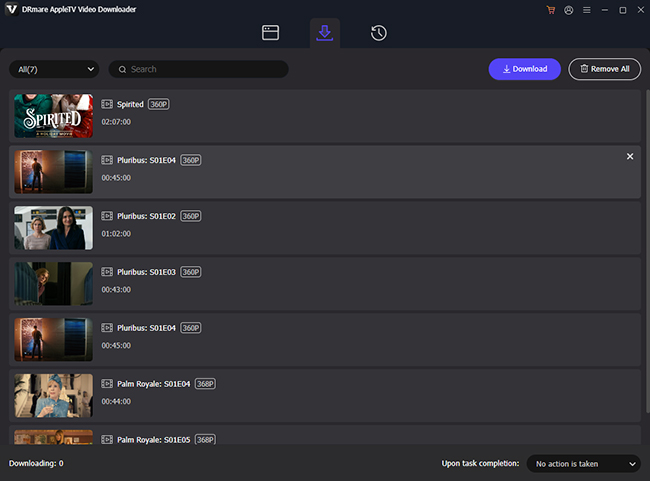
Hit the "Download" icon, and the software will convert the Apple TV videos into MP4 or MKV files. By removing Apple TV's playback restrictions, you can play Apple TV offline and avoid common T-Mobile Apple TV issues such as login failures and playback errors.
- Step 4Watch Apple TV Anywhere Without T-Mobile Limits
Once the downloads are complete, your Apple TV videos are stored locally on your device. You can watch them on TVs, computers, or mobile devices without the Apple TV app or T-Mobile plan.
Part 5. FAQs About Apple TV with T-Mobile
How to share T-Mobile Apple TV with family?
Apple TV supports Family Sharing for up to six people. Once you have activated the promotion on Apple Account, go to "Settings > [Your Name] > Family Sharing" on your iPhone and ensure "Apple TV" is toggled on.
How to cancel Apple TV on T-Mobile?
If you decide you no longer want the $3/month charge, you must cancel it through the T-Mobile side, not the Apple side. Go to the T-Life app, find the Apple TV add-on in your "Manage" section, and uncheck/remove it. The service will typically remain active until the end of your current billing cycle.
To avoid the $3/month charge, you can cancel through T-Mobile directly. Log in to the T-Life App or T-Mobile site. Navigate to "Manage > Plan Details > Manage Add-ons". Deselect the Apple TV feature and select "Continue".
How to redeem the T-Mobile Apple TV?
Before you begin, ensure you are the Primary Account Holder and have your T-Mobile ID ready.
Via T-Life/Website: Log in, go to "Manage Add-ons," select Apple TV, and submit the order.
Via Registration Link: After adding the feature, you will receive a text or email. Click the link, select "Start Activation," and sign in with your Apple ID to link the service.
Via Redemption code: For Business Customers, visit the promotion website and enter your business mobile number to generate a unique code for redemption.

 Home
Home





User Comments
Leave a Comment