





"If I cancel Audible, do I lose my books?" That was the concern of one Audible user who wanted to cancel a membership with three unused credits and move to another audiobook service. They also wanted to know whether books purchased with credits would remain available and what would happen to titles they had accessed through Audible without using credits.
The answer comes down to the type of Audible content you have. Purchased audiobooks generally remain available after cancellation, while membership-based titles such as Audible Plus Catalog books become locked. Unused credits are a separate issue and should be checked before you cancel. This guide explains what you can keep, what you may lose, and how to still listen to your Audible books after cancelling your membership.
If I Cancel My Audible, Do I Keep or Lose My Books/Credits? Quick Summary
Not every audiobook in your Library has the same status. The golden rule of Audible cancellation is simple: If you bought it, you own it. If you streamed it through membership perks, you lose it.
What You Keep vs. What You Lose If You Cancel an Audible Membership
| Content Type | Status After Cancellation | Can You Re-download? |
|---|---|---|
| Purchased with Cash / Card | Kept permanently in your Library | Yes |
| Purchased with Audible Credit | Kept permanently in your Library | Yes |
| Audible Plus / Included Catalog | Locked (Access revoked) | No |
| Unused Standard Credits | Lost immediately upon cancellation | No |
| In-App Purchased Credits (iOS/Android) | Retained until expiration date | Yes |
What Happens to My Books If I Cancel Audible?
Purchased Audible Titles (Yours to Keep)
Any audiobook acquired using a credit or paid for directly with a credit/debit card belongs to your account permanently. The platform essentially treats these transactions as standard retail purchases, meaning your ownership is not tied to an active membership status.
- No active subscription required: You can listen to, download, and re-download these titles anytime via the Audible app or website, even years after cancelling.
- Post-cancellation purchases: You can still buy individual audiobooks at regular price without an active membership.
Important Note on License Terms:
Like most digital media platforms, Audible sells digital licenses. While purchased books remain in your library indefinitely, availability for new downloads ultimately depends on Audible continuing to host the publisher's file.
Audible Plus Catalog Titles (Locked)
Titles added to your library from the Audible Plus Catalog without spending a credit are subscription perks. They tend to operate under a different set of rules. Once your membership ends, these titles will show a lock icon and become unplayable.
Downloading them to your phone before cancellation will not bypass this restriction; offline downloads automatically verify license status when played.
How to Still Listen to Purchased Audible Books After Cancelling
You do not need an active subscription to access your purchased audiobooks. Audible provides several officially supported listening methods to listen to Audible books without a membership:
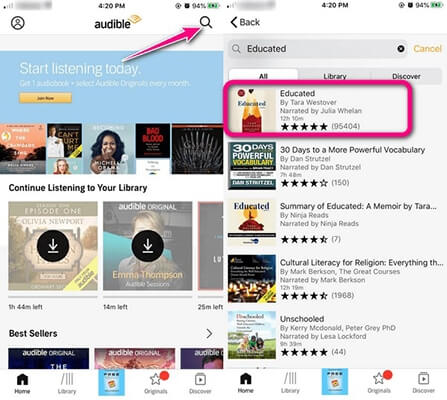
- Audible Mobile App (iOS / Android): Log in with your Amazon account. Your purchased audiobooks remain in Library > All Titles and can be downloaded for offline listening at any time.
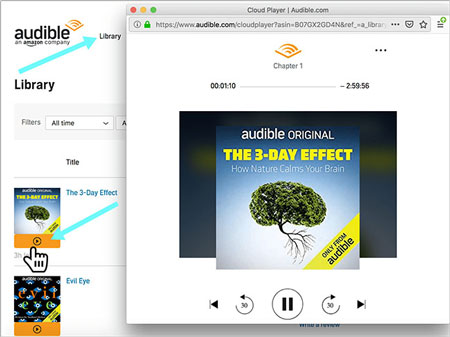
- Web Cloud Player: Stream your audiobooks directly from any web browser on desktop or mobile by visiting your Audible Library online.
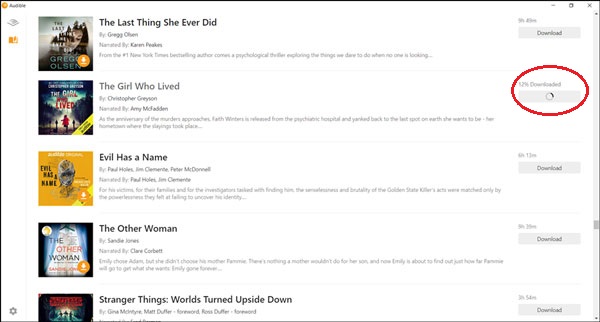
- AudibleSync (Windows): For transferring purchased Audible files to compatible MP3 players or specialized accessibility devices.
How to Keep Your Audible Plus Catalog Books If You Cancel Audible
When you cancel your Audible membership, any audiobooks browsed from the Audible Plus Catalog are automatically locked. You will lose access through the official app as soon as your billing cycle ends.
If you want to keep your favorite Plus Catalog audiobooks accessible on all your devices after cancelling, you need to download and convert them into local audio files (such as MP3 or M4A) before your subscription expires. You can use a dedicated desktop tool like DRmare Audible Converter to bypass post-cancellation playback locks.
It converts Audible AAX/AA files to MP3, M4A, FLAC, AIFF, WAV, and M4B while preserving 100% of the original sound quality. It also allows you to split large audiobooks into smaller segments by chapter, time duration, or equal parts. Converted Audible files can be transferred to non-Audible-supported devices like classic MP3 players, car audio systems, smart TVs, and smartwatches.
How to Download and Listen to Audible Books After Cancelling
Step 1. Launch DRmare Audible Converter on your computer. Inside the software's embedded browser window, click the Sign in button to log into your Audible/Amazon account to grant access to your Library.
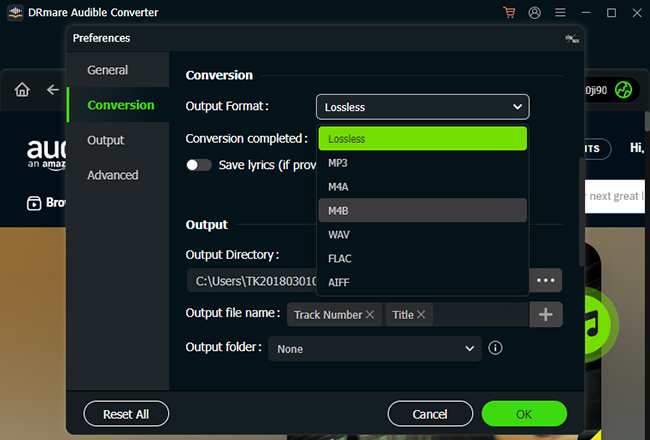
Step 2. Click the Menu icon (top-right corner on Windows) or DRmare Audible Converter (menu bar on Mac), select Preferences, and navigate to the Conversion tab. Choose MP3, M4A, or Lossless as your target format, and adjust bit rate, sample rate, or channel settings if needed.
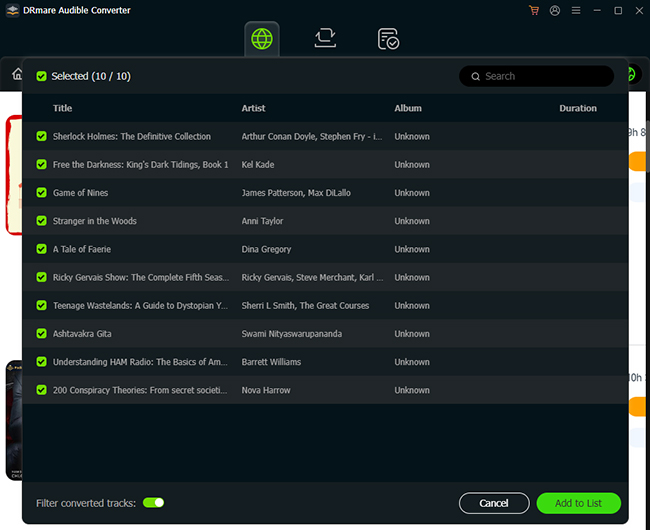
Step 3. Browse your Library or Plus Catalog inside the built-in web player. Locate the audiobooks you want to preserve after cancellation and click the floating green Add button in the bottom-right corner. Review the titles in the pop-up list and click Add to List.
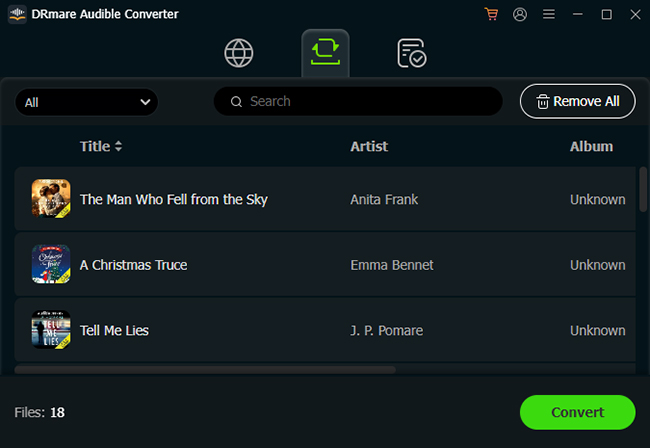
Step 4. Click the Convert button in the bottom-right corner. The software will download and convert the titles simultaneously at up to 100X speed. Once complete, click the Converted tab to locate your unrestricted MP3 files on your computer.
Now, even if you end your Audible subscription, you can still keep and listen to audiobooks offline on any device as you want.
Note on Fair Use & Copyright:
Converting Audible audiobooks should be strictly reserved for personal backup and offline listening. Ensure you perform the conversion while your active Audible subscription or ownership rights remain valid.
What Happens to Audible Credits After Cancelling
Unused credits deserve special attention because they are treated differently from audiobooks you have already purchased. A frequent mistake listeners make is walking away with unspent tokens sitting in their digital wallet. Do not cancel your membership until you check your credit balance!
For Standard Web/Monthly Credits:
Any unused credits generated from standard monthly or annual plans expire instantly when your cancellation takes effect. It is highly recommended to spend your remaining balance on audiobooks before initiating the termination process.
For App Store & Google Play Credits:
Credits purchased directly through the Audible app via Apple App Store or Google Play billing are managed under mobile app rules and generally do not expire upon subscription cancellation.
For that reason, check your credit type and expiration information before cancelling rather than assuming every credit follows the same rule.
How to Pause Your Audible Account Instead of Cancelling Membership
If your primary goal is simply taking a break from monthly charges while catching up on a heavy backlog, placing your membership on hold might be a practical alternative to outright cancellation. The service generally offers a temporary pause feature for direct-billed monthly members.
Step 1. Navigate to the account details page on the desktop website and look for the Pause membership option to pause your membership.
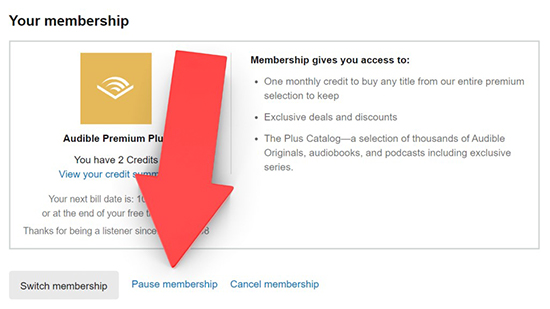
Step 2. Click it, and then choose a temporary hold of 30, 60, or 90 days.
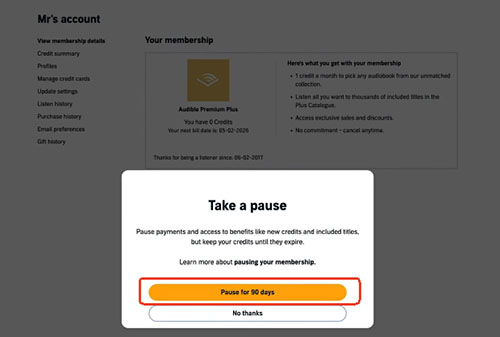
During this hold period, you usually retain your unused credits and can continue enjoying your owned collection, though Plus catalog access is often suspended until regular billing resumes.
FAQs About Keeping My Audiobooks If I Cancel Audible
What to do before cancelling Audible?
Before confirming your cancellation, run through this quick checklist:
- Spend All Standard Credits: Exchange any remaining credits for audiobooks. Once converted into purchased books, they are yours forever.
- Identify Plus Catalog Books: Check your library for titles with a "Plus" badge. Finish listening to them or convert them to MP3 locally before your final billing cycle ends.
- Verify Your Billing Channel: If you subscribed through Apple (iOS Settings) or Google Play, cancel directly through your device's subscription settings, not on the Audible website.
- Note Your Expiration Date: You retain full membership perks until the end of your current billing period, even if you cancel mid-cycle.
Will deleting the Audible app delete my books?
No. Your purchases are tied to your Amazon/Audible account in the cloud, not to your physical phone storage. You can reinstall the app and sign back in at any time.
What is the difference between cancelling membership and deleting an account?
Cancelling a subscription stops recurring charges while keeping your library and account intact. Deleting your entire Amazon/Audible account will permanently erase your purchased library.
Can I re-gain access to locked Plus Catalog books later?
Yes. If you re-subscribe to Audible Plus/Premium Plus in the future, or buy the locked book outright, it will immediately unlock in your library with your previous listening progress saved.
Can I still buy Audible books without a membership?
Yes. You can still purchase Audible titles with or without an active membership.

 Home
Home





User Comments
Leave a Comment